1. Okwu mmalite
Daalụ maka ịzụrụasing the Bushnell 202450 Custom Laser Rangefinder. This device is designed to provide accurate distance measurements for various outdoor activities. Featuring 4x magnification and a 21mm objective lens, it offers reliable performance for targets up to 600 yards. This manual provides detailed instructions for proper setup, operation, and maintenance to ensure optimal performance and longevity of your rangefinder.
2. Ozi nchekwa
- Nchekwa laser: This device emits invisible Class 1 laser radiation. Do not stare into the laser beam or view ozugbo na ngwa anya.
- Ijikwa batrị: Use only the specified battery type. Do not mix old and new batteries. Dispose of batteries according to local regulations.
- Nchedo anya: Always use caution when operating optical devices. Avoid pointing the rangefinder directly at the sun or other bright light sources, as this can cause permanent eye damage.
- Nguzogide mmiri: The device is water-resistant (IP54 rated), but it is not designed for submersion. Avoid prolonged exposure to heavy rain or water.
- Nhicha: Use a soft, clean cloth for cleaning lenses. Avoid abrasive materials.
3. Ihe ngwugwu
Chọpụta na ihe niile dị na ngwugwu gị:
- Bushnell 202450 Custom Laser Rangefinder
- Akpa na-ebu
- Eriri olu
- Akwa nhicha oghere
- Akwụkwọ ntuziaka onye ọrụ a
4. Ngwaahịa gafereview
Familiarize yourself with the components of your Bushnell Custom Laser Rangefinder.
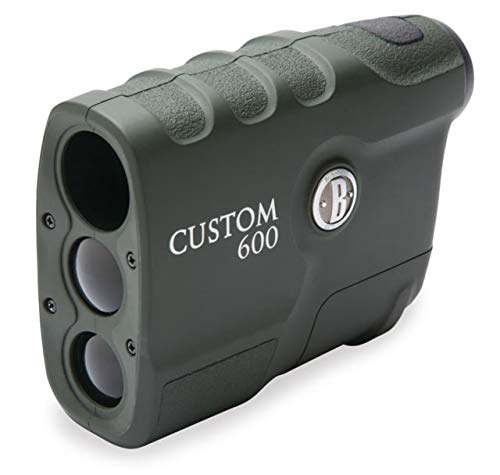
Foto 1: N'ihu view of the Bushnell 202450 Custom Laser Rangefinder. This image shows the objective lens, the laser emitter/receiver, and the compact design of the device.
- Igwe anya ebumnobi: The front lens through which the laser is emitted and received.
- Anya anya: The lens you look through to view the target and display.
- Power/Fire Button: Used to power on the device and take distance measurements.
- Akụkụ batrị: Located on the side or bottom, houses the battery.
- Ebe Mgbakwunye Eriri: For securing the neck strap.
5. Nhazi
5.1 Ntinye batrị
The Bushnell 202450 Custom Laser Rangefinder requires one CR2 3-volt Lithium battery (not included).
- Locate the battery compartment cover, typically on the side or bottom of the unit.
- Twist or slide the cover to open the compartment.
- Insert one new CR2 3-volt Lithium battery, ensuring the positive (+) and negative (-) terminals are aligned correctly as indicated inside the compartment.
- Replace the battery compartment cover securely to ensure water resistance.
Foto 2: Illustration of the battery compartment. While the exact compartment location may vary, this image represents the general device where the battery would be inserted.
6. Ntuziaka ọrụ
6.1 Gbanyụọ/ gbanyụọ
- To power on the device, press and release the bọtịnụ ike/ọkụ. The display will activate.
- The device will automatically power off after approximately 10 seconds of inactivity to conserve battery life.
6.2 Taking a Measurement (Ranging)
- With the device powered on, look through the eyepiece.
- Aim the reticle (crosshairs) at your desired target.
- Pịa ma hapụ ya bọtịnụ ike/ọkụ. The distance to the target will be displayed instantly in yards.
- For continuous scanning, press and hold the bọtịnụ ike/ọkụ while sweeping across multiple targets. The display will update distances as you move.
6.3 Ngosipụta ihe ngosi
The in-view display provides important information:
- Reticle: Used for aiming.
- Distance Reading: Displays the measured distance in yards.
- Ihe ngosi batrị: Na-egosi ndụ batrị fọdụrụ.
- Laser Active Indicator: Appears when the laser is being fired.
7. Nlekọta na nlekọta
- anya anya nhicha: Gently wipe lenses with the included lens cleaning cloth or a soft, lint-free cloth. Do not use abrasive cloths, paper towels, or tissues. For stubborn dirt, use a small amount of lens cleaning fluid on the cloth.
- Ahụ nhicha: Jiri ihe dị nro, d hichaa ahụ nke ihe nchọta rangefinder ahụ.amp akwa . Zere kemịkalụ siri ike ma ọ bụ ihe mgbaze.
- Nchekwa: Store the rangefinder in its protective carrying case in a cool, dry place when not in use. Remove the battery if storing for extended periods to prevent leakage.
- Zere oke okpomọkụ: Do not expose the device to extreme heat or cold for prolonged durations.
8. Nchọpụta nsogbu
| Nsogbu | Ihe nwere ike ime | Ngwọta |
|---|---|---|
| Ngwaọrụ anaghị agbanwu ọkụ. | Batrị anwụọla ma ọ bụ etinyere ya na ezighi ezi. | Replace battery with a new CR2 3-volt Lithium battery, ensuring correct polarity. |
| Ọgụgụ na-ezighi ezi ma ọ bụ na-ekwekọghị ekwekọ. | Target is too small, too far, or non-reflective. Environmental conditions (fog, heavy rain). | Aim at a larger, more reflective target. Ensure clear line of sight. Ranging performance may be reduced in adverse weather. |
| Ngosipụta adịchaghị ma ọ bụ na-egbuke egbuke. | Batrị dị ala. | Dochie batrị. |
| "E" or "Error" displayed. | Measurement out of range or laser blocked. | Ensure target is within 10-600 yards. Check for obstructions in the laser path. |
9. Nkọwapụta
| Aha Nlereanya | 202450 |
| Nkwalite | 4x |
| Ihe oghere ebumnobi | 21mm |
| Ranging Performance | 10-600 yards (reflective targets) |
| Izi ezi | +/- 1 yard |
| Ụdị batrị | CR2 3-volt Lithium (not included) |
| Mmiri Nguzogide | IP54 (mmiri na-eguzogide) |
| Ihe onwunwe | Plastic |
| Agba | Nwa |
10. Akwụkwọ ikike na nkwado ndị ahịa
Your Bushnell 202450 Custom Laser Rangefinder is backed by a limited warranty. For specific warranty details, please refer to the warranty card included with your product or visit the official Bushnell websaịtị.
For technical support, service, or to inquire about replacement parts, please contact Bushnell Customer Service. Contact information can typically be found on the Bushnell websaịtị ma ọ bụ na nkwakọ ngwaahịa gị.
Websaịtị: www.bushnell.com


