1. Okwu mmalite
This manual provides essential information for the safe and effective use of your Vivibright GP90 UP Portable Video Projector. Please read it thoroughly before operating the device and retain it for future reference. The Vivibright GP90 UP is a portable video projector featuring an Android 4.42 operating system, 3200 lumens brightness, and 1280x800 native resolution, designed for multimedia entertainment and presentations.
2. Ntuziaka nchekwa
- Do not block the ventilation openings. Ensure adequate airflow around the projector to prevent overheating.
- Do not expose the projector to rain or moisture to avoid electric shock or fire.
- Zere ile anya ozugbo na oghere projector mgbe lamp dị na ya, ebe ọ bụ na ìhè na-egbuke egbuke nwere ike imebi anya.
- Place the projector on a stable, level surface to prevent it from falling.
- Jiri naanị ihe nkwụnye ike enyere na ihe ngosi ahụ.
- Agbalịla ịkwatu ma ọ bụ rụzie ihe onyonyo ahụ n'onwe gị. Nye ndị ọrụ ruru eru ọrụ niile.
- Debe ihe ngosi ahụ ka ọ ghara iru ebe okpomọkụ na anwụ na-acha kpọmkwem.
3. Ihe ngwugwu
Chọpụta na ihe niile dị na ngwugwu:
- Vivibright GP90 UP Projector
- Igwe ọkụ ọkụ
- Remote Control (may not be included with all models)
- Akwụkwọ ntuziaka (akwụkwọ a)
4. Ngwaahịa gafereview
Familiarize yourself with the projector's components and connection ports.
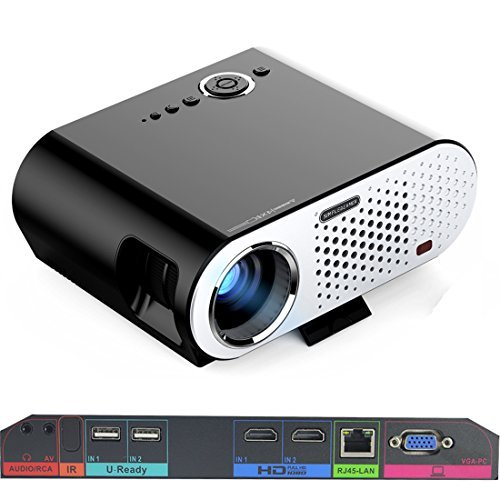
Image: The Vivibright GP90 UP projector showing its top controls, lens, and various input/output ports on the rear panel. The top features power and navigation buttons. The front has the projection lens. The rear panel includes Audio/RCA, IR receiver, two USB ports (U-Ready), two HDMI ports (HD), an RJ45-LAN port, and a VGA-PC port.
4.1 Ogwe ihu
- Okirikiri anya: Emits the image.
4.2 Ogwe Top
- bọtịnụ njikwa: Power, navigation, and menu access.
4.3 Rear Panel (Input/Output Ports)
- AUDIO/RCA: Audio output and composite video input.
- IR: Nnata infrared maka njikwa anya.
- IN 1 / IN 2 (USB): Two USB ports for connecting USB storage devices.
- IN 1 / IN 2 (HDMI): Two HDMI inputs for digital video and audio sources.
- RJ45-LAN: Ọdụ ụgbọ mmiri Ethernet maka njikọ netwọk ikuku.
- VGA-PC: VGA input for connecting to computers.
5. Nhazi
5.1 Ntinye
- Place the projector on a flat, stable surface or mount it on a ceiling or tripod.
- Ensure the projector is positioned directly in front of the screen or wall. Avoid angled placement as horizontal keystone correction is not available.
- The optimal projection distance ranges from 1.2m to 8.5m, producing screen sizes from 35 to 280 inches. For a 100-inch image, a distance of approximately 3 meters is recommended.
5.2 Njikọ ike
- Connect the power cable to the projector's power input.
- Plug the other end of the power cable into a suitable electrical outlet (90~240V/50~60Hz).
5.3 Ngwaọrụ Ntinye Njikọta
- HDMI: Connect an HDMI cable from your source device (e.g., laptop, Blu-ray player, gaming console) to one of the projector's HDMI ports.
- USB: Insert a USB flash drive or external hard drive into a USB port to access media files.
- VGA: Connect a VGA cable from your computer to the projector's VGA-PC port.
- Nke: Use an RCA cable to connect older devices to the AV input.
- LAN: Connect an Ethernet cable to the RJ45-LAN port for a wired internet connection.
5.4 Mgbanwe nke Isi Ihe na Ndozi
- Gbado anya: Rotate the focus ring around the lens until the projected image is sharp and clear.
- Ndozi isi okwu: Use the manual vertical keystone correction feature (±15°) to adjust the image shape if the projector is not perfectly perpendicular to the screen. This corrects trapezoidal distortion.
6. Ntuziaka ọrụ
6.1 Gbanyụọ/ gbanyụọ
- Ike Na: Press the power button on the projector or the remote control. The indicator light will change, and the projector will start.
- Gbanyụọ: Pịa bọtịnụ ike ọzọ. Kwenye mmechi ma ọ bụrụ na kpaliri ya. Kwe ka ihe nrụpụta ahụ daa jụụ tupu ịtọpụ ya.
6.2 Ịnyagharịa na sistemụ arụmọrụ gam akporo
- The projector runs on Android 4.42. Use the remote control or connect a wireless mouse (recommended for easier navigation) to interact with the interface.
- Access pre-installed apps or download compatible applications from the app store. Note that some newer applications may not be compatible with Android 4.42.
6.3 Ikuku amụma
- Wi-Fi: Connect to a wireless network via the settings menu. Supports dual-band Wi-Fi 2.4G.
- Bluetooth: Supports Bluetooth 4.0 for connecting wireless devices such as speakers. Note that Bluetooth audio output may only be available when using USB or Android sources, not HDMI.
- Wireless Push (EZCast / Miracast / Airplay): Use compatible apps on your smartphone or tablet to mirror your device's screen to the projector. Ensure your device and the projector are on the same Wi-Fi network.
6.4 Ntọala ọdịyo
- The projector features built-in 4Ω, 5W stereo speakers with SRS sound technology.
- For enhanced audio, connect external speakers via the Audio Out port or wirelessly via Bluetooth (when using Android or USB sources).
7. Nlekọta
7.1 Nhicha
- oghere: Jiri ákwà dị nro, nke na-enweghị ihe e ji ehicha ihe nke e mere maka anya anya. Ejila ihe nhicha aka.
- Casing: Jiri ákwà dị nro ma kpọọ nkụ hichaa mpụta ihe ngosi ahụ. Maka unyi siri ike, jiri obere d hichaa ya.amp akwa wee kpoo nke oma.
- Mmeghe ikuku: Jiri ahịhịa dị nro ma ọ bụ ikuku a kpọchiri akpọchi hichaa oghere ikuku ikuku mgbe niile iji gbochie uzuzu ịbata, nke nwere ike imetụta arụmọrụ na ndụ.
7.2 Nchekwa
- Mgbe a naghị eji ya eme ogologo oge, chekwaa ihe nrụpụta ahụ n'ebe dị jụụ, nke kpọrọ nkụ, pụọ na ìhè anyanwụ kpọmkwem na oke okpomọkụ.
- Cover the lens with its cap to protect it from dust and scratches.
8. Nchọpụta nsogbu
| Nsogbu | Ihe nwere ike ime | Ngwọta |
|---|---|---|
| Ọnweghị onyonyo atụpụtara | Power not connected; Input source not selected; Lens cap on | Check power connection; Select correct input source; Remove lens cap |
| Onyonyo na-agba agba | Focus not adjusted; Projector too close/far | Adjust focus ring; Adjust projection distance |
| Foto a bụ trapezoidal | Projector adịghị n'akụkụ ihuenyo | Adjust vertical keystone correction; Reposition projector to be centered |
| Enweghị ụda | Volume too low; Muted; External speakers not connected/selected | Increase volume; Unmute; Check external speaker connections/settings |
| Wireless projection unstable | Weak Wi-Fi signal; Device incompatibility; Outdated Android OS | Ensure strong Wi-Fi signal; Check device compatibility with Miracast/Airplay; Consider wired connection if issues persist with older Android version. |
9. Nkọwapụta
| Njirimara | Nkọwa |
|---|---|
| Ụdị | Vivibright |
| Nlereanya | GP90 UP |
| Sistemụ nrụọrụ | Android 4.42 |
| Icha ọkụ | 3200 Lumens (LED Luminous efficiency) |
| Mkpebi obodo | 1280 x 800 (supports up to 1080P) |
| Ọnụọgụ ọdịiche | 3000:1 (Dynamic up to 10,000:1) |
| Nha amụma | 35-280 sentimita asatọ |
| Ogologo amụma | 1.2m - 8.5m |
| Tufu Ratio | 1.45:1 |
| Keystone Ndozi | Akwụkwọ ntuziaka kwụ ọtọ ±15° |
| Ìhè Isi Iyi Ndụ | Ruo awa iri abụọ |
| Njikọta | Wi-Fi (2.4G), Bluetooth 4.0, 2x HDMI, 2x USB, VGA, AV, RJ45-LAN |
| Audio | Built-in 4Ω, 5W stereo speakers with SRS sound |
| Ịnye ọkụ | 90 ~ 240V / 50 ~ 60Hz |
| Akụkụ ngwaahịa | 27 x 22 x 9 cm |
| Ibu Ibu | 3.17 n'arọ |
10. Akwụkwọ ikike na nkwado
For warranty information and technical support, please refer to the documentation provided at the time of purchase or contact Vivibright customer service. Keep your purchase receipt as proof of purchase for warranty claims.


