Okwu mmalite
This manual provides comprehensive instructions for the CHERRY MX Keyboard 1.0 TKL. This wired keyboard features a compact design, allowing for more desk space. It includes nonslip mounting feet for adjustable height and a comfortable typing experience. Dimmable illumination ensures convenient visibility in dark settings. The abrasion-resistant, laser-etched key caps are designed to prevent fading through extended use, and anti-ghosting technology helps eliminate input errors for reliable performance.
Melite
To set up your CHERRY MX Keyboard 1.0 TKL, follow these steps:
- Mepee ahụigodo: Jiri nlezianya wepụ ahụigodo ahụ na nkwakọ ngwaahịa ya.
- Jikọọ na Kọmputa: Locate the USB-A connector on the keyboard's cable. Insert the USB-A connector into an available USB port on your computer. The keyboard is plug-and-play and should be recognized automatically by most operating systems.
- Adjust Keyboard Height: The keyboard features adjustable non-slip mounting feet. Gently flip out the feet located on the underside of the keyboard to raise its angle for a more comfortable typing position. Ensure both feet are extended evenly.

Figure 1: The CHERRY MX Keyboard 1.0 TKL with its USB cable, ready for connection.

Figure 2: Illustration of the adjustable non-slip feet on the underside of the keyboard, allowing for ergonomic height adjustment.
Ntuziaka ọrụ
Basic Typing and Functionality
The CHERRY MX Keyboard 1.0 TKL operates as a standard QWERTY keyboard. Its tenkeyless (TKL) design provides a compact footprint while retaining all essential alphanumeric and function keys.
Ọkụ na-akụda mmụọ
The keyboard features dimmable white backlighting for enhanced visibility in various lighting conditions. You can adjust the brightness and lighting modes using the function keys in combination with the FN igodo.
- FN + F5: Belata nchapụta azụ.
- FN + F6: Mụbaa nchapụta azụ azụ.
- FN + F7: Cycle through backlight modes (e.g., static, breathing).
- FN + F8: Adjust backlight effect speed.
- FN + F9: Mkpọchi/kpọghee igodo Windows.

Figure 3: Comparison showing the keyboard with its backlight off (left) and with the white backlight illuminated (right).

Figure 4: Diagram illustrating the multi-function keys and their combinations with the FN key for controlling multimedia, backlight, and Windows key lock.
Nkà na ụzụ mgbochi mmụọ
The CHERRY MX Keyboard 1.0 TKL features full N-key rollover (NKRO) anti-ghosting technology. This ensures that every key press is registered accurately, even when multiple keys are pressed simultaneously, which is beneficial for fast typing and gaming.

Figure 5: Visual representation of the full key anti-ghosting feature, highlighting the keyboard's ability to register multiple simultaneous key presses accurately.
Nlekọta
Proper maintenance will extend the lifespan of your CHERRY MX Keyboard 1.0 TKL.
- Nhicha:
- Kwụpụ kiiboodu na kọmputa gị tupu ihicha.
- Jiri akwa dị nro na-enweghị ntụpọ dampejiri mmiri ma ọ bụ ihe nhicha dị nro hichaa ihe mkpuchi igodo na elu keyboard ahụ.
- Maka uzuzu na irighiri ihe n'etiti igodo, jiri ikuku abịakọrọ.
- Avoid using harsh chemicals, abrasive cleaners, or excessive moisture, as these can damage the keyboard's finish and internal components.
- Nlekọta isi igodo: The keycaps are abrasion-resistant and laser-etched to prevent fading. Avoid scratching or picking at the key legends.
- Nchekwa: Mgbe ejighị ya ogologo oge, chekwaa ahụigodo ahụ n'ebe dị ọcha, kpọrọ nkụ pụọ na ìhè anyanwụ kpọmkwem na oke okpomọkụ.

Ọgụgụ 6: nso nso view of the keyboard's keycaps, highlighting their texture and laser-etched legends.
Nchọpụta nsogbu
If you encounter issues with your CHERRY MX Keyboard 1.0 TKL, please refer to the following common troubleshooting steps:
- Ahụigodo Anaghị aza:
- Gbaa mbọ hụ na ejikọrọ eriri USB na nchekwa na ma ahụigodo ma kọmputa. Gbalịa ọdụ ụgbọ USB dị iche.
- Malitegharịa ekwentị gị na kọmputa.
- Check your computer's device manager to see if the keyboard is recognized and if there are any driver issues.
- Ìhè azụ anaghị arụ ọrụ ma ọ bụ na-ebelata:
- Jiri ihe FN + F5 na FN + F6 key combinations to adjust brightness.
- Ensure the backlight is not turned off via FN + F7 or FN + F8.
- Keys Not Registering or "Ghosting":
- While the keyboard has anti-ghosting, ensure no debris is lodged under the keycap preventing proper actuation.
- Nwalee ahụigodo na kọmpụta ọzọ ka ewepụ nsogbu ndị metụtara sistemụ.
- Modifier Keys (Shift, Ctrl, Alt) Intermittent:
- Ensure no software conflicts are interfering with key inputs.
- Check for physical obstructions or damage to the key switch.
Nkọwapụta
| Njirimara | Nkọwa |
|---|---|
| Ụdị | cherị |
| Aha Nlereanya | MX Keyboard 1.0 TKL |
| Nọmba Nlereanya ihe | G803811LYAE2 |
| Teknụzụ Njikọta | Wired, USB-A |
| Nkọwa ahụigodo | Tenkeyless (TKL) |
| Agba | Nwa |
| Ibu Ibu | 1.43 pound |
| Akụkụ ngwaahịa (LxWxH) | 14.92 x 5.83 x 1.18 sentimita asatọ |
| Njirimara Pụrụ Iche | Ọkụ |
| Ngwa dakọtara | PC |
| Ngwa gụnyere | Keyboard wired |
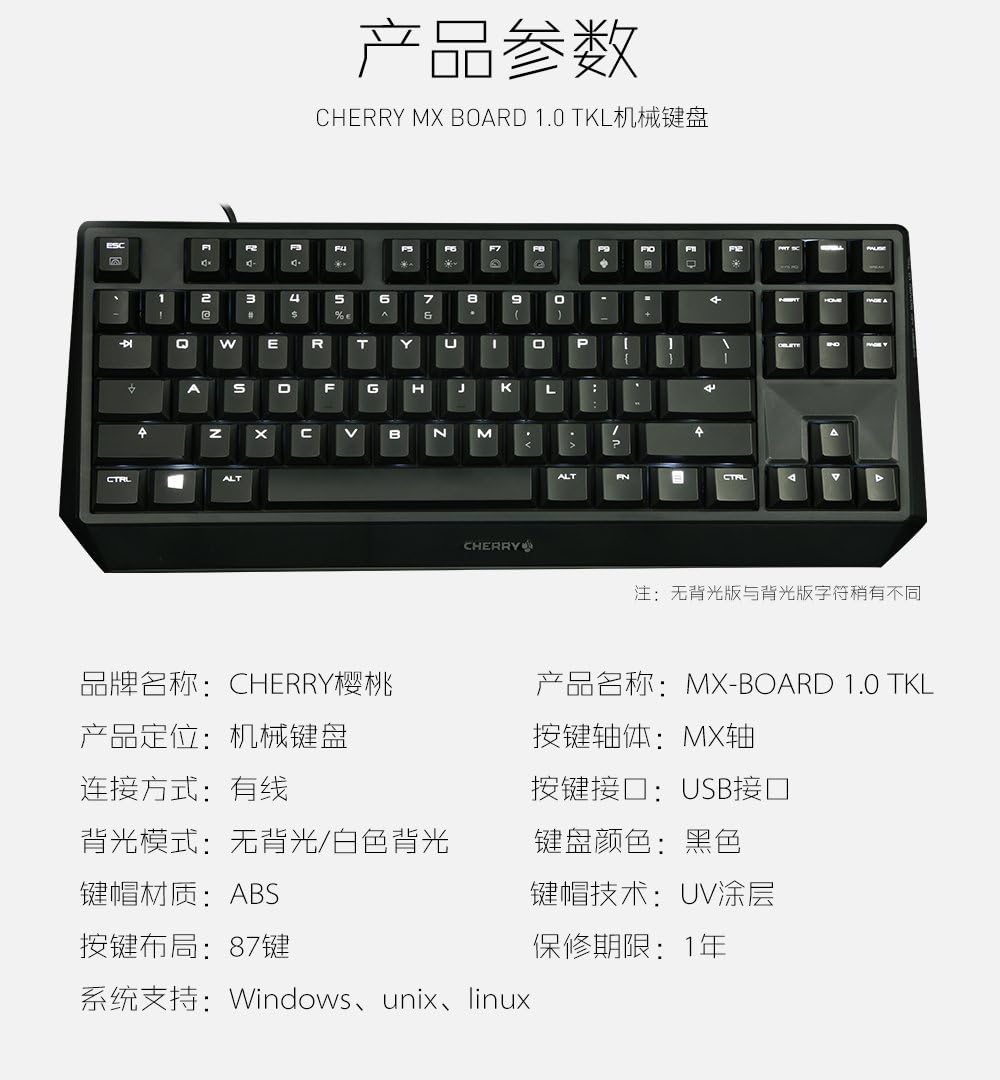
Figure 7: A detailed table outlining the technical specifications and parameters of the CHERRY MX Keyboard 1.0 TKL.
Akwụkwọ ikike na nkwado
Ozi akwụkwọ ikike
The CHERRY MX Keyboard 1.0 TKL typically comes with a Akwụkwọ ikike dị afọ 1 site na ụbọchị ịzụrụ. Akwụkwọ ikike a na-ekpuchi ntụpọ nrụpụta n'okpuru ojiji nkịtị. Biko dowe ihe akaebe nke ịzụrụ ihe maka akwụkwọ ikike.
For specific warranty terms and conditions, please refer to the documentation included with your product or visit the official Cherry websaịtị.
Nkwado ndị ahịa
If you require technical assistance, have questions about your product, or need to initiate a warranty claim, please contact Cherry customer support. Contact information can usually be found on the official Cherry websaịtị ma ọ bụ na nkwakọ ngwaahịa.
For more information, visit the official Cherry store: Cherry Store on Amazon.


