1. Okwu mmalite
The SJCAM SJ7 Star is a high-performance action camera designed to capture your adventures in stunning 4K resolution. Featuring an Ambarella A12S75 processor and a Sony IMX117 12MP sensor, it delivers clear images and smooth video. The camera includes a 2.0-inch touchscreen for easy navigation and a durable aluminum alloy housing. This manual provides essential information for operating and maintaining your device.

Image 1.1: SJCAM SJ7 Star Action Camera, available in silver and black finishes. This image displays the front view of two cameras, highlighting their compact design and lens.
2. Ihe ngwugwu
Verify that all items are present in your SJCAM SJ7 Star package:
- 1 x Original SJCAM SJ7 Star Action Camera
- 1 x Waterproof Housing
- 1 x Quick Release Buckle
- 1 x Handlebar Seat Post Mount
- 1 x Curved Adhesive Mount
- 1 x Flat Adhesive Mount
- 1 x 3-Way Pivot Arm Mount
- 2 x 3M Adhesive Tape
- 1 x Frame Mount
- 1 x Quick Release Clip for The Frame
- 1 x Vertical Quick Release J-Hook Buckle
- 1 x Universal 1/4" Camera Tripod Mount
- 1 x Tripod Mount Adapter
- 1 x akwa nhicha
- 1 x eriri USB
- 1 x 1000mAh batrị Li-ion
- 1 x Multi-language Manual
- 2 x SJCAM Stickers
Note: SJ Smart Remote and external microphone are not included in the standard package.
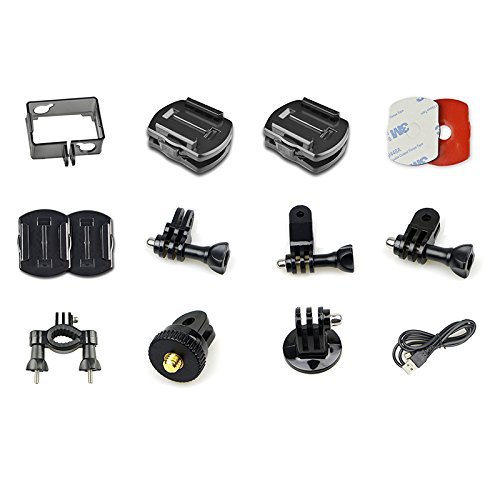
Image 2.1: Various mounting accessories and cables included with the SJCAM SJ7 Star. This image displays a collection of mounts, adhesive pads, and a USB cable, illustrating the comprehensive accessory kit.
3. Nhazi
3.1. Ntinye batrị
- Mepee mkpuchi nchekwa batrị na ala igwefoto.
- Tinye batrị Li-ion nke 1000mAh, hụ na kọntaktị ndị ahụ dabara nke ọma.
- Mechie mkpuchi nke batrị batrị nke ọma.
3.2. MicroSD kaadị ntinye
The SJ7 Star supports SDHC and SmartMedia flash memory types. A Class 10 or higher MicroSD card (up to 128GB, not included) is recommended for optimal performance, especially when recording 4K video.
- Chọta oghere kaadị MicroSD n'akụkụ igwefoto ahụ.
- Insert the MicroSD card with the gold contacts facing the back of the camera until it clicks into place.
- Iji wepụ ya, jiri nwayọ pịa kaadị ahụ ruo mgbe ọ ga-apụta.
3.3. Ụlọ na-egbochi mmiri
The included waterproof housing allows the camera to be used underwater. Ensure the housing is properly sealed before submerging the camera. Test the housing without the camera first to confirm its integrity.
3.4. Ịtinye igwefoto
Utilize the various mounts provided to attach your SJ7 Star to helmets, handlebars, or other surfaces. Refer to the specific mount instructions for secure attachment.

Image 3.1: Multiple views of the SJCAM SJ7 Star, showing its various ports and buttons. This composite image displays the camera from different angles, highlighting the power button, settings button, lens, and side ports for USB and MicroSD card.
4. Ntuziaka ọrụ
4.1. Gbanyụọ / gbanyụọ
- Ike Na: Press and hold the Power/Mode button (usually on the front or top) for a few seconds until the screen illuminates.
- Gbanyụọ: Press and hold the Power/Mode button again until the screen turns off.
4.2. Iji Touchscreen
The 2.0-inch TFT LCD touchscreen allows for intuitive navigation through menus and settings.

Image 4.1: The 2.0-inch touchscreen interface of the SJCAM SJ7 Star, showing menu options. This image illustrates a hand interacting with the camera's display, showcasing the intuitive icons for photo, video, and various capture modes.
- Gagharịa: Swipe left, right, up, or down to browse through modes and settings.
- Họrọ: Tap on an icon or option to select it.
- Ụzọ ọpụpụ: Tap the 'X' icon or swipe from the edge to return to the previous screen or main interface.
4.3. Ndekọ vidiyo
The SJ7 Star supports various video resolutions and frame rates, including native 4K at 30fps.
- Malite ndekọ: In video mode, tap the record icon on the touchscreen or press the Shutter button.
- Kwụsị ịdekọ: Tap the record icon or press the Shutter button again.
- Electronic Image Stabilization (EIS): EIS is supported at 1080P 60/30 fps to reduce camera shake. Enable this feature in the settings menu for smoother footage.
- Ụdị vidiyo: Videos are recorded in H.264 BP/MP/HP Level 5.1 and MJPEG codecs.
4.4. Foto ese foto
Capture still images up to 12MP, with interpolation available for 16MP photos.
- Were foto: In photo mode, tap the capture icon on the touchscreen or press the Shutter button.
- Ụdị onyonyo: Photos are saved as JPEG files.
4.5. Njikọ WiFi
Connect your SJ7 Star to a smartphone or tablet via WiFi for remote control and file nyefe
- Enable WiFi on the camera via the settings menu.
- Download the official SJCAM app on your mobile device.
- Connect to the camera's WiFi network from your device's WiFi settings.
- Open the SJCAM app to control the camera and access media.
4.6. Igwe okwu dị n'èzí
The SJCAM SJ7 Star supports external microphones. Only official SJCAM external microphones are compatible. Using microphones from other brands may result in non-functionality.
4.7. Ọrụ ndị ọzọ
The camera offers various advanced functions accessible through the settings menu:
- Time Lapse Function: Capture a series of photos at set intervals to create a time-lapse video.
- Oge Onwe Gị: Set a delay before a photo is taken.
- Agbapụ na-aga n'ihu: Take multiple photos in quick succession.
- Auto Shooting: Automatically capture photos.
- Nchọpụta ngagharị: Start recording when motion is detected.
- Ndekọ: Overwrite the oldest footage mgbe kaadị ebe nchekwa juru.
- Nkọ: Adjust the image sharpness.
- Ntụle ọcha: Adjust color temperature for accurate colors in different lighting conditions.
5. Nlekọta
5.1. Nhicha
- Use the provided cleaning cloth or a soft, lint-free cloth to clean the camera body and lens.
- Zere iji kemịkalụ siri ike ma ọ bụ ihe na-emebi emebi.
- Ensure the lens is free of dust and smudges for clear images.
5.2. Nlekọta batrị
- Chajịa batrị zuru oke tupu ojiji mbụ.
- Store the camera and battery in a cool, dry place when not in use.
- Zere ikpughe batrị na oke okpomọkụ.
5.3. Mmelite firmware
Periodically check the official SJCAM website for firmware updates. Keeping your camera's firmware updated can improve performance, add new features, and resolve bugs.
- Budata ngwa ngwa kachasị ọhụrụ file from the SJCAM official websaịtị.
- Follow the specific instructions provided with the firmware update to avoid damaging the device.
6. Nchọpụta nsogbu
If you encounter issues with your SJCAM SJ7 Star, refer to the following common problems and solutions:
- Ịkpọ oke ọkụ na igwefoto: Prolonged 4K recording or use in hot environments can cause the camera to overheat. Reduce recording resolution or allow the camera to cool down.
- External Microphone Not Working: Ensure you are using an official SJCAM external microphone. Third-party microphones are not supported. Check the microphone connection.
- Camera Freezes or Becomes Unresponsive: Remove and reinsert the battery to perform a hard reset. Ensure your firmware is up to date.
- Okwu njikọ WiFi: Restart both the camera and your mobile device. Ensure the SJCAM app is updated. Try reconnecting to the camera's WiFi network.
- Red Lines on Screen: This may indicate a firmware issue or hardware malfunction. Try updating or re-flashing the firmware. If the problem persists, contact customer support.
- Batrị na-agbapụta ngwa ngwa: Ensure all unnecessary features (like WiFi) are turned off when not in use. Reduce screen brightness. Consider replacing an aging battery.
- Missing HDMI Port: Some product images may show an HDMI port. Verify your specific model's specifications. If a feature is critical and missing, contact your retailer.
If these solutions do not resolve your issue, please contact SJCAM customer support.
7. Nkọwapụta
| Njirimara | Nkọwapụta |
|---|---|
| Ụdị | Ụlọ ọrụ SJCAM |
| Nlereanya | SJ7 |
| Chipset | Ambarella A12S75 |
| Ihe mmetụta onyonyo | Sony IMX117 12MP CMOS |
| Ngosipụta LCD | 2.0 inch TFT LCD Touch ihuenyo |
| Mkpebi vidiyo | 4K (3840x2160) 30fps, 2.7K, 2.5K, 1440P, 1080P, 960P, 720P |
| Mkpebi foto | 12MP (4000x3000), 8.3M, 5M, 3M (Interpolated up to 16M) |
| Usoro vidiyo | H.264 |
| Usoro onyonyo | JPEG |
| Usoro ọdịyo | PCM |
| Ndozi onyonyo | Digital (EIS supported at 1080P 60/30 fps) |
| Ụdị oghere | Wide Angle (Adjustable FOV up to 166°) |
| Nchekwa | MicroSD (SDHC, SmartMedia) |
| Njikọta | USB, Wi-Fi |
| Batrị | 1000mAh Lithium Ion Rechargeable Battery |
| Atụmatụ pụrụ iche | Gyro Stabilization, Time Lapse, Self Timer, Continuous Shooting, Motion Detection, Loop Record |
| Ibu Ibu | 650 g |

Image 7.1: Diagram illustrating the Ambarella A12S75 processor and Sony IMX117 CMOS sensor within the SJCAM SJ7 Star. This image highlights the core components responsible for the camera's image processing and performance.
8. Akwụkwọ ikike na nkwado
8.1. Akwụkwọ ikike Ozi
The SJCAM SJ7 Star typically comes with a Akwụkwọ ikike onye nrụpụta afọ 1. Please retain your proof of purchase for warranty claims. The warranty covers manufacturing defects but generally excludes damage caused by misuse, accidents, or unauthorized modifications.
8.2. Nkwado ndị ahịa
For technical assistance, warranty claims, or further inquiries, please contact SJCAM customer support through their official website or the retailer where you purchased the product. Provide your product model and serial number for faster service.
9. Official Product Videos
A hụghị vidiyo ngwaahịa gọọmentị sitere n'aka onye na-ere ahịa na data enyere.


