Okwu mmalite
This manual provides comprehensive instructions for the installation, operation, and maintenance of your WISI Compact Station FRANSAT Pro (Model OM10F0646). This device is designed for professional DVB-S/S2 signal processing and DVB-T transmodulation, offering advanced features for content delivery and multiplex management.
Please read this manual carefully before operating the device to ensure proper functionality and to prevent damage.
Ngwaahịa gafereview
The WISI Compact Station FRANSAT Pro is a versatile and compact solution for satellite signal reception and distribution. Its key features include:
- DVB-S/S2 signal processing and DVB-T transmodulation.
- Single cable input with 4 slots for efficient signal management.
- Integrated Common Interface (CI) inputs for signal decryption and demultiplexing.
- Workflow inputs to optimize multiplexing based on specific requirements.
- Automatic multiplex remodeling for flexible content distribution.
- USB port for convenient content delivery.
- Ethernet connectivity for PC-based programming and configuration.
- Automatic configuration capabilities.
- Bluetooth connectivity for control via smartphone and tablet applications.
- Compact design (250 x 160 x 40 mm) for easy integration.
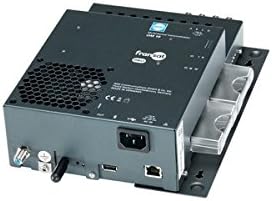
Foto 1: N'ihu view of the WISI Compact Station FRANSAT Pro, showing various ports and indicators. The device is black with a compact form factor.
Ntọala na nwụnye
1. Mwepu na nyocha
Carefully unpack the WISI Compact Station and inspect it for any signs of damage. Ensure all components listed in the packaging are present. The package should include the main unit and a single cable for 4 slots.
2. Ntinye
Choose a suitable location for the device. Ensure it is:
- E tinyere ikuku nke ọma iji gbochie oke okpomọkụ.
- Away from direct sunlight, heat sources, and moisture.
- On a stable, flat surface.
3. Njikọ
Soro usoro ndị a iji jikọọ ngwaọrụ:
- Ntinye Satellite: Connect the DVB-S/S2 satellite signal cable to the designated input port.
- Mpụta: Connect the DVB-T output cable to your distribution network. The device supports 4 video output ports with 1080p resolution.
- Njikọ Ethernet: For PC programming and network integration, connect an Ethernet cable from the device's Ethernet port to your network router or PC.
- Ngwa USB: If required, connect USB storage devices for content delivery to the USB port.
- Ike: Connect the power adapter to the device and then to a suitable power outlet.
4. Nhazi mmalite
The device supports automatic configuration. Upon first power-on, it will attempt to detect and configure basic settings. For advanced programming, use the Ethernet connection with a PC or Bluetooth with a compatible smartphone/tablet application.
Ntuziaka ọrụ
1. Ịgbanye / gbanyụọ
To power on the device, ensure all connections are secure and plug in the power adapter. The device will automatically start. To power off, simply disconnect the power adapter.
2. Signal Processing and Transmodulation
The WISI Compact Station automatically processes incoming DVB-S/S2 signals and transmodulates them into DVB-T. Ensure your input signals are strong and stable for optimal performance.
3. Using CI Modules
Insert compatible Common Interface (CI) modules into the designated CI slots for decryption of encrypted channels. Refer to your CI module's manual for specific insertion instructions.
4. Multiplex Management
The device features advanced multiplex management capabilities, including workflow inputs for optimization and automatic remodeling. These functions are typically configured via the PC interface or dedicated mobile applications.
5. Content Delivery via USB
To deliver content via USB, connect a USB storage device containing the desired content. The device's software interface will allow you to manage and distribute this content.
6. Remote Configuration (PC/Smartphone/Tablet)
The WISI Compact Station can be configured remotely:
- PC: Connect via Ethernet and use the manufacturer's dedicated software for comprehensive programming.
- Ekwentị / mbadamba: Download the official WISI application (if available) and connect via Bluetooth for convenient configuration and monitoring.
Nlekọta
1. Nhicha
Regularly clean the exterior of the device with a soft, dry cloth. Do not use liquid cleaners, aerosols, or abrasive materials, as these can damage the casing ma ọ bụ ihe ndị dị n'ime.
2. Igwe ikuku
Ensure that the ventilation openings are not blocked. Proper airflow is crucial for preventing overheating and maintaining optimal performance.
3. Mmelite firmware
Check the WISI official website periodically for firmware updates. Keeping the firmware up-to-date ensures the best performance, compatibility, and security for your device. Follow the instructions provided with the firmware update package carefully.
Nchọpụta nsogbu
This section addresses common issues you might encounter with your WISI Compact Station. If the problem persists, please contact technical support.
| Nsogbu | Ihe nwere ike ime | Ngwọta |
|---|---|---|
| No signal output. | Incorrect cable connections; Weak input signal; Device not powered on. | Check all cable connections (input, output, power). Verify the strength and quality of the DVB-S/S2 input signal. Ensure the device is powered on. |
| Cannot connect via Ethernet/Bluetooth. | Incorrect network settings; Bluetooth not enabled on device/smartphone; Software/app issues. | For Ethernet, check network cable and IP settings. For Bluetooth, ensure Bluetooth is active on both devices and they are within range. Restart the device and the controlling application. |
| Decryption issues with CI module. | CI module not inserted correctly; Incompatible CI module; Expired subscription. | Re-insert the CI module firmly. Ensure the CI module is compatible with FRANSAT Pro. Verify your subscription status with your service provider. |
| ekpo oke ọkụ ngwaọrụ. | Blocked ventilation; Poor placement. | Ensure ventilation openings are clear. Move the device to a well-ventilated area, away from heat sources. |
Nkọwapụta
| Njirimara | Nkọwa |
|---|---|
| Nọmba nlereanya | OM10F0646 |
| Ụdị | Wisi |
| Agba | Nwa |
| Teknụzụ Njikọta | Bluetooth, USB, Ethernet |
| Ngwa dakọtara | Laptọọpụ, Smartphone, Mbadamba ụrọ |
| Ọnọdụ mmepụta ọdịyo | Stereo, Gburugburu |
| Ụdị ọdịyo akwadoro | Dolby Digital, PCM |
| Satellite Service Description | FRANSAT Pro |
| Total Video Output Ports | 4 |
| Mkpebi mmepụta vidiyo | 1080p |
| Akụkụ (Ihe dị ka) | 250 x 160 x 40 mm |
| Ngwa gụnyere | Single cable in 4 slots |
Akwụkwọ ikike na nkwado
Information regarding the warranty period and specific support procedures for the WISI Compact Station FRANSAT Pro (Model OM10F0646) is not available in this document.
For detailed warranty information, technical support, and service inquiries, please refer to the official WISI website or contact your authorized dealer. It is recommended to register your product, if applicable, to receive updates and support.
Please have your model number (OM10F0646) and purchase details ready when contacting support.


