Okwu mmalite
Thank you for choosing the Eyoyo 12-inch monitor, Model EM12B. This compact monitor is designed for versatile applications, including CCTV surveillance, secondary display for computers, and multimedia playback. It features multiple input options such as HDMI, VGA, AV, and BNC, along with a 1366x768 resolution display. This manual provides detailed instructions for setup, operation, maintenance, and troubleshooting to ensure optimal performance and longevity of your device.

Image: The Eyoyo 12-inch monitor, suitable for various applications including security monitoring.
Kedu ihe dị na Igbe ahụ
Biko chọpụta na ihe niile dị na ngwugwu:
- 1 x 11.6" Monitor
- 1 x Monitor stand
- 1 x BNC Cable
- 1 x Mpempe mgbidi
- 1 x HDMI USB
- 1 x VGA eriri
- 1 x Njikwa anya
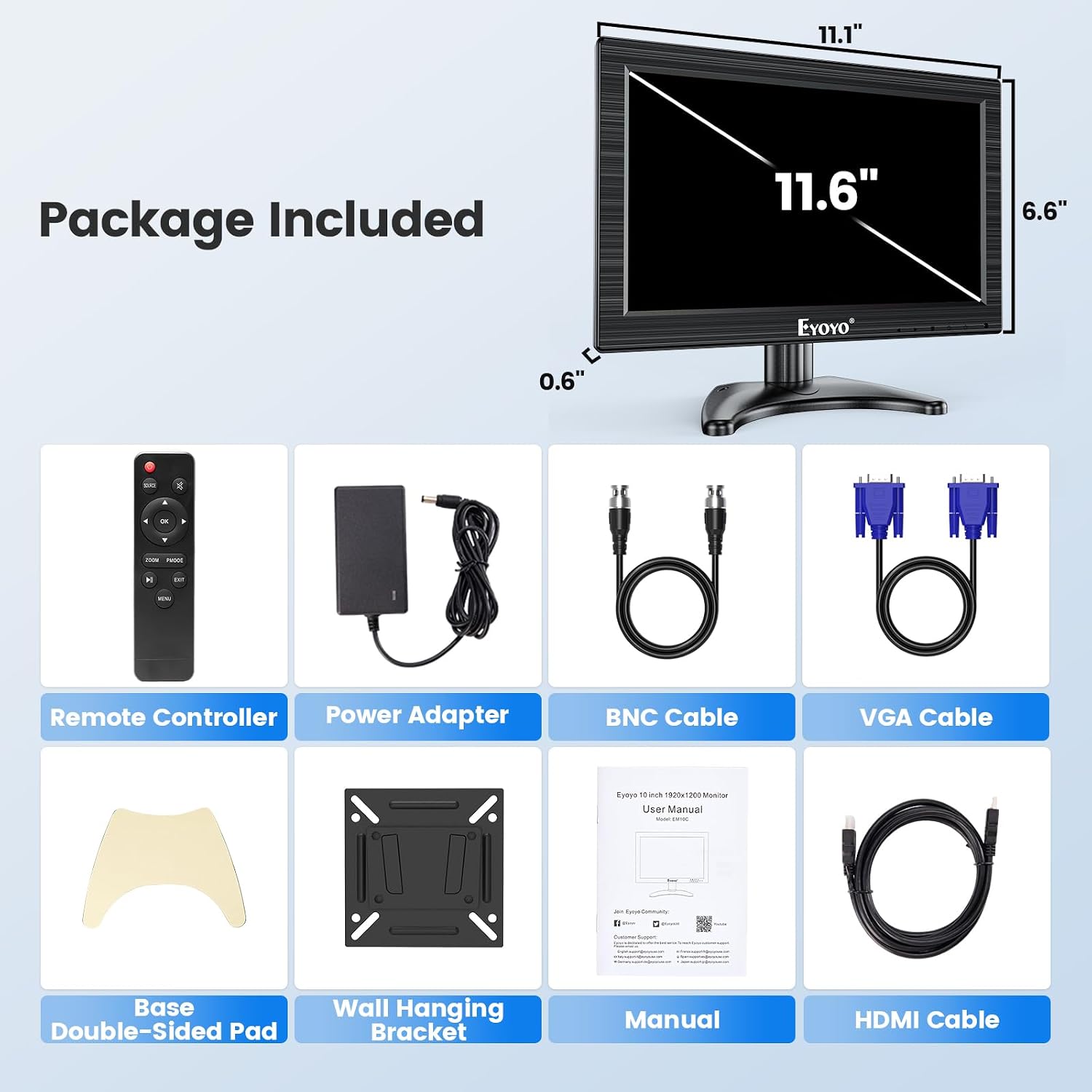
Image: All components included in the Eyoyo 12-inch monitor package.
Melite
Nyochaa nwụnye nkwụnye
Follow these steps to assemble and install the monitor stand:
- Unpack the monitor and stand components.
- Turn the screw on the stand base to loosen it.
- Disassemble the parts of the stand arm.
- Place the stand arm components onto the stand base.
- Adjust the angle of the stand arm as desired.
- Tighten the parts to secure the stand arm.
- Set up the stand to the monitor by aligning the mounting points.
- Adjust the height and turn the gear to lock the monitor in place.
- Ensure the monitor is securely attached and stable.

Image: Visual guide for monitor stand assembly.
Video: Instructions on how to install the monitor stand.
Ngwa jikọọ
The Eyoyo EM12B monitor supports multiple input types. Connect your devices to the appropriate ports on the back of the monitor:
- Ntinye HDMI: For high-definition digital video and audio from devices like laptops, desktop PCs, Raspberry Pi, or gaming consoles.
- Ntinye VGA: For analog video from older computers or laptops.
- Ntinye AV: For standard definition analog video and audio from devices like DVD players or TV boxes.
- BNC Input: Specifically designed for direct connection to CCTV security cameras and analog surveillance systems.
- Ọdụ ụgbọ mmiri USB: For connecting USB storage devices (U-disk) up to 32GB for media playback.

Foto: Ofeview of the monitor's multi-input professional connectivity.

Image: Connectivity options and compatible devices for the Eyoyo monitor.
Ntuziaka ọrụ
Power On/Off and Input Selection
Use the power button on the monitor or the remote control to turn the device on or off. To switch between input sources (HDMI, VGA, AV, BNC), press the 'Input' or 'Source' button on the monitor's control panel or the remote control. Navigate through the available inputs until your desired source is displayed.
Image Flip Function
The monitor includes an image flip function, allowing you to rotate the display horizontally or vertically. This feature is useful for specialized installations such as teleprompters or when the monitor needs to be mounted in an inverted position. Access this function through the OSD (On-Screen Display) menu using the monitor buttons or remote control.

Image: Demonstration of the monitor's image flip capabilities.

Image: The instant image flip feature for quick display adjustments.
USB playback
Insert a USB flash drive (U-disk) into the USB port on the monitor. The monitor supports media playback from USB devices up to 32GB. Use the remote control to navigate through files and play videos or view onyonyo.
Video: Demonstration of the monitor's features, including USB playback and various input connections.
Audio
The monitor features built-in dual speakers for basic audio output. Adjust the volume using the remote control or the monitor's control buttons.

Image: Location of the built-in speakers on the monitor.
Nlekọta
To ensure the longevity and optimal performance of your Eyoyo monitor, follow these maintenance guidelines:
- Nhicha: Use a soft, dry cloth to clean the screen and exterior. For stubborn marks, lightly dampen the cloth with water or a mild, non-abrasive screen cleaner. Avoid using harsh chemicals, alcohol, or abrasive materials.
- Igwe ikuku: Gbaa mbọ hụ na egbochighị oghere ikuku ikuku nke onye nleba anya ka ọ ghara ikpo oke ọkụ.
- Nchekwa: When not in use for extended periods, store the monitor in a cool, dry place, away from direct sunlight and extreme temperatures.
- Ijikwa: Handle the monitor with care to avoid physical damage. Do not place heavy objects on top of it.
Nchọpụta nsogbu
Ọ bụrụ na ị hụ nsogbu na ihe nlele gị, gaa na usoro ndị a na-emekarị maka nchọpụta nsogbu:
- Enweghị ike:
- Check if the power adapter is securely connected to both the monitor and a working power outlet.
- Ensure the power button on the monitor or remote control is pressed.
- Enweghị akara:
- Verify that the input cable (HDMI, VGA, AV, BNC) is correctly connected to both the monitor and the source device.
- Select the correct input source using the 'Input' button on the monitor or remote.
- Hụ na ngwaọrụ isi mmalite ahụ na-agba ọkụ ma na-ewepụta akara ngosi.
- Distorted Image/Poor Quality:
- Check the cable connections for looseness or damage. Try a different cable if possible.
- Adjust the display settings (brightness, contrast, resolution) through the OSD menu.
- Ensure the source device's output resolution is compatible with the monitor's native resolution (1366x768).
- Enweghị ụda:
- Increase the volume using the remote control or monitor buttons.
- Check if the audio is muted on the monitor or the source device.
- If using AV input, ensure the red and white audio cables are correctly connected.
- Njikwa anya anaghị arụ ọrụ:
- Dochie batrị ndị dị na njikwa anya.
- Ensure there are no obstructions between the remote and the monitor's IR receiver.
Nkọwapụta
| Nọmba nlereanya | EM12B |
| Nha ihuenyo | 11.6 Inches (Standing screen display size) |
| Mkpebi | 1366 x 768 Pixels (HD+) |
| Akụkụ akụkụ | 16:9 |
| Ihe onyonyo | 350 Candela |
| Ntinye | HDMI, VGA, AV, BNC |
| Mgbakọta ọdụ ụgbọ mmiri USB | 1 |
| Voltage | 12 volts |
| Akụkụ ngwaahịa | 1.3 x 13 x 7.9 sentimita asatọ |
| Ibu Ibu | 0.01 ounces |
| Onye nrụpụta | China OEM |
Akwụkwọ ikike na nkwado
For warranty information and technical support, please refer to the documentation included with your purchase or visit the official Eyoyo websaịtị. Debe nnata nzụta gị dị ka ihe akaebe nke ịzụrụ maka nkwupụta ikike.


