Okwu mmalite
This manual provides comprehensive instructions for the safe and effective use of your Winplus AC55925-80 3-in-1 Emergency Socket Power Bank. This device combines a compact power bank, a USB car charger, and an emergency glass-breaking tool. Please read this manual thoroughly before operation and retain it for future reference.
Ngwaahịa gafereview
The Winplus 3-in-1 Emergency Socket Power Bank is designed for convenience and safety, offering multiple functionalities in a compact form factor.

Figure 1: Winplus 3-in-1 Emergency Socket Power Bank with key features highlighted.
Ngwa:
- Compact Power Bank: Provides portable power for charging devices.
- chaja ụgbọ ala USB: Plugs into a 12V car socket to charge devices and the power bank.
- Emergency Glass-Breaking Tool: Integrated for emergency situations.
- Ọdụ ụgbọ mmiri USB: For connecting charging cables to devices.
- Ọdụ ntinye Micro USB: For charging the internal power bank.
- Ihe ngosi LED: Na-egosiputa ọkwa nchaji.

Ọgụgụ 2: Zuru ezu view of the device's ports.
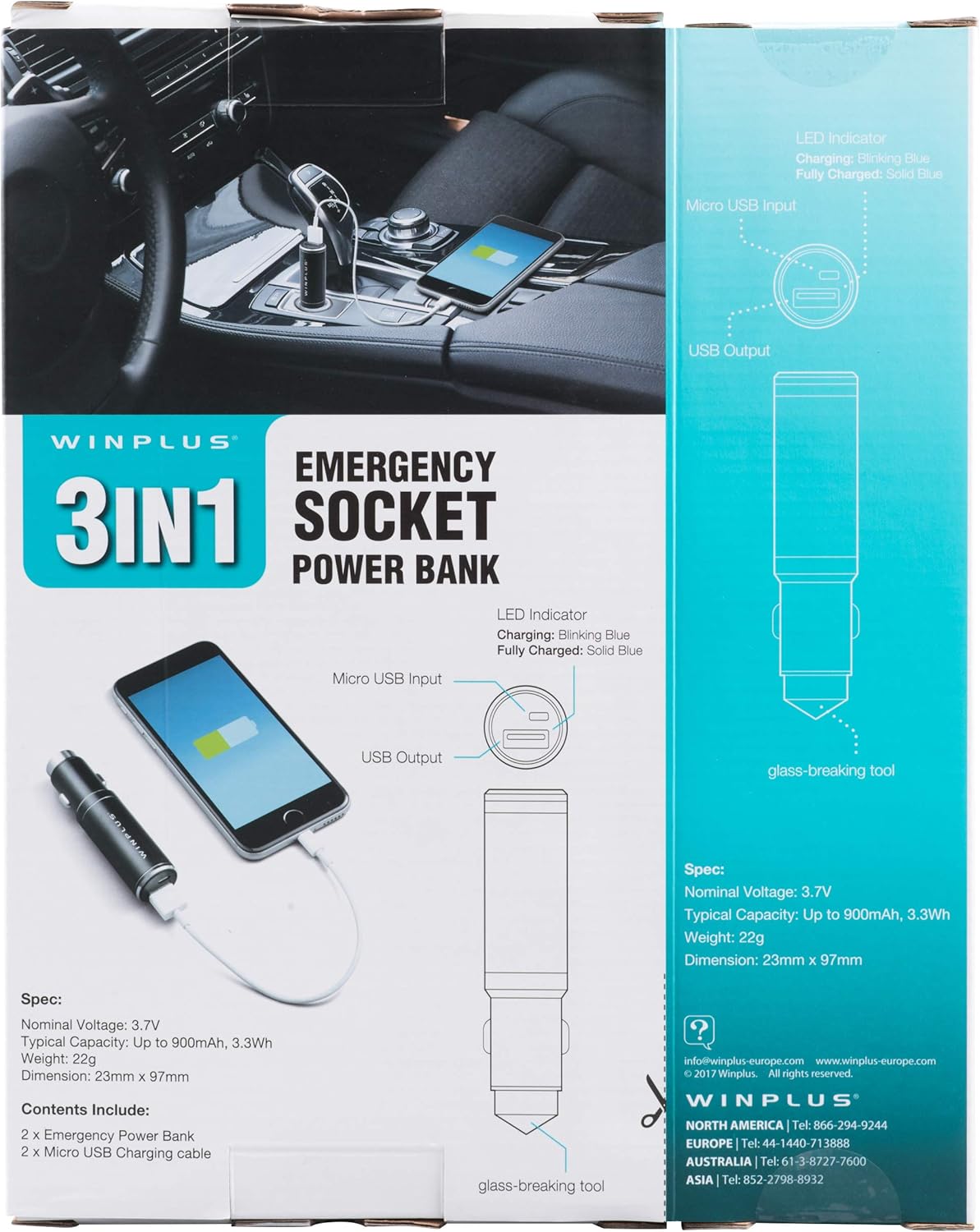
Figure 3: LED indicator status and glass-breaking tool location.
Melite
Nchaji Mbụ nke Ụlọ Nchekwa Ike:
- Locate the Micro USB Input port on the device.
- Connect the provided Micro USB charging cable to the Micro USB Input port.
- Connect the other end of the USB cable to a standard USB power source (e.g., a computer USB port, a wall adapter, or the car's 12V socket when used as a car charger).
- The LED indicator will blink blue during charging.
- Once fully charged, the LED indicator will turn solid blue.
Note: It is recommended to fully charge the power bank before its first use.
Ntuziaka ọrụ
Iji dị ka Portable Power Bank:
- Ensure the power bank is charged (solid blue LED indicator).
- Connect your device's charging cable to the USB Output port on the power bank.
- Connect the other end of the cable to your mobile device (smartphone, tablet, etc.).
- Ụlọ akụ ọkụ ga-amalite chajị ngwaọrụ gị ozugbo.
Using as a USB Car Charger:
- Insert the Winplus 3-in-1 device into your vehicle's 12V accessory socket (cigarette lighter socket).
- Connect your device's charging cable to the USB Output port on the Winplus device.
- Jikọọ nsọtụ nke ọzọ nke eriri na ekwentị mkpanaaka gị.
- Your device will begin charging. The internal power bank will also charge simultaneously if it is not full.
Using the Emergency Glass-Breaking Tool:
The emergency glass-breaking tool is located at the tip of the device, opposite the USB ports. This tool is intended for emergency use only to break vehicle side windows in situations where occupants are trapped.
- In an emergency, firmly press the tip of the tool against a corner of a side window.
- Apply steady pressure until the spring-loaded mechanism activates and shatters the glass.
- Once the glass is broken, carefully clear any remaining shards before exiting the vehicle.
Ịdọ aka ná ntị: Use this tool only in genuine emergencies. Misuse can cause serious injury. Keep out of reach of children.
Nlekọta
- Debe ngwaọrụ ahụ ka ọ kpọọ nkụ. Mmiri nwere ike imebi sekit dị n'ime.
- Ekpughela na oke okpomọkụ (ọkụ ma ọ bụ oyi).
- Jiri akwa dị nro hichaa ngwaọrụ ahụ. Ejila kemịkalụ siri ike ma ọ bụ ihe mkpocha abrasive.
- Chekwaa n'ebe dị jụụ, kpọrọ nkụ mgbe ọ naghị eji ya.
- Zere idobe ma ọ bụ idobe ngwaọrụ ahụ na mmetụta siri ike.
Nchọpụta nsogbu
| Nsogbu | Ihe nwere ike ime | Ngwọta |
|---|---|---|
| Ngwaọrụ anaghị akwụ ụgwọ. | Power bank is depleted. Cable is faulty. USB port is dirty or damaged. | Fanye ikike ụlọ akụ. Gbalịa eriri chaja dị iche. Clean the USB ports carefully or try another port. |
| Ihe ngosi LED anaghị agba ọkụ. | Device is not connected to a power source. Device is fully charged (if solid blue). Ngwaọrụ ezighi ezi. | Ensure proper connection to a power source. Check if it's already solid blue. Kpọtụrụ nkwado ndị ahịa ma ọ bụrụ na nsogbu dị. |
| Nchaji nwayọ. | Cable is not suitable. Power source is low current. Device being charged has high power requirements. | Use a high-quality charging cable. Connect to a higher current USB adapter. This device provides 2.1A output, which is standard for fast charging most phones. |
Nkọwapụta
- Ụdị: AC55925-80
- Elu ọnụ Voltage: 3.6V
- Ike a na-ahụkarị: Up to 2500 mAh, 9 Wh
- Ngwakọta cell batrị: Lithium polymer
- USB mmepụta: 5V / 2.1A
- Ntinye USB USB: 5V / 0.5A
- Akụkụ: 23mm x 127mm (approximate)
- Ibu ihe: 510 g (for the 2-pack)
- Ụdị njikọ: Micro USB (Input), USB Type-A (Output)
Ozi nchekwa
- Achịkọtala, mepee, ma ọ bụ kụrie mkpọ batrị.
- Ekpughela ngwugwu batrị ka ọ kpoo ọkụ ma ọ bụ gbaa ọkụ. Zere nchekwa na ìhè anyanwụ kpọmkwem.
- Edoghachila mkpọ batrị mkpụmkpụ. Echekwala ngwugwu batrị nke ọma n'ime igbe ma ọ bụ drọwa ebe ha nwere ike ịmegharị ibe ha mkpụmkpụ ma ọ bụ ihe igwe ndị ọzọ ga-adị mkpụmkpụ.
- Edobanyela ngwugwu batrị ka ọ bụrụ ujo igwe.
- Ọ bụrụ na batrị na-agbapụta, ekwela ka mmiri mmiri bata na akpụkpọ ahụ ma ọ bụ anya. Ọ bụrụ na akpọtụrụla ya, were oke mmiri saa ebe ahụ ọ metụtara wee chọọ ndụmọdụ ahụike.
- Ejila chaja ọ bụla na-abụghị nke enyere maka iji ya na akụrụngwa.
- Debe ngwugwu batrị ka ụmụaka ghara iru.
- Chọọ ndụmọdụ ahụike ozugbo ma ọ bụrụ na eloro ngwugwu batrị.
- Na-azụta ngwugwu batrị ziri ezi maka akụrụngwa mgbe niile.
- Keep battery packs clean and dry.
- Ahapụla batrị na chaja ogologo oge mgbe anaghị eji ya.
- Tụfuo ngwugwu batrị nke ọma dịka iwu obodo si dị.
Akwụkwọ ikike na nkwado
For warranty information or technical support, please contact Winplus North America Inc. directly.
- Onye nrụpụta: Winplus North America Inc
- Ozi mkpọtụrụ: Refer to product packaging or the official Winplus websaịtị maka nkọwa nkwado kachasị ugbu a.
You can also visit the Winplus website for FAQs and additional product information: www.winplus-europe.com


