1. Okwu mmalite
This manual provides detailed instructions for the setup, operation, maintenance, and troubleshooting of your YAMAHA RX-V683BL 7.2-Channel MusicCast AV Receiver. Designed for an immersive home theater experience, this receiver features Dolby Atmos and DTS:X object-based surround sound, 4K Ultra HD compatibility, and Yamaha's MusicCast multi-room audio system.
Atụmatụ gụnyere:
- 7.2 channel surround sound with Dolby Atmos and DTS:X for dynamic, object-based audio.
- MusicCast compatibility for adding audio in up to 9 additional rooms with MusicCast wireless speakers or other MusicCast devices.
- Wi-Fi, Bluetooth, and AirPlay wireless connectivity for versatile audio streaming.
- Phono input for vinyl playback.
- Zone 2 audio for independent audio playback in a second room.
- ECO mode to reduce power consumption by approximately 20 percent.
- 17 DSP Programs for enhanced sound fields.
- User-friendly Graphical User Interface (GUI) for on-screen display.
2. Nhazi
2.1 Mwepu na nyocha izizi
Jiri nlezianya wepụ ihe niile dị na nkwakọ ngwaahịa. Gbaa mbọ hụ na ihe niile edepụtara na ngalaba 'Gịnị dị n'igbe ahụ' nọ na emebighị emebi.
2.2 Ijikọ ihe nnata gị
The RX-V683BL serves as the central hub for your home theater system. All audio and video sources, such as Blu-ray players, gaming consoles, cable/satellite boxes, and streaming devices, should be connected to the receiver via HDMI. The receiver then outputs video to your display (TV or projector) and audio to your speakers.
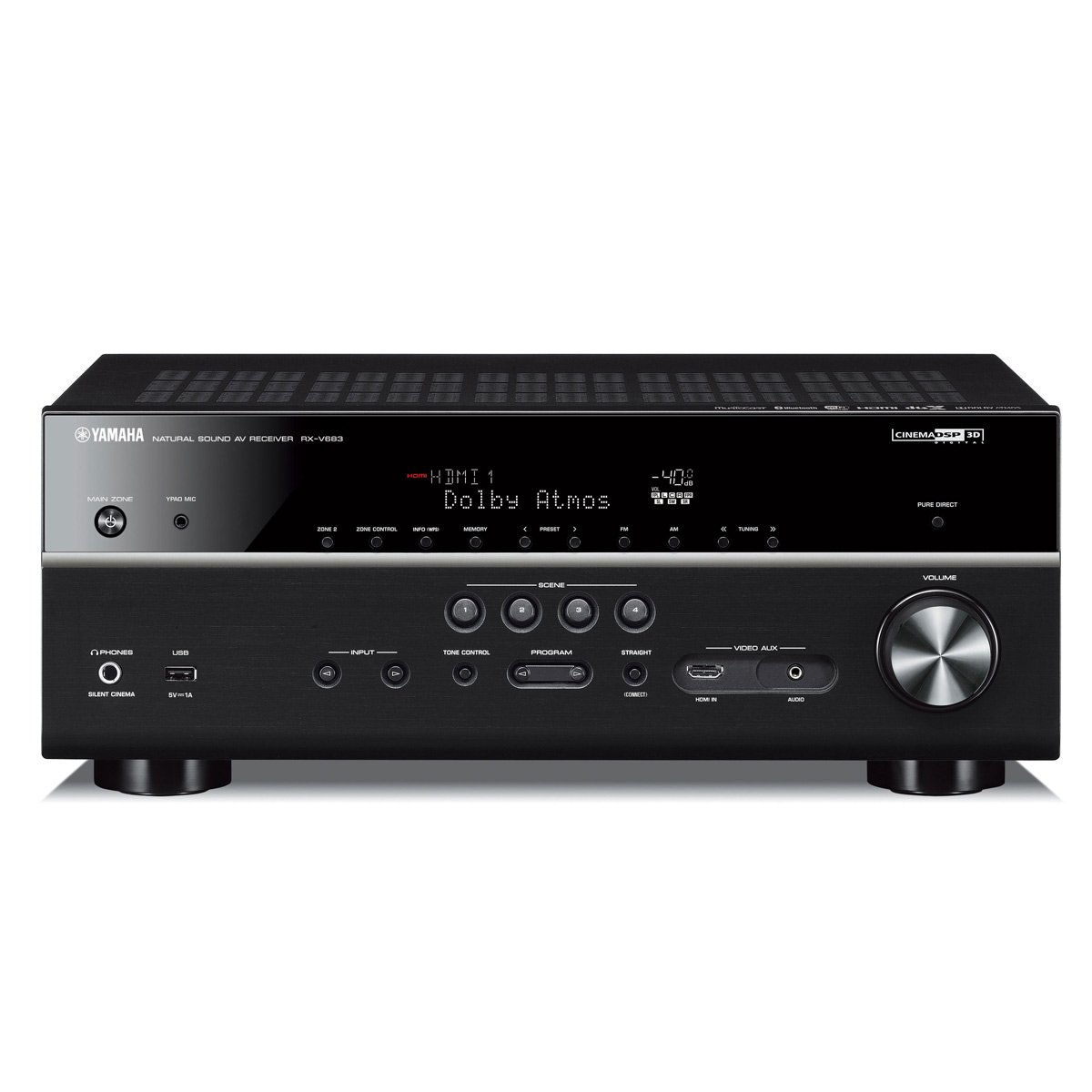
Foto 1: N'ihu view of the Yamaha RX-V683BL AV Receiver, showing the main unit, remote control, and YPAO microphone for acoustic calibration.
For optimal performance, use high-quality HDMI cables for all connections. The receiver supports 4K Ultra HD with HDR pass-through, ensuring compatibility with the latest video formats.
2.3 Njikọ azụ azụ
The rear panel of the RX-V683BL provides a comprehensive array of inputs and outputs for all your home theater components. Refer to the diagram below for detailed connection points.
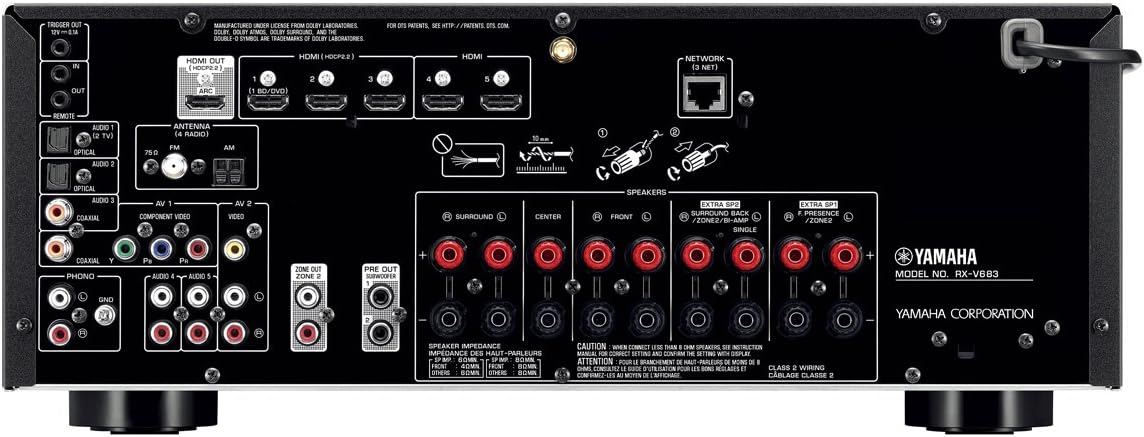
Ọgụgụ 2: Zuru ezu view of the rear panel of the Yamaha RX-V683BL, illustrating various input/output ports including multiple HDMI inputs, component video, optical/coaxial audio, and speaker terminals for a 7.2-channel setup.
- Ntinye HDMI: Connect your video sources (Blu-ray player, game console, etc.) to the HDMI inputs.
- HDMI Output (ARC): Connect to your TV's HDMI ARC (Audio Return Channel) port for audio from your TV to the receiver.
- Ọnụ Ọkà Okwu: Connect your speakers (Front L/R, Center, Surround L/R, Surround Back L/R, Presence L/R) to the corresponding terminals. Ensure correct polarity (+ to + and - to -).
- Mbupu Subwoofer: Connect your powered subwoofer(s) to these outputs. The RX-V683BL supports two subwoofers.
- Port Port: Connect an Ethernet cable for wired network connectivity.
- Ọnụ ahịa antenna: Connect the supplied AM/FM antennas.
- Ntinye phono: For connecting a turntable.
2.4 Speaker Setup and Calibration (YPAO)
The Yamaha Parametric Acoustic Optimizer (YPAO) system automatically analyzes room acoustics and adjusts various audio parameters to provide optimal sound for your listening position. Connect the supplied YPAO microphone to the front panel and follow the on-screen instructions for automatic calibration.
2.5 Network and Wireless Setup
The receiver supports Wi-Fi and Bluetooth connectivity. For Wi-Fi, connect the supplied Wi-Fi antenna and follow the on-screen setup wizard or use the MusicCast Controller app. Bluetooth allows for easy wireless streaming from compatible devices.
3. Na-arụ ọrụ onye nnata gị
3.1 Basic Arụmọrụ
Use the front panel controls or the remote control to select input sources, adjust volume, and navigate menus. The Graphical User Interface (GUI) provides an intuitive on-screen display for settings and information.

Foto 3: N'ihu view of the Yamaha RX-V683BL, highlighting the display panel which shows active connections and features like Bluetooth.
3.2 MusicCast Multi-Room Audio
MusicCast allows you to stream music wirelessly to compatible Yamaha devices throughout your home. Download the free MusicCast Controller app on your smart device (iOS/Android) to access your music library and streaming services, and to control audio in up to 9 additional rooms.

Figure 4: The Yamaha RX-V683BL receiver shown alongside a smartphone running the MusicCast app, demonstrating its multi-room audio control capabilities.
3.3 Voice Control with Amazon Alexa
The RX-V683BL is compatible with Amazon Alexa for voice control. Pair your Alexa device (sold separately) with the receiver to control playback, volume, and other functions using voice commands.
3.4 DSP Programs
The receiver features 17 Digital Sound Field Processing (DSP) programs. These programs recreate the sound fields of famous concert halls and music clubs, allowing you to customize your listening experience for various content types.
4. Nlekọta
4.1 Nlekọta n'ozuzu
To maintain the performance and appearance of your receiver, regularly wipe the exterior with a soft, dry cloth. Avoid using abrasive cleaners or solvents. Ensure adequate ventilation around the unit to prevent overheating.
4.2 Mmelite firmware
Yamaha periodically releases firmware updates to improve performance, add new features, or address issues. Connect your receiver to the internet (wired or Wi-Fi) and check for available updates through the on-screen menu. Follow the instructions carefully during the update process.
4.3 Ụdị ECO
Activate ECO mode to reduce the receiver's power consumption by approximately 20 percent. This setting can be found in the system's configuration menu.
5. Nchọpụta nsogbu
If you encounter issues with your receiver, refer to the following common troubleshooting steps before contacting support:
- Enweghị ike: Ensure the power cord is securely plugged into both the receiver and a working electrical outlet.
- Enweghị ụda: Check all speaker connections for proper polarity and secure fit. Verify the correct input source is selected. Ensure the volume is not muted or set too low.
- Enweghị vidiyo: Confirm all HDMI cables are securely connected between sources, the receiver, and your TV. Check that the correct HDMI input on your TV is selected.
- Okwu njikọ netwọkụ: For Wi-Fi, ensure the antenna is connected and the network settings are correct. For wired connections, verify the Ethernet cable is properly connected. Restart your router and the receiver.
- Njikwa anya anaghị arụ ọrụ: Lelee batrị ndị dị na njikwa remote. Hụ na enweghị ihe mgbochi ọ bụla n'etiti remote na sensọ IR nke receiver.
For more detailed troubleshooting, consult the full owner's manual available on the Yamaha support websaịtị.
6. Nkọwapụta
| Njirimara | Nkọwa |
|---|---|
| Akụkụ ngwaahịa | 14.88 x 17.13 x 6.75 sentimita asatọ |
| Ibu Ibu | 22 pound |
| Onye nrụpụta | Ngwa eletrọniki Yamaha |
| ASIN | B06XY1YTMJ |
| Nọmba ihe nlereanya | RX-V683BL |
| Batrị | A chọrọ batrị 2 AAA. (gụnyere) |
| Ụbọchị mbụ dị | Maachị 28, 2017 |
| Ụdị | Yamaha |
| Teknụzụ Njikọta | Bluetooth, WiFi |
| Ụdị njikwa | Amazon Alexa |
| Njirimara Pụrụ Iche | Equalizer, Pandora, Spotify |
| Ngwa dakọtara | Ọkà okwu |
| Mgbakọta ọdụ ụgbọ mmiri HDMI | 6 |
| Ụdị njikọ | HDMI |
| Ndekọ ọdịyo | DTS |
| Ọnọdụ mmepụta ọdịyo | Gburugburu |
| Nhazi ọwa ụda gburugburu | 7.2 |
7. Kedu ihe dị na Igbe ahụ
The following items are included with your YAMAHA RX-V683BL AV Receiver:
- Onye nnata AV
- Calibration microphone (YPAO)
- Njikwa anya
- Anten AM/FM
- Owner's manual (physical or digital access)
- 1.5V AA Batteries (2)
- Wi-Fi mpi
8. Akwụkwọ ikike na nkwado
For warranty information, please refer to the documentation included with your product or visit the official Yamaha website. For technical support, product registration, or service inquiries, please contact Yamaha customer support directly. Keep your purchase receipt for warranty claims.


