1. Okwu mmalite
This manual provides comprehensive instructions for the assembly, operation, maintenance, and troubleshooting of your Glideaway Ascend Adjustable Bed. The Ascend is a premium adjustable base designed to enhance your sleep experience with its patented Elevate lift feature and Sleep Enhancement Technology. Please read this manual thoroughly before setup and operation to ensure safe and proper use.
2. Ozi nchekwa dị mkpa
ỊDỌ AKA NA NTỊ: Ọdịda iso ntuziaka nchekwa ndị a nwere ike bute mmerụ ahụ ma ọ bụ mebie ngwaahịa a.
- Soro ntuziaka mgbakọ mgbe niile nke ọma iji gbochie enweghị ntụkwasị obi ma ọ bụ daa.
- Ekwela ka ibu arọ gị gafere kilogram 800 karịa.
- Kpachara anya maka ebe nwere ike ịpụ apụ ma ọ bụ akụkụ dị nkọ mgbe a na-ejikọta ya na iji ya.
- Keep the bed frame away from heat sources to prevent damage to the electrical components.
- Ensure all electrical connections are secure and properly grounded.
- Keep children and pets away from the adjustable bed mechanism during operation.
3. Ihe ngwugwu
Tupu ịmalite mgbakọ, chọpụta na akụrụngwa niile dị na enweghị mmebi. Ọ bụrụ na akụkụ ọ bụla na-efu ma ọ bụ mebie, biko kpọtụrụ nkwado ndị ahịa.
- Adjustable Bed Base (Queen Size)
- Njikwa ime ikuku ikuku
- Legs (set of 6 or 9 depending on model variant)
- Ụdọ ọkụ na nkwụnye
- Retainer Bar (to hold mattress in place)
4. Ntọala na Mgbakọ
Assembly is required for the Glideaway Ascend Adjustable Bed. It is recommended that two people assemble the bed base due to its weight and size.
- Wepu akụrụngwa: Carefully remove all components from the packaging. Place the bed base upside down on a clean, flat surface to protect the upholstery.
- Tinye ụkwụ: Screw the provided legs into the threaded receptacles on the underside of the bed base. Ensure all legs are tightened securely.
- Install Retainer Bar: Locate the retainer bar slots at the foot end of the bed base. Insert the retainer bar into these slots to prevent the mattress from sliding.
- Position Bed Base: With assistance, carefully flip the bed base over and position it in your desired location.
- Njikọ Ike: Plug the power cord into the control box located under the bed base, then plug the adapter into a grounded electrical outlet. Ensure the power cord is routed safely to avoid tripping hazards or damage.
- Nnwale izizi: Use the remote control to test all functions (head up/down, foot up/down, Elevate, Sleep Enhancement) before placing your mattress on the base.
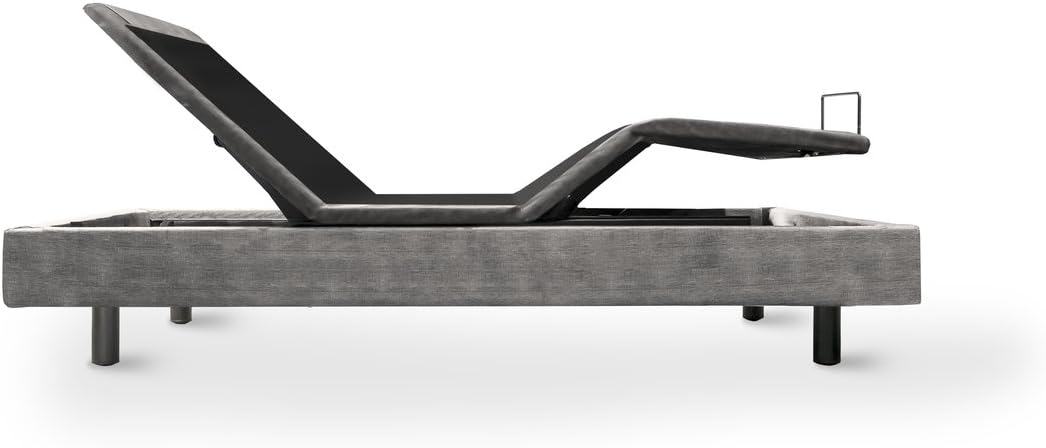
Figure 4.1: The Ascend Adjustable Bed base in its flat, unadjusted position, ready for leg attachment.
5. Ntuziaka ọrụ
Your Ascend Adjustable Bed is operated using the included wireless remote control. Familiarize yourself with the remote's functions for optimal use.
5.1 Remote Control Overview
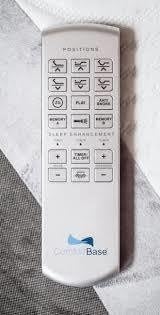
Figure 5.1: Wireless Remote Control for Ascend Adjustable Bed.
The remote features intuitive buttons for adjusting the bed's position and activating special features. Common buttons include:
- Isi Elu/Ala: Adjusts the head section of the bed.
- Ụkwụ Elu/Ala: Adjusts the foot section of the bed.
- Ewepụghị: Na-eweghachi ihe ndina ahụ n'ọnọdụ dị larịị kpamkpam.
- Ike ndọda efu: Pre-programmed position designed to relieve pressure on the back and improve circulation.
- Anti-snore: Pre-programmed position that slightly elevates the head to help reduce snoring.
- Memory Positions: Buttons to save and recall your favorite bed positions.
- Bulie: Activates the patented Elevate lift feature, raising the entire bed base.
- Sleep Enhancement Technology: Controls for massage functions (if equipped) and timer settings.
5.2 Using the Elevate Feature
The Elevate feature allows the entire bed base to tilt, providing an inclined sleeping surface. This can be beneficial for various health and comfort reasons.
- Press the "Elevate" button on your remote to activate the full bed tilt.
- The bed will smoothly transition to the elevated position.
- To return to a flat or standard position, press the "Flat" button or adjust the head/foot sections as desired.
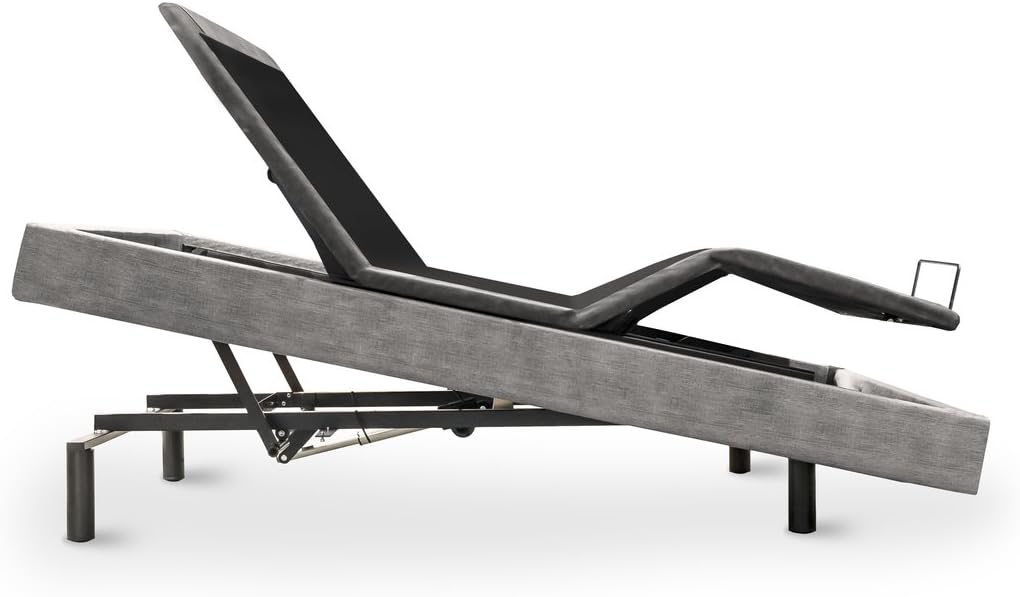
Figure 5.2: The Ascend Adjustable Bed demonstrating its Elevate feature, with the entire bed base tilted.
5.3 Sleep Enhancement Technology
This feature provides customizable comfort options. Refer to your remote for specific controls related to massage intensity, patterns, and timers.
6. Nlekọta na nlekọta
Proper care will extend the life of your adjustable bed.
- Nhicha: Wipe the fabric finish with a dry cloth. Do not use liquid cleaners or abrasive chemicals, as they may damage the upholstery or electrical components.
- Nyocha: Periodically check all connections (power cord, remote pairing) and ensure no wires are pinched or frayed.
- Oke ibu: Adhere strictly to the 800-pound weight limit to prevent damage to the motor and frame.
7. Nchọpụta nsogbu
If you experience issues with your adjustable bed, try the following steps before contacting customer support:
- Enweghị ike:
- Ensure the power cord is securely plugged into a working electrical outlet and the control box.
- Lelee ma ọ bụrụ na ihe nkwụnye ahụ arụ ọrụ site na itinye ngwaọrụ ọzọ.
- Chọpụta na ihe nbibi sekit emebibeghị.
- Remote anaghị aza:
- Lelee batrị ndị dị na njikwa anya wee dochie ha ma ọ dị mkpa.
- Ensure there are no obstructions between the remote and the bed base.
- Refer to the remote's specific pairing instructions if it has lost connection.
- Bed Not Adjusting Smoothly:
- Ensure the bed is not overloaded beyond its weight capacity.
- Check for any obstructions under or around the bed base that might impede movement.
8. Nkọwapụta
| Nha | Queen |
| Akụkụ ngwaahịa | 80"L x 60"W x 7"H |
| Njirimara Pụrụ Iche | Elevation - Tilt |
| Ụdị mmecha | Akpụkpọ anụ |
| Ngwa gụnyere | Remote, Legs |
| Dakọtara na nha matarasị | Queen |
| UPC | 612520484460 |
| Ụdị Ihe | Kemeghi Bed |
| Ibu Ibu | 240 pound |
| Ikike ịdị arọ kacha | 800 pound |
| Mgbakọ chọrọ | Ee |
| Ụbọchị mbụ dị | Maachị 18, 2017 |

Figure 8.1: Features comparison chart highlighting the capabilities of the Ascend model.
9. Akwụkwọ ikike Ozi
The Glideaway Ascend Adjustable Bed comes with a 20-Year Limited Warranty. This warranty covers manufacturing defects and material flaws under normal use. Please retain your proof of purchase for warranty claims. For full details regarding warranty coverage, terms, and conditions, please refer to the warranty card included with your product or contact Glideaway customer support.
10. Nkwado ndị ahịa
If you have any questions, require assistance with assembly, or need troubleshooting support that is not covered in this manual, please contact Glideaway customer service. For the most up-to-date contact information, please visit the official Glideaway website or refer to your product packaging.
Ị nwekwara ike ịga na Glideaway Store on Amazon maka ozi ngwaahịa na akụrụngwa nkwado.


