1. Okwu mmalite
The Diamond Audio HX1600.1D Monoblock Amplifier is engineered for audiophiles demanding superior sound quality and power. This manual provides essential information for the proper installation, operation, and maintenance of your ampihe na-eme ka ihe dị mma, na-eme ka arụmọrụ ya dịkwuo mma ma na-adịte aka.
The Hex Series Amplifiers are designed with meticulous precision and feature high-tolerance components, ensuring an unparalleled listening experience. With top-of-the-line features and user-friendly controls, these amplifiers seamlessly blend advanced technology with convenience.
2. Ozi nchekwa
Ịdọ aka ná ntị: This product can expose you to chemicals known to the State of California to cause cancer. For more information, please visit P65Warnings.ca.gov.
Always ensure proper ventilation around the amplifier. Do not expose the unit to moisture or extreme temperatures. Disconnect power before making any connections or performing maintenance. Professional installation is recommended for optimal safety and performance.
3. Ihe ngwugwu
Mgbe ị meghere ngwugwu ahụ, hụ na ihe niile edepụtara n'okpuru dị ma dịkwa mma:
- 1 x Diamond Audio HX1600.1D - HEX Mono Class D Subwoofer Ampna -emegharị ihe
- Njikwa anya
- Akwụkwọ ntuziaka onye nwe (akwụkwọ a)
4. Ngwaahịa gafereview
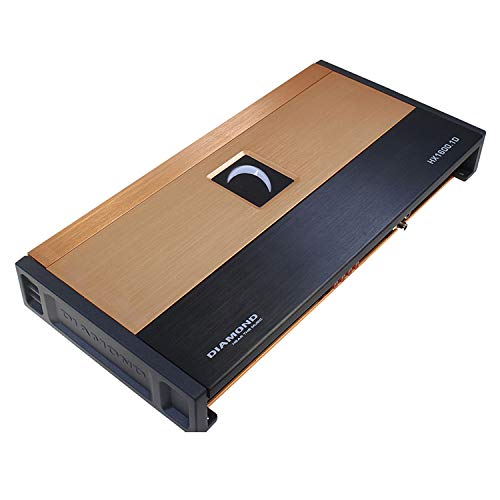
Foto 4.1: N'elu view of the Diamond Audio HX1600.1D Monoblock Ampihe ngosi, ihe ngosiasing its sleek design with a gold and black finish and illuminated logo.
Key features of the HX1600.1D Monoblock Ampihe ọkụ gụnyere:
- HEX Series Mono Amplifier engineered for audiophiles demanding superior sound quality and power.
- Delivers up to 1600 W x 1 @ 1Ω, ensuring robust power output and exceptional bass performance.
- High-end anodized extruded aluminum heat sink for superior thermal performance and long-lasting reliability.
- Advanced 4-layer PCB board with balanced differential inputs for clear, distortion-free sound.
- Full-range Class D IR chipset and audiophile-grade components for unmatched efficiency and sound clarity.
- Illuminated logo and fully concealed mounting for a sleek and stylish ampnhazi ọkwa.
5. Ntọala na nwụnye
Nrụnye kwesịrị ekwesị dị oke mkpa maka ịrụ ọrụ na ogologo ndụ nke gị amplifier. It is highly recommended to have the amponye ọkachamara tozuru oke arụnyere.
5.1 Na-arịgo
The HX1600.1D features fully concealed mounting for a clean installation. Choose a mounting location that provides adequate ventilation and is protected from moisture and excessive heat. Ensure the surface is stable and secure.
5.2 Njikọ njikọ
Refer to the wiring diagram (not provided in this manual, consult a professional or detailed product sheet) for correct power, ground, remote turn-on, and speaker connections. Use appropriate gauge wiring for all connections to prevent power loss and ensure safety.
- Ntinye ike: Connect to the vehicle's positive battery terminal via a fuse or circuit breaker.
- Ala: Jikọọ na elu ígwè dị ọcha, nke a na-eseghị agba nke chassis ụgbọala ahụ.
- Gbanwuo ime anya: Connect to the head unit's remote output.
- Mpụta okwu: Connect to your subwoofer(s). Ensure correct polarity and impedance matching (1Ω stable).
6. Ntuziaka ọrụ
Ozugbo arụnyere, na amplifier requires proper configuration for optimal audio performance.
6.1 Ike mbido
After all connections are made, turn on your head unit. The amplifier's illuminated logo should light up, indicating it is powered on. If not, recheck all connections, especially the remote turn-on wire.
6.2 Njikwa Nhazi
The HX1600.1D features top-mounted controls for convenient adjustment. These include:
- Nweta njikwa: Adjust this to match the output voltage of your head unit. Start low and gradually increase until the output clip indicator illuminates, then back off slightly.
- Ihe nzacha dị ala (LPF): A fully variable crossover allows you to set the upper frequency limit for the subwoofer. Typically set between 50Hz and 120Hz.
- Subsonic Myọcha: Filters out extremely low frequencies that are below the audible range and can damage subwoofers.
- Njikwa usoro: Adjusts the phase of the subwoofer output relative to the main speakers (0-180 degrees) to ensure proper bass integration.
- Output Clip Indicators: These indicators provide precise feedback for setting the gain, helping to prevent distortion and protect your speakers.
Adjust these settings incrementally and listen carefully to the sound output to achieve the desired audio balance and clarity.
7. Nlekọta
To ensure the longevity and optimal performance of your Diamond Audio HX1600.1D amplifier, soro ntuziaka mmezi dị mfe ndị a:
- Nhicha: Na-ehichapụkwa oge ụfọdụ ampmputa lifier nwere akwa dị nro, kpọrọ nkụ. Zere iji kemịkalụ siri ike ma ọ bụ ihe nchacha.
- Igwe ikuku: Gbaa mbọ hụ na amplifier's heat sink and ventilation areas are free from obstructions. Proper airflow is essential for thermal performance.
- Njikọ: Occasionally check all wiring connections to ensure they are secure and free from corrosion. Loose connections can lead to poor performance or damage.
- gburugburu: Chebe nke amplifier from direct sunlight, excessive heat, and moisture.
8. Nchọpụta nsogbu
Ọ bụrụ na ị nwere nsogbu na ndụ gị amplifier, rụtụ aka na nsogbu na azịza ndị a na-ahụkarị:
| Nsogbu | Ihe nwere ike ime | Ngwọta |
|---|---|---|
| Enweghị ike / Amplifa anaghị agbanyụ | Blown fuse; loose power/ground/remote wire; faulty remote turn-on signal. | Check and replace fuse; verify all power, ground, and remote connections are secure and correctly wired. |
| Enweghị mpụta ụda | Loose RCA cables; incorrect gain setting; speaker wires disconnected; amplifia na ọnọdụ nchekwa. | Ensure RCA cables are firmly connected; adjust gain; check speaker wire connections; if in protect mode, check for short circuits or overheating. |
| Ụda agbagọ | Gain set too high; incorrect crossover settings; poor ground connection; damaged speaker. | Lower gain setting; adjust LPF/subsonic filters; verify ground connection; inspect speakers for damage. |
| Amplifier ekpo oke ọkụ | Insufficient ventilation; impedance too low; prolonged high-volume operation. | Hụ na ikuku na-efe efe nke ọma gburugburu amplifier; verify speaker impedance matches amplifier's capabilities; reduce volume or allow cooling time. |
If the problem persists after attempting these solutions, contact Diamond Audio customer support or a qualified car audio technician.
9. Nkọwapụta
The following are the technical specifications for the Diamond Audio HX1600.1D Monoblock Ampntughari:
- Mmepụta Ike (RMS):
- 700 W x 1 @ 4Ω
- 1150 W x 1 @ 2Ω
- 1600 W x 1 @ 1Ω
- Oke Mgbaàmà-na-Mkpọtụ (S/N): ≥ 95 dBA
- Mgbakọta Harmonic (THD): 0.06%
- Akụkụ (L x W x H): 15.8" x 7.67" x 2" (402 x 195 x 51.5 mm) (Remote Included)
- Ngwa mbelata okpomọkụ: Aluminom Extruded Anodized
- PCB Board: 4-Layer with Balanced Differential Inputs
- Chipset: Full Range Class D IR
- Ngwa: "SNAP" Capacitors, Audiophile Grade High Tolerance
- FET Clips: Mmiri Steel
- Njikwa: Fine Tuned Fully Variable Crossovers and Phase Control, Top Mounted
- Ndị na-egosi: Ngosipụta obere vidiyo
- Ụdị nkwụnye: Ugwu elu
- Ọnụọgụ ọwa: 1
- Ibu ihe: 12 pound
10. Akwụkwọ ikike na nkwado
Diamond Audio products are manufactured to the highest quality standards. For warranty information, please refer to the warranty card included with your product or visit the official Diamond Audio websaịtị. Debe ihe akaebe nke ịzụrụ ihe maka akwụkwọ ikike ọ bụla.
For technical support, troubleshooting assistance, or to inquire about service, please contact Diamond Audio customer service. You can find contact information on the official Diamond Audio websaịtị ma ọ bụ site na onye na-ere gị ikike.
Ndị ọchịchị Websaịtị: While a direct link isn't provided, you can typically find support information by searching for "Diamond Audio official websaịtị".


