1. Okwu mmalite
This manual provides comprehensive instructions for the installation, operation, and maintenance of your UHPPOTE 4 Channel Color Quad System Video Splitter, Model UT-XYL-440. This device is designed to process and display video feeds from up to four CCTV cameras simultaneously on a single monitor, offering various display modes and control options for effective surveillance monitoring.
2. Ozi nchekwa
- Hụ na e tinyere ngwaọrụ ahụ n'elu ebe kwụsiri ike ma dị larịị iji gbochie ịda ada na mberede.
- Mee ka ngwaọrụ ahụ rụọ ọrụ n'ime voltage range (DC 12V) using the provided power adapter.
- Avoid exposing the unit to moisture, rain, or extreme temperatures. This device is intended for indoor use only.
- Emeghela casing or attempt to repair the unit yourself. Refer all servicing to qualified personnel.
- Maintain adequate ventilation around the unit to prevent overheating.
3. Ihe ngwugwu
Biko chọpụta na ihe niile dị na ngwugwu gị:
- UHPPOTE 4 Channel Color Quad System Video Splitter (UT-XYL-440)
- Njikwa Ime Ime Infrared
- BNC Adapters (7 pieces)
- Ihe nkwụnye ọkụ (DC 12V)

Image 3.1: UHPPOTE 4 Channel Color Quad System Video Splitter, remote control, and BNC adapters.
4. Ngwaahịa gafereview
Familiarize yourself with the components and controls of your video splitter.
4.1. Ogwe Ihu
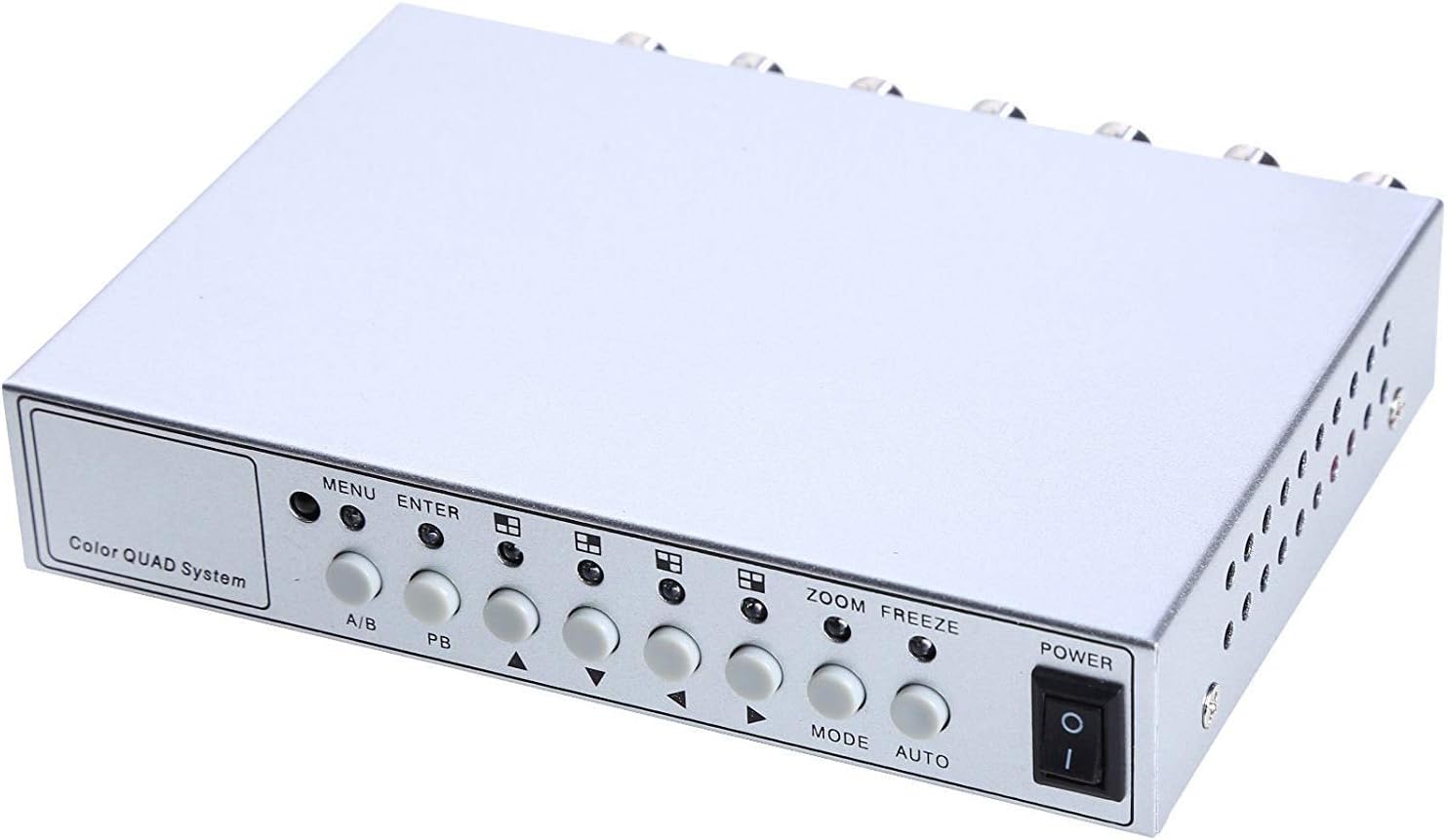
Image 4.1: Front panel controls and indicators.
- NchNhr: Accesses the on-screen display (OSD) menu for settings adjustment.
- Tinye: Confirms selections within the OSD menu.
- A/B: Switches between different display modes or channels.
- PB: Playback control (if connected to a VCR).
- Àkụ̀tụ Ntuziaka (Elu/Ala/Ekpe/Aka nri): Navigate through menu options and adjust values.
- Mbugharị: Activates the digital zoom function.
- OZI: Freezes the current video frame.
- Edị: Cycles through various display modes (Quad, Full Screen, PIP, Dual Split).
- UTgbọala: Activates the auto-sequence display mode.
- IKE: Mgbanyụ/Mgbanyụ mgbanyụ maka ngwaọrụ ahụ.
4.2. Ogwe azụ

Image 4.2: Rear panel video input/output ports and power input.
- VIDEO 1-4: BNC inputs for connecting up to four CCTV cameras.
- VCR IN: BNC input for connecting a VCR or other recording device.
- VCR OUT: BNC output for connecting to a VCR or other recording device.
- Nlebaanya: BNC output for connecting to a display monitor.
- DC 12V: Power input jack for the DC 12V power adapter.
4.3. Remote Control

Image 4.3: Infrared remote control for convenient operation.
The remote control provides convenient access to all functions, mirroring the front panel controls and offering direct channel selection.
5. Nhazi
Follow these steps to set up your UHPPOTE Video Splitter:
- Jikọọ Igwefoto: Connect your CCTV cameras to the VIDIO 1, VIDIO 2, VIDIO 3, na VIDIO 4 BNC input ports on the rear panel. Ensure secure connections.
- Jikọọ Nyochaa: Connect your display monitor to the MGBE BNC output port on the rear panel.
- Connect VCR (Optional): If you wish to record video, connect the VCR IN na VCR OUT BNC ports to your VCR or recording device.
- Njikọ Ike: Insert the DC 12V power adapter into the DC 12V input jack on the rear panel, then plug the adapter into a standard electrical outlet.
- Ike Na: Pịa IKE bọtịnụ dị na panel ihu ma ọ bụ njikwa ime obodo iji gbanye unit ahụ.
6. Ntuziaka ọrụ
6.1. Gbanyụọ / gbanyụọ
Pịa IKE button on the front panel or the remote control to switch the unit on or off.
6.2. Ụdị ngosi
The unit supports various display configurations. Use the MODE button on the front panel or remote to cycle through them:
- QUAD Split Mode: Displays all four camera feeds simultaneously in a four-way split screen.
- Ụdị ihuenyo zuru oke: Displays a single camera feed in full screen. Use the directional arrows or number buttons (1-4) on the remote to select the desired camera.
- PIP (Picture-in-Picture) Mode: Displays one main camera feed with a smaller window of another camera feed. The position of the PIP window can often be adjusted via the menu.
- Dual Split Mode: Displays two camera feeds simultaneously (e.g., side-by-side or top-bottom).
- Auto Sequence Mode: Automatically cycles through full-screen views of each connected camera. Activate using the AUTO button on the front panel or remote.
6.3. Ntugharị menu na Ntọala
To access and adjust system settings:
- Pịa MENU button on the front panel or remote control. The On-Screen Display (OSD) menu will appear.
- Jiri ihe Elu/ala directional arrows to navigate between menu options.
- Pịa Banye to select an option or enter a sub-menu.
- Jiri ihe Aka ekpe/aka nri directional arrows to adjust values (e.g., brightness, contrast) or change settings.
- Pịa MENU ọzọ ịpụ na menu.
Ntọala igodo:
- Ndozi vidiyo: Adjust Brightness, Contrast, Saturation, Hue, and Sharpness for optimal image quality.
- Ụdị sistemụ: Select between NTSC (for North America, Japan, etc.) or PAL (for Europe, Asia, etc.) based on your region's video standard. Incorrect selection can lead to distorted or black and white images.
- Overlay Information: Configure display of Camera Title, Real Time and Date, and Alarm/Loss/Motion messages.
- Event Report: Review event logs and configure buzzer/relay output settings.
6.4. Ọrụ mbugharị
In full-screen mode, press the ZOOM button on the front panel or remote to activate digital zoom. Use the directional arrows to select the area to zoom in on.
6.5. Freeze Function
Pịa FREE (FRZ) button on the front panel or remote to pause the current video frame. Press it again to resume live video.
7. Nlekọta
- Nhicha: Jiri ákwà dị nro ma kpọọ nkụ hichaa mpụta nke ngwaọrụ ahụ. Ejila ihe nhicha mmiri ma ọ bụ ihe nhicha aerosol.
- Igwe ikuku: Ensure the ventilation holes are not obstructed to prevent overheating.
- Nchekwa: If storing the unit for an extended period, disconnect it from power and store in a cool, dry place.
8. Nchọpụta nsogbu
| Nsogbu | Ihe nwere ike ime | Ngwọta |
|---|---|---|
| Enweghị ihe ngosi vidiyo na ihe nlele |
|
|
| Distorted, black & white, or rolling image |
|
|
| Njikwa anya anaghị arụ ọrụ |
|
|
| Constant buzzing sound |
|
|
9. Nkọwapụta
| Njirimara | Nkọwa |
|---|---|
| Nọmba nlereanya | UT-XYL-440 |
| Ntinye vidiyo | 4 BNC (for cameras), 1 BNC (VCR In) |
| Mpụta vidiyo | 1 BNC (Monitor), 1 BNC (VCR Out) |
| Mkpebi vidiyo | 720x480 (NTSC 60Hz), 720x576 (PAL 50Hz) |
| Ụdị ngosi | Quad Split, Full Screen, PIP, Dual Split, Auto Sequence |
| Ndozi onyonyo | Icha ọkụ, ọdịiche, saturation, hue, nkọ |
| Ọrụ Pụrụ Iche | Freeze Function, Zoom Function, Video Loss Detection, Motion Detection |
| Ịnye ọkụ | DC 12V |
| Ibu Ibu | 13.4 ounces (ihe dị ka 380g) |
| Akụkụ ngwugwu | 8.54 x 6.06 x 2.4 sentimita (ihe dịka 21.7 x 15.4 x 6.1 cm) |
| Batrị nke Ime Ime | Batrị 1 x CR2 (achọrọ) |
10. Akwụkwọ ikike na nkwado
UHPPOTE products are designed for reliability and performance. For warranty information, technical support, or service inquiries, please refer to the contact information provided with your purchase or visit the official UHPPOTE website. Please have your model number (UT-XYL-440) available when contacting support.


