1. Ngwaahịa gafereview
The DJI Inspire 2.0 Quadcopter is a professional-grade aerial platform designed for high-quality video capture. This combo includes the Zenmuse X5S Camera Gimbal, a remote controller, flight battery, charger, charging hub, and pre-installed CinemaDNG and Apple ProRes license keys. It features advanced obstacle sensing, intelligent flight modes, and a robust Lightbridge transmission system for stable control and video feed.

Figure 1: DJI Inspire 2.0 Quadcopter with propellers extended.
The aircraft has a diagonal distance of 18 inches (457.20mm) (605 mm in Landing Mode, propeller excluded) and a maximum takeoff sea level of 1.55 miles (2500 m), or 3.1 miles (5000 m with specially-designed propellers). It offers a maximum flight time of approximately 27 minutes with the Zenmuse X4S camera. The Inspire 2.0 supports various flight modes including P-mode (35 deg. max tilt angle, 25 deg. with Forward Vision System enabled), A-mode (35 deg.), and S-mode (40 deg.).
2. Ntọala na Mgbakọ
Before first use, ensure all components are present and undamaged. Charge all Intelligent Flight Batteries using the provided charging hub and power cable. The remote controller also requires charging.
2.1 Unboxing na nlele mbụ
Carefully remove all items from the carrying case. Inspect the aircraft, remote controller, camera, and accessories for any signs of damage.
2.2 Njikọta Propellers
Attach the propeller pairs to the motor mounts. Ensure the propellers with silver caps are attached to motors with silver dots, and propellers with black caps are attached to motors with black dots. Twist to secure.
2.3 Installing Intelligent Flight Battery
Slide the Intelligent Flight Battery into the battery compartment on the aircraft until it clicks securely into place.

Figure 2: Battery installation on the DJI Inspire 2.0.
2.4 Attaching Zenmuse X5S Camera Gimbal
Align the gimbal with the mounting plate on the aircraft and twist to lock it into position. Ensure it is firmly attached.
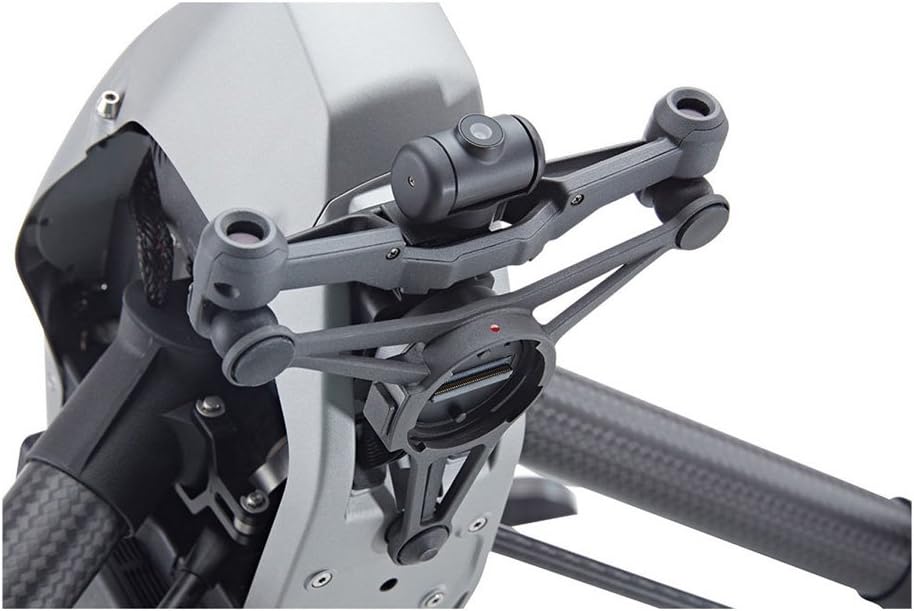
Figure 3: Gimbal mounting mechanism.
2.5 Remote Controller Preparation
Extend the antennas on the remote controller. If using a mobile device for display, attach it to the remote controller's device holder and connect it via USB cable.
2.6 Unboxing Overview Vidiyo
Maka ntuziaka nlegharị anya na mkpọpu ọkpọ na nhazi mbụ, biko rụtụ aka na vidiyo gọọmentị dị n'okpuru:
Video 1: Official DJI Inspire 2 Drone Unboxing Overview. This video demonstrates the unboxing process and initial setup steps for the DJI Inspire 2.
3. Operating the DJI Inspire 2.0
The DJI Inspire 2.0 offers a variety of intelligent flight modes and advanced features to enhance your aerial operations.
3.1 Ụdị ụgbọ elu nwere ọgụgụ isi
- Spotlight Pro: This powerful tracking mode allows a single pilot to capture complex, dramatic images. It uses visual-tracking algorithms to lock onto a subject during flight, regardless of the drone's direction. It features Quick Mode for immediate tracking and Composition Mode for pre-setting tracking positions.
- ActiveTrack: This mode enables the Inspire 2 to recognize and track a range of objects, including people, bikes, cars, and boats. Tracking profiles can be adjusted for greater precision based on the subject.
- TapFly: The 2-axis onboard FPV camera separates the flight view from the main camera view. Tap a point on the screen in the FPV view to set a flight route, and the Inspire 2 will automatically fly along that route, allowing the pilot to focus on gimbal movement.
- Waypoint & Point of Interest (POI): These modes allow for pre-planned flight paths and orbiting a specific point, respectively, for automated cinematic routines.
3.2 Advanced Obstacle Sensing
Forward and downward vision systems detect obstacles up to 30 meters ahead, enabling protected flight at speeds up to 34 mph. Upward-facing infrared sensors scan obstacles 16 feet above, providing additional protection in enclosed spaces. These systems are active during normal flight, Return-to-Home (RTH), and all intelligent flight modes.
3.3 DJI Lightbridge Technology
The Inspire 2 features DJI Lightbridge technology, offering an effective transmission distance of up to 4.3 miles (under ideal conditions). It delivers 1080P/720P video and the FPV view to both pilot and camera operator. Users can switch between 2.4 GHz and 5.8 GHz control frequencies to minimize interference and enhance signal stability.
4. Nlekọta
Regular maintenance ensures the longevity and optimal performance of your DJI Inspire 2.0.
- Nlekọta batrị: Store batteries in a cool, dry place. Avoid overcharging or fully discharging. Follow recommended charging and storage procedures.
- Nyocha igwe ihe Before each flight, inspect propellers for cracks, bends, or damage. Replace damaged propellers immediately.
- Nhicha: Keep the aircraft and camera clean. Use a soft, dry cloth to wipe surfaces. Avoid using harsh chemicals.
- Nchedo Gimbal: Always use the gimbal clamp or cover when transporting the drone to prevent damage.
5. Nchọpụta nsogbu
If you encounter issues with your DJI Inspire 2.0, refer to the following common troubleshooting tips:
- Ọnwụ nke mgbaama: If the video transmission system signal is lost and Smart Return Home is enabled, the aircraft will attempt to fly home along its original route. It will switch to a straight line when it regains a signal and use the primary camera to identify obstacles.
- Enweghị nchekwa ụgbọ elu: Ensure all propellers are correctly installed and undamaged. Perform IMU and compass calibrations as instructed in the DJI GO 4 app.
- Obstacle Detection Issues: Ensure vision sensors are clean and unobstructed. Avoid flying in conditions that may impair sensor performance (e.g., heavy fog, extremely dark environments).
6. Nkọwapụta
| Njirimara | Nkọwa |
|---|---|
| Ụdị | DJI |
| Aha Nlereanya | Mkpali 2 |
| Njirimara Pụrụ Iche | Advanced Obstacle Sensing, High-Quality Video Recording, Intelligent Flight Modes, Extended Range |
| Agba | Nwa |
| Mkpebi ịse vidiyo | 4K |
| Teknụzụ Njikọta | DJI Lightbridge, Wi-Fi |
| Ọkwa nka | Ọkachamara |
| Ibu Ibu | 7.6 pound |
| Oke kacha | 4.3 kilomita |
| Ihe onwunwe | Carbon Fiber / High-Grade Plastic |
| Ụdị onyonyo akwadoro | CinemaDNG |
| Mkpebi mmepụta vidiyo | 1920x1080 pikselụ |
| Teknụzụ ihe mmetụta anya | CMOS |
| Nọmba ihe nlereanya | CP.BX.000185 |
| Akụkụ ngwaahịa | 1 x 1 x 1 sentimita asatọ |
7. Kedu ihe dị na Igbe ahụ
- DJI Inspire 2 Quadcopter with CinemaDNG and Apple ProRes Licenses
- Njikwa anya (onye na-ebufe)
- 4 x Propeller Pairs
- 2 x Intelligent Flight Battery
- Chaja batrị
- Ebe Nchaji
- Igwe ọkụ ọkụ
- eriri USB
- microSD Kaadị
- Ọhụụ Sistemụ Mgbanwe Efere
- 3 x Gimbal Damper
- Propeller Mounting Plates
- Akpa na-ebu
- 4 x Battery Insulation Sticker
- Inspire 2 CinemaDNG & Apple ProRes License Key (Pre-Installed)
- Limited 1-Year Warranty on Aircraft (Excluding Gimbal, Camera, and Battery)
- Limited 6-Month / 200-Cycle Warranty on Battery (Whichever Comes First)
8. Akwụkwọ ikike na nkwado
The DJI Inspire 2.0 Quadcopter Combo comes with a limited 1-year warranty on the aircraft (excluding gimbal, camera, and battery) and a limited 6-month / 200-cycle warranty on the battery (whichever comes first). For detailed warranty information or technical support, please refer to the official DJI website or contact DJI customer service directly.