1. Okwu mmalite
The PETKIT P410 Smart Pet Drinking Fountain is designed to provide your pets with fresh, filtered water. Featuring an intelligent working mode, a triple purification system, and an ultra-silent pump, this 2-liter capacity fountain ensures your pet's hydration needs are met with convenience and efficiency. This manual will guide you through the setup, operation, and maintenance of your new pet drinking fountain.

Image 1.1: The PETKIT P410 Smart Pet Drinking Fountain, a white square-shaped device with a clear top and a water level indicator on the front.

Foto 1.2: Ofeview of the PETKIT P410's key features, including its triple purifying system, intelligent working mode, water-shortage alert, and filter replacement notification.
2. Ozi nchekwa
- Gụọ ntuziaka niile nke ọma tupu i jiri ngwa ahụ.
- Ngwa a bụ naanị maka ime ụlọ.
- Do not immerse the electrical adapter or power cord in water or other liquids.
- Ensure the power cord is placed where it cannot be tripped over or damaged.
- Always unplug the fountain before cleaning or performing maintenance.
- Keep out of reach of children and pets during assembly and disassembly.
- Use only original PETKIT parts and accessories.
3. Ihe ngwugwu
Biko lelee ma ihe niile dị na ngwugwu ahụ:
- PETKIT P410 Smart Pet Drinking Fountain Unit
- Ihe nzacha nzacha
- Filter Element (pre-installed or separate)
- Mgbapụta mmiri
- Ihe nkwụnye ọkụ
- Akwụkwọ ntuziaka onye ọrụ
4. Nhazi
- Wepu akụrụngwa: Jiri nlezianya wepụ akụkụ niile na nkwakọ ngwaahịa.
- Sachaa ihe ndị a: Rinse the water tray, filter tray, and water tank thoroughly with clean water. Do not use soap or harsh detergents.
- Wụnye nzacha: Place the filter element into the filter tray. Ensure it is seated correctly.
- Mgbakọta Isi iyi: Place the water pump into its designated slot in the main unit. Then, place the filter tray with the filter element on top of the pump. Finally, place the drinking tray on top of the filter tray.
- Jupụta na mmiri: Fill the water tank with clean drinking water up to the MAX fill line. The water level indicator on the front will show the current water volume.
- Njikọ Ike: Connect the power adapter to the fountain and then plug it into a wall outlet. The fountain will start operating.

Foto 4.1: Ihe dị n'ime view of the PETKIT P410, highlighting the water level indicator and internal components.
5. Ụdị arụ ọrụ
The PETKIT P410 offers two operating modes: Smart Mode and Normal Mode. You can switch between modes using the button on the front of the fountain.
- Ụdị ọgụgụ isi: Equipped with a light sensor, the fountain automatically adjusts the frequency of water output between day and night. This mode is quieter and more energy-efficient, providing water when needed while conserving power.
- Ụdị nkịtị: In this mode, the fountain provides a continuous flow of water, ensuring constant access for your pets, especially after periods of high activity.

Image 5.1: Illustration showing the PETKIT P410's control button for switching between Smart and Normal operating modes.
Ngosipụta ihe ngosi
- Ìhè na-acha anụnụ anụnụ: A blue indicator light signifies a low water level. The fountain will automatically shut off when the water level is critically low to prevent pump damage. Refill the water tank promptly.
- Ìhè oroma: An orange indicator light signals that it is time to replace the filter element. Refer to the Maintenance section for filter replacement instructions.
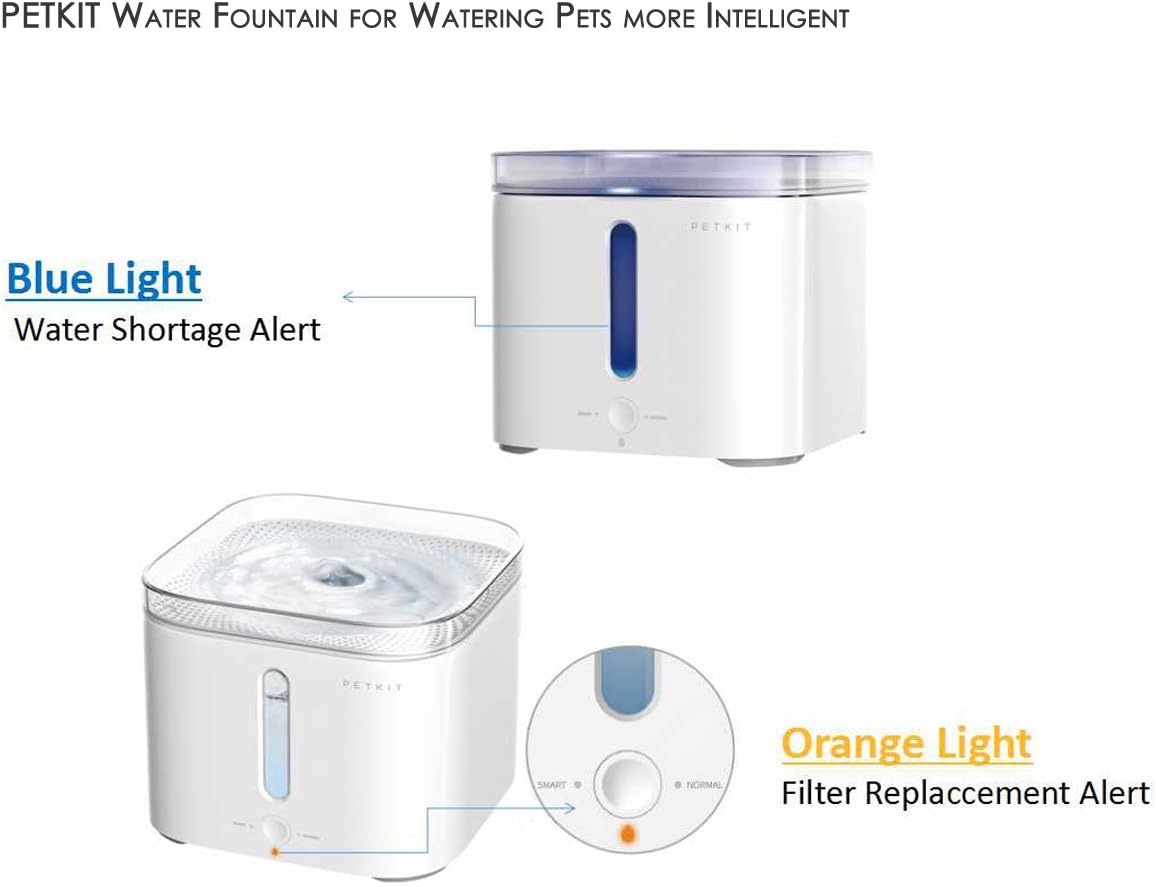
Image 5.2: The PETKIT P410 displaying a blue light for water shortage and an orange light for filter replacement.
6. Nlekọta
6.1 Cleaning the Fountain
Regular cleaning is essential to maintain hygiene and prolong the life of your fountain. It is recommended to clean the fountain at least once a week.
- Unplug the fountain from the power outlet.
- Disassemble the drinking tray, filter tray, and water tank.
- Wepu ihe nzacha.
- Clean all components (except the power adapter and pump motor) with clean water. You may use a soft brush to remove any residue. Do not use abrasive cleaners.
- Rinse thoroughly to ensure no cleaning residue remains.
- Reassemble the fountain after all parts are clean.
6.2 Ndochi nzacha
The PETKIT P410 uses a triple cleaning system filter, consisting of a mesh screen, activated carbon, and ion-exchange resin, to purify the water. The orange indicator light will illuminate when it's time to replace the filter, typically every 1-2 months depending on usage and water quality.

Foto 6.1: Zuru ezu view of the PETKIT P410's filter components, including the mesh screen, activated carbon filter, and ion-exchange resin.
- Kpupu isi iyi.
- Remove the drinking tray and filter tray.
- Wepu ihe nzacha ochie.
- Rinse the new filter element under running water for a few minutes to remove any loose carbon dust.
- Place the new filter element into the filter tray.
- Reassemble the fountain and plug it back in.
- Press and hold the mode button for 5 seconds to reset the filter replacement reminder. The orange light will turn off.
7. Nchọpụta nsogbu
| Nsogbu | Ihe nwere ike ime | Ngwọta |
|---|---|---|
| Ọ dịghị eruba mmiri | Power not connected; Low water level; Pump clogged; Filter clogged. | Check power connection; Refill water; Clean pump; Replace filter. |
| Fountain is noisy | Low water level; Pump dirty or obstructed; Improper assembly. | Refill water; Clean pump and impeller; Reassemble correctly. |
| Ọkụ na-acha anụnụ anụnụ na-agbanye | Ọkwa mmiri dị ala. | Mejupụta tank mmiri ahụ. |
| Ọkụ oroma na-agbanye | Nzacha ahụ chọrọ nnọchi. | Replace the filter and reset the indicator (press and hold mode button for 5 seconds). |
8. Nkọwapụta
| Ụdị | PETKIT |
| Nọmba nlereanya | TKWT1WH |
| Akụkụ ngwaahịa | 19.69 x 19.69 x 16.81 cm |
| Ibu Ibu | 1.13 n'arọ (2.5 pound) |
| Ike | 2 lita |
| Ihe onwunwe | Plastic |
| Isi Iyi Ike | Igwe ọkụ eletrik |
| Voltage | 12 volts |
9. Akwụkwọ ikike na nkwado
For warranty information or technical support, please refer to the warranty card included with your product or visit the official PETKIT website. You may also contact PETKIT customer service directly for assistance with product issues or inquiries.
10. Pet Usage Examples

Image 10.1: A dog happily drinking fresh water from the PETKIT P410 Smart Pet Drinking Fountain.

Image 10.2: A cat drinking from the PETKIT P410 Smart Pet Drinking Fountain, demonstrating its suitability for feline companions.


