Okwu mmalite
This manual provides detailed instructions for the proper use and maintenance of your Bushnell V4 PinSeeker Slope Tour Rangefinder. This device is designed to provide accurate distance measurements for golf, incorporating advanced features like Slope compensation, PinSeeker technology, and JOLT vibration feedback.
Ozi nchekwa
Nchekwa Laser
The Bushnell V4 Rangefinder is a Class 1 laser product, compliant with IEC 60825-1:2007 and FDA 21 CFR 1040.10 and 1040.11. This device emits invisible infrared energy. Do not stare directly into the laser beam or view directly with optical instruments. Avoid direct eye exposure.
Akpachara anya nchekwa izugbe
- Do not attempt to disassemble or modify the device. This could cause damage and void the warranty.
- Debe ngwaọrụ ahụ pụọ na oke okpomọkụ yana ìhè anyanwụ kpọmkwem.
- Zere idobe ngwaọrụ ma ọ bụ tinye ya na mmetụta siri ike.
- Debe ebe ụmụaka na-apụghị iru.
- Use only the specified battery type (CR2 Lithium).
Ihe ngwugwu
Chọpụta na ihe niile dị na ngwugwu:
- Bushnell V4 PinSeeker Slope Tour Rangefinder
- Dedicated Carrying Case
- Akwa nhicha oghere
- Instruction Manual (Japanese Version)
- Warranty Card (Japanese Version)
- Nọmba usoro n'usoro Tag (affixed to unit)
- Genuine Product Inspection Certificate
- Kaadị kọntaktị
- Campaign Application Postcard
- Original Amenity
- CR2 Lithium Battery (1 piece)
- Cosmetic Box (with genuine product tag affixed)

The image above shows a summary of the technical specifications and the list of accessories included with your Bushnell V4 Rangefinder.
Melite
Ntinye batrị
- Locate the battery compartment cover, usually on the side or bottom of the device.
- Gbagọrọ ma ọ bụ mịpịa mkpuchi ahụ iji mepee ya.
- Insert one CR2 Lithium battery, ensuring the correct polarity (+/-) as indicated inside the compartment.
- Mechie mkpuchi nke batrị batrị nke ọma.
Gbanyụọ/ Gbanyụọ
Press the power button (often red, located on top) to turn the device on. The display will activate. The device will automatically power off after a period of inactivity to conserve battery life.

This image displays the Bushnell V4 Rangefinder from an angled perspective, clearly showing the red power button on the top surface, which is used to activate the device and initiate measurements.
Ntuziaka ọrụ
Basic Distance Measurement
- Lelee anya site na nku anya.
- Aim the reticle (crosshairs) at your desired target.
- Press and release the power button. The distance to the target will be displayed in yards.

This image illustrates the correct posture for using the rangefinder, with a user holding the device to their eye, ready to aim and measure distances on a golf course.
PinSeeker Technology
PinSeeker mode automatically isolates the flagstick from background objects, ensuring you get the distance to the flag, not what's behind it. When multiple objects are detected, the closest object (the flag) is prioritized.
JOLT Technology (Vibration Feedback)
When PinSeeker technology successfully locks onto the flagstick, the device will vibrate briefly (JOLT) to confirm that the measurement has been taken to the correct target.
Ọrụ mkpọda
The Slope function automatically calculates and displays the "Plays Like" distance, adjusting for elevation changes (incline/decline up to ±20°). This provides a more accurate distance for club selection. Note: The PinSeeker Slope function is not permitted for use in competitive play.
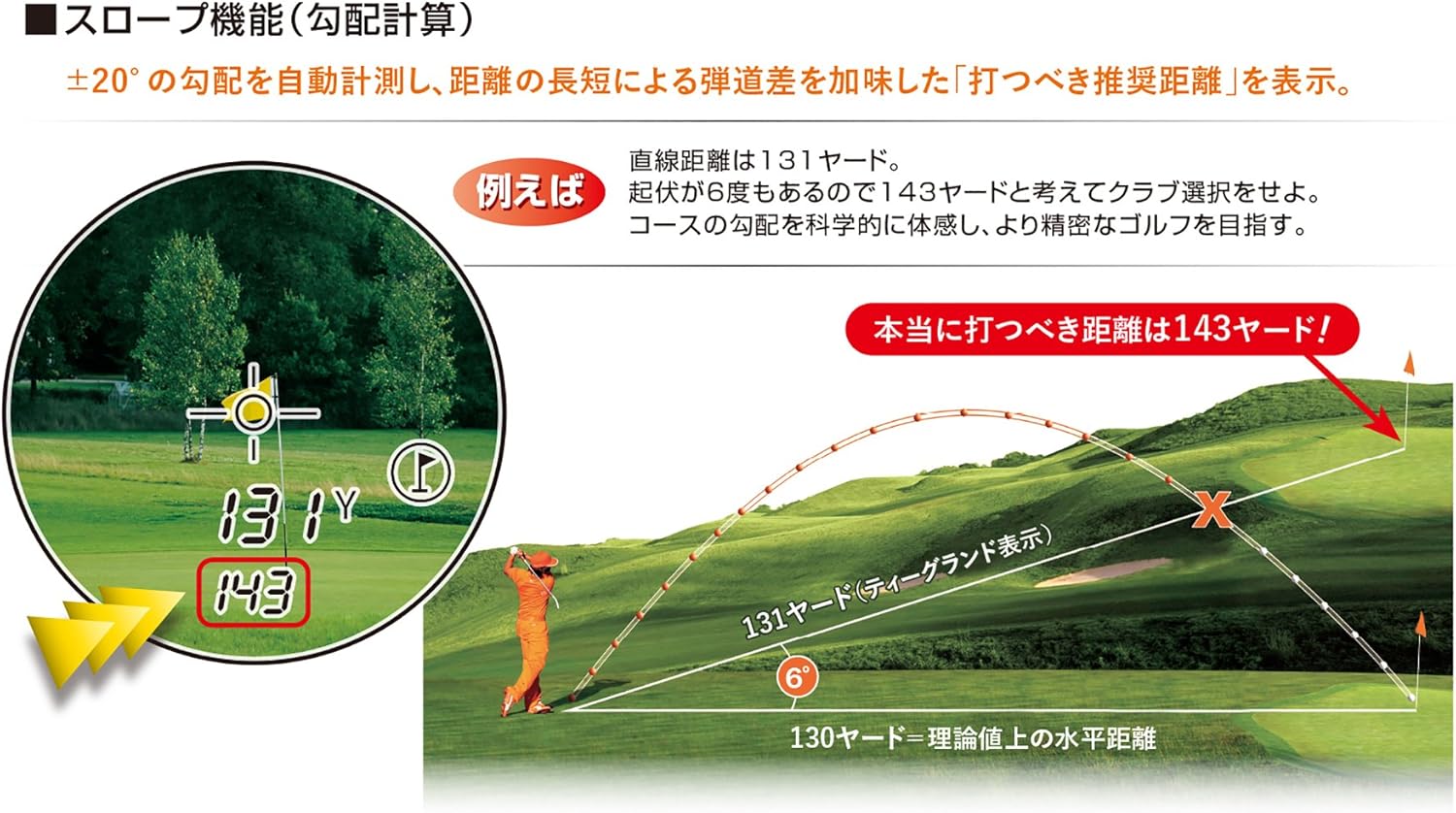
This diagram illustrates the Bushnell V4's Slope function. It shows a golfer on an uphill lie, where the actual straight-line distance is 131 yards, but due to a 6-degree incline, the recommended "Plays Like" distance is 143 yards, indicating the effective distance to hit the ball.
Nlekọta
Na-ehicha oghere anya
Gently wipe the lenses with the included lens cleaning cloth or a soft, clean microfiber cloth. Do not use abrasive materials or harsh chemicals, as they can damage the lens coatings. Remove any loose dust or debris before wiping.
Nchekwa
When not in use, store the rangefinder in its dedicated carrying case in a cool, dry place. Remove the battery if the device will not be used for an extended period to prevent leakage.
Nchọpụta nsogbu
- No Display/Device Not Powering On:
- Check if the battery is inserted correctly with the correct polarity.
- Replace the CR2 Lithium battery with a new one.
- Gbaa mbọ hụ na ịpịrị bọtịnụ ike nke ọma.
- Ọgụgụ na-ezighi ezi:
- Ensure the lenses are clean and free from smudges or debris.
- Make sure you are aiming at a clear, reflective target.
- Verify that the target is within the device's measurement range (5-1000 yards).
- For PinSeeker, ensure you are steady and sweeping the target area slowly.
- JOLT Function Not Activating:
- Ensure PinSeeker mode is active and the device is successfully locking onto the flagstick.
- The JOLT function only activates when the PinSeeker successfully identifies the closest target (flag).
Nkọwapụta
| Njirimara | Nkọwa |
|---|---|
| Oke nghọta | 5-1000 nkeji |
| Izizi nha nha | ±1 yad |
| Slope Angle Range | ±20° (up to 20° incline/decline) |
| Slope Angle Accuracy | ±1° |
| Ngosipụta Nkeji | 1 yard |
| Ụdị Laser | Class 1 Eye-Safe Laser (IEC 60825-1:2007 / FDA 21 CFR 1040.10 and 1040.11) |
| Ọrụ | JOLT Function, PinSeeker Function (Automatic), Slope Mode |
| Magnification / Objective Lens | 5x / 20mm |
| mkpuchi oghere | Multi-coated (Multi-layer coating) |
| Enyemaka Anya | 17mm |
| Wepu Obosara nwata akwụkwọ | 4.0mm |
| Ndozi diopter | ±3° (Focus adjustment) |
| Ngosipụta LCD | Multi-function Crystal LCD |
| Nha / Ibu | 41 x 104 x 79 mm / 159g |
| Isi Iyi Ike | CR2 Lithium Battery (1 piece included) |
| Nọmba Nlereanya Ngwaahịa | 201661A |
| ASIN | B01LXRVOT2 |
Mara: Nkọwapụta nwere ike ịgbanwe na-enweghị ọkwa mbụ.
Akwụkwọ ikike
This Bushnell V4 PinSeeker Slope Tour Rangefinder comes with a 1-afọ akwụkwọ ikike from the date of purchase. Please retain your proof of purchase and the warranty card for any warranty claims. The warranty covers defects in materials and workmanship under normal use. It does not cover damage caused by misuse, unauthorized modifications, or accidents.
Nkwado
For technical assistance, troubleshooting beyond this manual, or warranty service, please contact Bushnell customer support. Refer to the contact card included in your package for specific regional contact information. You may also visit the official Bushnell website for further support resources.


