1. Okwu mmalite
This manual provides instructions for the proper use and maintenance of your Paulmann 500.01 Smart Home Bluetooth Remote Control. This remote allows you to control various Paulmann Smart Home Bluetooth lighting products, offering convenient operation without the need for a smartphone or tablet application.
2. Ngwaahịa gafereview
The Paulmann 500.01 remote control is designed for intuitive control of your Paulmann Smart Home lighting. It features dedicated buttons for power, brightness adjustment, color temperature control, and scene selection.

Foto nke 1: N'ihu view of the Paulmann 500.01 Smart Home Bluetooth Remote Control. It is a black, rectangular remote with multiple buttons for controlling smart home lighting functions.
2.1. Atụmatụ igodo
- Controls all Paulmann Bluetooth Smart Home products.
- Operating range of up to 10 meters in open field conditions.
- Battery-powered for portability (requires AAA batteries).
2.2. Ihe ngwugwu
- Paulmann 500.01 Smart Home Bluetooth Remote Control
- Akwụkwọ ntuziaka (akwụkwọ a)
- Rịba ama: Batrị AAA adịghị na ya, a ga-azụrịrị ya iche iche.
3. Nhazi
3.1. Ntinye batrị
- Chọta mkpuchi mkpuchi batrị n'azụ nke njikwa anya.
- Gbanye ma ọ bụ jiri nwayọọ bido mepee mkpuchi ahụ.
- Insert two (2) AAA batteries, ensuring correct polarity (+ and -) as indicated inside the compartment.
- Dochie mkpuchi nke batrị batrị ruo mgbe ọ pịrị na ebe nchekwa.
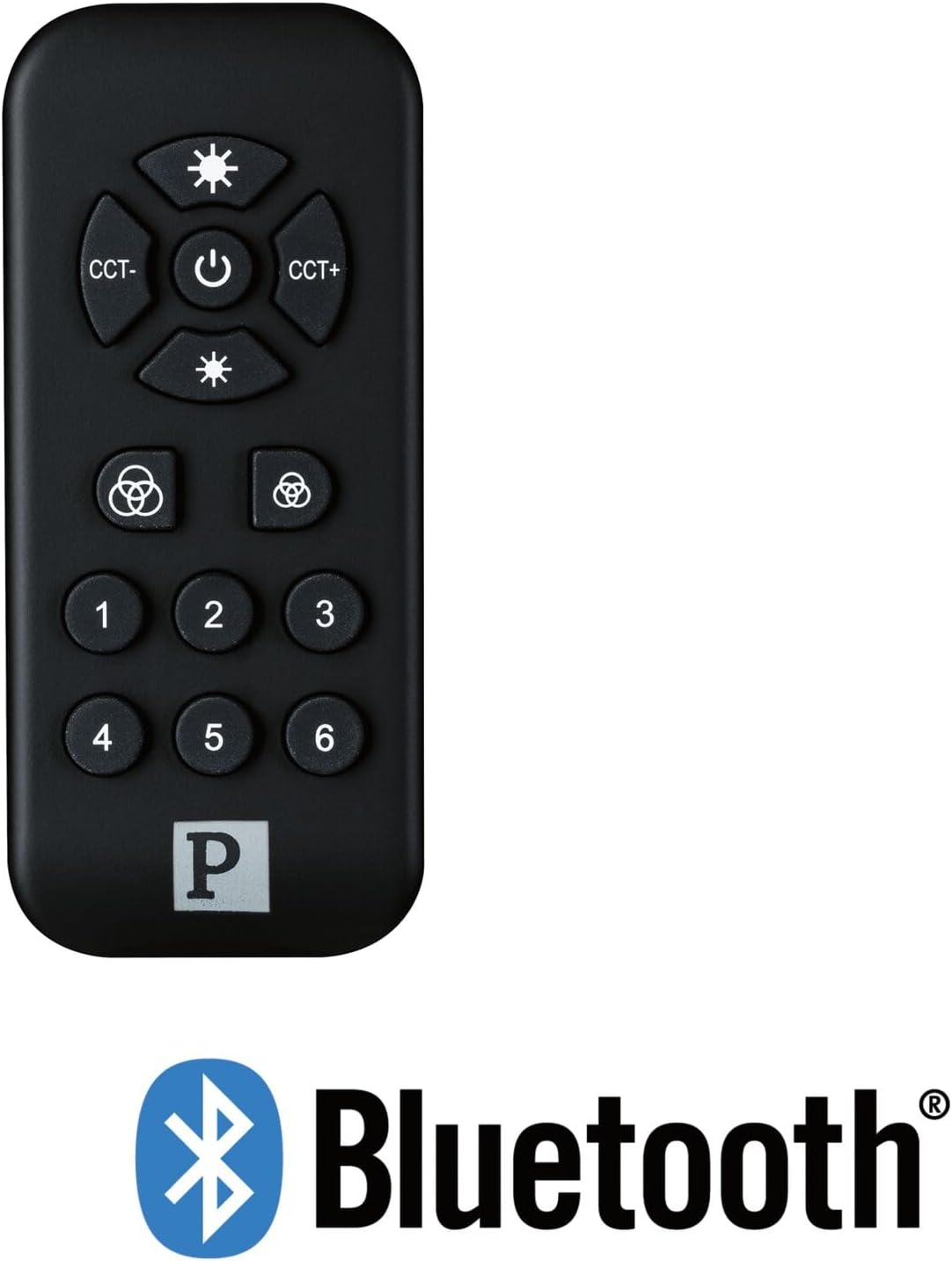
Foto nke 2: The Paulmann 500.01 remote control displayed alongside the Bluetooth logo, indicating its wireless connectivity technology.
3.2. Pairing with Smart Home Devices
To use the remote control, it must be paired with your Paulmann Smart Home Bluetooth lighting products. The specific pairing process may vary slightly depending on the individual lighting product. Generally, the steps involve:
- Ensure your Paulmann Smart Home lighting device is powered on and in pairing mode (refer to the specific device's manual for details on how to activate pairing mode).
- Na remote njikwa, pịa ma jide Ike button (or a designated pairing button, if available) for several seconds until an indicator light on the remote or the lighting device confirms pairing initiation.
- Once paired, the lighting device should respond to commands from the remote control.
- If pairing fails, ensure the remote is within range (up to 10 meters) and repeat the process.
For detailed pairing instructions, always consult the user manual of the specific Paulmann Smart Home lighting product you intend to control.
4. Ntuziaka ọrụ
The Paulmann 500.01 remote control features several buttons for controlling your Smart Home lighting:
- Bọtịnụ ike (Ebe etiti): Press to turn the connected lighting devices ON or OFF.
- Brightness Up (Top Sun Icon): Increases the brightness of the light.
- Brightness Down (Bottom Sun Icon): Decreases the brightness of the light.
- CCT- (Left CCT Button): Adjusts the color temperature towards warmer white.
- CCT+ (Right CCT Button): Adjusts the color temperature towards cooler white.
- Color Cycle / Scene Buttons (Color Wheel Icons): These buttons typically cycle through predefined color modes or activate specific lighting scenes. Refer to your lighting device's manual for exact functionality.
- Bọtịnụ ọnụọgụgụ (1-6): These buttons are usually used to select or save specific lighting scenes or groups of devices. Their function can often be customized through the Paulmann Smart Home app or by following specific pairing procedures with your lighting products.
5. Nlekọta
5.1. Nhicha
To clean the remote control, use a soft, dry cloth. Do not use abrasive cleaners, solvents, or harsh chemicals, as these may damage the surface or internal components.
5.2. Ngbanwe batrị
When the remote control's performance degrades or it stops responding, it is likely time to replace the batteries. Follow the battery installation steps outlined in Section 3.1. Always replace both AAA batteries simultaneously with new ones.
6. Nchọpụta nsogbu
| Nsogbu | Ihe nwere ike ime | Ngwọta |
|---|---|---|
| Remote anaghị aza. | Batrị nwụrụ anwụ ma ọ bụ arụnyere na ezighi ezi. | Dochie batrị, hụ na ọ dị mma iji ya. |
| Remote anaghị aza. | Enweghị oke. | Move closer to the lighting device (within 10 meters). |
| Remote anaghị aza. | Not paired with the device. | Soro ntuziaka njikọta na Nkebi nke 3.2. |
| Njikwa na-aga n'ihu. | Ntinye aka ma ọ bụ mgbaàmà adịghị ike. | Ensure no obstructions between remote and device. Check for other Bluetooth devices causing interference. |
7. Nkọwapụta
- Akara: Paulman
- Nọmba nlereanya: 50001
- Teknụzụ Njikọta: Bluetooth
- Agba: Nwa
- Ngwa dakọtara: Paulmann Smart Home lighting products
- Njikwa Type: Njikwa bọtịnụ
- Oke kacha: 10 mita
- Achọrọ batrị: 2 x AAA batrị
8. Akwụkwọ ikike na nkwado
For warranty information and technical support, please refer to the official Paulmann website or contact Paulmann customer service directly. Keep your purchase receipt as proof of purchase for any warranty claims.
Ị nwere ike ịchọta ozi kọntaktị na akụrụngwa nkwado na gọọmentị onye nrụpụta. websaịtị: www.paulmann.com


