1. Ngwaahịa gafereview
The Keeley Bubble Tron Dynamic Flanger Phaser and Random Synth Filter is a versatile effects pedal designed to produce unique modulation sounds. Inspired by classic dynamic flangers and phasers, this pedal offers three distinct modes of operation: Dynamic Flange, Dynamic Phase, and Random Filter. It allows for expressive control over your guitar's signal, reacting to your pick attack and playing dynamics to create a range of sonic textures.
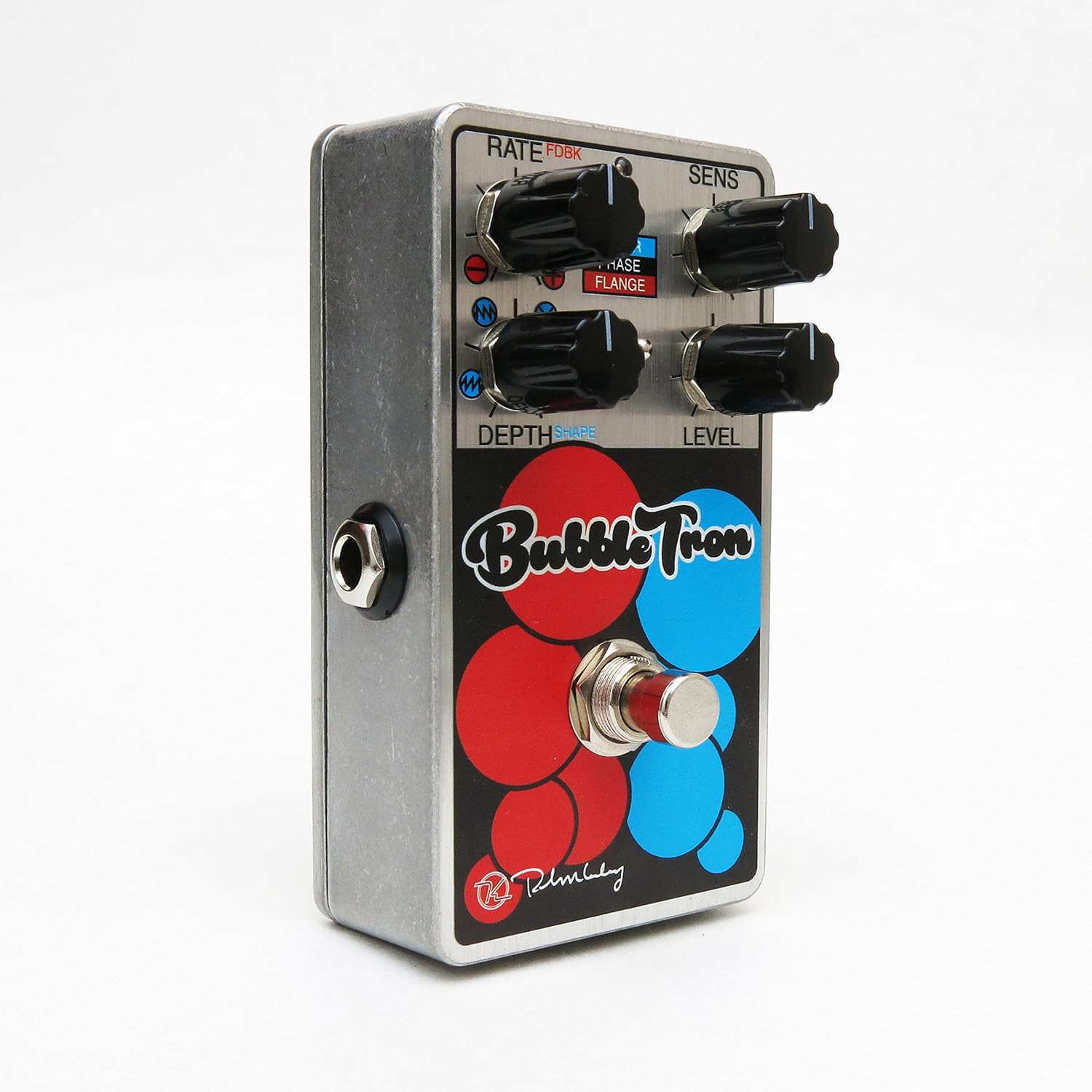
Figure 1: Keeley Bubble Tron Dynamic Flanger Phaser Pedal.
The pedal features a simple yet powerful control layout, allowing users to dial in subtle or extreme effects. Its dynamic response makes it an intuitive tool for guitarists seeking to add expressive modulation to their sound.
2. Nhazi
To set up your Keeley Bubble Tron pedal, follow these steps:
- Njikọ ike: Connect a standard 9V DC power supply (center negative, 65mA+ current draw) to the 9V jack on the pedal. Ensure the power supply meets these specifications to prevent damage.
- Njikọ ntinye: Connect your guitar or other instrument to the "INPUT" jack on the right side of the pedal using a standard 1/4-inch instrument cable.
- Njikọ mmepụta: Connect the "OUTPUT" jack on the left side of the pedal to your amplifia ma ọ bụ pedal ọzọ dị na agbụ mgbaàmà gị site na iji eriri ngwa egwu nke 1/4-inch ọkọlọtọ.
- Ntọala mbụ: Before engaging the pedal, set all knobs to their 12 o'clock position and ensure the mode switch is in the middle (Phase) position for a neutral starting point.
3. Ntuziaka ọrụ
The Keeley Bubble Tron offers a variety of controls to shape your sound. Familiarize yourself with each knob and switch:
Njikwa:
- RATE (FDBK):
- In Filter & Phase modes: Controls the rate of the LFO.
- In Flange mode: Controls feedback. Turning left provides maximum negative feedback; turning right provides maximum positive feedback.
- SENS (Mmetụta):
- In Filter mode: Controls envelope sensitivity, acting like a synth filter.
- In Phase & Flange modes: Controls input sensitivity, determining the point at which dynamic control is triggered. Start with this knob at full left and adjust for desired responsiveness.
- DEPTH (Shape):
- In Filter mode: Selects LFO shape (from full left: ramp elu, ramp down, random, or triangle).
- In Phase & Flange modes: Sets the depth of the effect for mild or lush sounds.
- Ọkwa: Na-achịkwa ọkwa mmepụta n'ozuzu nke mmetụta.
- FOTSWITCH: Toggles the effect on and off.
Mode Select Switch:
- Elu: Activates Filter mode.
- N'etiti: Activates Phase mode.
- N'okpuru: Activates Flange mode.

Figure 2: Bank A (Default Mode) Control Layout. This mode is active when the internal switch is set to Bank A.
Internal Mini Toggles (Bank Selection):
The Bubble Tron features internal mini toggles to expand its sonic capabilities. To access these, you will need to remove the back plate of the pedal.
- ANALOG FILTER (Vintage/Modern):
- Vintage Ụdị: Rolls off some high frequencies for a warmer tone.
- Modern Mode: Provides full-range clarity (default setting).
- BANK TOGGLE (Bank 1/Bank 2):
- Bank 1 (Default): Offers Sample & Hold Filter, Dynamic Phaser, and Dynamic Flanger modes.
- Ụlọ akụ 2: Offers Envelope Filter, Standard 8-Stage Phaser, and Standard Classic Flanger modes.

Figure 3: Bank B Control Layout. Access this mode by switching the internal Bank Toggle from Bank A to Bank B.

Figure 4: Internal Mini Toggles for Analog Filter and Bank Selection.

Figure 5: External Toggle Switch modes for Bank 1 and Bank 2.
4. Nlekọta
To ensure the longevity and optimal performance of your Keeley Bubble Tron, observe the following maintenance guidelines:
- Nhicha: Use a soft, dry cloth to clean the pedal's exterior. Avoid abrasive cleaners or solvents, as these can damage the finish.
- Nchekwa: Store the pedal in a cool, dry place away from direct sunlight and extreme temperatures. When not in use for extended periods, disconnect the power supply.
- Ịnye ọkụ: Always use a regulated 9V DC power supply with a center-negative polarity and sufficient current (65mA+). Incorrect power supplies can cause damage and void the warranty.
- Njikọ: Ensure all cables are securely connected. Avoid excessive force when plugging or unplugging cables.
5. Nchọpụta nsogbu
If you encounter issues with your Keeley Bubble Tron, try these troubleshooting steps:
- Enweghị ụda:
- Check all cable connections (input, output, power).
- Verify the power supply is correctly connected and providing the specified 9V DC.
- Hụ na ngwaọrụ gị na amplifier na-arụ ọrụ nke ọma.
- Bypass the pedal to confirm the issue is with the pedal itself.
- Mkpọtụ/Ukwe A Na-achọghị:
- Jiri ike eletrik dị elu, nke dịpụrụ adịpụ.
- Lelee maka eriri ndị nwere nsogbu.
- Ensure proper grounding of your amplifier na akụrụngwa ndị ọzọ.
- Effect Not Engaging/Responding:
- Check the footswitch functionality.
- Adjust the SENS (Sensitivity) knob, especially in dynamic modes, to ensure it's set appropriately for your playing style and instrument output.
- Verify the MODE SELECT switch is in the desired position.
6. Nkọwapụta
| Njirimara | Nkọwapụta |
|---|---|
| Ụdị pedal | Dynamic Flange, Phaser, Random Synth Filter |
| Achọrọ ike | 9V DC Center Negative, 65mA+ |
| Ntinye/mmepụta | Mono Instrument Input, Mono Output |
| Ibu Ibu | 9.6 ounces |
| Akụkụ ngwaahịa | 6 x 7 x 10 sentimita asatọ |
| Nọmba Nlereanya ihe | Kbubble |
| Ụdị mgbaàmà | Analọg |
7. Akwụkwọ ikike na nkwado
Maka ozi gbasara akwụkwọ ikike na nkwado teknụzụ, biko gaa na Keeley Electronics gọọmentị websaịtị ma ọ bụ kpọtụrụ ndị ahịa ha ozugbo. Debe ihe akaebe nke ịzụrụ ihe maka akwụkwọ ikike ọ bụla.
Ndị ọchịchị Websaịtị: Keeley Electronics Store


