1. Ozi Nchekwa na Ihe Ndị Na-akpachara Anya
Please read this instruction manual thoroughly before use to ensure safe and proper operation of your blood pressure monitor.
1.1 Prohibitions and Restrictions
- Use only the cuff provided with this blood pressure monitor. Do not connect or use it in conjunction with other medical devices or equipment. [Risk of injury or accident]
- For self-measurement, always follow your doctor's guidance for measurement and diagnosis. Do not self-diagnose or self-medicate based on measurement results. Follow your doctor's instructions regarding medication.
- Do not apply the cuff to an arm with unhealed wounds. [Risk of worsening unhealed areas]
- Do not apply the cuff to an arm currently receiving intravenous drip or blood transfusion. [Risk of injury or accident]
- If you have severe circulatory disorders in your arm, consult your doctor before use. [Risk of adverse health effects]
- Measurement may not be possible for individuals with low blood flow in the measurement area, weak arterial pulse, or frequent arrhythmia. This determination should be made by a doctor. Always consult your doctor before use.
- Do not use near flammable gases, such as anesthetic gas, in hospitals. [Risk of ignition]
- Do not use in high-concentration oxygen environments, such as hyperbaric oxygen chambers or oxygen tents, in hospitals. [Risk of fire]
- This product is intended for self-measurement of blood pressure at home. Do not use it in medical institutions or public places where an unspecified number of people are subject to examination.
- Individuals with pacemakers should consult their doctor before use.
1.2 Important Usage Notes
- Do not use this device for any purpose other than blood pressure measurement. Do not disassemble, repair, or modify the device. [Risk of fire, malfunction, or accident]
- Do not place the device near equipment that generates electromagnetic waves, such as mobile phones. [Risk of malfunction]
- Do not use on children or individuals who cannot express their intentions.
- If measuring yourself, always follow your doctor's instructions for correct measurement.
- Continuous blood pressure measurements can cause blood stagnation or swelling. Always allow an interval of at least 1 minute between measurements.
- If the power mark appears on the display or nothing is displayed when pressing the [Measure/Stop] switch, replace all four dry cell batteries simultaneously with new ones. If using rechargeable batteries, recharge them.
- If you experience strong pressure or any other abnormality, press the [Measure/Stop] switch, remove the air hose plug, or remove the cuff.
- Jiri naanị ihe nkwụnye AC raara onwe ya nye. [Risk of fire or electric shock]
- Do not plug or unplug the AC adapter from the outlet with wet hands. When not in use, always unplug the power cord from the outlet. [Risk of electric shock, fire, or malfunction]
- If a malfunction is detected, immediately stop using the device and contact the retailer or our customer service center at 0120-88-6295.
- The manufacturer is not responsible for any issues arising from use not in accordance with the attached documents and instruction manual, or from unauthorized repair, modification, disassembly, or readjustment.
2. Ngwaahịa gafereview
The CITIZEN Arm Blood Pressure Monitor CHUA716-BK is an automatic electronic blood pressure monitor designed for home use to non-invasively measure systolic and diastolic blood pressure for health management.
2.1 Atụmatụ
- Easy-to-Wrap Hard Cuff: Designed for simple, one-handed application.
- Movement and Irregular Pulse Detection: Alerts you to body movement during measurement and detects irregular pulse intervals.
- Ọrụ ebe nchekwa: Stores 90 measurements for two users, allowing for tracking of blood pressure trends.
- Rechargeable Battery Compatibility: Can be used with rechargeable nickel-metal hydride batteries.
- WHO/ISH Blood Pressure Classification: Displays your blood pressure level according to a 6-stage classification by the World Health Organization (WHO) and International Society of Hypertension (ISH), providing an easy-to-understand overview.

Foto: WHO/ISH Blood Pressure Classification Display. This image illustrates how the device displays your blood pressure level according to a 6-stage classification by the World Health Organization (WHO) and International Society of Hypertension (ISH), allowing you to understand your blood pressure level at a glance.

Foto: Comparison of Arm and Wrist Type Blood Pressure Monitors. This table compares different types of blood pressure monitors (arm type with hard cuff/soft cuff, wrist type with soft cuff/hard cuff) based on ease of cuff attachment, portability, and recommended use cases.
3. Nhazi
3.1 Nwepu na ịlele ọdịnaya
Carefully unpack the blood pressure monitor and verify that all accessories are present.

Foto: Package Contents. This image shows the typical contents included in the package: the main unit, cuff, instruction manual/warranty, medical device attachment document, and four AA alkaline trial batteries.
3.2 Ntinye ike
The device can be powered by four AA alkaline batteries or a dedicated AC adapter.
- Nwụnye batrị: Open the battery compartment cover on the back of the unit. Insert four AA alkaline batteries, ensuring correct polarity (+/-). Close the cover securely.
- AC Adapter Connection (Optional): If using the dedicated AC adapter, plug it into the AC adapter jack on the side of the unit and then into a wall outlet.
3.3 Njikọ Cuff
Connect the air plug of the cuff to the air jack on the side of the main unit. Ensure it is securely inserted.
4. Ntuziaka ọrụ
4.1 Na-etinye Cuff
Proper cuff placement is crucial for accurate measurements. The applicable arm circumference for this device is 17.0 to 36.0 cm.
- Sit comfortably with your arm resting on a table, palm facing up.
- Slide your arm through the cuff loop. The air tube should run along the inside of your arm.
- Position the cuff so its lower edge is approximately 1-2 cm above your elbow.
- Tighten the cuff snugly around your arm using the hook-and-loop fastener. Ensure it is not too tight or too loose.

Foto: Applying the Arm Cuff. This image demonstrates how to easily wrap the hard cuff around the arm with one hand for simple attachment.
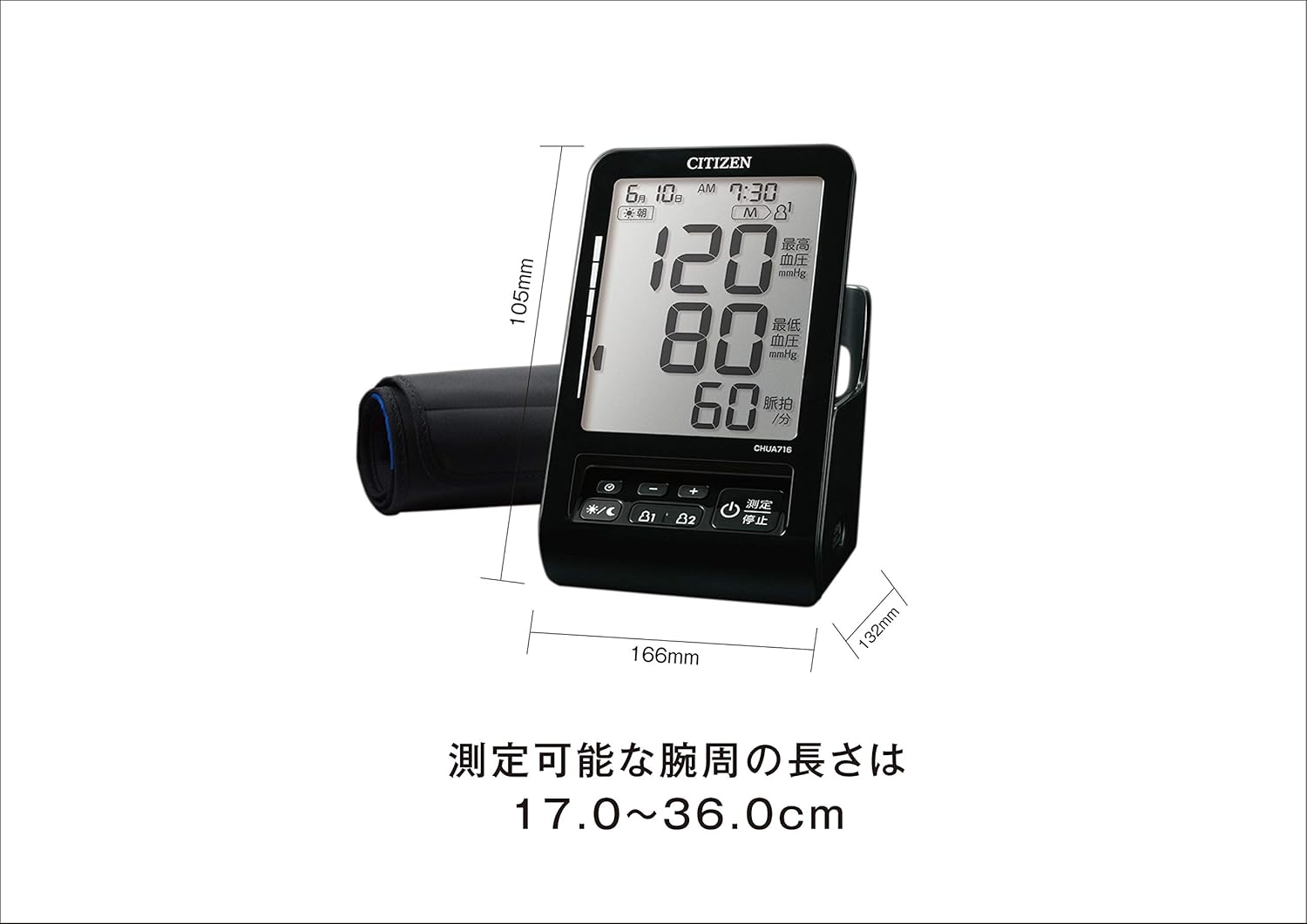
Foto: Device Dimensions and Arm Circumference. This image shows the dimensions of the blood pressure monitor (105mm H x 166mm W x 132mm D) and indicates that the measurable arm circumference is between 17.0 and 36.0 cm.
4.2 Inyocha ihe
- Once the cuff is correctly applied, press the [Measure/Stop] button to start the measurement.
- The cuff will inflate, and the measurement will begin. Remain still and do not talk during the measurement.
- After the measurement is complete, your systolic blood pressure, diastolic blood pressure, and pulse rate will be displayed on the screen.
- Press the [Measure/Stop] button again to turn off the device, or it will automatically power off after a period of inactivity.
4.3 Ozi ngosi
The monitor offers three selectable display patterns, allowing it to function as a clock or calendar when not measuring blood pressure.
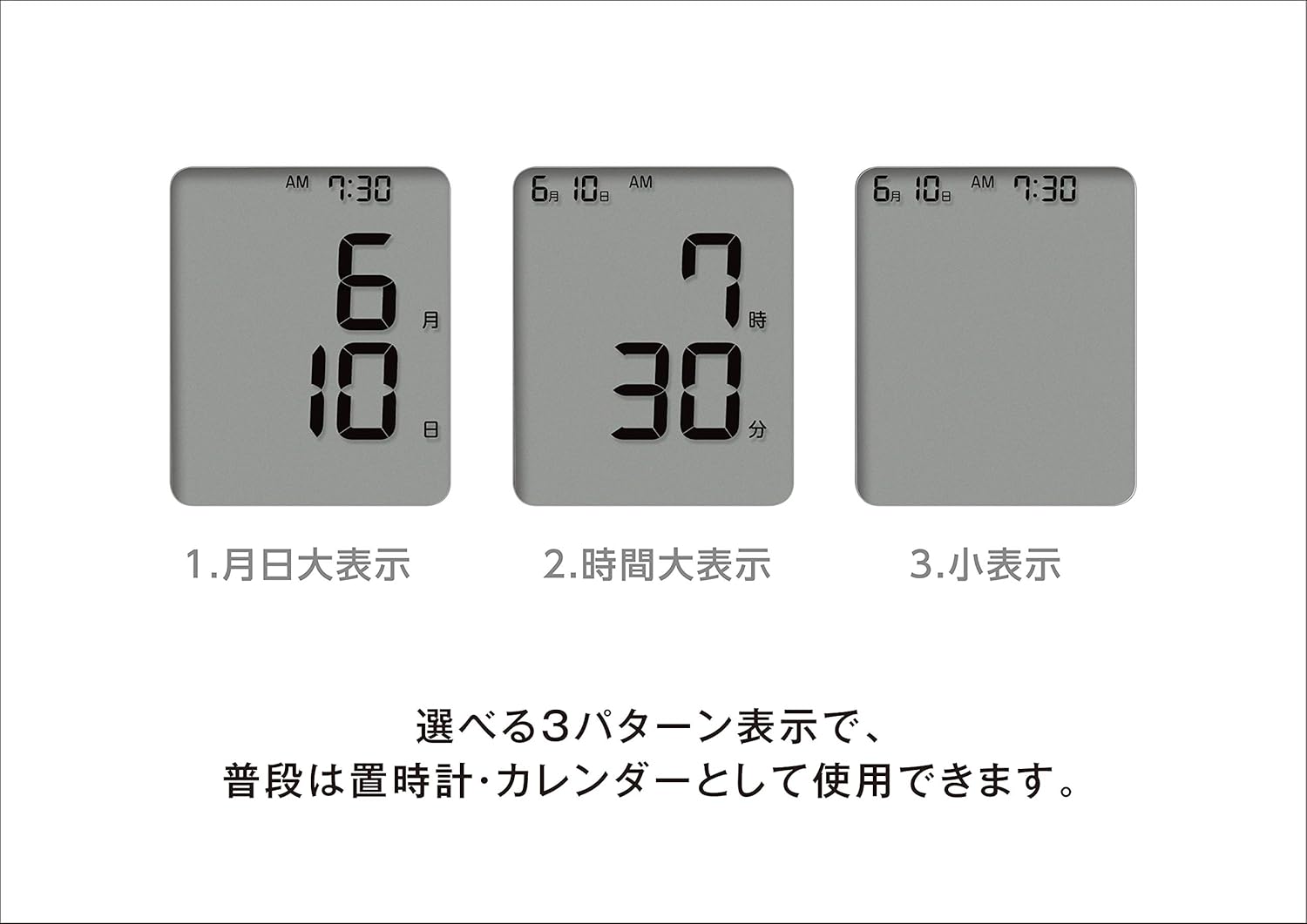
Foto: Display Patterns. This image illustrates the three selectable display patterns: 1. Date (Month/Day), 2. Time (Hour/Minute), and 3. Compact Display. These options allow the device to be used as a clock or calendar when not actively measuring blood pressure.
4.4 Ọrụ ebe nchekwa
The device can store 90 measurement results for two different users. Use the User 1 and User 2 buttons to switch between user profiles na review past measurements.
5. Nlekọta
5.1 Nhicha
- Wipe the main unit and cuff with a soft, dry cloth.
- Do not use abrasive cleaners, solvents, or harsh chemicals, as these may damage the device.
- Do not wash the cuff or immerse the main unit in water.
5.2 Nchekwa
- Ọ bụrụ na agaghị eji ngwaọrụ ahụ ruo ogologo oge, wepụ batrị ahụ ka ọ ghara ịpụpụ na mmebi.
- Store the blood pressure monitor in a cool, dry place, away from high temperatures, direct sunlight, high humidity, excessive dust, and areas where corrosive gases are generated.
6. Nchọpụta nsogbu
If you encounter any issues with your blood pressure monitor, please refer to the following common problems and solutions before contacting customer service.
| Nsogbu | Ihe nwere ike ime | Ngwọta |
|---|---|---|
| Ngosipụta bụ oghere ma ọ bụ anaghị anabata ya. | Akwụsịla batrị ma ọ bụ tinye na ezighi ezi. | Replace all four AA batteries with new ones, ensuring correct polarity. If using rechargeable batteries, recharge them. |
| Measurement feels too tight or uncomfortable. | Cuff is over-inflating or applied too tightly. | Press the [Measure/Stop] button immediately to stop inflation. Remove the cuff and reapply it more loosely, or remove the air hose plug. |
| Ọgụgụ na-ezighi ezi ma ọ bụ na-ekwekọghị ekwekọ. | Improper cuff placement, movement during measurement, or external interference. | Ensure the cuff is correctly placed and snug. Remain still and silent during measurement. Avoid using near mobile phones or other electronic devices. Allow at least 1 minute between measurements. |
| Ngwaọrụ anaghị agbanwu ọkụ. | Enweghị ike ọkọnọ ma ọ bụ njikọ adịghị mma. | Check batteries or AC adapter connection. Ensure batteries are new/charged and correctly inserted. |
If the problem persists after trying these solutions, please contact customer service.
7. Nkọwapụta
| Njirimara | Nkọwa |
|---|---|
| Nọmba nlereanya | CHUA716-BK |
| Aha izugbe | Automatic Electronic Blood Pressure Monitor |
| Nhazi ngwaọrụ ahụike | Specified Controlled Medical Device |
| Medical Device Certification Number | 228ADBZX00030000 |
| Applicable Arm Circumference | 17.0 - 36.0 cm |
| Ịnye ọkụ | 4 x AA alkaline batteries or dedicated AC adapter |
| Ndụ batrị | Approx. 500 measurements (with alkaline batteries) |
| Ebe nchekwa | 90 measurements x 2 users |
| Ibu | Approx. 400g (excluding batteries and cuff) |
| Akụkụ (W x H x D) | 105 mm x 166 mm x 132 mm |
| Ụdị ngosi | LCD |
| Ngwa gụnyere | Cuff, Instruction Manual/Warranty/EMC Technical Data, Medical Device Attachment Document, 4 x AA alkaline batteries (for monitor) |
8. Akwụkwọ ikike Ozi
This product comes with a warranty from the manufacturer. Please retain your proof of purchase and the warranty card.
8.1 Warranty Period and Coverage
The manufacturer guarantees free repair for a period of 1 year from the date of purchase, provided the product has been used correctly according to the instruction manual and in the event of a malfunction.
8.2 Conditions for Paid Repair
Repairs will be charged even within the warranty period under the following circumstances:
- Malfunctions or damage due to incorrect use or handling.
- Malfunctions or damage attributable to improper storage or user negligence.
- Malfunctions or damage caused by fire, earthquake, flood, abnormal voltage, use of non-specified power sources, or other natural disasters or impacts.
- Absence of the warranty card.
- Incomplete or altered entries on the warranty card (e.g., purchase date, retailer name).
- Scratches, damage to exterior surfaces, replacement of exterior parts, accessories, or consumables (batteries) after use.
Please note that any costs incurred for bringing the product to the retailer or shipping it to our company for repair are the customer's responsibility. The warranty card will not be reissued, so please keep it safe. This warranty is valid only in Japan.
9. Nkwado na Ozi kọntaktị
9.1 Manufacturer and Distributor
- Onye nrụpụta/Onye nkesa: CITIZEN SYSTEMS INC.
- Osisi na-emepụta ihe: CITIZEN SYSTEMS (JIANGMEN) CO., LTD. (People's Republic of China)
9.2 Ọrụ ndị ahịa
For inquiries, support, or service, please contact our customer service center:
- adreesị: 6-1-12 Tanashi-cho, Nishi-Tokyo-shi, Tokyo 188-8511, Japan
- Ekwentị: 0120-88-6295