Okwu mmalite
Daalụ maka ịzụrụasing the Amazon Basics Portable Wireless, 2.1 Bluetooth Speaker. This manual provides important information regarding the setup, operation, maintenance, and troubleshooting of your new speaker. Please read it thoroughly before use and retain it for future reference.
Ngwaahịa gafereview
The Amazon Basics Portable Wireless, 2.1 Bluetooth Speaker offers high-quality sound with a portable design. It features Bluetooth connectivity for wireless audio streaming, a 3.5mm aux-in jack for wired connections, and a built-in microphone for hands-free calling.
Ihe ngwugwu
- Amazon Basics Portable Wireless, 2.1 Bluetooth Speaker
- Igwe nchaji USB
- Akwụkwọ ntuziaka
Ngwa okwu
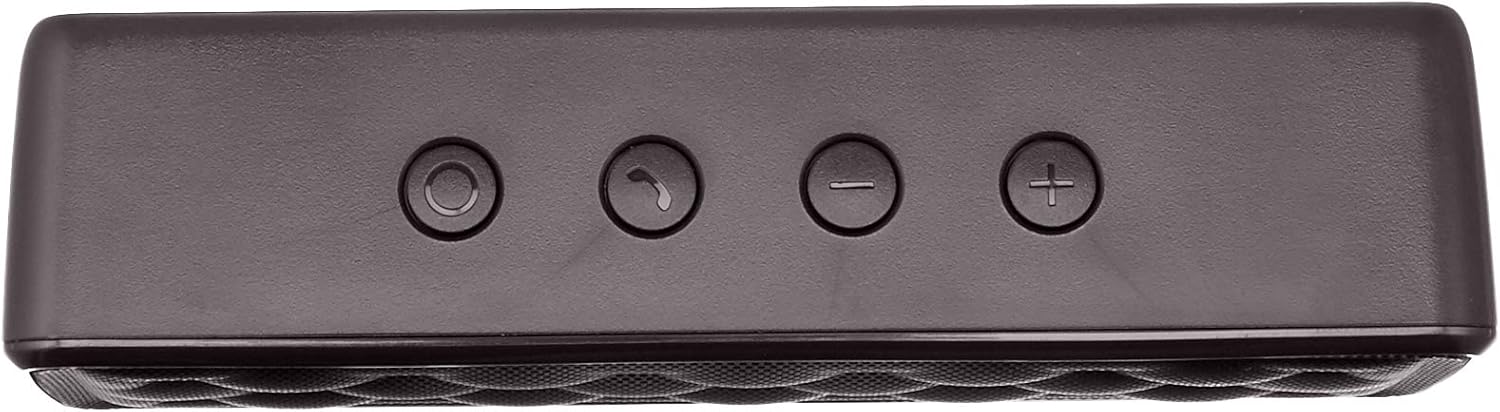


Melite
1. gingchaji Okwu Okwu
Before first use, fully charge the speaker. Connect the supplied USB charging cable to the Micro USB port on the speaker and the other end to a USB power source (e.g., computer USB port, USB wall adapter). The charging indicator light will illuminate during charging and turn off when fully charged. A full charge takes approximately 3 hours.
2. Ịgbanye / gbanyụọ
To power on the speaker, slide the ON/OFF switch located on the rear panel to the "ON" position. To power off, slide the switch to the "OFF" position.
Ntuziaka ọrụ
Njikọ Bluetooth
- Ensure the speaker is powered on and within 33 feet (10 meters) of your Bluetooth-enabled device.
- The speaker will automatically enter pairing mode, indicated by a flashing blue LED light.
- Na ngwaọrụ gị, gaa na ntọala Bluetooth wee chọọ ngwaọrụ dị.
- Select "Amazon Basics Speaker" from the list.
- Once paired, the blue LED light will stop flashing and remain solid. You can now stream audio wirelessly.
Note: If pairing fails, turn off the speaker and your device's Bluetooth, then repeat the steps. The speaker will attempt to reconnect to the last paired device automatically when powered on.
Ngwugharị ọdịyo
- Njikwa olu: Use the '+' and '-' buttons on the top panel of the speaker to adjust the volume. You can also control the volume from your connected device.
- Gwuo/kwụsịtụ: Use the controls on your connected device to play or pause audio.
Ịkpọ oku na-enweghị aka
When connected via Bluetooth, the speaker's built-in microphone allows for hands-free calling.
- Azịza/Kwụsị Oku: Press the Call/Bluetooth button once to answer an incoming call or end an ongoing call.
- Jụ oku: Press and hold the Call/Bluetooth button for 2 seconds to reject an incoming call.
- Agbagharị: Double-press the Call/Bluetooth button to redial the last number.
AUX ntinye ọnọdụ
To connect non-Bluetooth audio devices, use the 3.5mm AUX input jack on the rear panel. Connect one end of a 3.5mm audio cable (not included) to the speaker's AUX port and the other end to your audio device's headphone jack. The speaker will automatically switch to AUX mode when a cable is inserted.

Nlekọta
- Jiri akwa dị nro hichaa ọkà okwu. Ejila ihe nchacha abrasive ma ọ bụ ihe mgbaze.
- Zere ikpughe onye na-ekwu okwu n'ebe okpomọkụ dị oke elu, iru mmiri dị elu, ma ọ bụ anwụ kpọmkwem.
- Do not immerse the speaker in water. It is not waterproof.
- Chekwaa ọkà okwu n'ebe dị jụụ ma kpọọ nkụ mgbe ọ naghị eji ya ogologo oge.
Nchọpụta nsogbu
| Nsogbu | Ihe nwere ike ime | Ngwọta |
|---|---|---|
| Ọkà okwu anaghị agba ọkụ. | Batrị agwụla. | Charge the speaker using the supplied USB cable. |
| Enweghị ike ijikọ site na Bluetooth. | Bluetooth is off on your device; speaker is out of range; speaker is already paired to another device. | Ensure Bluetooth is enabled on your device. Move the speaker closer to your device (within 33 feet). Disconnect from other devices or restart the speaker to enter pairing mode. |
| Enweghị ụda ma ọ bụ obere olu. | Volume is too low on speaker or device; incorrect input mode. | Increase volume on both the speaker and your connected device. Ensure the correct input mode (Bluetooth or AUX) is active. |
| Mgbagwoju anya ụda. | Volume is too high; speaker is too far from the device. | Reduce the volume on the speaker and/or your device. Move the speaker closer to your device. |
Nkọwapụta
| Aha Nlereanya | BSK30BK |
| Teknụzụ Njikọta | Bluetooth, inyeaka |
| Ikuku iche | Ruo 33 ụkwụ (mita 10) |
| Ike mmepụta okwu | 2 x 2.5 Watts (5 Watts total) |
| Ndụ batrị | Ruo awa 8 (na ụgwọ zuru ezu) |
| Oge Nchaji | Ihe dị ka awa 3 |
| Akụkụ (L x W x H) | 6.3" x 1.5" x 2.6" (16 cm x 3.8 cm x 6.6 cm) |
| Ibu | 8.1 ounces (0.23 n'arọ) |
| Igwe okwu arụnyere n'ime ya | Ee |
| Waterproof | Mba |
Ozi akwụkwọ ikike
This product is covered by a Limited Warranty. For detailed information regarding warranty terms and conditions, please refer to the documentation included with your purchase or visit the Amazon Basics official websaịtị.
Nkwado ndị ahịa
For further assistance, troubleshooting, or product information, please visit the Amazon Basics support page or contact customer service through your Amazon account.
Ozi nchekwa dị mkpa
- Ewepụla, rụkwaa, ma ọ bụ gbanwee ngwaahịa.
- Keep the product away from water and high humidity.
- Zere ikpughe ogologo oge na ìhè anyanwụ kpọmkwem ma ọ bụ oke okpomọkụ.
- Ewepụla ma ọ bụ dobe ngwaahịa ahụ na mmetụta siri ike.
- Tụfuo ngwaahịa ahụ na batrị ya n'ụzọ kwesịrị ekwesị dịka iwu obodo si dị.
Vidiyo ngwaahịa
No official instructional videos from the seller are available for this product at this time.


