1. Okwu mmalite
Daalụ maka ịzụrụasing the Axess SPBT1041 Portable Bluetooth Speaker. This device is designed to provide high-quality audio playback from various sources, including Bluetooth-enabled devices, USB drives, SD cards, and auxiliary input. It also features an FM radio function and a built-in microphone for hands-free calls. Its portable design with an adjustable strap makes it suitable for both indoor and outdoor use.
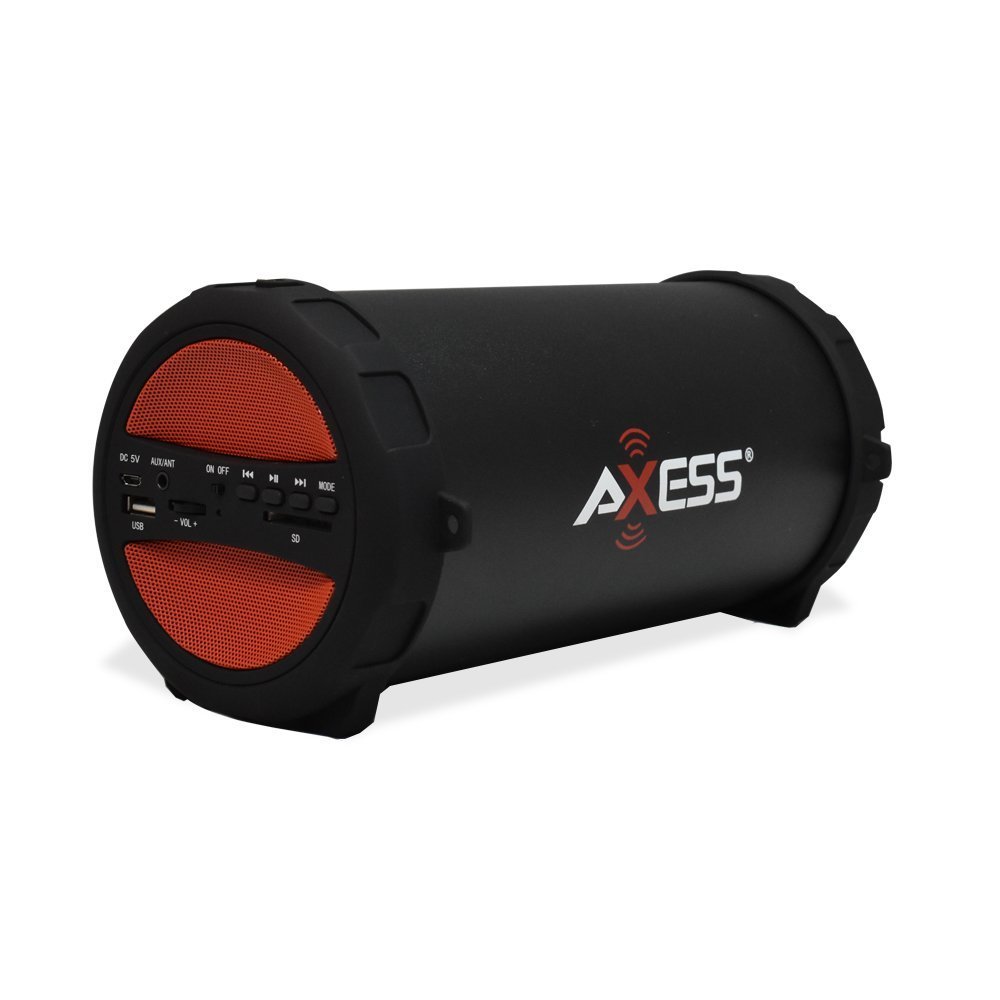
Figure 1: Axess SPBT1041 Portable Bluetooth Speaker (Red variant).

Figure 2: Key features of the SPBT1041 speaker, including FM Radio, USB Input, and AUX Input.
2. Ihe ngwugwu
Biko lelee ngwungwu maka ihe ndị a:
- Axess SPBT1041 Portable Bluetooth Speaker
- Igwe nchaji USB
- USB Audio inyeaka
- Eriri ubu nwere ike idozi
- Akwụkwọ ntuziaka
3. Ngwaọrụ gafereview
Familiarize yourself with the speaker's controls and ports.

Figure 3: Control panel and ports of the Axess SPBT1041 speaker.
- DC 5V ọdụ ụgbọ mmiri: Maka ịchaji ọkà okwu.
- AUX/ANT Port: For auxiliary audio input or connecting an external FM antenna.
- Gbanyụọ/gbanyụọ Na-agbanyụ ma ọ bụ gbanyụọ ọkà okwu.
- Ọdụ ụgbọ mmiri USB: Maka ịkpọ ụda site na draịvụ USB.
- Oghere kaadị SD: For playing audio from an SD memory card.
- Volume Control (-VOL +): Na-edozi olu okwu.
- Bọtịnụ Track/Ntugharị gara aga: Skips to the previous track or rewinds.
- Bọtịnụ Kwụsị/Kwụsị: Plays or pauses audio. Also answers/ends calls in Bluetooth mode.
- Bọtịnụ Ntugharị Track/Ọsọ ọsọ na-esote: Skips to the next track or fast forwards.
- Bọtịnụ MODE: Switches between Bluetooth, FM Radio, USB, SD, and AUX input modes.
4. Nhazi
4.1 Ịchaji ọkà okwu
Before first use, fully charge the speaker. Connect the provided USB charging cable to the DC 5V port on the speaker and the other end to a USB power source (e.g., computer USB port, USB wall adapter). The charging indicator light will illuminate during charging and turn off when fully charged.

Figure 4: The speaker can be played while charging, featuring a 1500 mAh battery.
4.2 Gbanyụọ/ gbanyụọ
Malite Gbanye/ Gbanyụọ switch to the 'ON' position to power on the speaker. Slide it to 'OFF' to power off.
5. Ntuziaka ọrụ
5.1 Ọnọdụ Bluetooth
- Power on the speaker. It will automatically enter Bluetooth pairing mode, indicated by an audible prompt.
- Kwado Bluetooth na ngwaọrụ mkpanaka gị (smartphone, tabletị, wdg).
- Chọọ maka available Bluetooth devices and select "SPBT1041" from the list.
- Once paired, the speaker will confirm with an audible sound. You can now play audio from your device through the speaker.
- To disconnect, disable Bluetooth on your device or press the MODE button on the speaker to switch modes.
5.2 Ụdị Kaadị USB/SD
- Tinye draịvụ USB flash n'ime ọdụ ụgbọ USB ma ọ bụ kaadị SD n'ime oghere kaadị SD.
- Ọkà okwu ahụ ga-achọpụta ngwaọrụ nchekwa ahụ na akpaghị aka wee malite ịkpọ ọdịyo files. Ọ bụrụ na ọ bụghị, pịa MODE button to switch to USB or SD mode.
- Use the Previous/Next Track buttons to navigate and the Play/Pause button to control playback.
Ọnọdụ redio FM 5.3
- Ike na ọkà okwu wee pịa MODE button until you hear the FM radio prompt.
- For better reception, connect the auxiliary audio cable to the AUX/ANT port; it acts as an external antenna.
- Pịa ma jide Gwuo/kwụsịtụ bọtịnụ ka inyocha na-akpaghị aka ma chekwaa ọdụ FM dị.
- Jiri bọtịnụ Track gara aga/Ọzọ ka ịgbanwee n'etiti ọdụ ụgbọ mmiri echekwara.
5.4 Ụdị ntinye AUX
- Connect one end of the auxiliary audio cable to the AUX/ANT port on the speaker and the other end to the audio output of your external device (e.g., MP3 player, laptop).
- Pịa MODE bọtịnụ ruo mgbe ọkà okwu ahụ banyere n'ọnọdụ AUX.
- Jikwaa ọkpụkpọ egwu na olu site na ngwaọrụ mpụga gị.
5.5 Call Function (Bluetooth Mode)
- When a call comes in during Bluetooth mode, press the Gwuo/kwụsịtụ bọtịnụ ịza.
- Pịa Gwuo/kwụsịtụ mkpọchi ọzọ iji kwusi oku.
Video 1: Demonstration of the Axess Portable Bluetooth Speaker's portability and ease of use in an outdoor setting. This video showcases the speaker's design and how it can be carried with its strap, highlighting its suitability for various activities.
6. Nlekọta
6.1 Nhicha
Wipe the speaker with a soft, dry cloth. Do not use abrasive cleaners or solvents. Avoid exposing the speaker to excessive moisture.
6.2 Nlekọta batrị
To prolong battery life, avoid fully discharging the speaker frequently. Recharge the battery when the low battery indicator or audible prompt is heard. If storing the speaker for an extended period, charge it to approximately 50% every few months.
6.3 Nchekwa
Chekwaa ọkà okwu n'ebe dị jụụ, kpọrọ nkụ na-adịghị na ìhè anyanwụ kpọmkwem na oke okpomọkụ.
7. Nchọpụta nsogbu
- Enweghị ike: Ensure the speaker is charged. Connect the USB charging cable and try again.
- Enweghị ụda: Check the volume level on both the speaker and your connected device. Ensure the correct input mode is selected (Bluetooth, USB, SD, AUX).
- Bluetooth anaghị ejikọ: Ensure the speaker is in Bluetooth pairing mode. Disable and re-enable Bluetooth on your device, then search for "SPBT1041" again. Make sure the speaker is within the 30-foot operating range.
- Nnabata FM adịghị mma: Extend the auxiliary audio cable and position it for better signal reception. Try scanning for stations again.
- USB/SD Card Not Playing: Ensure the USB drive or SD card is inserted correctly and contains compatible audio files (e.g., MP3 format).
8. Nkọwapụta
| Njirimara | Nkọwa |
|---|---|
| Aha Nlereanya | SPBT1041 |
| Ụdị Ọkà Okwu | N'èzí, Enwere ike ibugharị ya |
| Teknụzụ Njikọta | Bluetooth |
| Teknụzụ nzikọrịta ozi ikuku | Bluetooth |
| Ike Nwepu kacha elu | 10 Watt |
| Dayameta nke subwoofer | 3 sentimita asatọ |
| Ike batrị | 1500 ndeamp Awa (Lithium Ion) |
| Isi Iyi Ike | Akwanyere batrị |
| Akụkụ ngwaahịa | 7"D x 8"W x 12"H |
| Ibu Ibu | 2.1 pound |
| Ihe onwunwe | Plastic |
| Ọkwa Nguzogide mmiri | Ọ bụghị mmiri na-eguzogide |
| Ngwa gụnyere | Batrị |
9. Akwụkwọ ikike
The Axess SPBT1041 Portable Bluetooth Speaker comes with a Full Warranty. Please refer to the warranty card included in your package or contact Axess customer support for details regarding warranty terms and conditions.
10. Nkwado
For further assistance, technical support, or inquiries regarding your Axess SPBT1041 speaker, please visit the official Axess websaịtị ma ọ bụ kpọtụrụ ngalaba ọrụ ndị ahịa ha. Enwere ike ịhụ ozi kọntaktị na nkwakọ ngwaahịa ma ọ bụ nke onye nrụpụta websaịtị.


