1. Ngwaahịa gafereview
The Manhattan USB 2.0 Multi-Card Reader/Writer is designed for efficient data transfer and management across various flash memory card formats. This device allows you to easily access, download, and manage digital content such as pictures, music, and videos without directly connecting your media device to a computer. It supports simultaneous reading and writing on up to five different flash memory cards and functions as a USB mass storage device.
Atụmatụ gụnyere:
- Ndakọrịta ọtụtụ kaadị: Supports 79 card formats, including CompactFlash, Memory Stick, Secure Digital, MultiMedia, and XD.
- Ọrụ nkwụnye na-egwu: Enweghị nrụnye ọkwọ ụgbọala achọrọ maka ọtụtụ sistemụ arụmọrụ.
- Nyefee data Ọsọ Ọsọ: Achieves speeds up to 480 Mbps.
- Simultaneous Card Access: Read and write to five different card slots concurrently.
- USB kwadoro: No external power supply or adapters needed.

Figure 1: The Manhattan USB 2.0 Multi-Card Reader/Writer, showing its compact design and integrated USB cable.
2. Ihe ngwugwu
Chọpụta na ngwungwu gị nwere ihe ndị a:
- Manhattan USB 2.0 Multi-Card Reader/Writer (Model 101998)
- Akwụkwọ ntuziaka (akwụkwọ a)
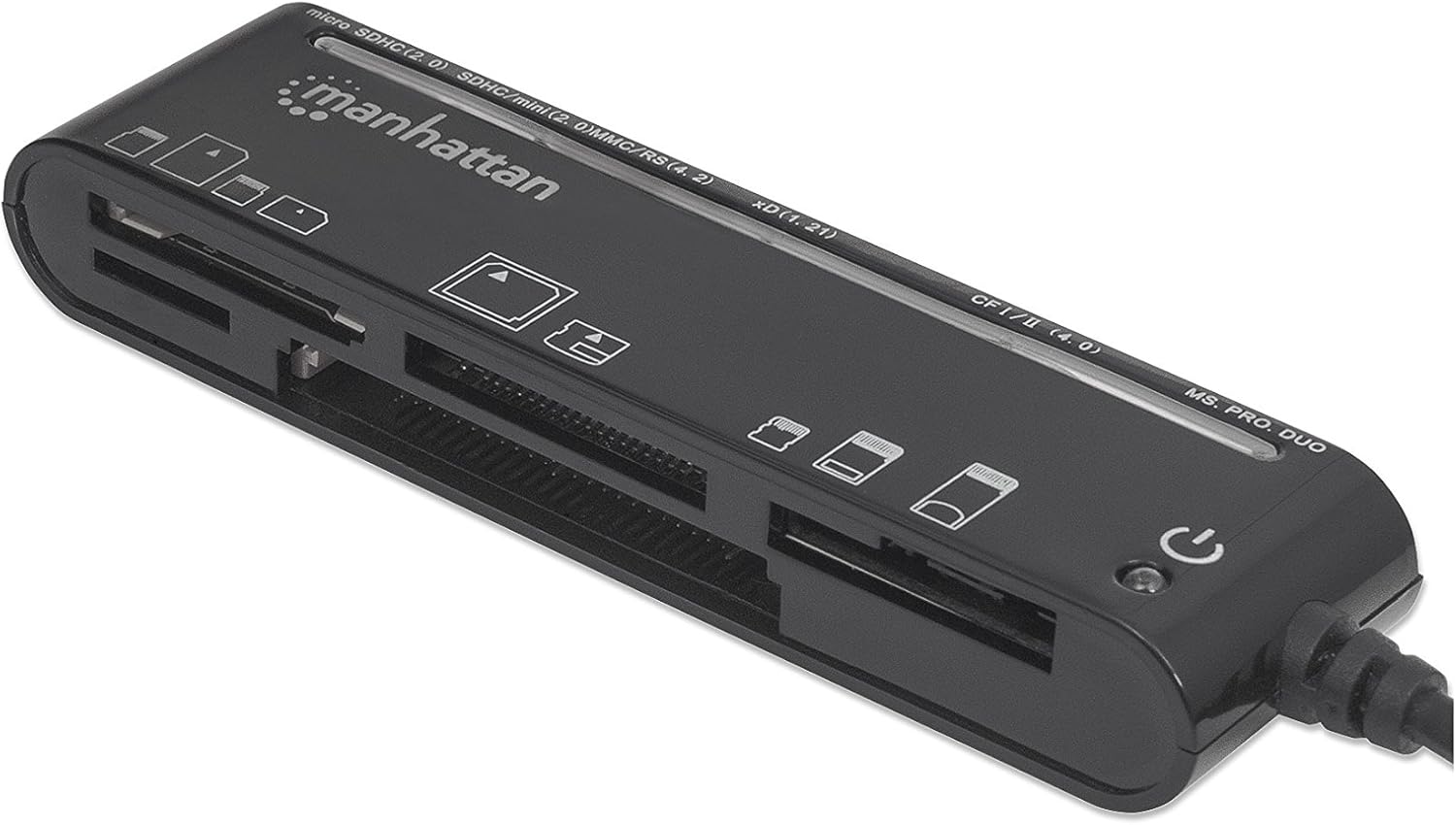
Figure 2: The Manhattan Multi-Card Reader/Writer shown in its retail packaging.
3. System chọrọ
- Available USB 2.0 or 1.1 port
- Windows operating system (Windows XP/Vista/7/8/10/11)
- Mac operating system (macOS 10.x or later)
4. Nhazi ntuziaka
- Jikọọ kaadị Reader: Plug the USB connector of the Manhattan Multi-Card Reader/Writer into an available USB port on your computer.
- Nwụnye ọkwọ ụgbọ ala akpaaka: Your operating system will automatically detect the device and install the necessary drivers. This process typically takes a few moments. No manual driver installation is required.
- Nyocha: Once installed, the device will appear as several removable disk drives in your computer's "My Computer" (Windows) or "Finder" (Mac) section.

Figure 3: The card reader connected via its USB cable.
5. Ntuziaka ọrụ
5.1 Ịtinye kaadị ebe nchekwa
Identify the correct slot for your memory card type. The card reader features multiple slots, each designed for specific card formats. Refer to the labels on the device for guidance.

Foto 4: Top view of the card reader, highlighting the various card slots and their labels.
- Họrọ oghere: Locate the appropriate slot for your memory card (e.g., SD, microSD, CF, MS PRO DUO, xD).
- Fanye kaadị: Gently insert the memory card into the designated slot until it is fully seated. Do not force the card; if it does not insert easily, verify the card's orientation.
- Nweta data: Once inserted, the card will appear as a removable drive on your computer. You can now access, copy, move, or delete files dị ka achọrọ.
5.2 Removing a Memory Card
- Eject Safely: Before physically removing the card, always safely eject the removable drive from your operating system to prevent data corruption.
- Windows: Right-click on the drive icon in "My Computer" and select "Eject."
- Mac: Drag the drive icon to the Trash or click the Eject button next to the drive in Finder.
- Wepu kaadị: Once safely ejected, gently pull the memory card out of its slot.
5.3 Simultaneous Card Access
The Manhattan Multi-Card Reader/Writer supports simultaneous access to multiple card types. You can insert different types of memory cards into their respective slots and access them as separate drives on your computer. This allows for easy data transfer between different card formats.
6. Nlekọta
- Nhicha: Jiri akwa dị nro dị nro hichaa mpụta nke kaadị kaadị. Zere iji ihe nhicha mmiri ma ọ bụ ihe mgbaze.
- Nchekwa: Debe ngwaọrụ ahụ n'ebe dị jụụ ma kpọọ nkụ, ebe anwụ na-anaghị apụta kpọmkwem, okpomọkụ na oke okpomọkụ mgbe a naghị eji ya.
- Ijikwa: Avoid dropping the device or subjecting it to strong impacts. Do not attempt to disassemble the unit.
7. Nchọpụta nsogbu
| Nsogbu | Ihe nwere ike ime | Ngwọta |
|---|---|---|
| Card reader not detected by computer. | Njikọ USB gbagọrọ agbagọ, ọdụ ụgbọ USB gbagọrọ agbagọ, nsogbu sistemụ arụmọrụ. |
|
| Memory card not recognized. | Incorrect card slot, improper card insertion, damaged card, unsupported card format. |
|
| Ọsọ mbufe data dị nwayọ. | Using a USB 1.1 port, system resource contention, slow memory card. |
|
8. Nkọwapụta
| Njirimara | Nkọwa |
|---|---|
| Nọmba nlereanya | 101998 |
| Interface | USB 2.0 |
| Ọsọ mbufe data | Ruo 480 Mbps |
| Ụdị kaadị akwadoro | CompactFlash (Type I/II, 4.0, Alpha, Elite Pro, PRO I/II, Turbo, Ultima I/II, UltraX, CF-PSP II, Extreme I/III/IV CF, Platinum II CF, ProMax CF/CF II), IBM/Hitachi/Seagate Microdrive, MagicStor, Memory Stick (MagicGate, MagicGate PRO, MagicGate Duo, High Speed Memory Stick PRO Duo, High Speed MagicGate PRO Duo, High Speed MagicGate PRO, Memory Stick, Memory Stick Duo, Memory Stick Extreme III PRO, Memory Stick Extreme III PRO Duo, Memory Stick Extreme PRO, Memory Stick PRO Duo, Memory Stick PRO Duo PSP, Memory Stick Ultra II PRO, Memory Stick Ultra II PRO Duo, Gaming Edition Memory Stick PRO Duo), SecureDigital (SD, Elite Pro SD, Extreme III SD, Gaming Edition SD, microSD/TransFlash, microSDHC, miniSD, miniSD Ultra II, miniSDHC, miniSD-Pro, Platinum II SD, SD Pro, SDHC, SDXC, SD-Max, SD-Pleomax, SD-Pro C, Super SD, Turbo SD, Ultima I SD, Ultima II SD, Ultimate SD, Ultra High Speed SD, Ultra II SD, Ultra II SD Plus, Ultra SD, Ultra-X SD), MultiMediaCard (MMC/MMC 4.0, DV-RS MMC, High Speed MMC/RS-MMC, MCCmobile, MMC Pro, MMCplus, MMCplus Turbo, RS-MMC), xD Picture Card (1.21/Type M/Type H) |
| Ndakọrịta sistemụ arụmọrụ | Windows, Mac OS |
| Ike | USB powered (5 Volts) |
| Akụkụ (LxWxH) | 8.66 x 3.15 x 7.87 sentimita asatọ |
| Ibu Ibu | 1.28 ounces |
9. Akwụkwọ ikike na nkwado
This Manhattan product is backed by a Akwụkwọ ikike nke onye nrụpụta afọ 3 when purchased from the manufacturer or an authorized reseller. For warranty claims or technical support, please contact Manhattan customer service or visit their official websaịtị.
Onye nrụpụta: MANHATTAN LUXURY BRANDS LLC Parent Code
For further assistance, please refer to the official Manhattan websaịtị ma ọ bụ kpọtụrụ ọwa nkwado ha.
10. Ozi nchekwa
Ịdọ aka ná ntị: Ngwaahịa a nwere ike ịnwe kemịkalụ Steeti California maara na ha na-akpata ọrịa kansa na mmerụ ahụ ọmụmụ nwa. Maka ozi ndị ọzọ, biko gaa na P65WARNINGs.ca.gov.


