1. Okwu mmalite
This manual provides instructions for the VINABTY RMT-B118A replacement remote control. This remote is designed to operate various Sony Blu-ray Disc Player models, offering a direct replacement for your original remote without the need for complex programming.
Compatible Sony Blu-ray Disc Player Models: BDP-BX18, BDP-S185, BDPBX3100, BDP-BX39, BDP-S1100, BDP-S185WM, BDP-185C, BDP-185WN, BDPBX18, BDPS185, BDPS185WM, BDP185C, BDP185WN.
This remote is also interchangeable with original Sony remote models RMT-B119A, RMT-B120A, RMT-B109A, and RMT-B116A.

Figure 1: VINABTY RMT-B118A Remote Control in a typical home entertainment setup.
2. Nhazi
The VINABTY RMT-B118A remote control is designed for immediate use with compatible Sony Blu-ray Disc Players. No programming or pairing is required.
2.1 Ntinye batrị
To begin using your remote control, you must install two AAA batteries (not included).
- Chọta mkpuchi mkpuchi batrị n'azụ nke njikwa anya.
- Pịa ala na taabụ ahụ wee mịda mkpuchi ahụ ala iji mepee ngalaba ahụ.
- Fanye batrị AAA ọhụrụ abụọ, na-ahụ na njedebe dị mma (+) na nke na-adịghị mma (-) dabara nke ọma na akara ndị dị n'ime ụlọ.
- Weghachite mkpuchi nke batrị batrị n'ime ebe ruo mgbe ọ pịrị na nchekwa.
Once batteries are installed, the remote is ready for operation.
3. Na-arụ ọrụ Remote Control
This section details the functions of the buttons on your VINABTY RMT-B118A remote control.
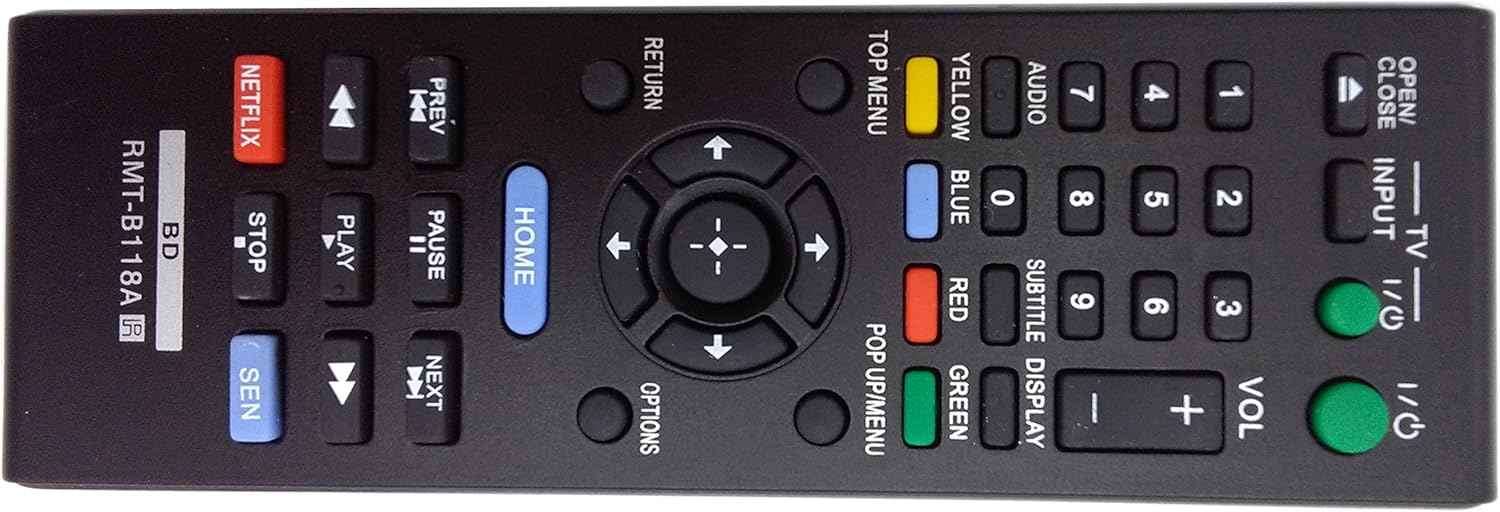
Figure 2: Layout of the VINABTY RMT-B118A Remote Control buttons.
3.1 Power and Input Control
- I/O (Ike): Turns the Blu-ray Disc Player on or off.
- TV I/O (TV Power): Turns the connected TV on or off.
- Ntinye: Cycles through available input sources on the connected TV.
3.2 Disc Playback Controls
- Mepee/mechie: Opens or closes the disc tray.
- PREV (Previous): Skips to the beginning of the current track/chapter or the previous track/chapter.
- OSOTE: Skips to the next track/chapter.
- KWURU: Starts or resumes disc playback.
- Kwụsịtụ: Pauses disc playback. Press again to resume.
- KWỤSỊ: Stops disc playback.
- Fast Rewind (double left arrow): Rewinds playback quickly.
- Gaa n'ihu ngwa ngwa (double right arrow): Fast forwards playback quickly.
3.3 Navigation and Menu Controls
- Ụka ntụzịaka (elu, ala, aka ekpe, aka nri): Gaa na menus na nhọrọ.
- ENTER (Center Button): Na-akwado nhọrọ ndị a họọrọ.
- ỤLỌ: Accesses the main menu of the Blu-ray Disc Player.
- laghachi: Goes back to the previous screen or menu.
- Nhọrọ: Displays context-sensitive options for the current screen or content.
- Nnụnụ Nnụnụ: Accesses the top menu of a Blu-ray disc.
- POP UP/MENU: Accesses the pop-up menu of a Blu-ray disc.
3.4 Numeric and Function Buttons
- 0-9 (bọtịnụ ọnụọgụ): Used for direct track/chapter selection or inputting numbers.
- AUDIO: Selects audio tracks or formats.
- Isi okwu: Selects subtitle languages or turns subtitles on/off.
- Ngosipụta: Shows playback information on screen.
- VOL + / - (Volume): Adjusts the volume of the connected TV or audio system.
- YELLOW, BLUE, RED, GREEN (Color Buttons): Used for specific functions indicated on-screen in menus or interactive content.
3.5 Streaming Service Buttons
- NETFLIX: Direct access to the Netflix streaming application.
- SEN: Direct access to the Sony Entertainment Network (SEN) or similar smart TV portal.
4. Nlekọta
4.1 nnọchi batrị
Replace batteries when the remote's response becomes sluggish or stops working. Always replace both batteries at the same time with new AAA alkaline batteries. Do not mix old and new batteries, or different types of batteries.
4.2 Nhicha
To clean the remote control, wipe it with a soft, dry cloth. For stubborn dirt, lightly dampen the cloth with water or a mild cleaning solution. Avoid using abrasive cleaners, alcohol, or solvents, as these can damage the remote's surface or internal components.
4.3 Nchekwa
Debe ihe njikwa remote n'ebe dị jụụ ma kpọọ nkụ, ebe anwụ na-anaghị apụta kpọmkwem, ebe okpomọkụ dị oke elu. Ọ bụrụ na a gaghị eji remote ahụ ruo ogologo oge, a na-atụ aro ka ị wepụ batrị ndị ahụ iji gbochie mmiri na mmebi nwere ike ime.
5. Nchọpụta nsogbu
Ọ bụrụ na ị na-enwe nsogbu na njikwa remote gị, lee azịza ndị a na-ahụkarị:
- Remote anaghị aza:
- Gbaa mbọ hụ na etinyere batrị nke ọma site na iji polarity ziri ezi (+/-).
- Replace old batteries with new AAA alkaline batteries.
- Check for any obstructions between the remote control and the Blu-ray Disc Player's infrared sensor.
- Ensure you are within the effective operating range and pointing the remote directly at the player.
- Ụfọdụ bọtịnụ anaghị arụ ọrụ:
- This remote is a replacement and may not support all advanced functions of your specific Blu-ray player model if those functions were unique to the original remote. However, core playback and menu navigation should function.
- Clean the remote control, especially around the unresponsive buttons, to remove any dirt or debris that might be interfering with button presses.
- Remote controls the Blu-ray player but not the TV:
- The TV power and input buttons are designed for basic TV control. Ensure your TV is compatible with basic universal remote commands.
- Some advanced TV functions may not be supported by this replacement remote.
If the problem persists after trying these steps, please contact the seller for further assistance.
6. Nkọwapụta
| Nọmba nlereanya | RMT-B118A |
| Ụdị | VINABTY |
| Ngwa dakọtara | Sony Blu-ray Disc Players (BDP-BX18, BDP-S185, BDPBX3100, BDP-BX39, BDP-S1100, etc.) |
| Isi Iyi Ike | Batrị 2 x AAA (anaghị etinye ya) |
| Akụkụ ngwaahịa | 5 x 1.9 x 0.5 sentimita (ihe dịka 12.7 x 4.8 x 1.3 cm) |
| Ibu Ibu | 2.39 ounces (ihe dị ka gram 67.7) |
| Agba | Nwa |
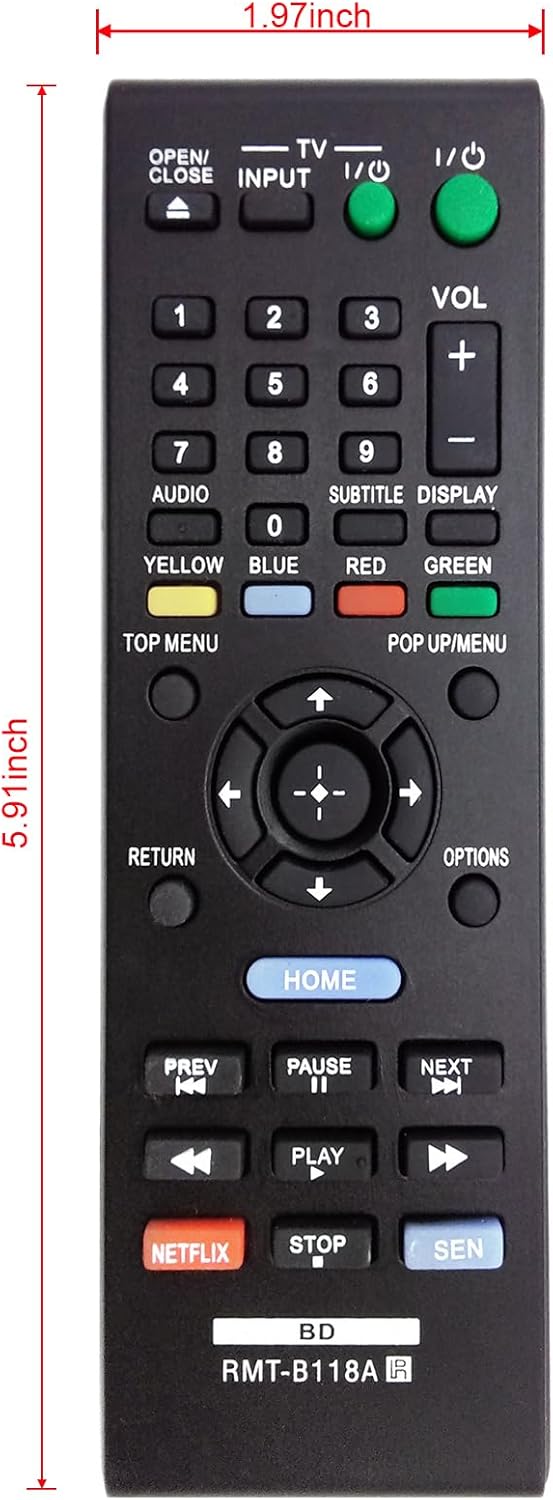
Figure 3: Dimensions of the VINABTY RMT-B118A Remote Control.
7. Akwụkwọ ikike na nkwado
Specific warranty information for the VINABTY RMT-B118A remote control is not provided in this manual. For details regarding warranty coverage, returns, or technical support, please refer to the purchase documentation or contact the seller directly.
When contacting support, please have your product model number (RMT-B118A) and purchase details readily available.


