1. Okwu mmalite
Thank you for choosing the Timex 1440 Sports Digital Watch, Model T5J5616S. This manual provides detailed instructions for setting up, operating, and maintaining your watch to ensure optimal performance and longevity. Please read this manual thoroughly before using your watch.

Foto 1: N'ihu view of the Timex 1440 Sports Digital Watch, showing the grey dial, digital display, and black resin band.
2. Akụrụngwa Ngwaahịa
- Ngosipụta Digital: Clear and easy-to-read digital time and date display.
- Indiglo Night-Light: Electroluminescent backlight for easy viewing na obere ìhè ọnọdụ.
- Chronograph: Stopwatch function for timing events.
- Mkpu: Ọrụ mkpu kwa ụbọchị.
- Nguzogide mmiri: Water resistant up to 100 meters (330 feet).
- Ihe owuwu na-adịgide adịgide: Features a robust resin case and band.

Ọgụgụ 2: Azụ view of the watch, showing the stainless steel case back with water resistance and model information.
3. Nhazi
Before initial use, ensure the watch is in the time display mode. The watch features four primary buttons:
- WEP :TARA: Used to enter and confirm setting modes.
- Edị: Used to cycle through different watch functions (Time, Alarm, Chronograph).
- Malite/Kwụsị: Used to adjust values in setting mode, and to start/stop the chronograph.
- INDIGLO: Activates the night-light.
3.1 Ịtọ oge na ụbọchị
- From the time display, press and hold the SET button until the seconds begin to flash.
- Pịa MODE button to cycle through the settings: Seconds → Hours → Minutes → Year → Month → Day.
- While a value is flashing, press the Malite/Kwụsị button to increase the value. Hold to rapidly advance.
- Ozugbo edoziri ntọala niile, pịa bọtịnụ SET button again to exit the setting mode and save changes.
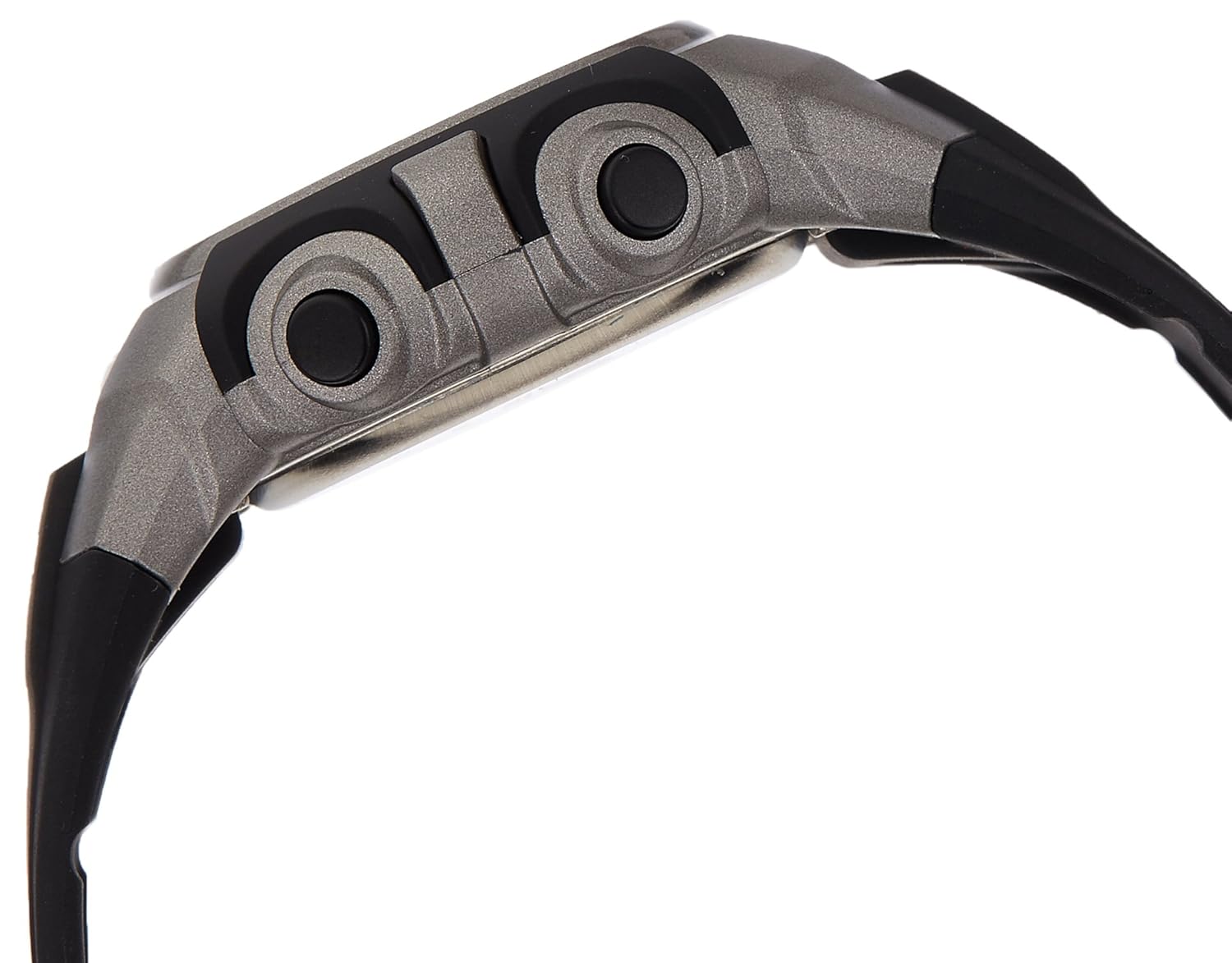
Foto 3: Akụkụ view of the watch, highlighting the button placement.
4. Ntuziaka ọrụ
4.1 Ngosipụta Oge
The default display shows the current time (hours, minutes, seconds) and day of the week. Press the INDIGLO bọtịnụ iji mee ka ngosipụta ahụ pụta ìhè ruo sekọnd ole na ole.
4.2 Chronograph (Agba Nkwụsị)
- From the time display, press the MODE button repeatedly until 'CHRONO' or 'STP' appears on the display.
- Pịa Malite/Kwụsị ịmalite oge.
- Pịa Malite/Kwụsị again to pause the timing. Press again to resume.
- To reset the chronograph, press the SET button while the chronograph is paused.
4.3 Ọrụ mkpu
- Pịa MODE button repeatedly until 'ALARM' or 'AL' appears on the display.
- Pịa ma jide SET button until the alarm hours begin to flash.
- Jiri ihe Malite/Kwụsị bọtịnụ iji hazie awa ahụ, wee pịa MODE ịkwaga na nkeji.
- Jiri ihe Malite/Kwụsị bọtịnụ ka ịhazie nkeji.
- Pịa SET to confirm the alarm time.
- Iji gbanye/Gbanyụọ mkpu ahụ, pịa pịa Malite/Kwụsị button while in the alarm display mode. An alarm icon will indicate if it's active.
5. Nlekọta
Proper care will extend the life of your Timex watch.
- Nhicha: Clean your watch with a soft, damp cloth. Do not use chemical cleaners or abrasive materials.
- Nguzogide mmiri: This watch is water resistant to 100 meters. It is suitable for showering, swimming, and snorkeling. Ọ dịghị mma maka igwu mmiri n'ime mmiri. Apịkwala bọtịnụ ọ bụla mgbe elekere ahụ jupụtara na mmiri.
- Okpomọkụ: Avoid exposing your watch to extreme temperatures (hot or cold) for prolonged periods.
- Ngbanwe batrị: The watch uses a standard watch battery. When the display dims or functions become erratic, it may be time for a battery replacement. It is recommended to have the battery replaced by a qualified watch technician to ensure proper sealing and maintain water resistance.
6. Nchọpụta nsogbu
| Nsogbu | Ihe nwere ike ime | Ngwọta |
|---|---|---|
| Ngosipụta bụ oghere ma ọ bụ nchara nchara. | Batrị dị ala. | Dochie batrị. |
| Oge ezighi ezi. | Edobeghị oge nke ọma ma ọ bụ pịa bọtịnụ mberede. | Lee Nkebi nke 3.1 iji tọgharịa oge ahụ. |
| Bọtịnụ anaghị anabata ya. | Watch may be in a locked mode or battery is very low. | Gbalịa ịpịa MODE button to cycle through functions. If still unresponsive, replace battery. |
| Mmiri dị n'ime elekere ahụ. | Seal compromised or buttons pressed underwater. | Immediately take the watch to a qualified service center. Do not attempt to dry it yourself. |
7. Nkọwapụta
| Njirimara | Nkọwapụta |
|---|---|
| Nọmba nlereanya | T5J5616S |
| Agba ọkpụkpọ | Agba ntụ |
| Ụdị ikpe | Gburugburu |
| Dayameta ikpe | 40 millimeters |
| Ọkpụrụkpụ ikpe | 13 millimeters |
| Agba agba | Nwa |
| Ụdị ihe Band | Resin |
| Lelee ụdị ngagharị | Quartz |
| Watch Display Type | Dijitalụ |
| Mmiri Nguzogide Omimi | 100 mita |
| Ibu Ibu | 140 grams |
| Onye nrụpụta | Timex |
| Ụbọchị mbụ dị | Maachị 22, 2016 |
8. Akwụkwọ ikike na nkwado
Your Timex 1440 Sports Digital Watch (Model T5J5616S) comes with a Akwụkwọ ikike nke Onye nrụpụta afọ 1 site na ụbọchị ịzụrụ ya. Akwụkwọ ikike a na-ekpuchi ntụpọ nrụpụta n'oge ojiji nkịtị.
Akwụkwọ ikike anaghị ekpuchi:
- Mmebi sitere na njikwa na-ekwesịghị ekwesị, enweghị nlekọta, ihe ọghọm, ma ọ bụ akwa na akwa nkịtị.
- Water damage if the watch was used beyond its specified water resistance depth or if buttons were pressed underwater.
- Ndochi batrị.
For warranty claims or technical support, please contact Timex customer service. Keep your purchase receipt as proof of purchase for warranty validation.

Ọgụgụ 4: Ọpụample of Timex product packaging.


