1. Okwu mmalite
The GAMDIAS Hermes GKB3000 is a mechanical gaming keyboard designed for enhanced durability and performance. It features GAMDIAS Certified Blue Switches with a 50 million actuation lifecycle, a 7-color spectrum backlight with 14 lighting effects, and various functional keys for an optimized gaming and typing experience. This manual provides instructions for setting up, operating, and maintaining your keyboard.
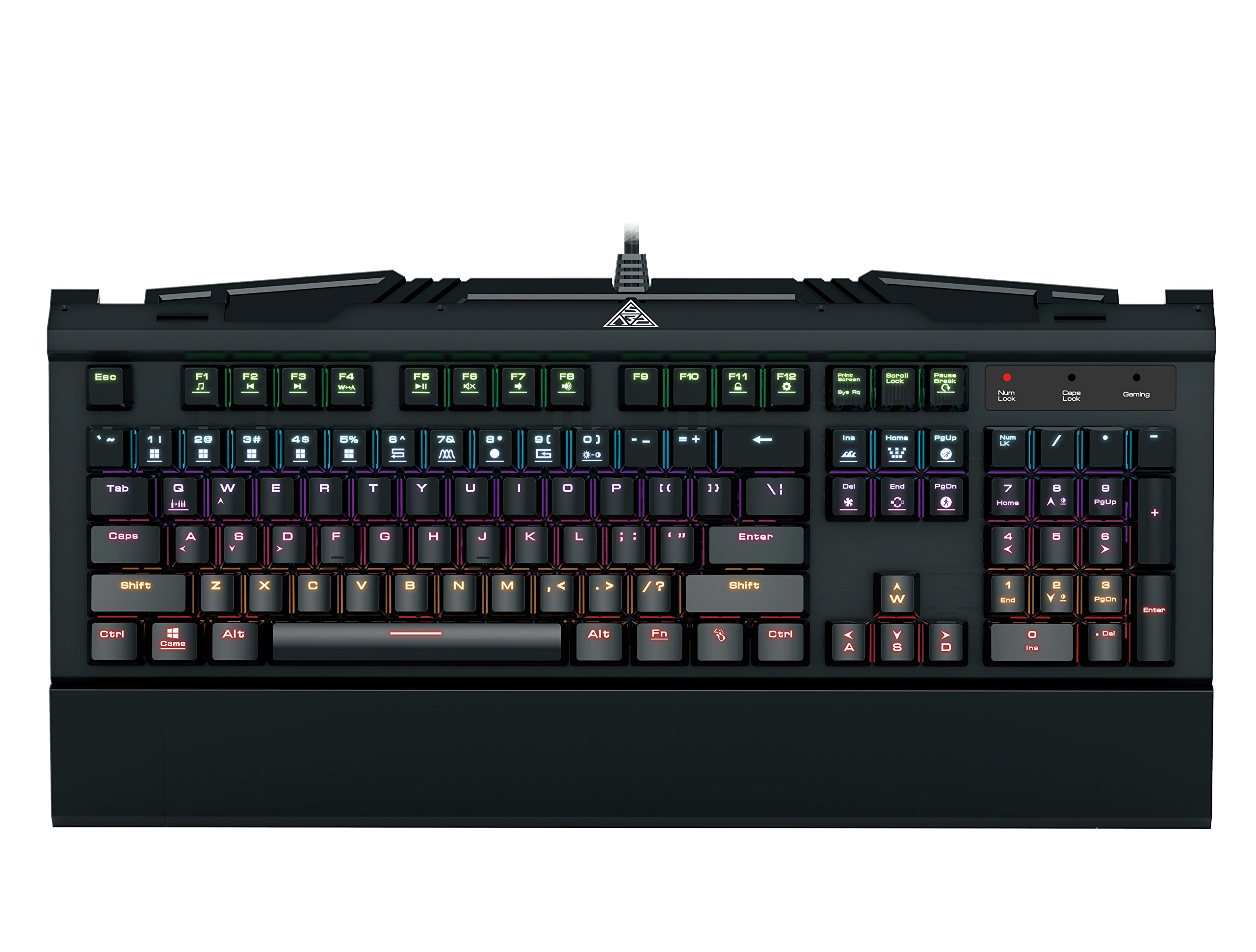
Image 1.1: The GAMDIAS Hermes GKB3000 Mechanical Gaming Keyboard. This image displays the full keyboard with its key layout and design, highlighting its compact yet robust build.
2. Ihe ngwugwu
Please check the package contents upon unboxing to ensure all items are present and undamaged.
- GAMDIAS Hermes GKB3000 Mechanical Gaming Keyboard
- Akwụkwọ ntuziaka (akwụkwọ a)
3. Nhazi
Follow these steps to set up your GAMDIAS Hermes GKB3000 keyboard:
- Mepee ahụigodo: Jiri nlezianya wepụ ahụigodo ahụ na nkwakọ ngwaahịa ya.
- Jikọọ na Kọmputa: Plug the USB-A connector of the keyboard cable into an available USB port on your computer.
- Nwụnye ọkwọ ụgbọala: The keyboard is plug-and-play. Your operating system (e.g., Windows) will automatically detect and install the necessary drivers. No additional software installation is typically required for basic functionality.
- Nkwanye: Place the keyboard on a stable, flat surface for comfortable use.
4. Ntuziaka ọrụ
4.1. Mmetụta ọkụ
The Hermes GKB3000 features a 7-color spectrum backlight with 14 sets of lighting effects. These include 9 preset effects and 5 customizable patterns.
- Switching Effects: Use the dedicated function keys (often combined with the Fn key) to cycle through the preset lighting effects. Refer to the keyboard's keycap legends for specific combinations.
- Customizing Effects: The keyboard supports 5 customizable lighting patterns. Instructions for programming these patterns are typically found in the full software suite available for download from the GAMDIAS website, if applicable.
- Ndozi ihie: Adjust backlight brightness using designated function key combinations.
4.2. Multimedia Control Keys
Access multimedia functions quickly using the dedicated multimedia control keys, often activated by holding the Fn key in combination with the F-keys (F1-F12).
- Njikwa olu: Increase, decrease, or mute audio.
- Ndabere mgbasa ozi: Play/pause, stop, previous track, next track.
- Ọrụ ndị ọzọ: May include opening default browser, email client, or calculator.
4.3. Special Gaming Functions
- WASD-Arrow Key Swap: This feature allows you to swap the functionality of the WASD keys with the arrow keys. This is useful for certain games or user preferences. Activate this function using a specific Fn key combination (e.g., Fn + W).
- Consecutive Attack Mode: This mode enhances rapid key input for gaming. Refer to the keyboard's specific documentation or GAMDIAS software for activation and configuration details.
- Mkpọchi ahụigodo: Temporarily disable the keyboard input to prevent accidental presses. Activate using a Fn nchịkọta igodo.
- Windows Key Disable: Prevent accidental presses of the Windows key during gaming, which can minimize your game. Activate using a Fn key combination (e.g., Fn + Win key).
- N-Key Rollover: The GKB3000 supports N-key rollover, meaning multiple keys can be pressed simultaneously without ghosting or missed inputs. This ensures accurate and responsive commands during intense gaming sessions.
5. Nlekọta
Ndozi nke ọma na-achọpụta ogologo ndụ yana ezigbo arụmọrụ nke ahụigodo gị.
- Nhicha:
- Kwụpụ kiiboodu na kọmputa gị tupu ihicha.
- Jiri akwa dị nro na-enweghị ntụpọ dampejiri mmiri ma ọ bụ ihe nhicha dị nro hichaa elu ahụ.
- Maka uzuzu na irighiri ihe n'etiti igodo, jiri ikuku abịakọrọ.
- Zere iji kemịkalụ siri ike, ihe na-ehicha ihe, ma ọ bụ ihe mgbaze.
- Nchekwa: Chekwaa ahụigodo ahụ n'ebe dị jụụ, kpọrọ nkụ pụọ na ìhè anyanwụ kpọmkwem na oke okpomọkụ mgbe ọ naghị eji ya ogologo oge.
- Ijikwa: Avoid dropping the keyboard or exposing it to excessive force, as this can damage the mechanical switches or internal components.
6. Nchọpụta nsogbu
If you encounter issues with your GAMDIAS Hermes GKB3000 keyboard, refer to the following common solutions:
| Nsogbu | Ngwọta enwere ike |
|---|---|
| Ahụigodo anaghị aza. |
|
| Ọkụ azụ anaghị arụ ọrụ ma ọ bụ na ọ dị ka ọkụ na-adịghị mma. |
|
| Certain keys are not working. |
|
| WASD keys are acting as arrow keys. |
|
If the problem persists after trying these solutions, please contact GAMDIAS customer support for further assistance.
7. Nkọwapụta
The following are the technical specifications for the GAMDIAS Hermes GKB3000 Mechanical Gaming Keyboard:
| Njirimara | Nkọwa |
|---|---|
| Ụdị | GAMDIAS |
| Nọmba nlereanya | GKB3000 |
| Ngbanwe Ụdị | GAMDIAS Certified Mechanical Blue Switches |
| Actuation Lifecycle | Nde 50 nde mkpịrịkpa |
| Ịkụ azụ azụ | 7-Color Spectrum, 14 Lighting Effects (9 preset, 5 customizable) |
| Mgbochi mmụọ | N-Key Rollover |
| Njikọta | USB-A |
| Sistemụ nrụọrụ | Windows |
| Ibu Ibu | 2.42 pound (ihe dị ka 1.1 n'arọ) |
| Akụkụ ngwaahịa (LxWxH) | 18.8 x 10.5 x 2 sentimita (ihe dịka 47.75 x 26.67 x 5.08 cm) |
| Ihe onwunwe | Plastic with Elegant Metal Plate Design |
8. Akwụkwọ ikike na nkwado
GAMDIAS products are manufactured to the highest quality standards. For information regarding warranty coverage, terms, and conditions, please refer to the warranty card included with your product or visit the official GAMDIAS websaịtị.
For technical support, troubleshooting assistance, or any product-related inquiries, please contact GAMDIAS customer support through their official websaịtị ma ọ bụ ozi kọntaktị enyere na nkwakọ ngwaahịa gị.
GAMDIAS Official Websaịtị: www.gamdias.com