1. Okwu mmalite
This manual provides essential information for the safe and efficient operation, installation, and maintenance of your Daitsu ADDH10 Digital Dehumidifier. Please read these instructions thoroughly before using the appliance and retain them for future reference.
The Daitsu ADDH10 is designed to reduce humidity levels in indoor environments, helping to prevent mold, mildew, and other moisture-related issues. It features a digital display and automatic functions for user convenience.
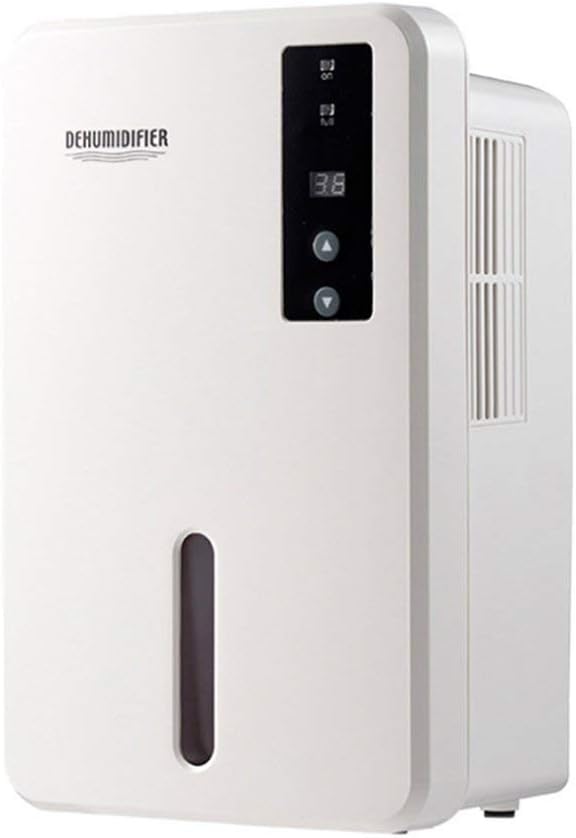
Foto 1.1: N'ihu view of the Daitsu ADDH10 Digital Dehumidifier, showing the control panel and water tank window.
2. Ozi nchekwa
Na-agbaso usoro nchekwa nchekwa mgbe niile mgbe ị na-eji ngwa eletriki iji belata ihe egwu nke ọkụ, ujo eletrik na mmerụ ahụ.
- Read all instructions before using the dehumidifier.
- Gbaa mbọ hụ na ọkọnọ ike dabara na voltage akọwapụtara na akara ọkwa.
- Ejila eriri ma ọ bụ plọg mebiri emebi rụọ ọrụ dehumidifier.
- Debe ngwa ahụ pụọ na ebe okpomọkụ, ìhè anyanwụ kpọmkwem, na ihe ndị na-ere ọkụ.
- Do not block the air inlet or outlet. Ensure adequate air circulation around the unit.
- Always place the dehumidifier on a stable, level surface.
- Unplug the unit before cleaning, maintenance, or when not in use for extended periods.
- Ezubere ngwa a maka iji ndị mmadụ (gụnyere ụmụaka) nwere ike anụ ahụ, mmetụta uche ma ọ bụ nke uche, ma ọ bụ enweghị ahụmịhe na ihe ọmụma, ma ọ bụrụ na enyereghị ha nlekọta ma ọ bụ ntụziaka gbasara iji ngwa ahụ site n'aka onye na-ahụ maka nchekwa ha.

Image 2.1: Illustration of the dehumidifier's double security protection, including automatic shut-off when the water tank is full and over-temperature protection (auto-stop if heat sink exceeds 80°C).
3. Ngwa ngwaahịa na atụmatụ
Mara onwe gị nke ọma akụkụ ndị bụ isi nke ikuku ikuku gị:
- Ogwe njikwa: Digital display and buttons for operation.
- Ikuku ụgbọ mmiri: Ebe a na-adọta ikuku mmiri n'ime ihe ahụ.
- Ọpụpụ ikuku: Ebe a na-achụpụ ikuku kpọrọ nkụ.
- tank mmiri: Collects condensed water. Features a transparent window to monitor water level.
- Water Tank Handle/Lid: For easy removal and emptying.

Image 3.1: Diagram showing the key components: Air outlet, Control panel, Air inlet, and the 1.5L water tank capacity.
The dehumidifier has a 1.5-liter water tank capacity and features automatic shut-off when the tank is full, indicated by a float sensor. It also includes over-temperature protection.
4. Ntọala na nwụnye
4.1 Nwepu
- Jiri nlezianya wepụ ihe mgbapụta na nkwakọ ngwaahịa ya.
- Wepụ ihe niile e ji ekpuchi ihe, teepu, na ihe mkpuchi nchekwa.
- Inspect the unit for any signs of damage. If damaged, do not operate and contact your retailer.
4.2 Ntinye
- Place the dehumidifier on a firm, level surface that can support its weight when the water tank is full.
- Ensure there is at least 20 cm (8 inches) of space around the air inlet and outlet for proper air circulation.
- Avoid placing the unit near walls, furniture, or curtains that could obstruct airflow.
- Do not place the unit in direct sunlight or near heat-generating appliances.
- For optimal performance, operate the dehumidifier in an enclosed area. Close all doors and windows in the room.
4.3 Njikọ ike
- Ensure your hands are dry before plugging in the unit.
- Tinye eriri ọkụ n'ime oghere eletrik dabara adaba nke ọma.
5. Ntuziaka ọrụ
5.1 Ogwe njikwa gafereview
The control panel features a digital display and control buttons:
- Ngosipụta Digital: Shows current humidity level or settings.
- Bọtịnụ ike: Gbanyụọ ma ọ bụ gbanyụọ unit ahụ.
- Bọtịnụ elu/ala: Adjust desired humidity level or other settings.

Image 5.1: Various angles of the dehumidifier, highlighting the digital control panel with up/down buttons and the transparent water tank.
5.2 Basic Arụmọrụ
- Gbanwuo: Press the Power button to turn on the dehumidifier. The digital display will light up, showing the current room humidity.
- Tọọ iru mmiri achọrọ: Use the Up and Down buttons to set your desired humidity level. The unit will operate until the room humidity reaches the set level, then cycle on and off to maintain it.
- Gbanyụọ: Press the Power button again to turn off the dehumidifier.
5.3 Na-ekpochapụ tankị mmiri
When the water tank is full, the dehumidifier will automatically stop operating, and an indicator light (if available) may illuminate. The unit will not resume operation until the tank is emptied and reinserted correctly.
- Jiri nwayọọ wepụ tank mmiri ahụ n'ihu unit ahụ.
- Carefully carry the tank to a sink or drain.
- Remove the tank lid (if applicable) and pour out the collected water.
- Replace the lid securely and slide the empty water tank back into the dehumidifier until it clicks into place.
- The unit will resume operation automatically if the power is on and the desired humidity level has not been reached.

Image 5.2: The transparent water tank, designed for easy removal and emptying.
6. Nlekọta
Regular maintenance ensures optimal performance and extends the lifespan of your dehumidifier. Always unplug the unit before performing any maintenance.
6.1 Ichacha tank mmiri
- Clean the water tank regularly (e.g., every few weeks) to prevent mold and bacteria growth.
- Remove the water tank as described in Section 5.3.
- Wash the tank with mild detergent and warm water. Rinse thoroughly.
- Kpoo tankị ahụ kpamkpam tupu ị tinyeghachi ya n'ime ngwaọrụ ahụ.
6.2 Na-ehicha Mpụga
- Jiri nwayọ hichaa mpụta nke dehumidifier, damp akwa .
- Ejila ihe nchacha abrasive, ihe mgbaze, ma ọ bụ kemịkalụ siri ike, n'ihi na ndị a nwere ike imebi elu.
- Gbaa mbọ hụ na ọ nweghị mmiri na-abanye n'ime akụrụngwa.
6.3 Nchekwa
- If storing the dehumidifier for an extended period, ensure the water tank is empty and clean.
- Hichaa mpụta nke otu ahụ.
- Store the unit in an upright position in a cool, dry place, away from direct sunlight and extreme temperatures.
7. Nchọpụta nsogbu
Tupu ịkpọtụrụ nkwado ndị ahịa, biko rụtụ aka na ntuziaka nchọpụta nsogbu ndị a maka okwu nkịtị:
| Nsogbu | Ihe nwere ike ime | Ngwọta |
|---|---|---|
| Dehumidifier anaghị agbanwuo. | Enweghị ọkụ. Ejinyeghị eriri ọkụ na nchekwa. |
Lelee ma oghere ọkụ na-arụ ọrụ. Gbaa mbọ hụ na etinyere eriri ọkụ ahụ nke ọma n'ime ngwa na nbata mgbidi. |
| Unit na-agba ọsọ mana ọ naghị anakọta mmiri. | Room humidity is already low. Okpomọkụ dị oke ala. A na -egbochi ikuku ikuku. |
Check the current humidity level on the display. If it's below your set point, the unit will not collect water. Dehumidifiers are less effective in very cold environments. Gbaa mbọ hụ na egbochighị ụzọ mbata ikuku. |
| Unit stops operating and indicator light is on. | Mmiri mmiri juru eju. Water tank is not properly inserted. |
Gbanyụọ tank mmiri ahụ. Reinsert the water tank correctly until it clicks into place. |
| Mkpọtụ na-adịghị ahụkebe n'oge arụ ọrụ. | Unit adịghị n'elu larịị. Okwu gbasara akụrụngwa. |
Gbaa mbọ hụ na etinyere unit ahụ n'elu kwụsiri ike, dịkwa larịị. If noise persists, discontinue use and contact customer support. |
8. Nkọwapụta
| Njirimara | Nkọwapụta |
|---|---|
| Ụdị | Daitsu |
| Nọmba nlereanya | ADDH10 (Technical Model: bb_S0403263) |
| Agba | Ọcha |
| Ibu Ibu | 10 kilogram |
| Akụkụ ngwaahịa (ihe dị ka.) | 286mm (ịdị elu) x 180mm (obosara) x 134mm (Omimi) |
| Ike tank mmiri | 1.5 lita |
| Ụdị ọrụ | Akpaaka |
| Ngwa gụnyere | Igwe ikuku |
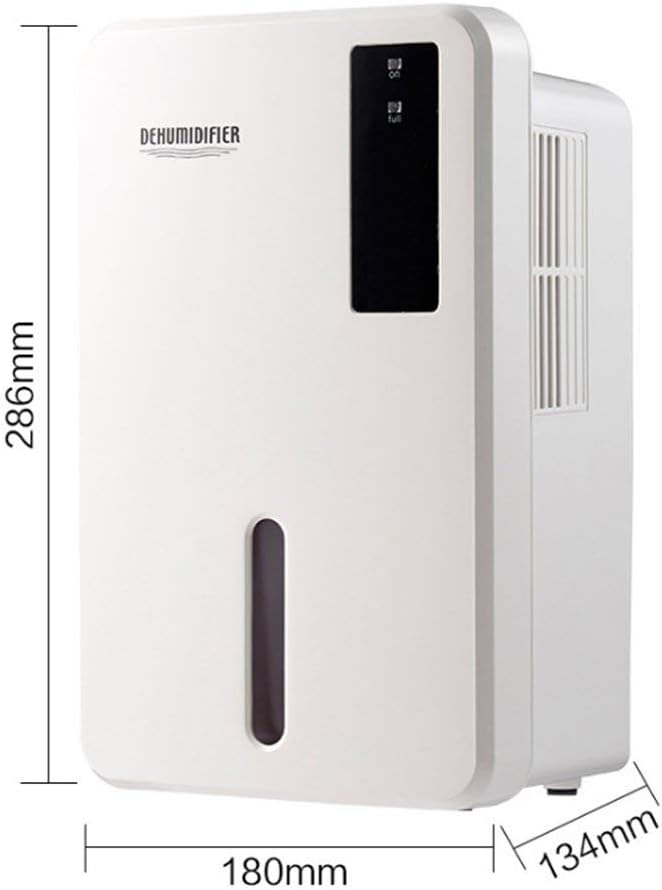
Image 8.1: Diagram illustrating the dimensions of the dehumidifier: 286mm height, 180mm width, and 134mm depth.
9. Akwụkwọ ikike na nkwado
For warranty information, please refer to the documentation included with your product packaging or visit the official Daitsu websaịtị. Usoro na ọnọdụ akwụkwọ ikike nwere ike ịdị iche site na mpaghara na onye na-ere ahịa.
If you encounter issues not covered in the troubleshooting section or require further assistance, please contact your retailer or the manufacturer's customer support. Have your model number (ADDH10) and purchase details ready when contacting support.