1. Okwu mmalite
Daalụ maka ịzụrụasing the Axess 2.1 HiFi Bluetooth Speaker SPBT1038BK. This portable speaker system is designed to provide clear audio and robust bass, suitable for various environments. It features Bluetooth connectivity, USB and SD card support, and a line-in function for versatile audio playback. This manual provides essential information for the safe and efficient use of your speaker.
Atụmatụ gụnyere:
- 2.1 outdoor passive HIFI Bluetooth speaker with 3-inch subwoofer.
- Secure and simple Bluetooth pairing with an operating range of up to 32 feet (10 meters).
- Support for USB drives, SD cards, and a line-in function for compatibility with various audio devices.
- Integrated slide panel control for volume adjustment.
- Durable leather handle for convenient portability.
- Built-in 1000mAh Lithium rechargeable battery.
2. Ozi nchekwa
Biko gụọ ntuziaka nchekwa niile nke ọma tupu i jiri ngwaahịa a. Ọ bụrụ na ị gbasoghị ntuziaka ndị a, ọ nwere ike ibute mgbawa eletriki, ọkụ, ma ọ bụ ihe egwu ndị ọzọ.
- Ewepụla ọkà okwu na oke okpomọkụ, ìhè anyanwụ kpọmkwem, ma ọ bụ oke iru mmiri.
- Zere idobe ma ọ bụ idobe ọkà okwu na mmetụta siri ike.
- Do not disassemble, repair, or modify the unit. Refer all servicing to qualified personnel.
- Debe ọkà okwu na mmiri na mmiri mmiri ndị ọzọ.
- Jiri naanị eriri nchaji enyere ma ọ bụ ihe dabara adabara.
- Hụ na ikuku na-abata nke ọma mgbe ị na-arụ ọrụ na ọkà okwu.
- Dispose of batteries according to local regulations. Do not expose batteries to excessive heat.
3. Ihe ngwugwu
Chọpụta na ihe niile dị na ngwugwu gị:
- Axess SPBT1038BK Bluetooth Speaker
- Igwe nchaji USB
- 3.5mm Audio (AUX) Cable
- Akwụkwọ ntuziaka onye ọrụ
4. Ngwaahịa gafereview
Mara onwe gị na akụkụ na njikwa ọkà okwu.
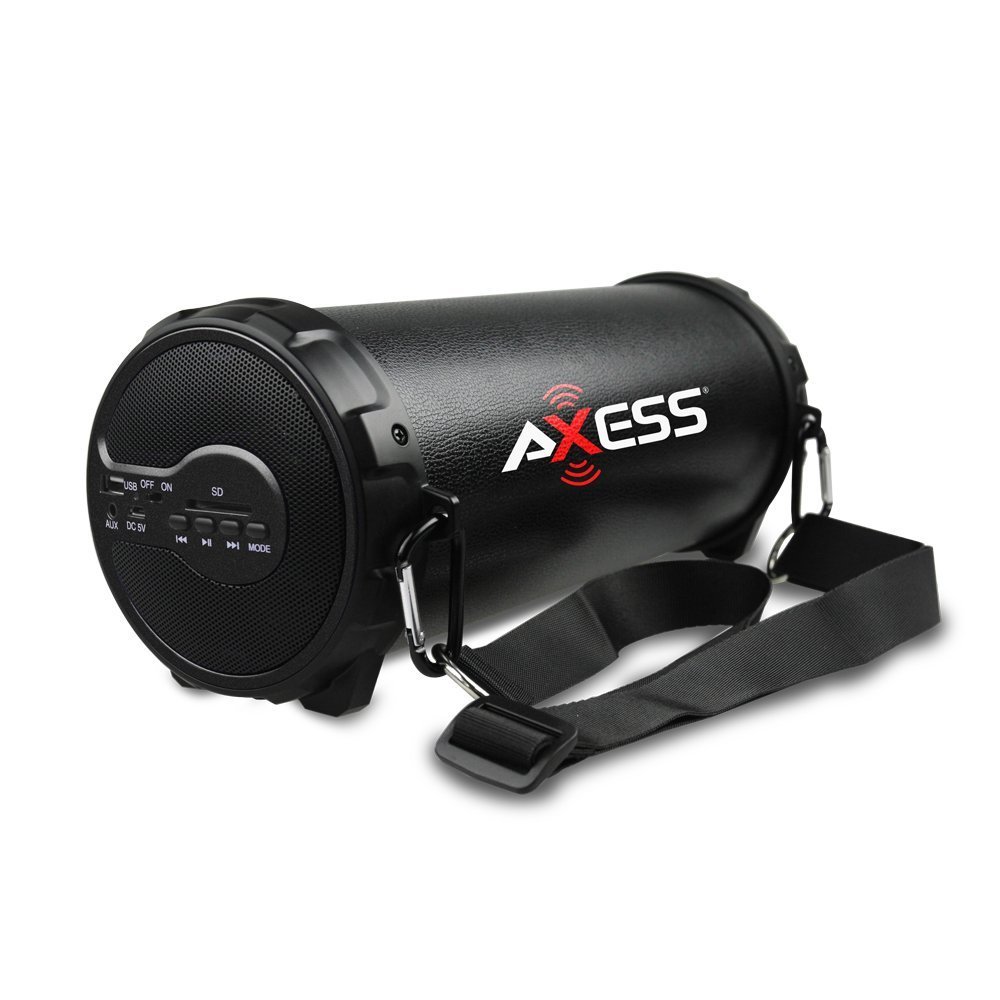
Foto 1: N'ihu view of the Axess SPBT1038BK Bluetooth Speaker, showcasing the speaker grille and overall design.

Foto 2: Akụkụ view of the Axess SPBT1038BK, illustrating the control panel and input ports.
Controls and Ports (Typical Layout)
- Bọtịnụ ike: Pịa ma jide iji gbanye/Gbanyụọ ọkà okwu.
- Bọtịnụ ụkpụrụ: Short press to switch between Bluetooth, AUX, USB, and SD card modes.
- Ihe mmịfe nke olu: Slide to adjust the master volume level.
- Bọtịnụ Kwụsị/Kwụsị: In Bluetooth/USB/SD mode, press to play or pause audio.
- Bọtịnụ egwu gara aga/ na-esote: In Bluetooth/USB/SD mode, press to skip tracks.
- Ọdụ ụgbọ mmiri USB: For connecting USB flash drives for audio playback.
- Oghere kaadị SD: For inserting SD memory cards for audio playback.
- Ntinye AUX (3.5mm): For connecting external audio devices via the 3.5mm audio cable.
- DC 5V ọdụ ụgbọ mmiri: For connecting the USB charging cable to recharge the battery.
5. Nhazi
5.1 Ịchaji batrị
- Connect the small end of the USB charging cable to the DC 5V charging port on the speaker.
- Jikọọ akụkụ ka ukwuu nke eriri chaja USB na ihe nkwụnye ike USB (anaghị etinye ya) ma ọ bụ ọdụ USB kọmputa.
- The charging indicator light (if present) will illuminate, typically red, during charging.
- Once fully charged, the indicator light may change color (e.g., turn off or turn blue/green). A full charge takes approximately 3-4 hours.
Note: For optimal battery life, fully charge the speaker before first use.
5.2 Gbanyụọ/ gbanyụọ
- To turn ON: Press and hold the bọtịnụ ike ruo sekọnd ole na ole ruo mgbe ị nụrụ ụda olu ma ọ bụ hụ ìhè ihe ngosi.
- To turn OFF: Press and hold the bọtịnụ ike ọzọ ruo sekọnd ole na ole.
5.3 Njikọ Bluetooth
- Ensure the speaker is powered ON and in Bluetooth mode. If not, press the Bọtịnụ ọnọdụ until you hear a Bluetooth pairing prompt. The Bluetooth indicator light will typically flash.
- Kwado Bluetooth na ngwaọrụ mkpanaka gị (smartphone, tabletị, wdg).
- Chọọ maka available Bluetooth devices. You should see "SPBT1038BK" or a similar name in the list.
- Select "SPBT1038BK" to connect. Once paired, you will hear a confirmation tone, and the Bluetooth indicator light will stop flashing and remain solid.
- Ị nwere ike ugbu a kpọọ ụda site na ngwaọrụ gị site na ọkà okwu.
Mara: Ọkà okwu ga-anwa ijikọ na ngwaọrụ ejikọrọ ikpeazụ na-akpaghị aka mgbe agbanyere ya.
5.4 Connecting via AUX Input
- Connect one end of the 3.5mm audio cable to the AUX input port on the speaker.
- Connect the other end of the 3.5mm audio cable to the headphone jack or audio output of your external device (e.g., MP3 player, computer, TV).
- Pịa Bọtịnụ ọnọdụ on the speaker until it enters AUX mode.
- Kpọọ ọdịyo sitere na ngwaọrụ mpụga gị.
5.5 Using USB/SD Card
- Fanye USB flash mbanye n'ime Ọdụ ụgbọ mmiri USB ma ọ bụ kaadị SD n'ime Oghere kaadị SD. Ensure the card is inserted correctly.
- The speaker should automatically switch to USB or SD card mode and begin playing audio files. Ọ bụrụ na ọ bụghị, pịa Bọtịnụ ọnọdụ iji họrọ ụdị kwesịrị ekwesị.
- Jiri bọtịnụ Play/Pause na Previous/Next Track iji chịkwaa ọkpụkpọ egwu.
6. Na-arụ ọrụ Ọkà Okwu
6.1 Njikwa olu
Adjust the overall volume by sliding the Ihe mmịfe olu on the speaker. You can also control the volume from your connected Bluetooth device or external audio source.
6.2 Njikwa ọkpụkpọ
- Gwuo/kwụsịtụ: Pịa Bọtịnụ Kwụsị/ Kwụsị to toggle between playing and pausing audio.
- Track na-esote: Pịa Bọtịnụ egwu na-esote ịgafe na egwu na-esote.
- Gara aga Track: Pịa Bọtịnụ egwu gara aga to go back to the beginning of the current song or to the previous song.
Note: Playback controls are primarily functional in Bluetooth, USB, and SD card modes. For AUX mode, control playback directly from your connected device.
7. Nlekọta
7.1 Nhicha
- Always power off the speaker before cleaning.
- Jiri akwa dị nro ma kpọọ nkụ hichapụ elu elu.
- Ejila ihe nchacha abrasive, waxes, ma ọ bụ ihe mgbaze.
- Zere ịbanye mmiri n'ime oghere ọ bụla.
7.2 Nchekwa
- Chekwaa ọkà okwu n'ebe dị jụụ, kpọrọ nkụ na-adịghị na ìhè anyanwụ kpọmkwem na oke okpomọkụ.
- Ọ bụrụ na ị na-echekwa ya ruo ogologo oge, chajie batrị ahụ ruo ihe dịka 50% kwa ọnwa ole na ole iji chekwaa ahụike batrị.
7.3 Nlekọta batrị
- Achachala batrị karịa. Kwupu chaja ozugbo batrị jupụtara.
- Zere ịgbasa batrị kpamkpam ugboro ugboro, n'ihi na nke a nwere ike ibelata ndụ ya.
8. Nchọpụta nsogbu
Ọ bụrụ na ị na-enwe nsogbu na ọkà okwu gị, rụtụ aka na nsogbu na ngwọta ndị a na-emekarị:
| Nsogbu | Ihe nwere ike ime | Ngwọta |
|---|---|---|
| Ọkà okwu anaghị agba ọkụ. | Batrị agwụla. | Jiri eriri USB chajie igwe okwu. |
| Enweghị ụda. | Volume is too low; incorrect mode selected; device not connected properly. | Increase speaker volume and device volume. Ensure the correct mode (Bluetooth, AUX, USB, SD) is selected. Reconnect the device. |
| Njikọ Bluetooth ada ada. | Ọkà okwu adịghị n'ụdị njikọta; gbanyụọ ngwaọrụ Bluetooth; tere aka site n'ikwu okwu. | Ensure speaker is in Bluetooth pairing mode. Turn device Bluetooth ON. Move device closer to speaker (within 32 feet). Forget previous pairings on your device and try again. |
| USB/SD card not playing. | Ụdị na-ezighi ezi; anaghị akwado ya file format; corrupted media. | Ensure speaker is in USB or SD mode. Check if audio files are in a supported format (e.g., MP3). Try a different USB drive or SD card. |
| Ogo ọdịyo adịghị mma. | Low battery; device too far (Bluetooth); interference. | Charge the speaker. Move the Bluetooth device closer. Avoid sources of wireless interference. |
9. Nkọwapụta
| Njirimara | Nkọwapụta |
|---|---|
| Nlereanya | SPBT1038BK |
| Ụdị Ọkà Okwu | 2.1 HiFi Outdoor Passive Bluetooth Speaker with 3-inch Subwoofer |
| Teknụzụ Njikọta | Bluetooth |
| Oke arụ ọrụ Bluetooth | Ruo 32 ụkwụ (mita 10) |
| Isi Iyi Ike | Akwanyere batrị |
| Ụdị batrị | Lithium ion |
| Ike batrị | 1000 mAh |
| Ibu Ibu | 1.16 n'arọ (2.56 lbs) |
| Akụkụ ngwaahịa (L x W x H) | 29.21 x 11.43 x 11.43 cm (11.5 x 4.5 x 4.5 inch) |
| Atụmatụ pụrụ iche | Portable, USB/SD Card Support, Line-in Function |
10. Akwụkwọ ikike na nkwado
This product is covered by a limited warranty. For specific warranty terms and conditions, please refer to the documentation provided with your purchase or contact Axess customer support.
For technical assistance, troubleshooting not covered in this manual, or general inquiries, please visit the official Axess websaịtị ma ọ bụ kpọtụrụ ngalaba ọrụ ndị ahịa ha. Enwere ike ịhụ ozi kọntaktị na nkwakọ ngwaahịa ma ọ bụ nke onye nrụpụta websaịtị.


