Okwu mmalite
This manual provides instructions for the safe and efficient operation of your Axess MS3912 Mini Entertainment System. Please read this manual thoroughly before using the device and retain it for future reference.
Akụkụ ndị bụ isi:
- AM/FM Redio
- Ihe ọkpụkpọ Cassette na ihe ndekọ
- Ihe ọkpụkpọ CD
- USB Port for MP3 Playback
- Ntinye inyeaka
- Jack ekweisi
- Portable/Detachable Speakers
- Njikwa anya
- AC/DC Power Operation
Ozi nchekwa
Ịdọ aka ná ntị:
Ngwaahịa a nwere kemịkalụ mara steeti California na-ebute ọrịa kansa na ntụpọ ọmụmụ ma ọ bụ mmerụ ahụ ọmụmụ ọzọ.
Na-agbaso usoro nchekwa nchekwa mgbe niile mgbe ị na-eji ngwa eletriki iji belata ihe egwu ọkụ, ujo eletrik na mmerụ ahụ nkeonwe.
- Ewepụla ngwa a na mmiri ozuzo ma ọ bụ mmiri.
- Akwụsịla oghere ikuku ikuku ọ bụla.
- Gbaa mbọ hụ na voltage supply (AC 120V/60Hz for US models, check local specifications).
- Emepela nke c nke ngwaọrụ ahụasing; zigara ndị ọrụ ruru eru ọrụ niile.
- Debe ihe ahụ ka ọ ghara ịnọ n'ebe okpomọkụ dị, anyanwụ kpọmkwem, na ebe magnet siri ike.
- Kwupụ ngwaọrụ ahụ n'oge oke mmiri ozuzo ma ọ bụ mgbe ejighi ya ogologo oge.
Ihe ngwugwu
Nyochaa na etinyere ihe niile edepụtara n'okpuru na ngwugwu gị:
- Axess MS3912 Main Unit
- Detachable Speakers (2)
- Njikwa anya
- Igwe ọkụ AC
- Akwụkwọ ntuziaka (akwụkwọ a)
Njikwa na Njikọ
Familiarize yourself with the various controls and connection points on your MS3912 system.
Njikwa Ogwe ihu
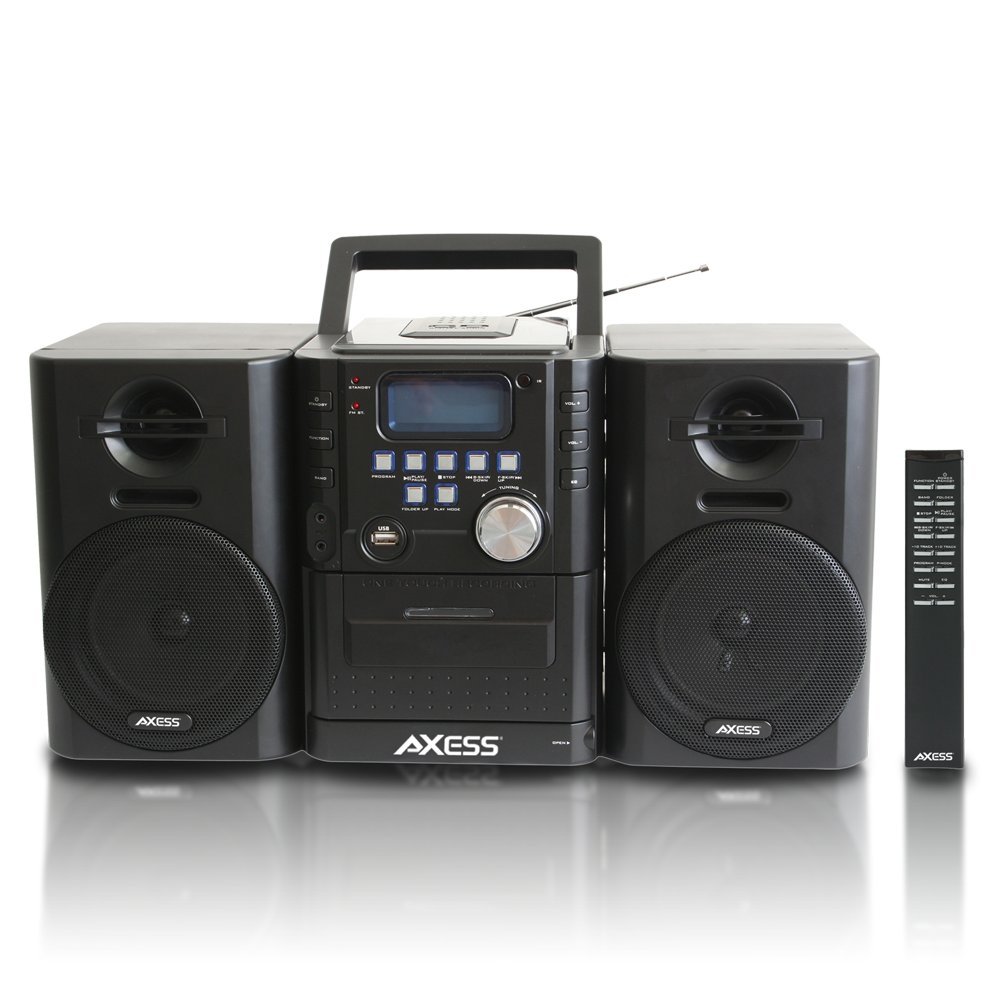
Foto: N'ihu view of the Axess MS3912 Mini Entertainment System, showing the central unit with display, control buttons, USB port, CD tray, cassette deck, and two detachable speakers. A remote control is also visible on the right.
- Bọtịnụ NKWEKỌRỊTA: Na-agbanye unit ahụ ma ọ bụ gbanyụọ.
- Bọtịnụ ỌRỤ: Selects between CD, USB, TAPE, AUX, and RADIO modes.
- BAND bọtịnụ: In Radio mode, switches between AM and FM bands.
- Bọtịnụ mmemme: Used for programming CD/USB tracks.
- Bọtịnụ Kwụsị/ Kwụsị: Starts or pauses playback for CD, USB, or Cassette.
- Bọtịnụ Kwụsị: Kwụsị ịkpọghachi ya.
- KWỤSỊ/CHỌỌ Bọtịnụ (<< / >>): Na-awụlikwa egwu ma ọ bụ na-aga n'ihu/na-alọghachi azụ ngwa ngwa.
- FOLDER UP / PLAY MODE Buttons: Navigates folders on USB or changes play mode.
- Mpịakọta olu: Na-emezi ọkwa mmepụta ọdịyo.
- Ọdụ ụgbọ mmiri USB: Connects USB flash drives for MP3 playback.
- PC/AUX IN Jack: Na-ejikọ ngwaọrụ ọdịyo mpụga.
- Jack ekweisi: Na-ejikọ ekweisi maka ige ntị nkeonwe.
- Ngalaba CD: Top-loading CD player.
- Ogbe Cassette: Front-loading cassette player/recorder.
- Ngosipụta: Shows current function, track number, radio frequency, etc.
Njikọ Ogwe azụ

Foto: N'azụ view of the Axess MS3912 Mini Entertainment System, showing the FM antenna, battery compartment, AC power input, and speaker connection jacks.
- Antenna FM: Extend for optimal FM reception.
- Ọkà okwu Jacks: Connect the left and right speakers.
- Ntinye ike AC: Jikọọ eriri ọkụ AC.
- Akụkụ batrị: Holds batteries for portable operation.
Melite
1. Ijikọ ndị ọkà okwu
Connect the speaker wires from the detachable speakers to the corresponding speaker jacks on the rear of the main unit. Ensure the polarity (+/-) matches for optimal sound quality.
2. Ịkwanye Unit
Ọrụ ike AC:
Insert the AC power cord into the AC power input jack on the rear of the unit, then plug the other end into a standard wall outlet (AC 120V/60Hz).
DC (Battery) Power Operation:
Open the battery compartment cover on the rear of the unit. Insert the required number of C-size batteries (not included), ensuring correct polarity. Close the battery compartment cover securely. The unit will automatically switch to battery power when AC power is disconnected.
3. Ntọala antenna
For FM radio reception, fully extend the telescopic FM antenna. For AM reception, the unit has a built-in AM antenna, which may require rotating the unit for best reception.
Ntuziaka ọrụ
1. Gbanyụọ / gbanyụọ
Pịa KWỤRỤ N'ỤSỌ bọtịnụ dị na panel ihu ma ọ bụ njikwa ime obodo iji gbanye ma ọ bụ gbanyụọ ngwaọrụ ahụ.
2. Nhọrọ ọrụ
Pịa Ọrụ button repeatedly to cycle through the available modes: CD, USB, TAPE, AUX, and RADIO.
3. Ọrụ nke Onye Na-akpọ CD
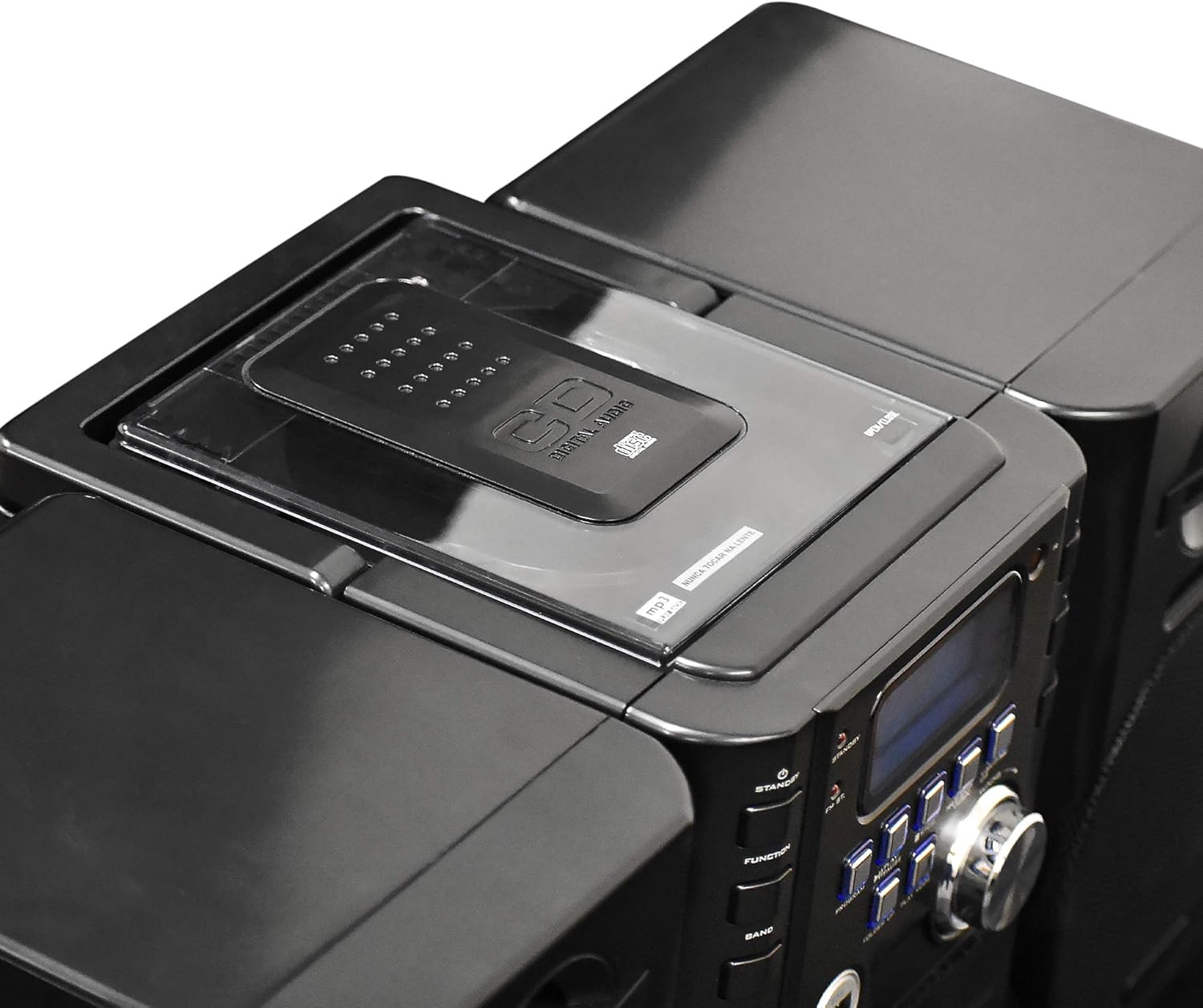
Foto: Top view of the Axess MS3912 Mini Entertainment System, showing the transparent lid of the top-loading CD compartment.
- Pịa Ọrụ to select CD mode.
- Mepee mkpuchi nke CD ahụ.
- Debe CD ka akụkụ akara ahụ chee ihu elu.
- Close the CD compartment cover. The unit will read the disc.
- Pịa KWURU/Kwụsịa ibido playback.
- Jiri ihe KPỌP /TA / ỌR SE bọtịnụ ka ịnyagharịa egwu.
- Pịa KWỤSỊ kwụsị ịkpọghachi.
4. USB/MP3 Player Operation

Foto: Akụkụ view of the Axess MS3912 Mini Entertainment System, highlighting the USB port and PC/AUX IN jack on the central unit.
- Fanye eriri USB n'ọdụ ụgbọ mmiri USB.
- Pịa Ọrụ ka ịhọrọ ọnọdụ USB.
- Ngwaọrụ ahụ ga-amalite ịkpọ MP3 na akpaghị aka files site na USB mbanye.
- Jiri KWURU/Kwụsịa, KWỤSỊ, na KPỌP /TA / ỌR SE bọtịnụ maka njikwa.
- Jiri Mpempe akwụkwọ to navigate between folders on the USB drive.
5. Ọrụ nke Igwe Kaseti/Ndekọ
- Pịa Ọrụ to select TAPE mode.
- Open the cassette deck door and insert a cassette tape.
- Pịa KWURU/Kwụsịa ibido playback.
- Jiri ihe Ọsọ n'iru na KWESỊRỊ buttons (often combined with SKIP/SEARCH buttons) to move through the tape.
- Pịa KWỤSỊ kwụsị ịkpọghachi.
- Edekọ: To record from CD, USB, or Radio, select the desired source, then press the Dekọọ button on the cassette deck (if available, or a combination of PLAY and RECORD). Ensure a blank, recordable cassette is inserted.
6. AM/FM Radio Operation
- Pịa Ọrụ ka ịhọrọ usoro RADIO.
- Pịa BAND to select AM or FM.
- Jiri ihe NKWUKWU mkpịsị aka ma ọ bụ KPỌP /TA / ỌR SE buttons to tune to your desired station.
- For FM, extend the telescopic antenna. For AM, rotate the unit for best reception.
- Ebe ndị a na-ahazigharị: Tune to a station, press Mmemme, wee jiri KPỌP /TA / ỌR SE iji họrọ nọmba edobere, wee pịa Mmemme ọzọ iji chekwaa.
7. Auxiliary Input (AUX) Use
Jikọọ ngwaọrụ ọdịyo dị n'èzí (dịka ọmụmaatụ, ekwentị mkpanaaka, ihe ọkpụkpọ MP3) na PC/AUX IN jack using a 3.5mm audio cable (not included). Press Ọrụ to select AUX mode. Audio from the external device will play through the MS3912 speakers.
8. Ojiji Ekweisi
Plug standard 3.5mm headphones into the Igwe ekwe ntị jack for private listening. The speakers will automatically mute when headphones are connected.
9. Remote Control
The included remote control allows for convenient operation of most functions from a distance. Ensure batteries are correctly inserted into the remote control.
Nlekọta
Na-ehicha Ngalaba
Wipe the exterior of the unit with a soft, dry cloth. Do not use abrasive cleaners, waxes, or solvents. For the CD lens, use a specialized CD lens cleaner disc. For the cassette deck, use a head cleaning cassette.
Nchekwa
If storing the unit for an extended period, remove all batteries to prevent leakage. Store in a cool, dry place away from direct sunlight and extreme temperatures.
Nchọpụta nsogbu
| Nsogbu | Ihe nwere ike ime | Ngwọta |
|---|---|---|
| Enweghị ike | A naghị agbanye eriri AC; Batrị agwụla ma ọ bụ tinye ezighi ezi. | Lelee njikọ eriri AC; Dochie batrị ma ọ bụ hụ na polarity ziri ezi. |
| Enweghị ụda | Volume too low; Headphones connected; Speakers not connected properly; Incorrect function selected. | Increase volume; Disconnect headphones; Check speaker connections; Select correct function (CD, USB, TAPE, AUX, RADIO). |
| CD na-awụli elu ma ọ bụ anaghị egwu egwu | CD is dirty or scratched; CD inserted incorrectly; Unit is vibrating. | Clean CD with a soft cloth; Reinsert CD label side up; Place unit on a stable surface. |
| Nnabata redio adịghị mma | FM antenna not extended; Unit position for AM is poor; Interference. | Fully extend FM antenna; Rotate unit for better AM reception; Move unit away from other electronic devices. |
| USB adịghị egwu | A naghị edozi draịva USB nke ọma; Anaghị ekwekọ na ya file types; USB drive not inserted fully. | Ensure USB is FAT32 format; Only MP3 files are supported; Reinsert USB drive. |
| Cassette recording not working | Tape is write-protected; No blank tape inserted; Incorrect source selected. | Check tape's write-protect tab; Insert a blank, recordable tape; Select the desired audio source (CD, USB, Radio, AUX). |
Nkọwapụta
| Njirimara | Nkọwapụta |
|---|---|
| Nọmba nlereanya | MS3912 |
| Ụdị | ASỤSỤ |
| Mpụta ike | Ndị na-ekwu okwu 12W |
| Isi Iyi Ike | AC 120V/60Hz or DC (C-size batteries, not included) |
| Ugboro Redio | AM/FM |
| Mgbasa ozi akwadoro | CD, MP3 (via USB), Cassette Tape |
| Ntinye | USB Port, 3.5mm AUX Input |
| Nsonaazụ | Jack ekweisi 3.5mm |
| Akụkụ (L x W x H) | 43.82 x 21.59 x 24.13 cm (17.25 x 8.5 x 9.5 inches approx.) |
| Ibu | 3.88 n'arọ (8.55 lbs ihe dị ka.) |


