1. Okwu mmalite
The AJA V2Analog is a compact, high-quality mini-converter designed to convert HD/SD-SDI signals to analog component or composite video. This device is engineered for professional video workflows, providing reliable signal conversion for various applications.
Its versatility allows for complete integration into any workflow, making it a valuable asset in any video production environment.

Foto 1: N'ihu na akụkụ view of the AJA V2Analog Mini-Converter, highlighting input and output ports.
2. Ozi nchekwa
Please read all safety instructions carefully before operating the device. Keep this manual for future reference.
- Etinyela igwe ahụ n'ime mmiri ozuzo, mmiri ozuzo, ma ọ bụ oke okpomọkụ.
- Gbaa mbọ hụ na ikuku ikuku dị mma iji gbochie ikpo oke ọkụ.
- Use only the specified power supply (5-20 VDC).
- Zere ịda ma ọ bụ itinye ihe ahụ n'ọnọdụ dị oke njọ.
- Tụtụ aka n'aka ndị ọrụ ruru eru.
3. Ntọala na Njikọ
Follow these steps to set up your AJA V2Analog converter:
- Njikọ ike: Connect the appropriate power supply (5-20 VDC) to the "POWER" input on the converter.
- Ntinye SDI: Connect your HD/SD-SDI source to the "SDI IN" BNC connector.
- Mmepụta Analog: Connect the Y/G, Pb/B, and Pr/R BNC outputs to your analog component or composite display/device. Ensure correct color component matching (Y/G for Luminance/Green, Pb/B for Blue Difference, Pr/R for Red Difference).
- Njikọ USB (Nhọrọ): For firmware updates or configuration, connect a USB cable from the "USB" port on the converter to your computer.
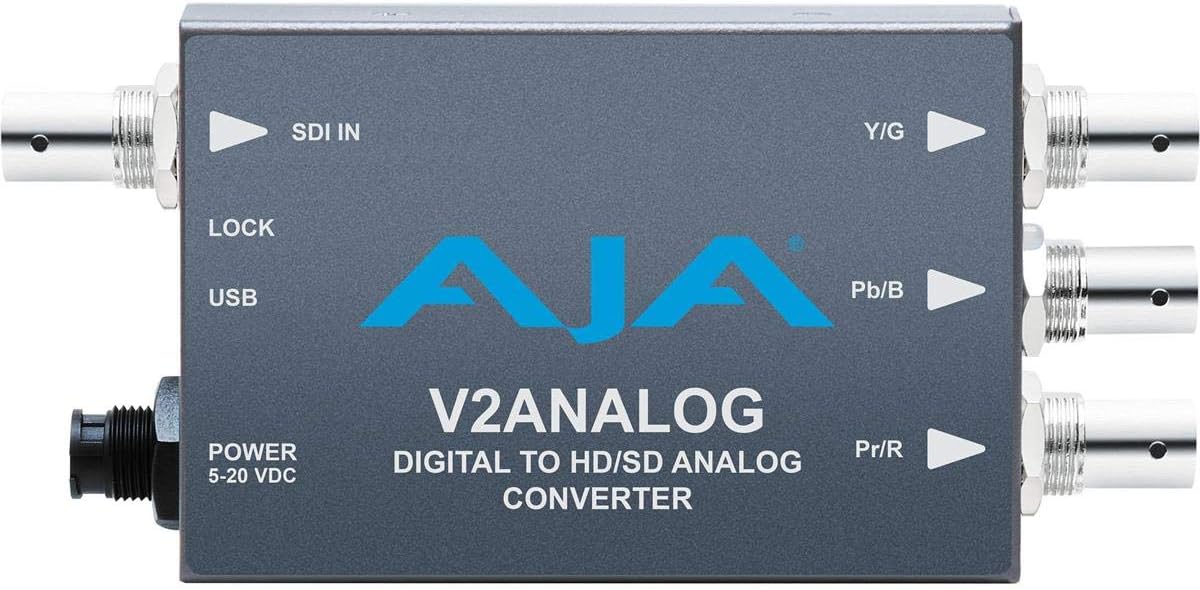
Foto 2: Top view of the AJA V2Analog Mini-Converter, illustrating port labels for connection.
4. Ntuziaka ọrụ
Once all connections are made, power on the device. The V2Analog will automatically detect the incoming SDI signal format and convert it to the appropriate analog output. The "LOCK" LED indicator will illuminate when a stable SDI signal is detected and locked.
4.1. Signal Compatibility
The V2Analog supports various HD and SD SDI formats. It is designed to convert these digital signals to standard analog component (YPbPr) or composite (CVBS) outputs.
4.2. Configuration (Advanced)
Advanced configuration options, such as output format selection or color space adjustments, may be available via AJA's Mini-Config software, accessible through the USB port. Refer to the AJA websaịtị maka ngwanrọ kachasị ọhụrụ na ntuziaka nhazi zuru ezu.
5. Nlekọta
The AJA V2Analog is designed for reliable operation with minimal maintenance. Follow these guidelines:
- Nhicha: Jiri ákwà dị nro ma kpọọ nkụ hichaa mpụta nke ngwaọrụ ahụ. Ejila ihe nhicha mmiri ma ọ bụ ihe nhicha aerosol.
- Mmelite femụwe: Lelee AJA mgbe niile website for firmware updates. Keeping the firmware current ensures optimal performance and compatibility.
- Nchekwa: Mgbe a naghị eji ya ruo ogologo oge, debe ya n'ebe dị jụụ ma kpọọ nkụ, ebe anwụ na-anaghị apụta kpọmkwem ma ọ bụ oke okpomọkụ.
6. Nchọpụta nsogbu
If you encounter issues with your V2Analog, refer to the following common problems and solutions:
| Nsogbu | Ihe nwere ike ime | Ngwọta |
|---|---|---|
| Enweghị mmepụta vidiyo | No power; Incorrect SDI input; Incorrect analog output connection; No signal lock. | Check power supply; Verify SDI source is active and connected to "SDI IN"; Ensure Y/G, Pb/B, Pr/R are connected correctly to display; Check "LOCK" LED. |
| Distorted or colored video | Incorrect analog output format; Loose connections. | Ensure display is set to correct input type (component/composite); Tighten all BNC connections. |
| "LOCK" LED not illuminated | No valid SDI input signal. | Verify SDI source is active and sending a compatible signal. Check SDI cable integrity. |
If the problem persists, contact AJA Technical Support for further assistance.
7. Nkọwapụta
| Njirimara | Nkọwa |
|---|---|
| Nlereanya | V2ANALOG |
| Ụdị | AJA |
| Ntinye | HD/SD-SDI (BNC) |
| Mpụta | Component (Y/G, Pb/B, Pr/R BNC), Composite (selectable) |
| Ụdị interface | USB, SDI, Component |
| Ike | 5-20 VDC |
| Akụkụ (L x W x H) | 7.2 x 5.7 x 4.2 sentimita asatọ |
| Ibu | 1.35 pound |
| UPC | 091131246023 |
8. Nkwado na akwụkwọ ikike
For technical support, product registration, or warranty information, please visit the official AJA website or contact their customer service department. Specific warranty terms and conditions may vary by region and purchase date.
AJA Websaịtị: www.aja.com


