1. Okwu mmalite
The Aduro Amplify LED Wireless Speaker, model BSP15, is a portable audio device designed for wireless music playback and hands-free calling. It features integrated LED lighting with multiple settings to enhance the audio experience. This manual provides instructions for the proper setup, operation, and maintenance of your speaker.
Kedu ihe dị na igbe:
- Aduro Amplify LED Wireless Speaker (BSP15)
- Ịchaji eriri
2. Ozi nchekwa
- Do not expose the speaker to water or moisture. This product is not water-resistant.
- Avoid extreme temperatures. Do not place near heat sources or in direct sunlight for extended periods.
- Do not attempt to disassemble or modify the speaker. This may void the warranty and cause damage.
- Jiri naanị eriri nchaji enyere ma ọ bụ ihe dabara adabara.
- Debe ebe ụmụaka na-apụghị iru.
3. Akụrụngwa Ngwaahịa
- Ikuku Njikọ: Connects to smartphones, tablets, and other Bluetooth-enabled devices.
- Easy-Touch Pairing: Simplifies the process of connecting to your device.
- Igwe okwu agbakwunyere: Allows for hands-free phone calls.
- Mpụta ụda dị elu: Delivers clear and loud audio.
- Multiple LED Settings: Offers various light modes to complement your audio experience.
4. Njikwa karịrịview
The Aduro Amplify speaker features intuitive controls located on the top panel for easy access to functions.
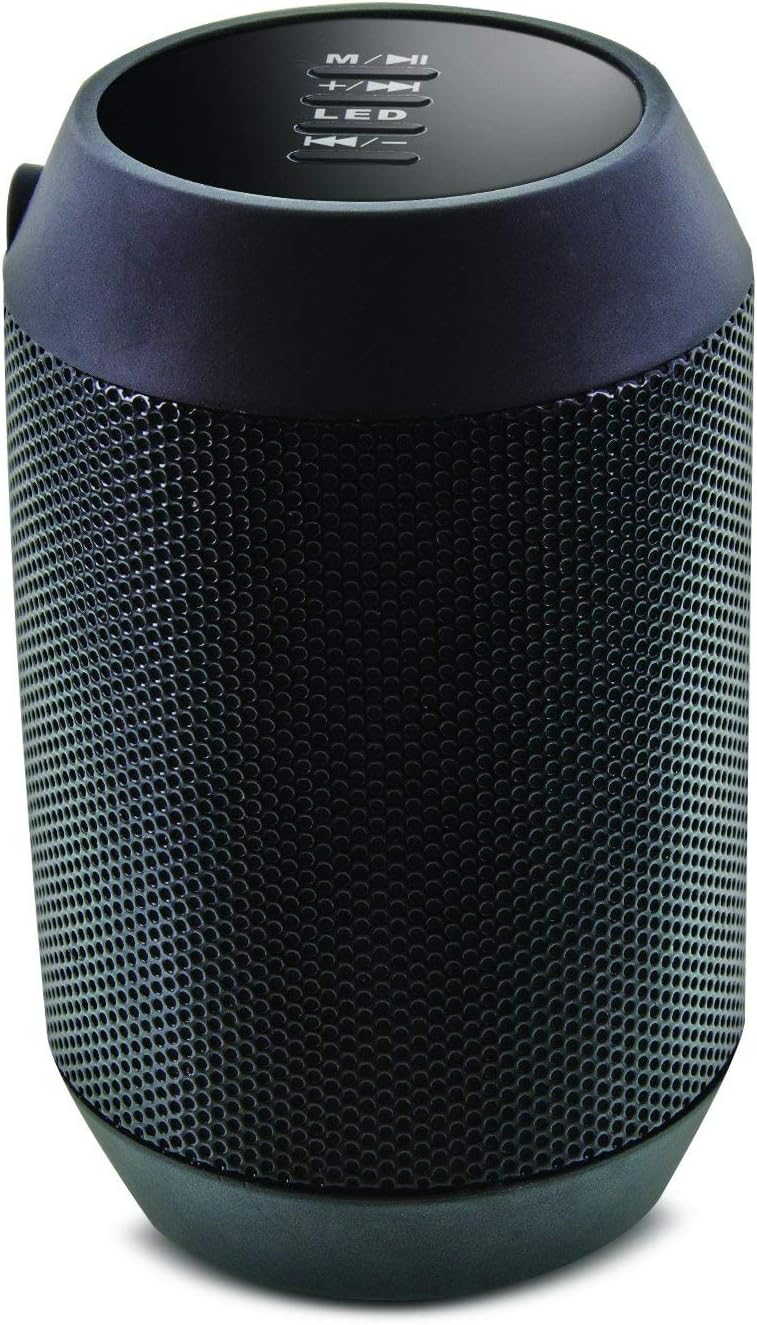
Foto: Top view of the Aduro Amplify speaker, highlighting the control panel. From top to bottom, buttons include: M/▶█ (Mode/Play/Pause), +/▶▶ (Volume Up/Next Track), LED (LED Mode Control), ◀◀/- (Volume Down/Previous Track).
- M/▶█ Button: Press to switch between modes (e.g., Bluetooth, AUX). Press and hold to power on/off. Short press to Play/Pause music.
- +/▶▶ Button: Short press to increase volume. Press and hold to skip to the next track.
- bọtịnụ LED: Press to cycle through different LED light modes.
- ◀◀/- Button: Short press to decrease volume. Press and hold to go to the previous track.
5. Nhazi ntuziaka
5.1 Ịchaji ọkà okwu
Before first use, fully charge the speaker. Connect the provided charging cable to the speaker's charging port and the other end to a USB power source (e.g., computer USB port, USB wall adapter). The LED indicator will show charging status and turn off or change color when fully charged.
5.2 Gbanyụọ/ gbanyụọ
- Iji gbanye: Pịa ma jide M/▶█ button for approximately 3 seconds until you hear an audible prompt or see the LED indicator light up.
- Iji gbanyụọ: Pịa ma jide M/▶█ button for approximately 3 seconds until you hear an audible prompt or the LED indicator turns off.
5.3 Njikọ Bluetooth
Iji jikọọ igwe okwu gị na ngwaọrụ Bluetooth nwere ike ịrụ ọrụ:
- Ensure the speaker is powered on and in Bluetooth pairing mode. The LED indicator will typically flash rapidly, indicating it is ready to pair.
- On your smartphone, tablet, or other device, navigate to the Bluetooth settings.
- Kwado Bluetooth wee chọọ ngwaọrụ dị.
- Select "Aduro BSP15" (or similar name) from the list of found devices.
- Once paired, the speaker will emit an audible confirmation, and the LED indicator will typically stop flashing and remain solid.
- Ọkà okwu ahụ ga-anwa ijikọghachi na ngwaọrụ ejikọtara ikpeazụ ozugbo mgbe agbanyere ya.
5.4 Wired Connection (AUX)
For devices without Bluetooth, you can use a 3.5mm audio cable (not included) to connect to the speaker's AUX input port. Once connected, the speaker should automatically switch to AUX mode. If not, press the M/▶█ bọtịnụ iji okirikiri gaa na ọnọdụ AUX.
6. Ntuziaka ọrụ
6.1 Na-akpọ Audio
- Gwuo/kwụsịtụ: Mkpirisi pịa M/▶█ bọtịnụ.
- Olu elu: Mkpirisi pịa +/▶▶ bọtịnụ.
- Olu ala: Mkpirisi pịa ◀◀/- bọtịnụ.
- Track na-esote: Pịa ma jide +/▶▶ bọtịnụ.
- Gara aga Track: Pịa ma jide ◀◀/- bọtịnụ.
6.2 Oku n'enweghị aka
When connected via Bluetooth, the speaker's built-in microphone allows for hands-free calling.
- Oku azaa: Mkpirisi pịa M/▶█ bọtịnụ mgbe oku mbata na-ada.
- Oku ngwụcha: Mkpirisi pịa M/▶█ bọtịnụ n'oge oku.
- Jụ oku: Pịa ma jide M/▶█ bọtịnụ mgbe oku mbata na-ada.
6.3 LED Light Settings
Pịa Ikanam button to cycle through the available light modes. The speaker offers various visual effects, including pulsating lights that react to music.
7. Nlekọta
7.1 Nhicha
Wipe the speaker with a soft, dry cloth. Do not use abrasive cleaners, alcohol, or other chemical solvents, as these may damage the surface.
7.2 Nchekwa
Mgbe a naghị eji ya ruo ogologo oge, debe igwe okwu ahụ n'ebe dị jụụ ma kpọọ nkụ, ebe anwụ na-anaghị apụta kpọmkwem ma ọ bụ oke okpomọkụ. A na-atụ aro ka ị chajịa batrị ahụ mgbe niile iji mee ka ọ dịgide ndụ.
8. Nchọpụta nsogbu
- Ọkà okwu agaghị agba ọkụ:
Ensure the battery is charged. Connect the charging cable and try again after a few minutes. - Enweghị ike ijikọ na ngwaọrụ Bluetooth:
Ensure the speaker is in pairing mode (LED flashing). Make sure Bluetooth is enabled on your device and it is within range (typically 10 meters/30 feet). Turn both devices off and on again, then try pairing. Ensure no other devices are currently connected to the speaker. - Enweghị ụda ma ọ bụ obere olu:
Check the volume levels on both the speaker and your connected device. Ensure the speaker is correctly paired or the AUX cable is fully inserted. If using AUX, ensure the correct mode is selected. - Ọkụ LED anaghị arụ ọrụ:
Press the LED button to cycle through modes. If still unresponsive, power cycle the speaker.
9. Nkọwapụta

Foto: Akụkụ view of the Aduro Amplify LED Wireless Speaker, showing its cylindrical design and speaker grille.
| Aha Nlereanya | BSP15 |
| Nọmba Nlereanya ihe | LU4-01-BSP15 |
| Ụdị | Aduro |
| Ihe onwunwe | Plastic |
| Ụdị Ọkà Okwu | Subwoofer |
| Atụmatụ pụrụ iche | Built-in Microphone, Portable |
| Teknụzụ Njikọta | Ikuku (Bluetooth) |
| Nkwukọrịta ikuku | Bluetooth |
| Ọnọdụ mmepụta ọdịyo | Stereo |
| Ike Nwepu kacha elu | 5 Watt |
| Usoro njikwa | Metụ aka |
| Akụkụ ngwaahịa | 6"D x 3.8"W x 3.5"H |
| Ibu Ibu | 6.7 ounces |
| Ọkwa Nguzogide mmiri | Ọ bụghị mmiri na-eguzogide |
| Isi Iyi Ike | Igwe ọkụ eletrik (maka ịchaji) |
10. Akwụkwọ ikike na nkwado
10.1 Akwụkwọ ikike nwere oke
This Aduro product is covered by a limited warranty against defects in materials and workmanship under normal use. The duration and terms of the warranty may vary. Please refer to the warranty card included with your purchase or contact Aduro customer support for specific details.
10.2 Nkwado ndị ahịa
For technical assistance, warranty claims, or product inquiries, please contact Aduro customer support. Contact information can typically be found on the manufacturer's official websaịtị ma ọ bụ na nkwakọ ngwaahịa.
Manufacturer: Aduro


