ADJ Ikon Profile Akwụkwọ ntuziaka Projector
Model: IKON PROFILE
Brand: ADJ Products
1. Nhazi
This section provides instructions for the initial setup of your ADJ Ikon Profile ihe ngosi.
1.1 Unboxing na nlele mbụ
Carefully remove the Ikon Profile projector from its packaging. Inspect the unit for any signs of damage during transit. Ensure all components listed in the 'What's in the Box' section are present.
- Ikon Profile Projector
1.2 Nwụnye anụ ahụ
Ikon Profile is designed for versatile mounting. It includes a yoke for convenient mounting to truss or walls. Ensure the mounting surface or structure can safely support the unit's weight of 7 pounds.

Ọgụgụ 1: Akụkụ ihu view of the ADJ Ikon Profile Projector, showing the lens and mounting yoke.
1.3 Electrical and DMX Connections
Connect the power cable to the 'POWER IN' port on the rear of the unit. For DMX control, connect a DMX cable from your DMX controller to the 'DMX IN' port. If linking multiple units, connect from 'DMX OUT' of the first unit to 'DMX IN' of the next.
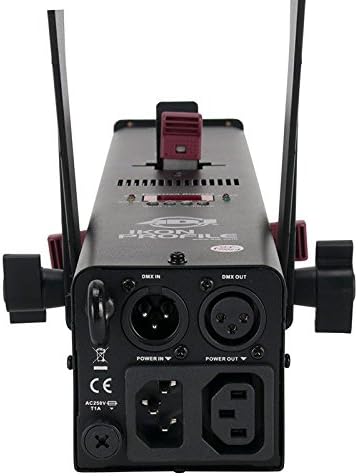
Figure 2: Rear panel of the Ikon Profile, illustrating the DMX and power connections.
2. Ntuziaka ọrụ
Ikon Profile offers various features for precise GOBO projection and lighting effects.
2.1 GOBO Projection
The unit comes with 4 metal GOBO patterns and one textured glass GOBO. These can be easily inserted into the drop-in GOBO slot to project different patterns. The GOBO size is 26.8mm with a viewable size of 24mm.

Figure 3: Included GOBO patterns for the Ikon Profile ihe ngosi.

Ọgụgụ 4: Ọpụample of star pattern projection.
2.2 Beam Angle and Focus Control
Ikon Profile features manual controls for adjusting the beam angle (15-30 degrees) and focus, allowing for sharp or soft-edged projections. Manual framing shutters enable projection in various four-sided shapes.
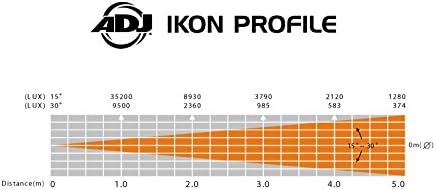
Figure 5: Beam angle adjustment diagram.
2.3 Nhọrọ njikwa
Ikon Profile can be controlled via DMX 512 (three channels), the UC IR Remote (sold separately), or the ADJ Airstream App (transmitter included).
2.4 Video ngosi ngwaahịa
Watch this video for a visual guide on the features and operation of the ADJ Ikon Profile projector, including manual framing, GOBO insertion, and color filter usage.
Video 1: ADJ Products Stage Light Unit, Multi-Colored (IKON PROFILE) demonstration.
3. Nlekọta
Regular maintenance ensures the longevity and optimal performance of your Ikon Profile ihe ngosi.
3.1 Nhicha
Periodically clean the exterior of the unit with a soft, dry cloth. Ensure the lens and GOBO slot are free from dust and debris to maintain clear projection. Always disconnect power before cleaning.
3.2 GOBO Replacement
To replace GOBOs, carefully open the GOBO slot cover and remove the existing GOBO. Insert the new GOBO, ensuring it is correctly seated, then close the cover. Handle GOBOs by their edges to avoid fingerprints or damage.
4. Nchọpụta nsogbu
This section addresses common issues you might encounter with your Ikon Profile ihe ngosi.
4.1 No Light Output
- Check power connection: Ensure the unit is properly plugged into a live power outlet.
- Verify power switch: Confirm the main power switch is in the 'ON' position.
- Check DMX signal: If using DMX, ensure a valid DMX signal is being received and the unit is addressed correctly.
4.2 Blurred Projection
- Adjust focus: Use the manual focus control to sharpen the projected image.
- Clean lens/GOBO: Dust or smudges on the lens or GOBO can cause blurring. Clean gently with a lint-free cloth.
4.3 Inconsistent Operation
- Check control mode: Ensure the unit is set to the correct control mode (e.g., DMX, Auto, Sound Active).
- Remote/App connection: If using UC IR Remote or Airstream App, verify proper connection and battery levels.
5. Nkọwapụta
| Njirimara | Nkọwa |
|---|---|
| Ụdị | Ngwaahịa ADJ |
| Nlereanya | IKON PROFILE |
| Ụdị isi iyi ọkụ | ọkụ Emitting Diode (LED) |
| Icha ọkụ | 32 Watts (7500K White LED) |
| Angle Beam | Adjustable 15-30 degrees |
| GOBO Size | 26.8mm (Viewable: 24mm) |
| Nhọrọ njikwa | DMX 512 (3 channels), UC IR Remote (sold separately), Airstream App |
| Isi Iyi Ike | Igwe ọkụ eletrik (AC 230V) |
| Ibu Ibu | 7 pound |
| Akụkụ ngwaahịa | 20.25 x 8.25 x 7.5 sentimita asatọ |
6. Akwụkwọ ikike na nkwado
The ADJ Ikon Profile projector is covered by a manufacturer's warranty. For specific warranty terms and conditions, please refer to the documentation included with your product or visit the official ADJ Products websaịtị.
For technical support, service, or additional product information, please contact ADJ Products customer service or visit their official store page:


