Okwu mmalite
This manual provides comprehensive instructions for the operation and maintenance of your ONN X5 HiFi Music Player. Please read this manual thoroughly before using the device to ensure proper functionality and to maximize your listening experience. The ONN X5 is designed to deliver high-fidelity audio playback in a compact and user-friendly format.
Ngwaahịa gafereview
The ONN X5 is a portable HiFi music player featuring a 2.0-inch TFT screen and an aluminum alloy shell. It supports a wide range of audio formats, including lossless files, and offers expandable storage via a MicroSD card.
Akụkụ ndị bụ isi:
- Ọdịda Ntụkwasị Obi Dị Elu: Supports WAV, FLAC, ALAC, APE, OGG lossless formats, and high-definition music up to 24Bit/192 KHz.
- Ngosipụta: 2.0-inch TFT screen (176x220 pixels) for clear navigation and information display.
- Nchekwa: 8GB internal memory, expandable up to 32GB with a MicroSD/TF card.
- Nhazi na-adịgide adịgide: Lightweight aluminum alloy body (60g) for enhanced durability and reduced external interference noise.
- Ngwa ngwa onye ọrụ: Intuitive key-based operation.
- Atụmatụ ndị ọzọ: FM Radio support.
- Batrị: High-capacity rechargeable lithium polymer battery.
- Nkwado ọtụtụ asụsụ: English, Russian, Korean, German, Japanese, Polish, Indonesian, Chinese.
Nhazi ngwaọrụ:

Foto: N'ihu view of the ONN X5 HiFi Music Player, showing its display and control buttons. The screen displays track information, audio quality (e.g., 24BIT, 88HHZ), and playback status.

Foto: Akụkụ view of the ONN X5 HiFi Music Player, illustrating the location of the MicroSD card slot on the right side of the device.

Foto: ihu na azụ view of the ONN X5 HiFi Music Player. The back panel shows the model number "X5" and branding information.
Melite
1. Ịchaji ngwaọrụ:
- Connect the ONN X5 to a power source using the provided USB cable.
- Ihe ngosi batrị dị na ihuenyo ga-egosi ọnọdụ chajị.
- A full charge is recommended before first use. The device uses a high-capacity rechargeable lithium polymer battery.
2. Inserting a MicroSD/TF Card:
- Locate the MicroSD/TF card slot on the side of the player.
- Gently insert a compatible MicroSD/TF card (up to 32GB) into the slot until it clicks into place.
- Hụ na etinyere kaadị ahụ nke ọma iji zere mmebi.

Image: Contents of the ONN X5 package, showing the player, USB charging cable, and other accessories. This illustrates the components available for setup.
3. Ịnyefe Egwu Files:
- Connect the ONN X5 to your computer using the USB cable.
- The device will appear as a removable storage drive.
- Dọrọ ma dobe ọdịyo ịchọrọ files (MP3, WMA, APE, FLAC, WAV, ALAC, OGG) into the player's internal storage or the MicroSD card.
- Wepụ ngwaọrụ ahụ na kọmputa gị n'enweghị nsogbu tupu ị kwụpụ eriri USB ahụ.
Ntuziaka ọrụ
Gbanyụọ/ Gbanyụọ:
- To power on, press and hold the power button (usually marked with a universal power symbol) until the screen illuminates.
- Iji gbanyụọ, pịa ma jide bọtịnụ ike ruo mgbe ngwaọrụ kwụsịrị.
Ntugharị:
The ONN X5 uses physical buttons for navigation. Refer to the device layout for button identification.
- Mpịakọta: Na-edozi olu.
- M (Menu): Accesses menus and confirms selections.
- Arrow Buttons (< / >): Navigate through menus, select tracks, or fast forward/rewind during playback.
- Bọtịnụ ike: Also functions as a play/pause button during music playback.
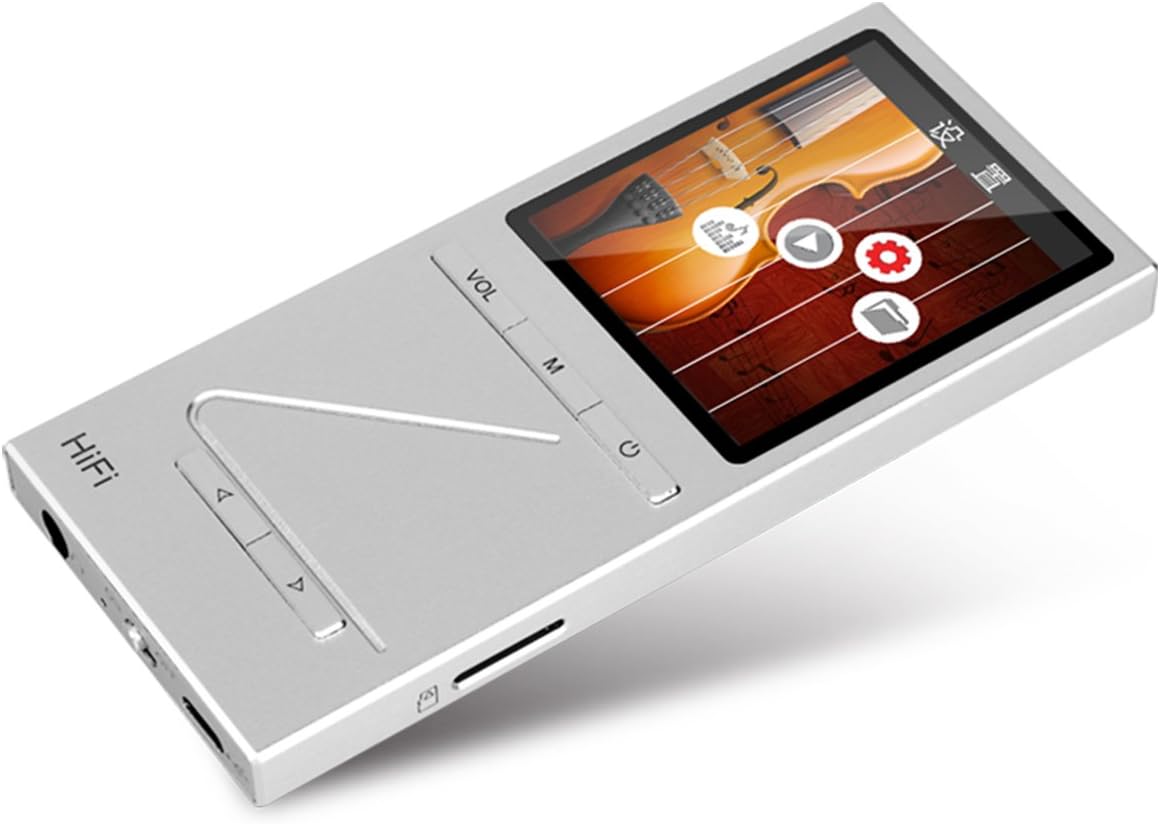
Foto: Angle view of the ONN X5 HiFi Music Player, showing the screen with various menu icons, indicating the user interface for navigation.
Nkpọghachi egwu:
- From the main menu, navigate to "Music" or "Files".
- Browse through your folders and select a track to play.
- Press the Power/Play button to start or pause playback.
- Use the arrow buttons to skip tracks or fast forward/rewind.
- Adjust volume using the VOL button.
Igwe Redio:
- Navigate to the "FM Radio" option from the main menu.
- Use the navigation buttons to scan for stations or manually tune to a frequency.
- Ensure headphones are connected as they often act as the antenna for FM radio.
Ntọala asụsụ:
Ngwaọrụ na-akwado ọtụtụ asụsụ. Ka ịgbanwe asụsụ:
- Go to "Settings" from the main menu.
- Select "Language" and choose your preferred language from the list (English, Russian, Korean, German, Japanese, Polish, Indonesian, Chinese).
Nlekọta
- Nhicha: Jiri akwa dị nro dị nro hichaa ngwaọrụ ahụ. Zere ndị na-ehicha mmiri mmiri ma ọ bụ ihe abrasive.
- Nchekwa: Debe onye ọkpụkpọ ahụ n'ebe dị jụụ ma kpọọ nkụ, ebe anwụ na-anaghị anwụ kpọmkwem na oke okpomọkụ dị oke njọ.
- Nlekọta batrị: Ka ịgbatị ndụ batrị ogologo, zere ịchaji batrị ugboro ugboro. Na-anya ngwaọrụ mgbe niile, ọbụlagodi na ọ naghị eji ya ogologo oge.
- Zere Mmetụta: The aluminum alloy shell provides durability, but avoid dropping the device or subjecting it to strong impacts.
- Mkpughe mmiri: Ngwaọrụ a anaghị amị mmiri. Zere ka mmiri ghara iru gị ala ma ọ bụ oke iru mmiri.
Nchọpụta nsogbu
Ngwaọrụ agaghị agba ọkụ:
- Ensure the battery is charged. Connect the device to a power source and allow it to charge for at least 30 minutes before attempting to power on again.
- Try performing a hard reset (if applicable, refer to manufacturer's specific instructions for hard reset, usually involves holding power button for an extended period).
Enweghị ụda:
- Check the volume level and ensure it is not muted.
- Verify that headphones or external speakers are properly connected.
- Test with different headphones or audio output devices.
- Gbaa mbọ hụ na Audio file is not corrupted or in an unsupported format.
Cannot Transfer Files:
- Ensure the USB cable is securely connected to both the player and the computer.
- Try a different USB port on your computer or a different USB cable.
- Verify that the device is recognized by your computer as a removable drive.
- Check if the MicroSD card is properly inserted and not full.
Screen Not Responding / Frozen:
- Press and hold the power button for approximately 10-15 seconds to force a restart.
- If the issue persists, ensure the battery is charged.
Nkọwapụta
| Njirimara | Nkọwa |
|---|---|
| Nọmba nlereanya | X5 |
| Ụdị | ONN |
| Nha ihuenyo | 2.0 Inches TFT (176x220 PIXEL) |
| Ebe nchekwa | 8 GB |
| Nchekwa enwere ike ịgbasa | MicroSD/TF card up to 32 GB |
| Ụdị ọdịyo akwadoro | APE, FLAC, ALAC, WAV, WMA, OGG, MP3 (up to 24Bit/192 KHz) |
| Teknụzụ Njikọta | USB, ihe mgbakwunye |
| Njirimara Pụrụ Iche | Redio FM |
| Batrị | 1 Lithium Ion battery required (High-capacity rechargeable lithium polymer) |
| Ibu Ibu | 7 ounces (approx. 0.2 Kilograms) |
| Akụkụ ngwugwu | 6.21 x 4.7 x 1.2 sentimita asatọ |
| Onye nrụpụta | SZTZWY |
Akwụkwọ ikike na nkwado
For detailed warranty information, please refer to the warranty card included with your purchase or visit the official ONN product support website. For technical assistance or further inquiries, please contact ONN customer support through their official channels.


