1. Okwu mmalite
This manual provides essential information for the safe and efficient operation of your NEC X555UNS 55-inch 1080p LED TV. Please read these instructions thoroughly before installation and use, and retain them for future reference.
The NEC X555UNS is designed for professional signage applications, particularly for building video walls, offering superior off-angle viewing and minimal color shift due to its S-IPS panel technology. It supports 24/7 operation with advanced heat management and localized dimming for improved brightness uniformity.

Image: The NEC X555UNS 55-inch LED TV displaying vibrant, colorful content, showcasing its high-quality visual output.
2. Ozi nchekwa
Na-agbaso ihe ndị a na-eme mgbe niile iji gbochie mmebi ngwaahịa ahụ ma hụ na onye ọrụ ahụ nwere nchekwa:
- Ensure the product is installed by qualified personnel.
- Akwụsịla oghere ikuku.
- Zere ikpughe akụkụ ahụ na mmiri ozuzo ma ọ bụ mmiri.
- Jiri naanị eriri ike enyere na nkeji ahụ ma ọ bụ ihe nnọchi kwesịrị ekwesị.
- Kwupu ike tupu ihicha ma ọ bụ ije ozi.
- Do not attempt to repair the unit yourself. Refer all servicing to qualified service personnel.
3. Ihe ngwugwu
Chọpụta na ihe niile dị na ngwugwu:
- NEC X555UNS 55-inch LED TV Unit
- Guzo
- Ụdọ ọkụ
- Njikwa anya
- Akwụkwọ ntuziaka (akwụkwọ a)

Foto: N'ihu view of the NEC X555UNS 55-inch LED TV, showing its sleek, dark display panel when powered off.
4. Ntọala na nwụnye
4.1 Nwụnye anụ ahụ
The NEC X555UNS is designed for video wall applications. Ensure proper mounting hardware is used for secure installation. The unit weighs approximately 81 pounds (36.7 kg).
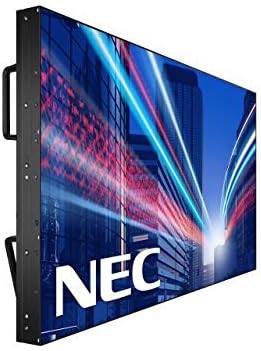
Foto: Akụkụ view of the NEC X555UNS 55-inch LED TV, highlighting its robust construction and integrated handles for easier installation in video wall configurations.
4.2 Njikọta
Connect your video sources and network cables to the appropriate ports on the display. The X555UNS offers various connectivity options:
- HDMI: Maka ntinye vidiyo na ọdịyo nkọwa dị elu.
- DVI-D: Maka ntinye vidiyo dijitalụ.
- LAN: For network control and content distribution.
- DisplayPort: Supports UHD pass-through for daisy-chaining multiple displays in a video wall setup.
- OPS Slot: Allows for integration of single board computers.
For video wall configurations, utilize the DisplayPort for UHD daisy-chaining to achieve a high-resolution display across the entire wall.
4.3 Ike mbido
- Connect the power cord to the display and a suitable power outlet.
- Press the power button on the display or remote control.
- The display will power on and show the NEC logo.
- Use the on-screen menu to configure initial settings such as language, input source, and display mode.
Nke Auto ID feature can simplify installation time, especially in multi-display setups, by reducing configuration steps to a single button press.
5. Ntuziaka ọrụ
5.1 Basic Arụmọrụ
Use the remote control or the buttons on the display to navigate the on-screen menu (OSD). Adjust settings such as brightness, contrast, color temperature, and input source.
5.2 Ngosipụta atụmatụ
- S-IPS Panel Technology: Provides excellent off-angle viewing and minimizes color shift, making it ideal for public viewing and video walls.
- Direct LED Backlighting with Localized Dimming: Enhances brightness uniformity and achieves a higher dynamic contrast ratio.
- Ọrụ 24/7: Designed for continuous use with advanced thermal protection, internal temperature sensors, and fan-based cooling.
- 700 cd/m² Brightness: Ensures clear visibility even in brightly lit environments.
6. Nlekọta
6.1 Na-ehicha ihe ngosi
Iji hichaa ihuenyo ahụ, jiri nwayọọ hichaa ya na akwa dị nro na-enweghị lint. Maka akara isi ike, dampJiri mmiri ma ọ bụ ihe nhicha ihuenyo dị nro, nke na-anaghị afụ ụfụ kpuchie ákwà ahụ ntakịrị. Efesala mmiri ozugbo na ihuenyo ahụ.
6.2 Nlekọta n'ozuzu
- Debe ihe ngosi ahụ na mpaghara ikuku nke ọma ka ọ ghara ikpo ọkụ.
- Avoid placing heavy objects on the display.
- Na-elele njikọ eriri mgbe niile iji hụ na ha dị nchebe.
7. Nchọpụta nsogbu
If you encounter issues with your NEC X555UNS, refer to the following common problems and solutions:
| Nsogbu | Ihe nwere ike ime | Ngwọta |
|---|---|---|
| Enweghị ike | Akwụsịla eriri ọkụ eletrik; Ọkụ eletrik nwere nsogbu. | Lelee njikọ eriri ọkụ eletrik; Nwalee ebe a na-enye ọkụ eletrik site na iji ngwaọrụ ọzọ. |
| Enweghị onyonyo | Ahọpụtara isi mmalite ntinye na-ezighi ezi; eriri vidiyo ahụ gbapụrụ agbapụ ma ọ bụ nwee nsogbu. | Select correct input source; Check video cable connections. |
| Ogo Foto adịghị mma | Resolution mismatch; Display settings incorrect. | Adjust resolution on source device; Calibrate display settings (brightness, contrast). |
If the problem persists, contact NEC customer support.
8. Nkọwapụta
| Njirimara | Nkọwa |
|---|---|
| Aha Nlereanya | X555UNS |
| Nha ihuenyo | 55 sentimita asatọ |
| Ngosipụta teknụzụ | LED, S-IPS Panel |
| Mkpebi | 1080p (HD zuru ezu) |
| Akụkụ akụkụ | 16:9 |
| Ọnụego ume ọhụrụ | 60 Hz |
| Icha ọkụ | 700 cd/m² (nits) |
| Njikọta | HDMI, DVI-D, LAN, DisplayPort |
| Atụmatụ pụrụ iche | Flat, S-IPS Panel, Auto ID, UHD Daisy Chain, OPS Slot, 24/7 Operation, Advanced Thermal Protection |
| Akụkụ ngwaahịa | 54 x 12 x 34 inch (ihe dị ka) |
| Ibu Ibu | 81 pound (ihe dị ka.) |
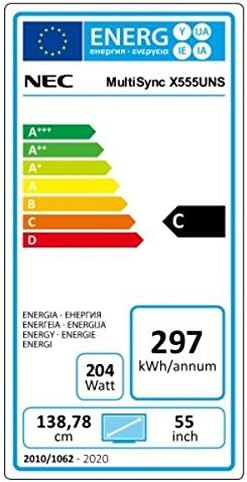
Image: Energy efficiency label for the NEC MultiSync X555UNS, showing energy consumption details and efficiency class.
9. Akwụkwọ ikike na nkwado
Maka ozi gbasara akwụkwọ ikike na nkwado teknụzụ, biko gaa na NEC gọọmentị website or contact your local NEC representative. Keep your purchase receipt as proof of purchase.
Akụrụngwa dị n'ịntanetị: Gaa leta www.necdisplay.com for product documentation, drivers, and support contact information.
Nkwado ndị ahịa: For direct assistance, please contact NEC customer service.


