1. Okwu mmalite
The Edifier P180 is a stereo earbud headset designed for clear audio and convenient communication. Featuring an inline microphone and control, it offers a comfortable listening experience for various devices.

Figure 1: Edifier P180 Wired Earbud Headset
2. Kedu ihe dị na Igbe ahụ
- Edifier P180 Earbud Headset
- USB
3. Atụmatụ igodo
- Classic Comfort: Ergonomic design for comfortable wear without irritating the ear canal.
- Ogo ụda mara mma: Equipped with 16mm neodymium magnetic monomers for high-fidelity audio playback.
- Integrated Microphone and Control: 3.5mm stereo earphones with a built-in microphone and remote button for mobile phone communication.
- Ọrụ: Single button control for picking up/hanging up calls and skipping songs (device dependent for iOS/Android).
- Nhazi na-adịgide adịgide: Constructed with quality materials for longevity.

Figure 2: Ergonomic design for comfortable fit.
4. Nhazi
- Ịkwapu: Carefully remove the Edifier P180 headset from its packaging.
- Nyochaa: Check the earbuds and cable for any visible damage.
- Jikọọ: Insert the 3.5mm audio jack into the headphone port of your compatible device (smartphone, tablet, computer, etc.). Ensure the jack is fully inserted for proper audio and microphone function.
- Ọkwa: Place the earbuds comfortably in your ears. The ergonomic design is intended to rest well without causing irritation.
5. Ntuziaka ọrụ
The Edifier P180 features an inline control button for easy management of calls and music playback.
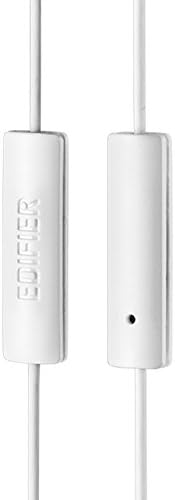
Figure 3: Inline microphone and control button.
- Oku na-aza/Nkwụsị: Press the control button once to answer an incoming call. Press it again to end an active call.
- Playing/Pausing Music: Press the control button once to play or pause audio playback.
- Egwu egwu: Double-press the control button to skip to the next track. Triple-press to go to the previous track (functionality may vary by device and operating system).
- Enyemaka Olu: Long-press the control button to activate your device's voice assistant (e.g., Siri, Google Assistant).
Vidiyo 1: Ngwaahịa a kwụsịrịview of the Edifier P180 Classic Earbud Headsets, demonstrating features and usage.
6. Nlekọta
- Nhicha: Gently wipe the earbuds and cable with a soft, dry cloth. Avoid using harsh chemicals or abrasive materials.
- Nchekwa: When not in use, store the headset in a clean, dry place, away from extreme temperatures and direct sunlight. Avoid tangling the cable.
- Zere mmiri mmiri: Do not expose the headset to water or excessive moisture, as this can damage the internal components.
7. Nchọpụta nsogbu
- Enweghị ụda:
- Hụ na etinyere jakị 3.5mm nke ọma n'ime ọdụ ọdịyo nke ngwaọrụ gị.
- Lelee ntọala olu ngwaọrụ gị.
- Test the earbuds with another device to rule out a device-specific issue.
- Igwe okwu anaghị arụ ọrụ:
- Gbaa mbọ hụ na etinyere jakị 3.5mm nke ọma.
- Check your device's microphone input settings.
- Nwalee igwe okwu ahụ site na iji ngwaọrụ ma ọ bụ ngwa ọzọ.
- Audio na-adịte aka:
- Check the cable for any kinks or damage.
- Hụ na eriri olu ahụ dị ọcha ma ghara inwe ihe ruru unyi.
8. Nkọwapụta
| Njirimara | Nkọwapụta |
|---|---|
| Nọmba nlereanya | P180 |
| Nzaghachi ugboro ugboro | 20 Hz - 20,000 Hz |
| Jack ekweisi | 3.5mm ọkpụrụkpụ |
| Teknụzụ Njikọta | Ekwenyere |
| Ibu Ibu | 1.76 ounce (gram 50) |
| Akụkụ ngwaahịa | 2.01 x 5.59 x 0.91 sentimita asatọ |
| Ihe onwunwe | Neodymium |
| Ụdị njikwa | Inline Control Button |
| Mgbochi | 32 ohms |
| Njikwa mkpọtụ | Mwepu ụda |
9. Akwụkwọ ikike & Nkwado
The Edifier P180 headset is backed by a 1-afọ akwụkwọ ikike. For any support inquiries or warranty claims, please refer to the contact information provided with your purchase or visit the official Edifier websaịtị.


