1. Ngwaahịa gafereview
The ORIENT NEO70's Horizon Solar Chronograph Watch (Model WV0021TY) is a sophisticated timepiece designed for reliability and precision. Featuring a solar-powered quartz movement and chronograph functionality, this watch offers both style and practical utility. Its robust construction and 30-meter water resistance make it suitable for daily wear.

Image 1: The ORIENT NEO70's Horizon Solar Chronograph Watch displayed on a wrist, illustrating its size and appearance when worn.
2. Atụmatụ
- Solar Powered Movement: Utilizes light energy for operation, eliminating the need for regular battery replacement.
- Ọrụ Chronograph: Allows for precise measurement of elapsed time.
- 30-Meter Water Resistance: Suitable for daily use, such as hand washing or light rain. Not suitable for swimming or diving.
- Ngosipụta analog: Classic multi-hand analog display with Arabic numerals for clear time reading.
- Ihe owuwu na-adịgide adịgide: Features a round case and a silver-colored bracelet-type band.
3. Nhazi
3.1 Nchaji izizi
Before initial use, or if the watch has stopped, expose the watch dial to a bright light source (natural sunlight is ideal) for several hours. This will charge the internal solar cell and allow the watch to operate correctly. Avoid placing the watch in direct sunlight for extended periods in extremely hot environments to prevent damage.
3.2 Ịtọ oge na ụbọchị
- Dọpụta okpueze ahụ: Gently pull the crown (located on the side of the watch) to the second click position.
- Tọọ oge: Rotate the crown to move the hour and minute hands to the desired time. Ensure the AM/PM is correctly set if your watch has a 24-hour indicator or date change mechanism.
- Tọọ ụbọchị: Push the crown back to the first click position. Rotate the crown to adjust the date. Avoid setting the date between 9 PM and 3 AM, as this may interfere with the automatic date change mechanism.
- Pịa okpueze ahụ: Once the time and date are set, push the crown back into its normal position against the watch case to start the watch and ensure water resistance.

Foto 2: Akụkụ view of the watch, highlighting the crown and chronograph pushers used for setting time, date, and operating the chronograph.
4. .rụ ọrụ
4.1 Using the Chronograph Function
The chronograph allows you to measure elapsed time. The watch features two pushers, typically located at 2 o'clock (A) and 4 o'clock (B).
- Malite: Press pusher A to start the chronograph. The chronograph second hand will begin to move.
- Kwụsị: Press pusher A again to stop the chronograph. The elapsed time will be indicated by the chronograph hands.
- Tọgharia: After stopping, press pusher B to reset all chronograph hands to their zero positions.
- Oge nkewa (ọ bụrụ na ọdabara): Some chronographs allow for split time measurement. Consult the full manufacturer's manual for advanced features.
5. Nlekọta
5.1 Na-ehicha elekere gị
Ịsacha elekere gị mgbe niile na-enyere aka idobe ọdịdị na ogologo oge nke elekere gị.
- For the case and metal band, wipe gently with a soft, dry cloth.
- Maka unyi isi ike, ntakịrị damp enwere ike iji akwa mee ihe, na-esote akwa akọrọ.
- Zere iji kemịkalụ na-ehicha ihe, ihe mgbaze, ma ọ bụ ihe ndị na-emebi ihe, n'ihi na ihe ndị a nwere ike imebi njedebe elekere ahụ.
5.2 Water Resistance Precautions
Your watch is rated for 30-meter water resistance. To maintain this rating:
- Ensure the crown is always pushed in completely against the case.
- Do not operate the crown or pushers while the watch is wet or submerged in water.
- Avoid exposing the watch to sudden temperature changes (e.g., hot shower followed by cold water), which can compromise seals.
- Water resistance is not a permanent condition and may decrease over time due to wear and tear. Have the water resistance checked periodically by a qualified service center.
5.3 Solar Cell Care
To ensure continuous operation, expose the watch to light regularly. If the watch is stored in darkness for extended periods, it may stop. A full charge can last for several months in darkness, but frequent exposure to light is recommended.
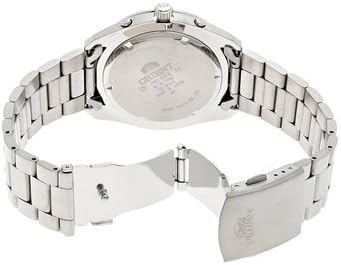
Image 3: The reverse side of the watch, showing the case back with engraved details and the clasp mechanism of the metal bracelet.
6. Nchọpụta nsogbu
- Elekere akwụsịla: Expose the watch to bright light for several hours to recharge the solar cell. If it still does not start, contact customer support.
- Oge ezighi ezi: Refer to Section 3.2 to reset the time. Ensure the crown is fully pushed in after setting.
- Date is incorrect: Refer to Section 3.2 to reset the date. Remember to adjust the date manually for months with fewer than 31 days.
- Chronograph hands do not reset to zero: If the chronograph hands are misaligned, consult the full manufacturer's manual for specific calibration instructions, or contact customer support.
- Condensation inside the watch: This indicates a potential breach in water resistance. Immediately contact a service center for inspection.
7. Nkọwapụta
| Njirimara | Nkọwapụta |
|---|---|
| Ụdị | ORIENT |
| Nọmba nlereanya | WV0021TY (Manufacturer Ref: spi0010092459) |
| Ụdị ngosi | Multi-hand Analog |
| Ntughari | Quartz (Solar Powered) |
| Atụmatụ pụrụ iche | Chronograph, Arabic Numerals |
| Mmiri Nguzogide | 30 Meters (Daily Life Waterproof) |
| Ụdị ikpe | Gburugburu |
| Dayameta ikpe | 42 mm |
| Ngwa igwe | Stainless Steel (Bracelet Type) |
| Agba agba | Ọlaọcha |
| Obosara band | 22 mm |
| Otu afọ | Okenye |
8. Akwụkwọ ikike na nkwado
This ORIENT watch is covered by a manufacturer's warranty against defects in materials and workmanship. The specific terms and duration of the warranty may vary by region and retailer. Please retain your proof of purchase for warranty claims.
For warranty service, technical support, or to inquire about authorized service centers, please refer to the warranty card included with your purchase or visit the official ORIENT website. Do not attempt to open or repair the watch yourself, as this may void the warranty.

Image 4: The product box for the ORIENT watch, typically containing the watch, warranty information, and additional documentation.