1. Okwu mmalite
This manual provides detailed instructions for the proper use and maintenance of your Hidizs AP100 High-Resolution Audio Player. Please read this manual thoroughly before operating the device to ensure optimal performance and longevity. The Hidizs AP100 is designed to deliver exceptional audio quality for a superior listening experience.
2. Ngwaahịa gafereview
Familiarize yourself with the physical components and controls of your AP100 player.

Foto 2.1: N'ihu view of the Hidizs AP100 High-Resolution Audio Player in white, displaying a music playback screen with track information and playback controls.

Foto 2.2: Akụkụ-akụkụ view of the Hidizs AP100 in white and black, illustrating the available color options for the device.
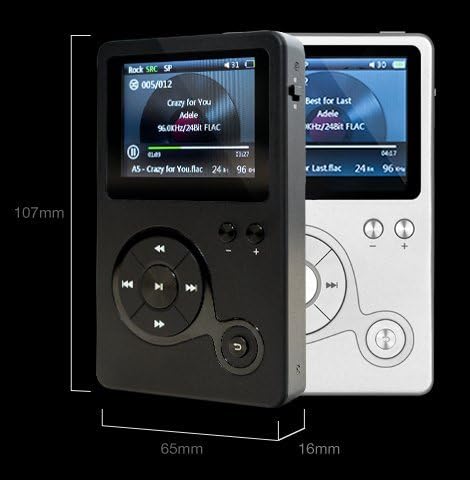
Foto 2.3: Physical dimensions of the Hidizs AP100 player, indicating a height of 107mm, width of 65mm, and thickness of 16mm.

Foto 2.4: Close-up of the bottom edge of the AP100, highlighting the Micro USB port for charging and data transfer, MicroSD card slot for expandable storage, Coaxial Input (COAX IN), and Coaxial Output (COAX OUT).

Foto 2.5: Close-up of the top edge of the AP100, showing the power switch, 3.5mm headphone output, 3.5mm line output, SRC (Sample Rate Converter) button, and EQ (Equalizer) button.
3. Nhazi
3.1 Ịchaji ngwaọrụ
Before first use, fully charge the AP100. Connect the included Micro USB cable to the Micro USB port on the bottom of the player and the other end to a USB power adapter (not included) or a computer's USB port. The charging indicator will illuminate during charging and turn off when complete.
3.2 Ịtinye kaadị MicroSD
The AP100 has 8GB of internal storage. To expand storage, insert a MicroSD card (up to 128GB, not included) into the MicroSD card slot on the bottom of the device. Ensure the card is inserted correctly until it clicks into place. To remove, gently push the card in until it springs out.
3.3 Transferring Music Files
Connect the AP100 to your computer using the Micro USB cable. The device will appear as a removable disk drive. You can then drag and drop your audio files (e.g., FLAC, WAV, MP3) into the internal storage or the MicroSD card folder. Disconnect safely after transfer.
3.4 Ejikọ ekweisi
Plug your headphones into the 3.5mm headphone output jack located on the top of the device. For connecting to an external amplifier or speaker system, use the 3.5mm line output jack.
4. Ntuziaka ọrụ
4.1 Gbanyụọ ma ọ bụ gbanyụọ
To power on the device, slide the power switch located on the top edge to the 'On' position. To power off, slide it back to the 'Off' position.
4.2 Nsoro ụzọ
The AP100 features a circular navigation pad and dedicated buttons:
- Bọtịnụ etiti: Play/Pause, Select.
- Akụ Elu/Ala/Aka Ekpe/Aka Aka Nri: Navigate menus, skip tracks, fast forward/rewind.
- Bọtịnụ olu (+/-): Gbanwee olu nkwughachi.
- Bọtịnụ SRC: Cycles through Sample Rate Converter settings.
- EQ bọtịnụ: Accesses equalizer presets and custom settings.
4.3 Ịkpọ egwu
- Navigate to the 'Music' or 'Browser' option from the main menu.
- Select your desired storage (internal or MicroSD card).
- Browse through folders, artists, albums, or tracks.
- Press the center button to select and play a track.
4.4 Njikwa olu
Use the dedicated '+' and '-' buttons on the front panel to increase or decrease the playback volume. Adjust to a comfortable listening level to prevent hearing damage.
4.5 Supported Audio Formats
The Hidizs AP100 supports a wide range of audio formats, including but not limited to: FLAC, WAV, MP3, APE, WMA, ALAC, and AAC.
5. Nlekọta
5.1 Nhicha
Wipe the device with a soft, dry, lint-free cloth. Do not use liquid cleaners or abrasive materials, as they may damage the screen or casing.
5.2 Nlekọta batrị
To prolong battery life, avoid fully discharging the battery frequently. If storing the device for an extended period, charge it to approximately 50% and store in a cool, dry place.
5.3 Mmelite ngwanrọ
Periodically check the official Hidizs website for firmware updates. Updates can improve performance, add features, or fix bugs. Follow the instructions provided with the update package carefully.
6. Nchọpụta nsogbu
- Device will not power on: Ensure the battery is charged. Connect to a power source and try again. Check the power switch position.
- Enweghị ụda: Check headphone connection. Ensure volume is not set to zero. Test with different headphones. Verify the audio file adịghị emerụ emerụ.
- Cannot read MicroSD card: Ensure the card is inserted correctly. Try reinserting the card. Format the card on a computer (backing up data first) and try again. Ensure the card capacity is supported (up to 128GB).
- Ngwaọrụ kwụsịrị ma ọ bụ ọ naghị anabata ya: Press and hold the power button for 10-15 seconds to force a restart. If the issue persists, perform a factory reset (refer to device settings, note this will erase all data).
- Files not appearing after transfer: Gbaa mbọ hụ files are in a supported format. Disconnect and reconnect the device to the computer. Refresh the music library on the player if an option is available.
7. Nkọwapụta
| Njirimara | Nkọwapụta |
|---|---|
| Ụdị | Ndị Hidiz |
| Nọmba nlereanya | AP100 |
| Akụkụ ngwaahịa | 2.56 x 0.63 x 4.21 sentimita (65 x 16 x 107 mm) |
| Ibu Ibu | 5 ounce (0.31 pound) |
| Internal Memory Storage | 8 GB |
| Nchekwa enwere ike ịgbasa | MicroSD card slot (up to 128 GB) |
| Nha ihuenyo | 2.4 sentimita asatọ |
| Teknụzụ Njikọta | Aux (3.5mm Headphone Out, 3.5mm Line Out, Coaxial In, Coaxial Out), Micro USB |
| Njirimara Pụrụ Iche | Hi-Res Audio Nkpọghachi |
| Ụdị ọdịyo akwadoro | FLAC, WAV, MP3, APE, WMA, ALAC, AAC, etc. |
| Onye nrụpụta | Ụgwọ nke ụlọ ọrụ Hidizs Technology Company Limited |
| Agba | Ọcha |
8. Akwụkwọ ikike na nkwado
For warranty information and technical support, please refer to the warranty card included with your product or visit the official Hidizs websaịtị. Debe nnata nzụta gị dị ka ihe akaebe nke ịzụrụ maka nkwupụta ikike.


