1. Okwu mmalite
Thank you for choosing the Knightsbridge JB003 IP68 16A 3-Way Cable Connector. This manual provides essential information for the safe and effective installation, operation, and maintenance of your connector. Please read these instructions carefully before use and retain them for future reference.
The JB003 is designed to provide a robust, waterproof, and dustproof electrical connection for outdoor and demanding environments, ensuring reliable power distribution for various applications.
2. Ozi nchekwa
Ịdọ aka ná ntị: Electrical installations should only be carried out by a qualified electrician or competent person. Always disconnect the power supply before commencing any electrical work.
- Ensure the power supply is isolated before installation or maintenance.
- Chọpụta na voltage and current ratings of the connector are suitable for your application (450V, 16A max).
- Use appropriate cable types and sizes (H07RNF 3G 0.75mm² - 4.0mm² with outer diameter 5mm-14mm) to ensure a secure and watertight seal.
- Do not exceed the specified torque for tightening glands and terminals.
- The IP68 rating ensures protection against dust and continuous immersion in water under specified conditions. Ensure all seals are correctly seated and glands are tightened to maintain this rating.
- Inspect the connector periodically for any signs of damage, wear, or water ingress.
3. Ngwaahịa gafereview
The Knightsbridge JB003 is a high-quality, durable 3-way, 3-pole inline T-connector designed for outdoor electrical connections. Its robust construction and IP68 rating make it ideal for harsh environments.

Figure 1: Knightsbridge JB003 IP68 3-Way Cable Connector. This image shows the black T-shaped connector with yellow sealing rings, designed for robust outdoor electrical connections.
Ezubere iji:
This connector is suitable for various outdoor electrical applications, including:
- Garden lighting systems
- Outdoor power distribution for features like ponds or Christmas lights
- General outdoor cable extensions and junctions
4. Nkọwapụta
| Ụdị | Knightsbridge |
| Nọmba nlereanya | JB003 (Item Model Number: JBAV003) |
| Ogo dị ugbu a | 16 Amps |
| Voltage Ntụle | 450 volts |
| Ogo IP | IP68 (2 bar) |
| Ọnụọgụ nke sekit | 3 (3-pole connection) |
| Oke dayameta USB | Min 5mm, Max 14mm |
| Compatible Cable Type | H07RNF 3G 0.75mm² - 4.0mm² |
| Ihe onwunwe | PA99, UL94-V0 (Plastic) with Silicon Sealing Gasket |
| Ọnụ ụzọ | Screw Fix, Copper Nickel Plated |
| Akụkụ (L x W x H) | Ihe ruru. 3.23 x 3.7 x 1.26 sentimita (82 x 94 x 32 mm) |
| Ibu | Ihe dị ka ounce 1.76 (50g) |
| Asambodo | CE, EN50262 |

Figure 2: Dimensional drawing of the Knightsbridge JB003 connector, showing key measurements in millimeters.
5. Ihe ngwugwu
Ngwungwu ahụ kwesịrị ịnwe ihe ndị a:
- 1 x Knightsbridge JB003 IP68 16A 3-Way Cable Connector
- 1 x Akwụkwọ ntuziaka (akwụkwọ a)
6. Nwụnye na Ntọala
Follow these steps carefully to ensure a safe and watertight connection. Refer to the installation diagram (Figure 3) for visual guidance.
- Kwadebe eriri: Ensure the power supply is disconnected. For each cable, strip the outer insulation to expose the inner conductors (Live, Neutral, Earth). Strip approximately 8-10mm of insulation from the ends of the individual conductors.
- Kwụpụ njikọ: Unscrew the glands and locking nuts from each of the three entry points of the connector. Remove the internal seals and set them aside.
- Insert Cables: Thread each cable through the gland, locking nut, and then through the corresponding entry point of the connector body. Ensure the cable passes through the internal seals correctly.
- Jikọọ waya: Insert the stripped ends of the Live, Neutral, and Earth wires into their respective screw terminals within the connector body. Ensure no stray strands are present and that the insulation reaches the terminal block. Tighten the terminal screws securely.
- Reassemble and Seal: Push the internal seals firmly into place around the cables at each entry point. Screw the locking nuts back onto the connector body, ensuring they are tight. Finally, screw the glands onto the locking nuts.
- Tighten Glands: Using an appropriate tool, tighten the glands to a torque of 2.5 Nm. This is crucial for maintaining the IP68 waterproof rating. Do not overtighten.
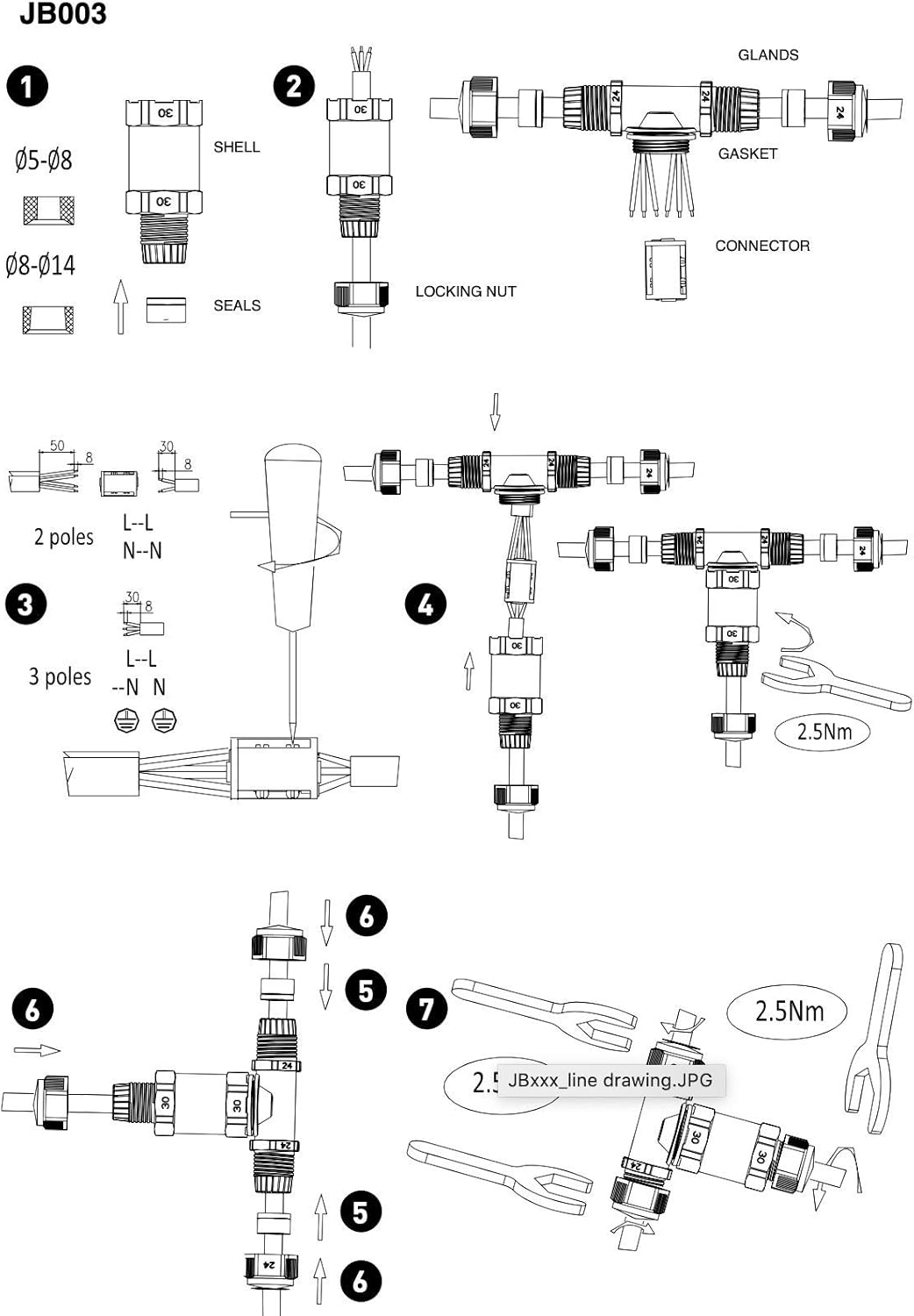
Figure 3: Step-by-step installation diagram for the Knightsbridge JB003 connector, illustrating cable preparation, wire connection, and sealing procedures.

Figure 4: The Knightsbridge JB003 connector installed in an outdoor garden setting, demonstrating its use for connecting multiple cables in a T-configuration.
7. Ọrụ
Once correctly installed and sealed, the Knightsbridge JB003 connector operates passively by providing a secure and waterproof junction for your electrical cables. There are no user-operable controls or settings on the connector itself. Ensure the connected electrical system is functioning as intended after installation.
8. Nlekọta
To ensure the longevity and continued performance of your Knightsbridge JB003 connector, consider the following maintenance guidelines:
- Nyocha oge: Regularly inspect the connector for any visible signs of damage, cracks, or degradation of the seals. Check for any signs of water ingress or corrosion.
- Gland Tightness: Periodically check that all cable glands remain securely tightened to maintain the IP68 rating.
- Nhicha: If necessary, clean the exterior of the connector with a damp akwa . Ejila ihe nchacha abrasive ma ọ bụ ihe mgbaze.
- Ihe na-akpata gburugburu: While designed for outdoor use, extreme environmental conditions (e.g., prolonged exposure to direct sunlight, extreme temperatures) can affect material lifespan.
9. Nchọpụta nsogbu
If you encounter issues with your Knightsbridge JB003 connector, consider the following:
- No Power to Connected Device:
- Ensure the main power supply is active.
- Verify that all wire connections within the connector are secure and terminals are tightened.
- Check for continuity in the cables leading to and from the connector.
- Signs of Water Ingress:
- Kwụpụ ike ozugbo.
- Carefully disassemble the connector and inspect all seals for proper seating and damage.
- Ensure the cable outer diameter falls within the specified range (5mm-14mm) for effective sealing.
- Reassemble, ensuring glands are tightened to the specified torque (2.5 Nm).
- Njikọ ndị rụrụ arụ:
- Kwupu ike.
- Open the connector and re-tighten all screw terminals.
- Ensure sufficient conductor length is inserted into the terminals.
If problems persist, consult a qualified electrician or contact Knightsbridge customer support.
10. Akwụkwọ ikike na nkwado
Specific warranty details for the Knightsbridge JB003 connector may vary by region and retailer. Please refer to your purchase documentation or the Knightsbridge official websaịtị maka ozi akwụkwọ ikike kachasị ọhụrụ.
For technical support, product inquiries, or warranty claims, please contact your retailer or Knightsbridge customer service directly. Contact information can typically be found on the manufacturer's webngwugwu saịtị ma ọ bụ ngwaahịa.


