1. Okwu mmalite
The SilverStone SX500-LG is a high-performance 500W power supply unit (PSU) designed for small form factor (SFF) systems. Featuring the SFX-L form factor, 80 PLUS Gold efficiency, and a fully modular cable design, it provides stable and reliable power delivery. Its lengthened design accommodates a larger 120mm fan for quieter operation compared to standard SFX PSUs. This manual provides essential information for the proper installation, operation, and maintenance of your SX500-LG power supply.

Image 1.1: The SilverStone SX500-LG power supply shown with its retail packaging.
2. Ozi nchekwa
Please read and follow these safety guidelines carefully to prevent injury or damage to your equipment.
- Emeghela PSU casing. Oke voltages are present inside, even when the unit is unplugged. Opening the casing will void the warranty and poses a severe electrical shock hazard.
- Ensure the power supply is disconnected from the AC outlet before installation, removal, or cleaning.
- Install the PSU in a well-ventilated area. Do not block any ventilation openings.
- This product is designed for computer use only. Do not use it for any other purpose.
- Keep the unit away from water, moisture, and extreme temperatures.
- Use only the modular cables provided with this power supply. Using incompatible cables may cause damage.
3. Ihe ngwugwu
Chọpụta na ihe niile dị na ngwugwu gị:
- SilverStone SX500-LG Power Supply Unit
- Modular Cable Set (including 24-pin ATX, 4+4-pin EPS, 6+2-pin PCIe, SATA, and Peripheral connectors)
- ATX Adapter Bracket
- Ịkwanye kposara
- Igwe ọkụ AC
- Akwụkwọ ntuziaka onye ọrụ

Image 3.1: The retail box for the SilverStone SX500-LG, indicating the product and its features.
4. Atụmatụ
The SilverStone SX500-LG power supply offers several key features for optimal performance and compatibility:
- Silent Running 120mm Fan: Equipped with an intelligent semi-fanless operation mode for reduced noise.
- SFX-L Form Factor Support: Designed for compact systems, with an included ATX adapter bracket for compatibility with larger cases.
- Ịrụ ọrụ dị elu: 80 PLUS Gold certification, achieving 87% to 90% efficiency at 20% to 100% loading.
- 100% Modular Cables: Allows for clean cable management and improved airflow within the PC case.
- Flexible Flat Cables: All cables are designed with flexible flat arrays for easier routing and installation.
- +12V Single Rail Design: Provides stable and powerful output for high-end components.
- Active PFC: Active Power Factor Correction for improved power efficiency and reduced harmonic distortion.

Foto 4.1: N'ihu view of the SilverStone SX500-LG power supply, highlighting the 120mm fan and modular connectors.
5. Ntọala na nwụnye
Follow these steps to properly install your SilverStone SX500-LG power supply.
5.1. Nkwadebe
- Unpack the power supply and all accessories.
- Gbaa mbọ hụ na agbanyụrụ sistemụ kọmputa gị kpamkpam wee wepụ ya na oghere mgbidi.
- If replacing an existing PSU, carefully remove it from your system.
5.2. Ịkwanye PSU
The SX500-LG is an SFX-L form factor PSU. It can be installed directly into SFX-L compatible cases or into ATX cases using the included ATX adapter bracket.
- For SFX-L Cases: Align the PSU with the mounting holes in your case and secure it with the provided screws.
- Maka ikpe ATX: Attach the ATX adapter bracket to the SX500-LG, then mount the assembly into your ATX case's PSU bay using the appropriate screws.

Foto 5.1: Elu view of the SilverStone SX500-LG, showing the fan and mounting screw locations.
5.3. Ijikọ eriri Modular
Connect only the necessary cables to your components. The fully modular design allows for better cable management.
- Jikọọ eriri ATX 24-pin na motherboard gị.
- Connect the 4+4-pin EPS (CPU) cable to your motherboard's CPU power connector.
- For graphics cards, connect the 6+2-pin PCIe cables as required.
- Connect SATA power cables to your SSDs/HDDs and optical drives.
- Connect Peripheral (Molex) cables for any other components requiring them.
- Gbaa mbọ hụ na njikọ niile echekwara ma nọrọkwa nke ọma.

Image 5.2: The modular cable connection panel on the SilverStone SX500-LG, showing various ports for different cable types.
5.4. Njikọ ike
- Ensure the power switch on the back of the PSU is in the 'OFF' (0) position.
- Connect the AC power cord to the PSU's inlet and then to a wall outlet.

Foto 5.3: N'azụ view of the SilverStone SX500-LG, featuring the AC power inlet and the main power switch.
6. Ntuziaka ọrụ
6.1. Ịgbanye / gbanyụọ
- After all connections are made, flip the power switch on the back of the PSU to the 'ON' (I) position.
- Press your computer's power button to start the system.
- To power off, shut down your operating system normally, then flip the PSU power switch to 'OFF' (0) if desired for complete power disconnection.
6.2. Semi-Fanless Operation
The SX500-LG features an intelligent semi-fanless operation. The 120mm fan will remain off under low load conditions to provide silent operation. As the system load and internal temperature increase, the fan will automatically spin up to dissipate heat. This design optimizes for quietness while ensuring adequate cooling when needed.
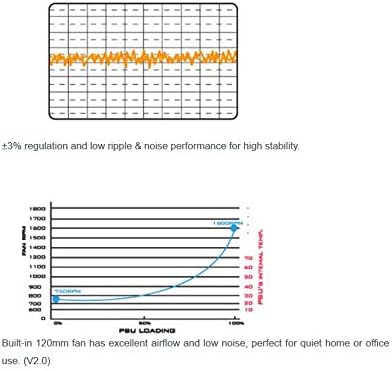
Image 6.1: Graphs illustrating the fan speed curve relative to PSU loading and the voltage regulation stability of the power supply.
7. Nlekọta
Nlekọta kwesịrị ekwesị na-eme ka ọ dị ogologo ndụ na ịrụ ọrụ kacha mma nke ọkụ eletrik gị.
- Debe ikuku ikuku ọcha: Ensure that the intake and exhaust vents of the PSU are not obstructed to allow for proper airflow.
- Nhicha uzuzu: Periodically clean dust from the PSU's fan and vents using compressed air. Do this with the system powered off and unplugged.
- Akwụsịla: Never attempt to open the power supply unit. There are no user-serviceable parts inside, and doing so can be dangerous and will void your warranty.
8. Nchọpụta nsogbu
If you encounter issues with your SX500-LG, refer to the following common troubleshooting steps:
- Enweghị ike:
- Lelee ma ọ bụrụ na ejikọrọ eriri ọkụ AC na PSU na oghere mgbidi.
- Ensure the power switch on the back of the PSU is in the 'ON' (I) position.
- Verify all modular cables are correctly and firmly connected to the PSU and your components.
- Jiri ngwaọrụ ọzọ nwalee oghere mgbidi ahụ iji gosi na o nwere ike.
- Akwụsịghị / Mkpọka Sistemu:
- Gbaa mbọ hụ na ike sistemụ gị agafeghị ikike 500W nke PSU.
- Lelee maka ikuku ikuku dị mma n'ime akpa PC gị iji gbochie ikpo oke ọkụ.
- Verify all components are correctly installed and seated.
- Mkpọtụ na-adịghị ahụkebe:
- The SX500-LG operates in a semi-fanless mode; the fan may not spin at low loads. This is normal.
- If the fan is spinning and making excessive noise, ensure no cables or obstructions are interfering with the fan blades.
- If a persistent, abnormal noise (e.g., grinding, high-pitched whine) occurs, contact SilverStone support.
If problems persist after following these steps, contact SilverStone customer support for further assistance.
9. Nkọwapụta
Detailed technical specifications for the SilverStone SX500-LG power supply:
| Njirimara | Nkọwapụta |
|---|---|
| Nọmba nlereanya | SST-SX500-LG |
| Ụdị | Nkume Silver |
| Ụdị Ihe | SFX-L |
| Mpụta Wattage | 500 Watt |
| Asambodo arụmọrụ | 80 gbakwunyere ọla edo |
| Usoro jụrụ oyi | Air (120mm fan, semi-fanless) |
| Modul | Modul zuru ezu |
| Ntinye AC | 100-240V / 7A / 50-60Hz |
| DC Output (+3.3V) | 20A |
| DC Output (+5V) | 20A |
| DC Output (+12V) | 40A |
| DC Output (-12V) | 0.3A |
| DC Output (+5Vsb) | 3A |
| Max. Power (+3.3V & +5V) | 105W |
| Max. Power (+12V) | 480W |
| Max. Power (-12V) | 3.6W |
| Max. Power (+5Vsb) | 15W |
| Akụkụ ngwaahịa (LxWxH) | 5.12 x 4.92 x 2.5 sentimita (130 x 125 x 63.5 mm) |
| Ibu Ibu | 3.09 pound (gram 1400) |
| Ụbọchị mbụ dị | Jenụwarị 16, 2015 |

Image 9.1: The specification label on the SilverStone SX500-LG power supply, detailing electrical ratings and certifications.
10. Akwụkwọ ikike na nkwado
SilverStone Technology provides a limited warranty for its products. For specific warranty terms, duration, and conditions applicable to your region, please refer to the warranty card included with your product or visit the official SilverStone Technology websaịtị.
For technical support, troubleshooting assistance beyond this manual, or inquiries regarding replacement parts, please visit the SilverStone Technology support page or contact their customer service department. Contact information can typically be found on the official SilverStone websaịtị: www.silverstonetek.com


