1. Okwu mmalite
The Bogen 1126-BG-UTI1 is a single-zone paging controller designed to integrate a paging system with a telephone system. It provides a reliable interface for making announcements over a public address system from a telephone. This manual provides detailed instructions for the proper installation, operation, and maintenance of your Bogen paging controller.
2. Ozi nchekwa dị mkpa
Please read and understand all safety instructions before operating this device. Retain this manual for future reference.
- Isi mmalite ike: Jikọọ nkeji ahụ naanị na volta ike akọwapụtaratage.
- Mmiri: Ewepụla unit ahụ na mmiri ozuzo ma ọ bụ mmiri.
- Igwe ikuku: Gbaa mbọ hụ na ikuku ikuku dị mma. Akwụsịla oghere ikuku.
- Ije ozi: Nye ndị ọrụ ọrụ ruru eru ọrụ niile. Anwala ịrụzi ngwaahịa a n'onwe gị.
- Nhicha: Jiri akwa kpọrọ nkụ hichaa naanị.
3. Ihe ngwugwu
Chọpụta na ihe niile dị na ngwugwu:
- Bogen 1126-BG-UTI1 Single Zone Paging Controller Unit
- Ihe nkwụnye ọkụ
- Akwụkwọ ntuziaka (akwụkwọ a)
- Mounting Hardware (if applicable)
4. Ngwaahịa gafereview
The Bogen 1126-BG-UTI1 features various ports and indicators for seamless integration and operation. Familiarize yourself with the unit's components before installation.
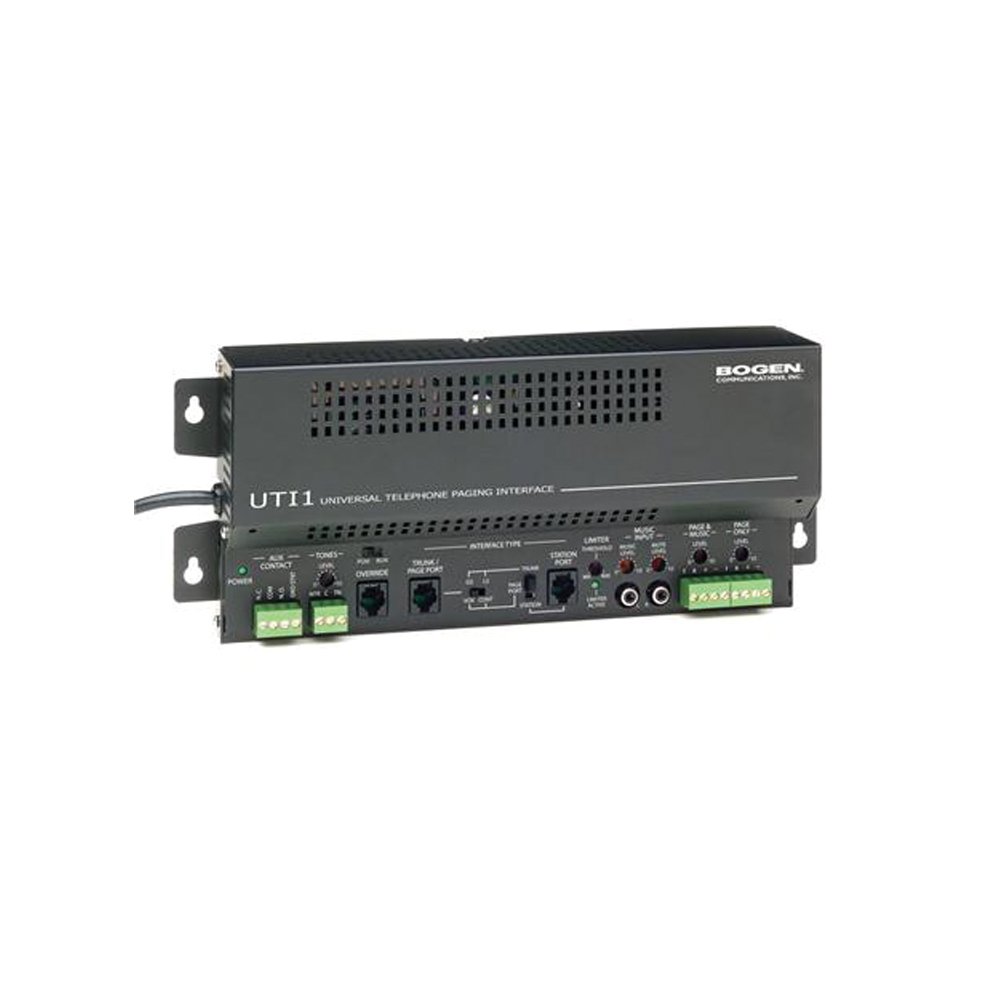
Foto 1: N'ihu view of the Bogen Single Zone Paging Controller. This image displays the main unit, highlighting its compact design and essential connection points for audio input and output, as well as power. The various ports and indicators are visible, crucial for understanding the device's functionality and connectivity.
4.1 Ogwe ihu
- Igwe ọkụ ọkụ: Na-egosi ọkwa ike.
- Njikwa Ọkwa ntinye: Adjusts the audio input sensitivity.
- Njikwa Ọkwa mmepụta: Na-agbanwe olu mmepụta ọdịyo.
4.2 Ogwe azụ
- Telephone Line Input: RJ-11 jack for connecting to the telephone system.
- Mmepụta ọdịyo: RCA or screw terminal connections for connecting to an ampna -emegharị ihe.
- Ntinye ike: Jack for connecting the power adapter.
- MOH Output: Music On Hold output (if applicable).
5. Ntọala na nwụnye
Follow these steps to properly install your paging controller:
- Ịkwanye: Choose a suitable location for the controller, away from excessive heat or moisture. Secure the unit using appropriate mounting hardware if desired.
- Connect to Telephone System: Connect an RJ-11 cable from your telephone system's paging port or a suitable analog extension to the "Telephone Line Input" on the controller. Consult your telephone system's manual for specific paging port details.
- Jikọọ na Ampntughari: Connect the "Audio Output" of the paging controller to an available input on your paging amplifier. Ensure correct polarity if using screw terminals.
- Njikọ Ike: Plug the provided power adapter into the "Power Input" jack on the controller, then plug the adapter into a standard electrical outlet. The Power LED should illuminate.
- Initial Level Adjustment: Start with the Input Level and Output Level controls set to their minimum positions.
6. Ntuziaka ọrụ
Once installed, the Bogen 1126-BG-UTI1 is ready for operation.
6.1 Making a Page
- From a telephone connected to the system, dial the designated paging access code or extension.
- Wait for the confirmation tone or voice prompt from the paging controller.
- Speak clearly into the telephone handset to make your announcement.
- Hang up the telephone when finished.
6.2 Ịgbanwe Ọkwa Ọdịyo
- Ọkwa ntinye: Slowly increase the "Input Level Control" until the paging audio is clear and distortion-free. If the audio is too loud or distorted, decrease this level.
- Mmepụta Ọkwa: Adjust the "Output Level Control" to achieve the desired volume through the paging speakers. This should be done in conjunction with the ampnjikwa olu nke lifier.
7. Nlekọta
The Bogen 1126-BG-UTI1 is designed for reliable operation with minimal maintenance.
- Nhicha: Periodically wipe the unit with a soft, dry cloth. Do not use liquid cleaners or aerosols.
- Igwe ikuku: Ensure that ventilation openings remain clear of dust and debris.
- Njikọ: Occasionally check all cable connections to ensure they are secure.
8. Nchọpụta nsogbu
If you encounter issues, refer to the following troubleshooting guide:
| Nsogbu | Ihe nwere ike ime | Ngwọta |
|---|---|---|
| No power indicator light. | Power adapter not connected or faulty; no power at outlet. | Check power adapter connection. Verify outlet has power. Test with another adapter if available. |
| No paging audio. | Incorrect telephone system connection; amplifier off or muted; audio levels too low. | Verify telephone line and audio output connections. Ensure amplifier is on and not muted. Adjust Input and Output Level controls. |
| Paging audio is distorted. | Input or output levels set too high. | Reduce Input Level and/or Output Level controls. |
| Cannot access paging from telephone. | Incorrect paging access code; telephone system not configured correctly. | Confirm the correct paging access code with your telephone system administrator. Verify telephone system programming. |
If the problem persists after attempting these solutions, contact Bogen technical support.
9. Nkọwapụta
| Njirimara | Nkọwa |
|---|---|
| Nọmba nlereanya | 1126-BG-UTI1 |
| Ụdị | Bogen |
| Akụkụ ngwugwu | 15 x 9 x 7 sentimita asatọ |
| Ibu Ibu | 6.7 pound |
| ASIN | B00P1AOL2C |
| Onye nrụpụta | Bogen |
| Paging Zones | Mpaghara Otu |
| Ndakọrịta | Telephone systems with analog paging port or extension |
10. Akwụkwọ ikike na nkwado
Bogen products are designed for durability and performance. For specific warranty information, please refer to the warranty card included with your product or visit the official Bogen website. Technical support is available to assist with any questions or issues you may encounter.
- Nkwado n'ịntanetị: Gaa leta www.bogen.com/support for FAQs, documentation, and contact information.
- Ozi mkpọtụrụ: Refer to the Bogen website for current telephone numbers and email addresses for technical assistance.


