Okwu mmalite
This manual provides comprehensive instructions for the setup, operation, and maintenance of your Genius SW-2.1 355 Speaker System. Please read this manual thoroughly before using the product to ensure proper functionality and to maximize your listening experience.
Ozi nchekwa
Debe ihe nchekwa nchekwa ndị a iji gbochie mmebi ngwaọrụ ma ọ bụ imerụ onwe gị ahụ:
- Do not expose the speakers to water or moisture.
- Zere itinye igwe okwu n'akụkụ ebe okpomọkụ ma ọ bụ n'anwụ kpọmkwem.
- Hụ na ikuku na-efegharị nke ọma gburugburu subwoofer ahụ iji gbochie oke okpomọkụ.
- Jiri naanị ihe nkwụnye ọkụ ewepụtara na unit ahụ.
- Anwala imepe ma ọ bụ rụzie ihe niile dị na ngalaba ahụ n'onwe gị. Nye ndị ọrụ ruru eru ọrụ niile.
- Debe ebe ụmụaka na-apụghị iru.
Ihe ngwugwu
Chọpụta na ihe niile dị na ngwugwu:
- 1 x Subwoofer unit
- 2 x Satellite ọkà okwu
- 1 x Audio input cable (3.5mm stereo jack)
- 1 x nkwụnye ọkụ
- Akwụkwọ ntuziaka onye ọrụ 1 x (akwụkwọ a)
Ngwaahịa gafereview
The Genius SW-2.1 355 Speaker System consists of a subwoofer and two satellite speakers designed to deliver clear audio and powerful bass for your multimedia needs.
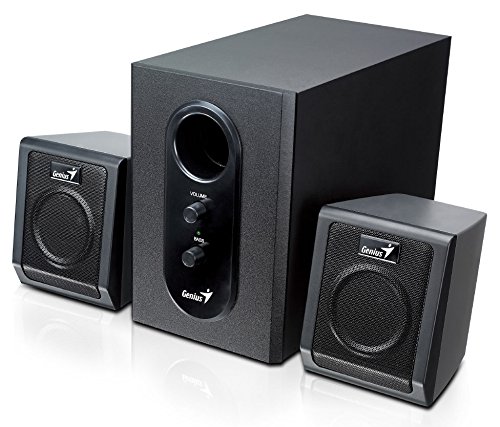
This image displays the Genius SW-2.1 355 Speaker System. It features a central, larger subwoofer unit with volume and bass control knobs on its front panel, and two smaller satellite speakers positioned on either side. All components are black.
Ngwa:
- Subwoofers: The main unit housing the bass driver and control panel.
- Ndị na-ekwu okwu Satellite: Two compact speakers for mid-range and high-frequency audio.
- Ogwe njikwa: Located on the subwoofer, featuring Volume and Bass adjustment knobs.
Melite
- Ndokwa ndị ọkà okwu: Place the subwoofer on the floor or a sturdy surface. Position the satellite speakers on either side of your listening area, facing towards you for optimal stereo separation.
- Ndị na-ejikọta okwu Satịlaịtị: Connect the cables from the two satellite speakers to the corresponding output jacks on the rear of the subwoofer unit. Ensure a secure connection.
- Connecting Audio Source: Connect one end of the 3.5mm audio input cable to the "Audio In" jack on the subwoofer. Connect the other end to the audio output jack (e.g., headphone jack) of your computer, MP3 player, smartphone, or other audio source.
- Ike ijikọ: Plug the power adapter into the DC input jack on the subwoofer. Then, plug the power adapter into a standard electrical outlet.
- Ike Na: Turn on the speaker system using the power switch, usually integrated with the volume knob.
Ọrụ
- Gbanyụọ/ gbanyụọ yana njikwa olu: The main knob on the subwoofer controls both power and overall volume. Rotate clockwise to turn on and increase volume; rotate counter-clockwise to decrease volume and turn off.
- Ndozi Bass: Use the "Bass" knob on the subwoofer to adjust the level of low-frequency sound. Rotate clockwise to increase bass, and counter-clockwise to decrease it, according to your preference.
- Audio Source Volume: For optimal sound quality, set the volume on your audio source (computer, phone, etc.) to about 75% and then use the speaker system's volume control for fine adjustments.
Nlekọta
- Nhicha: Use a soft, dry cloth to clean the surfaces of the speakers. Do not use liquid cleaners or abrasive materials.
- Nchekwa: Ọ bụrụ na ị na-echekwa okwu ndị ahụ ruo ogologo oge, wepụ ha na ọkụ ma debe ha n'ebe dị jụụ ma kpọọ nkụ.
- Njikwa USB: Ensure cables are not tangled or pinched to prevent damage.
Nchọpụta nsogbu
| Nsogbu | Ihe nwere ike ime | Ngwọta |
|---|---|---|
| Enweghị ụda |
|
|
| Ụda agbagọ |
|
|
| Bass adịghị ike |
|
|
Nkọwapụta
| Njirimara | Nkọwa |
|---|---|
| Aha Nlereanya | SW-2.1 355 |
| Ụdị Ọkà Okwu | 2.1 Channel Multimedia Speaker System (Bookshelf, Satellite, Subwoofer) |
| Mkpokọta ike mmepụta | 10 Watts RMS (5W Subwoofer + 2.5W x 2 Satellites) |
| Ihe onwunwe | Wood (Subwoofer) |
| Teknụzụ Njikọta | Wired (3.5mm audio input) |
| Ngwa dakọtara | MP3 Player, Personal Computer, Smartphones, Tablets, Televisions |
| Njikwa | Olu, Bass |
| Isi Iyi Ike | DC |
| Ibu Ibu | 2.78 n'arọ |
| Akụkụ ngwugwu | 39.6 x 25 x 18.4 cm |
Akwụkwọ ikike na nkwado
Genius products are designed for reliability and performance. For information regarding warranty coverage, technical support, or service inquiries, please refer to the warranty card included with your product or visit the official Genius websaịtị. Debe nnata nzụta gị ka ihe akaebe nke ịzụrụ.


