1. Okwu mmalite
This manual provides essential information for the safe and efficient operation of your LD Systems Road LDRJ8 Portable PA System. Please read this manual thoroughly before using the device to ensure proper setup, operation, and maintenance. Keep this manual for future reference.
The LD Systems Road LDRJ8 is an 8-channel portable PA system designed for versatile audio applications. It features battery-powered operation for mobility and offers multiple connectivity options including XLR, Speakon, Auxiliary, and USB. The system is equipped with a 15-inch Faital Pro neodymium woofer and a 1.4-inch BMS compression driver, delivering a powerful 1400 Watts output. Advanced features include a 1ms predictive peak limiter for distortion-free sound, state-of-the-art analog/digital converters, and an 80-degree x 50-degree rotatable asymmetrical horn flare. Its robust steel construction and integrated wheels make it suitable for various portable sound reinforcement needs.

Foto 1: N'ihu view of the LD Systems Road LDRJ8 Portable PA System with its retractable handle extended, showcasing the main speaker grille and control panel.
2. Ntuziaka nchekwa
- Isi mmalite ike: Connect the device only to the specified voltage and frequency. Ensure the power cord is not damaged.
- Igwe ikuku: Ekpuchila oghere ikuku. Hụ na ikuku zuru oke gburugburu ngwaọrụ ahụ iji gbochie oke okpomọkụ.
- Mmiri: Do not expose the device to rain or moisture. Avoid placing liquid-filled objects on the unit.
- Nhicha: Disconnect from power before cleaning. Use a dry cloth. Do not use liquid cleaners or aerosols.
- Ije ozi: Nye ndị ọrụ ọrụ ruru eru ọrụ niile. Anwala ịrụzi ngwaọrụ ahụ n'onwe gị.
- Nkwanye: Place the unit on a stable, level surface. Avoid extreme temperatures, direct sunlight, and strong vibrations.
- Nchekwa batrị: The unit is battery-powered. Follow all instructions regarding battery charging and usage. Do not expose batteries to excessive heat.

Figure 2: Rear panel of the LD Systems Road LDRJ8, showing the power input, fuse compartment, voltage selector, and the "SOUNDSYSTEM BATTERY LEVEL" indicator with three LEDs.
3. Ihe ngwugwu
Please check the package contents immediately after unpacking to ensure all components are present and undamaged.
- 1 x LD Systems Road LDRJ8 Portable PA System
- 1 x eriri ọkụ
- Akwụkwọ ntuziaka onye ọrụ 1 x (akwụkwọ a)
Mara: If any components are missing or damaged, please contact your dealer immediately.
4. Ngwaahịa gafereview
4.1. Ogwe njikwa

Ọgụgụ 3: Zuru ezu view of the LDRJ8 control panel, featuring input channels (CH 1, CH 2, CH 3/AUX), level controls, EQ (LOW, HIGH), ECHO, MASTER VOL, MP3 player controls, and a display screen.
- CH 1 Input: XLR/TRS combo jack for microphone or line-level sources.
- CH 1 Level: Adjusts the input level for Channel 1.
- CH 2 Input: TRS/TS jack for instrument or line-level sources.
- CH 2 Level: Adjusts the input level for Channel 2.
- CH 3 / AUX Input: RCA stereo input for external audio devices.
- CH 3 / AUX Level: Adjusts the input level for Channel 3 / AUX.
- EQ dị ala: Bass frequency adjustment.
- EQ dị elu: Treble frequency adjustment.
- ECHO: Controls the echo effect level.
- Mpịakọta Nna-ukwu: Njikwa olu zuru oke maka sistemụ ahụ.
- IKE: Ihe ngosi ọkụ LED.
- MP3 Player Section:
- Ngosipụta: Shows track information and settings.
- Edị: Switches between MP3, AUX, Bluetooth, and SD card modes.
- USB na: USB port for media playback.
- Oghere kaadị SD: For SD card media playback.
- Njikwa ọkpụkpọ: Play/Pause, Stop, Previous/Next Track.
4.2. Ogwe azụ
Figure 4: Rear panel of the LDRJ8, detailing the power switch, AC input, fuse, voltage selector, and battery level indicators.
- Gbanyụọ/gbanwuo: Isi mgba ọkụ maka otu.
- CHARGE Indicator: LED indicating battery charging status.
- Ntinye AC: Njikọ maka eriri ọkụ.
- FUSE: Ihe njide fuse.
- VOLTAGE Selector: Switch to select between 115V and 230V operation.
- SOUNDSYSTEM BATTERY LEVEL: LED indicators for battery charge status (LOW, 1, 2, 3).
4.3. Portability Features

Foto 5: Akụkụ view of the LDRJ8, illustrating the retractable handle fully extended and the integrated wheels for easy transport.
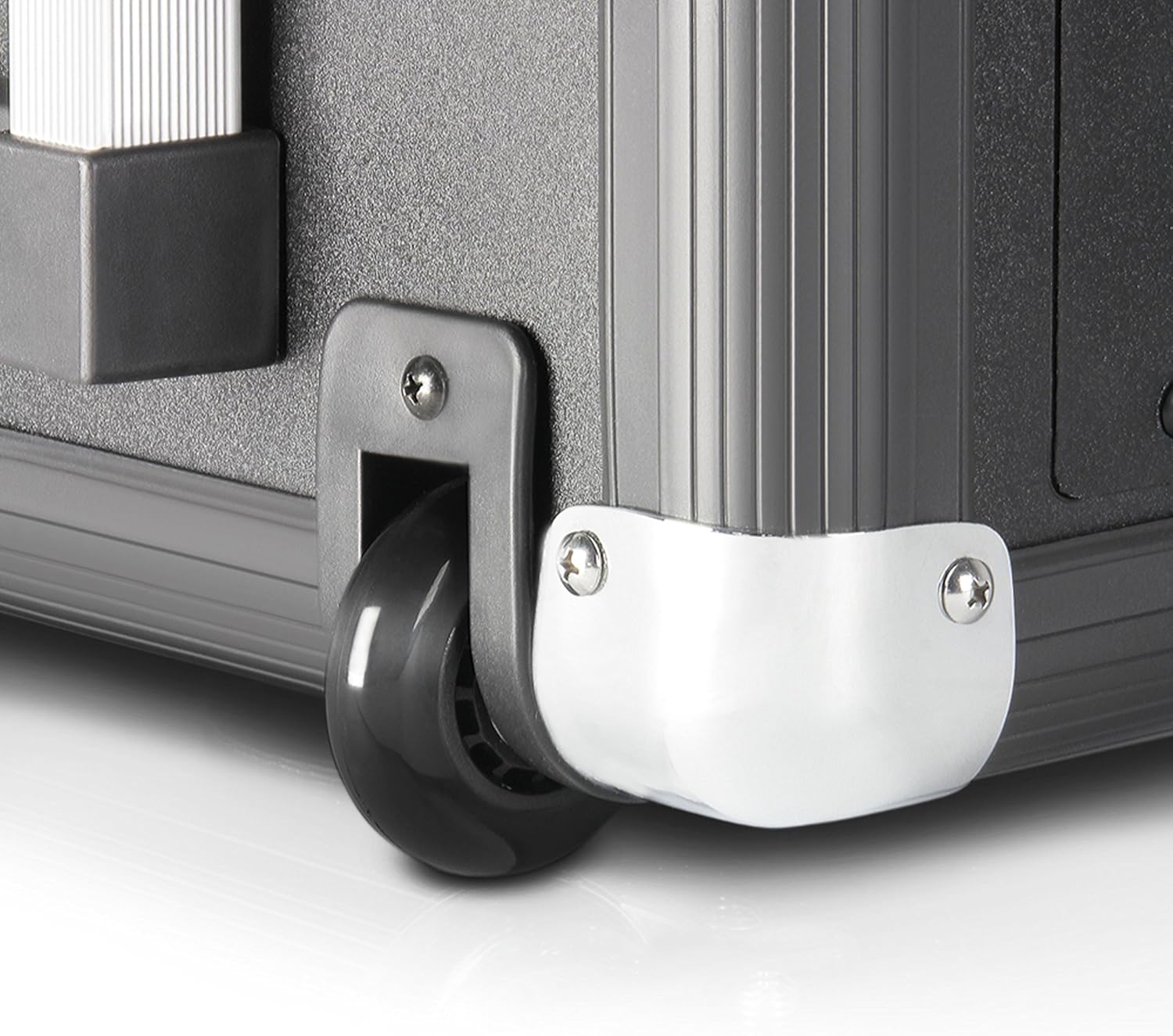
Figure 6: Close-up of one of the durable wheels and a metal corner protector, highlighting the robust construction designed for portability.
The LDRJ8 is designed for easy transport with integrated wheels and a retractable handle, similar to luggage. This allows for convenient movement of the system to various locations.
5. Nhazi
5.1. Ike na Nchaji Mmalite
- Ensure the unit's power switch (OFF/ON) on the rear panel is in the Gbanyụọ ọnọdụ.
- Verify the VOLTAGE selector on the rear panel matches your local power supply (115V or 230V).
- Connect the supplied power cable to the AC Input on the rear panel and then to a suitable power outlet.
- Nke EGO indicator LED will illuminate, indicating the battery is charging. Allow sufficient time for a full charge before initial battery-powered use.
5.2. Ijikọ Isi mmalite ọdịyo
- Microphones/Instruments: Connect microphones to CH 1 (XLR) and instruments to CH 2 (TRS/TS). Adjust the respective LEVEL knobs.
- External Audio Devices (e.g., CD Player, Mixer): Connect to CH 3 / AUX using RCA cables. Adjust the CH 3 / AUX LEVEL knob.
- Kaadị USB/SD: Insert a USB drive into the USB IN port or an SD card into the SD Card Slot for media playback.
- Bluetooth: Refer to the "Operating" section for Bluetooth pairing instructions.
6. Operating the PA System
6.1. Basic Ọrụ
- After connecting your audio sources, switch the unit's power to ON. The POWER LED will illuminate.
- Slowly increase the MASTER VOL to a desired listening level.
- Adjust individual channel LEVEL knobs for a balanced mix.
- Use the LOW and HIGH EQ knobs to adjust the bass and treble frequencies of the overall mix.
- Apply ECHO effect as desired using the ECHO knob.
6.2. MP3 Player / Bluetooth Operation
- Pịa MODE button to cycle through available input modes: MP3 (USB/SD), AUX, Bluetooth.
- Ọkụ USB/SD:
- Fanye draịva USB ma ọ bụ kaadị SD na MP3 files.
- Select MP3 mode. The display will show track information.
- Use the Play/Pause, Stop, Previous/Next Track buttons to control playback.
- Njikọ Bluetooth:
- Select Bluetooth mode. The display will indicate "BT" or "Pairing".
- Na ama ma ọ bụ mbadamba gị, gbanye Bluetooth wee chọọ ngwaọrụ dịnụ.
- Select "LD Systems LDRJ8" (or similar) from the list to pair.
- Once paired, you can stream audio wirelessly to the PA system.
7. Nlekọta
- Nhicha: Use a soft, dry cloth to clean the exterior of the unit. Do not use abrasive cleaners, solvents, or waxes.
- Nchekwa: When not in use for extended periods, store the unit in a dry, cool place, away from direct sunlight and extreme temperatures.
- Nlekọta batrị: For optimal battery life, avoid fully discharging the battery frequently. Recharge the battery regularly, even if the unit is not in use, to maintain its capacity.
- Ndochi fiusi: If the unit does not power on, check the fuse on the rear panel. Replace it only with a fuse of the identical type and rating (e.g., T 1 AL / 250V or T 500mA L / 250V).
8. Nchọpụta nsogbu
| Nsogbu | Ihe nwere ike ime | Ngwọta |
|---|---|---|
| Enweghị ike |
|
|
| Enweghị mmepụta ụda |
|
|
| Bluetooth anaghị ejikọta |
|
|
| Ụda agbagọ |
|
|
9. Nkọwapụta
| Njirimara | Nkọwa |
|---|---|
| Nlereanya | LDRJ8 |
| Ụdị | Sistemụ LD |
| Ụdị nkwụnye | Ala guzo |
| Isi Iyi Ike | Akwanyere batrị |
| Ụdị njikọ | XLR, Speakon, Auxiliary, USB |
| Ihe onwunwe | Igwe igwe |
| Ibu Ibu | 30 pound (ihe dị ka 13.6 n'arọ) |
| Ọnụọgụ nke ọwa | 8 |
| Ntinye ọdịyo | Various audio input devices |
| Mpụta Wattage | 1400 watts (RMS) |
| Woofer | 15-inch Faital Pro neodymium |
| Ọkwọ ụgbọala mkpakọ | 1.4-inch BMS |
| Mgbasa | 80 Degree x 50 Degree (rotatable asymmetrical horn flare) |
| Akụkụ (L x W x H) | 11 x 15 x 17 sentimita (ihe dịka 27.9 x 38.1 x 43.2 cm) |
| Teknụzụ Njikọta | Various (including Bluetooth) |
| Ngwa dakọtara | Smartphone, Tablet, Microphones, Instruments |
| Atụmatụ pụrụ iche | 1ms predictive peak limiter, State-of-the-art analog/digital converters |
10. Akwụkwọ ikike Ozi
Specific warranty details for the LD Systems Road LDRJ8 Portable PA System are typically provided at the point of purchase or within separate documentation included with the product. Please refer to your purchase receipt or the official LD Systems websaịtị maka usoro na ọnọdụ akwụkwọ ikike kacha zie ezi na nke kachasị ọhụrụ.
Generally, warranties cover manufacturing defects under normal use. Damage resulting from misuse, accidents, unauthorized modifications, or improper maintenance is usually not covered. Keep your proof of purchase for any warranty claims.
11. Nkwado
For technical support, service, or further inquiries regarding your LD Systems Road LDRJ8 Portable PA System, please contact your authorized LD Systems dealer or visit the official LD Systems websaịtị.
- Akụrụngwa dị n'ịntanetị: www.ld-systems.com
- Kpọtụrụ onye na-ere ahịa: Refer to your purchase documentation for local dealer contact information.


