1. Okwu mmalite
This manual provides essential information for the safe and efficient use of the WERMA Kompakt 37 Signal Tower Plug, Model 698.220.75. This device is designed for industrial signaling applications, featuring green and red LED permanent light indicators. Please read this manual thoroughly before installation and operation.
2. Ozi nchekwa
- Ịdọ aka ná ntị: Disconnect power before installation, maintenance, or troubleshooting to prevent electric shock.
- Ndị ọrụ ruru eru ga-arụ ọrụ nrụnye ahụ dịka iwu eletriki mpaghara na nke mba si dị.
- Gbaa mbọ hụ na ọkọnọ ọkụ voltage matches the device's specified voltage (24 V AC/DC).
- Do not expose the device to excessive moisture, dust, or extreme temperatures beyond its operating range.
- Do not modify the device. Unauthorized modifications may void the warranty and create safety hazards.
- Always use appropriate personal protective equipment (PPE) during installation and maintenance.
3. Ngwaahịa gafereview
The WERMA Kompakt 37 Signal Tower Plug (Model 698.220.75) is a compact signal tower designed for clear visual status indication. It features a green and red LED permanent light, operating on a 24 V AC/DC power supply.
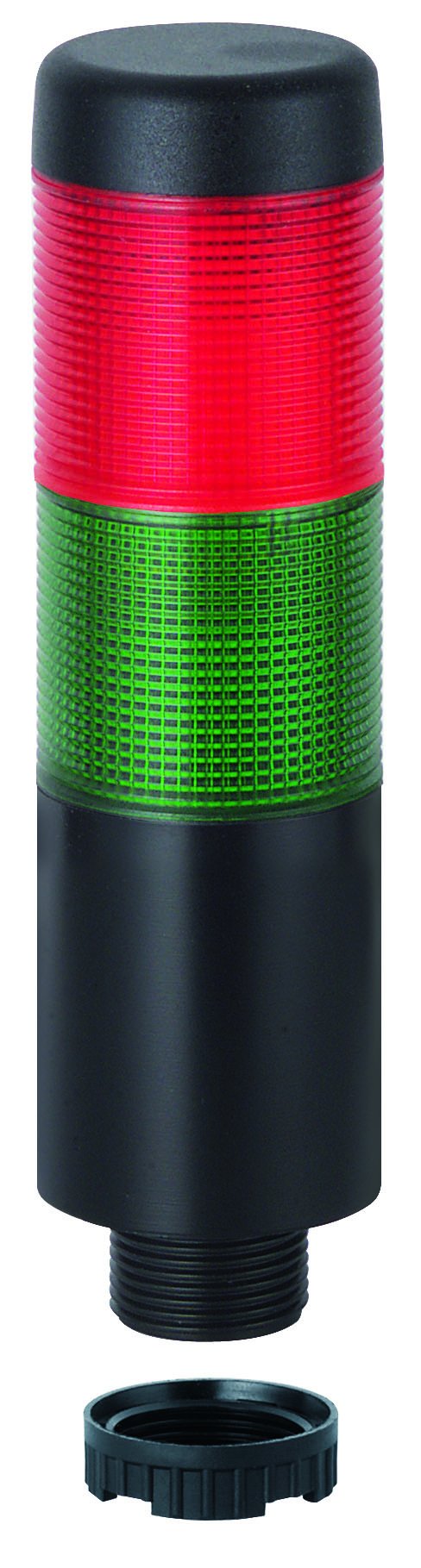
Figure 1: WERMA Kompakt 37 Signal Tower Plug. This image displays the signal tower with its distinct green and red light segments, indicating its compact design and visual signaling capabilities.
Akụkụ ndị bụ isi:
- Pre-assembled signal tower with max. 5 tiers (this specific model is a plug, implying it's part of a modular system).
- LED permanent light for reliable, long-lasting indication.
- Available with M12 plug or cable connection (this model is a plug type).
- Compact design with a diameter of 37.5 mm and a height of 140.5 mm.
- Operates on 24 V AC/DC.
4. Ntọala na nwụnye
Before proceeding, ensure all safety precautions are followed and power is disconnected.
- Iwepu: Carefully remove the signal tower plug from its packaging. Inspect for any visible damage.
- Ịkwanye: The Kompakt 37 plug is designed to integrate into a compatible base or system. Ensure the mounting surface or connection point is stable and secure.
- Njikọ eletrik:
- Identify the M12 plug connector on the signal tower.
- Connect the M12 plug to the corresponding M12 socket on your control unit or power supply. Ensure the connection is firm and secure.
- Verify that the power supply provides 24 V AC/DC. Incorrect voltage nwere ike imebi ngwaọrụ.
- Nyocha ikpeazụ: After connection, double-check all wiring and mounting for correctness and security before restoring power.
5. Ntuziaka ọrụ
The WERMA Kompakt 37 Signal Tower Plug operates as a visual indicator. Once properly installed and connected to a 24 V AC/DC power source, the LED permanent lights will illuminate according to the input signals from your control system.
- Ike Na: Apply 24 V AC/DC power to the connected M12 socket.
- Ngosipụta akara: The green and red LED segments will illuminate permanently based on the control signals received. Refer to your system's documentation for specific signal assignments (e.g., green for "operational," red for "fault").
- Ìhè Na-adịgide Adịgide: This model provides a steady, continuous light output, suitable for constant status indication.
6. Nlekọta
The WERMA Kompakt 37 Signal Tower Plug is designed for low maintenance. Regular inspection and cleaning will ensure optimal performance and longevity.
- Nhicha:
- Kwupu ike tupu ihicha.
- Wipe the exterior of the signal tower with a soft, damp akwa .
- Do not use abrasive cleaners, solvents, or harsh chemicals, as these can damage the housing.
- Nyocha:
- Periodically check the M12 connection for tightness and signs of corrosion.
- Inspect the housing for any cracks or damage.
- Ensure the signal tower is securely mounted.
- Ogologo ndụ LED: The LED lights are designed for long operational life and typically do not require replacement.
7. Nchọpụta nsogbu
If you encounter issues with your WERMA Kompakt 37 Signal Tower Plug, refer to the following common problems and solutions:
| Nsogbu | Ihe nwere ike ime | Ngwọta |
|---|---|---|
| Signal tower does not illuminate. | Enweghị ọkụ. Vol ezighi ezitage. Loose M12 connection. Mgbama njikwa na-ezighi ezi. | Check power supply to the M12 socket. Verify power supply is 24 V AC/DC. Ensure M12 plug is securely connected. Check control system output for correct signaling. |
| Only one color illuminates. | Control signal issue. Internal fault (rare). | Verify the control signals for both green and red indicators. If signals are correct and one color still fails, contact WERMA support. |
| Intermittent illumination. | Njikọ rụrụ arụ. Ọkụ ọkụ anaghị akwụsi ike. | Check M12 connection for tightness. Ensure power supply is stable and within specifications. |
If the problem persists after attempting these solutions, please contact WERMA customer support.
8. Nkọwapụta
- Nọmba nlereanya: 698.220.75
- Ụdị ngwaahịa: Kompakt 37 Signal Tower Plug
- Ụdị ọkụ: Ọkụ na-adịgide adịgide LED
- Agba: Green/Uhie
- Nrụ ọrụ Voltage: 24V AC/DC
- Dayameta: 37.5 mm
- Ogologo: 140.5 mm
- Akụkụ ngwaahịa: 19.69 x 19.69 x 11.02 inches (Packaging/Shipping dimensions)
- Ibu ihe: 0.16 ounces
- Onye nrụpụta: Werma (Shanghai) Co., Ltd.
- ASIN: B00LGDP6UO
- Ụbọchị mbụ dị: Ọnwa Isii 12, 2014
9. Akwụkwọ ikike na nkwado
For warranty information, technical support, or service inquiries regarding your WERMA Kompakt 37 Signal Tower Plug, please contact WERMA customer service or your authorized distributor. Keep your purchase receipt as proof of purchase.
Onye nrụpụta: Werma (Shanghai) Co., Ltd.
For further assistance, visit the official WERMA website or consult your local WERMA representative.


