1. Okwu mmalite
Thank you for choosing the Solis Fan-Tastic 750 Pedestal Fan. This powerful and quiet fan is designed to provide effective and comfortable cooling, featuring an active anion generator for improved air quality. This manual provides detailed instructions for safe operation, assembly, maintenance, and troubleshooting to ensure optimal performance and longevity of your appliance.

Image 1.1: The Solis Fan-Tastic 750 Pedestal Fan, showcasinnhazi ya mara mma na ntọala siri ike.
2. Ntuziaka nchekwa dị mkpa
Biko gụọ ntuziaka niile nke ọma tupu i jiri ngwa ahụ ma debe ha maka ntụaka n'ọdịnihu. Ọ bụrụ na i meghị iwu ndị a, ọ nwere ike ibute nkụchi ọkụ eletrik, ọkụ, ma ọ bụ mmerụ ahụ dị njọ.
- Gbaa mbọ hụ na ọkọnọ ọkụ voltage dakọtara na akara ọkwa dị na ngwa ahụ.
- Do not operate the fan with a damaged cord or plug. If damaged, contact authorized service personnel.
- Keep fingers, hair, and loose clothing away from the rotating blades.
- Do not insert any objects into the fan grille.
- Wepụ ihe mkpuchi ikuku ahụ mgbe niile tupu ị sachaa ma ọ bụ rụzie ihe ọ bụla.
- Ejila fan na mmiri ma ọ bụ damp ebe, dị ka ụlọ ịsa ahụ.
- Place the fan on a stable, flat surface to prevent tipping.
- Ngwa a bụ maka naanị ụlọ. Ejila n'èzí ma ọ bụ maka ebumnuche azụmahịa.
- The fan features a safety shut-off function: the fan will automatically stop if contact is made with the protective grille.
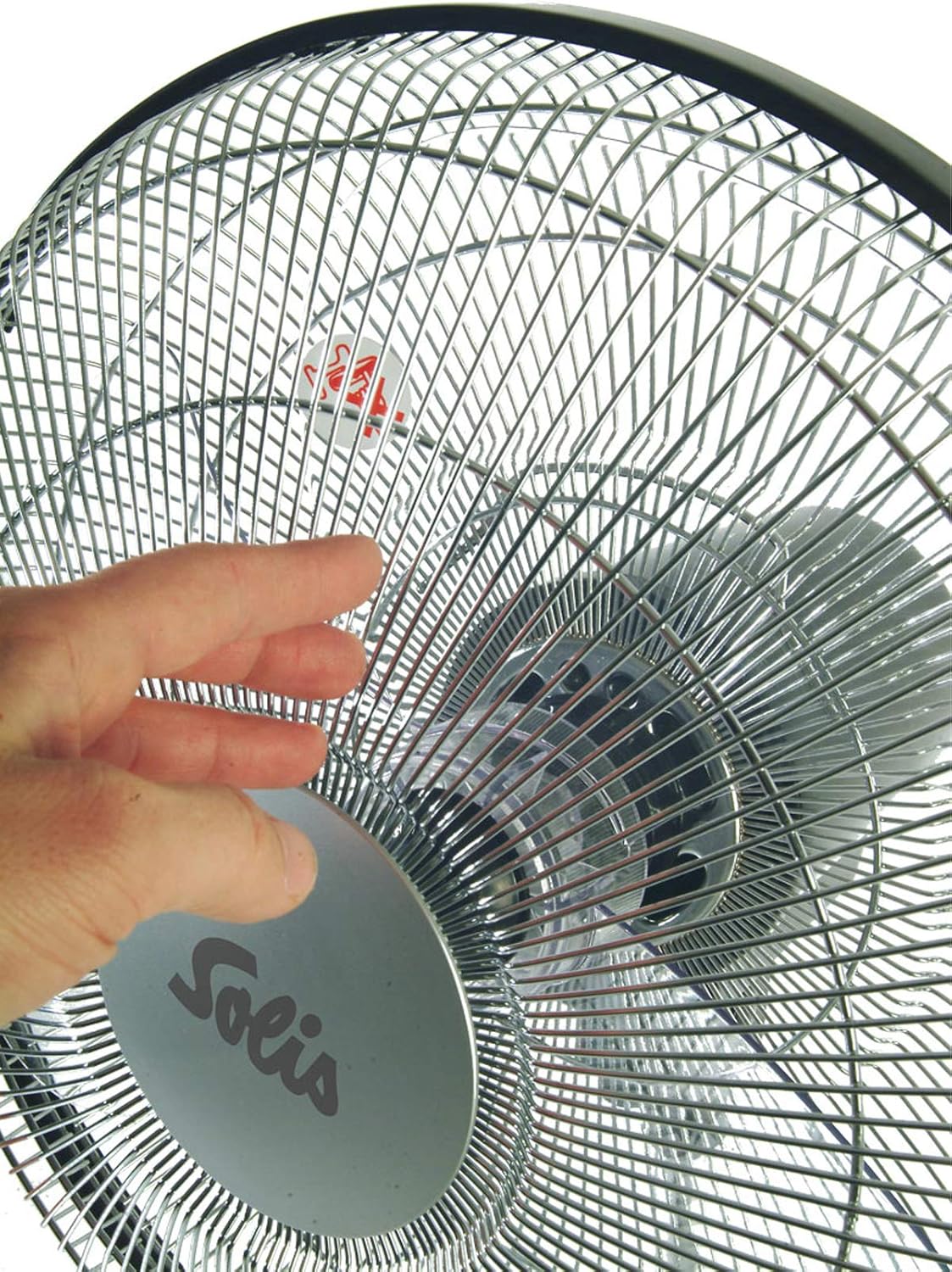
Image 2.1: Illustrates the safety shut-off feature, where the fan automatically stops if the grille is touched.
3. Ihe ngwugwu
Jiri nlezianya tọpụ igbe ahụ ma hụ na ihe niile dị ma dịkwa mma. Ọ bụrụ na ihe ọ bụla efuo ma ọ bụ mebie, kpọtụrụ onye na-ere ahịa gị ozugbo.
- Solis Fan-Tastic 750 Pedestal Fan Unit (main body, fan head, base)
- Njikwa anya (chọrọ batrị 2 AAA, etinyeghị ya)
- Akwụkwọ ntuziaka (akwụkwọ a)

Image 3.1: The Solis Fan-Tastic 750, highlighting its 5-year guarantee.
4. Ntọala na Mgbakọ
Follow these steps to assemble your Solis Fan-Tastic 750 fan.
- Mgbakọ ntọala: Place the fan base on a flat, stable surface.
- Attach Pedestal: Insert the main pedestal pole into the base, ensuring it clicks securely into place.
- Connect Fan Head: Carefully attach the fan head unit to the top of the pedestal pole. Ensure all connections are firm.
- Njikọ ike: Tinye eriri ọkụ n'ime ebe eletrik kwesịrị ekwesị.
- Batrị njikwa anya: Open the battery compartment on the remote control and insert 2 AAA batteries, observing polarity (+/-).

Foto 4.1: Akụkụ view of the fan, illustrating the connection points for assembly.
5. Ntuziaka ọrụ
Your Solis Fan-Tastic 750 can be operated using the control panel on the unit or the included remote control.
5.1. Ogwe njikwa na Ngosipụta
The fan features an LCD display and control buttons on the main unit for easy access to all functions.

Foto 5.1: Zuru ezu view of the fan's control panel and LCD display.
5.2. Power On/Off and Speed Adjustment
- Ike: Pịa Ike button on the control panel or remote to turn the fan on or off.
- Ọsọ: The fan offers 3 adjustable speed settings. Press the Ọsọ button repeatedly to cycle through low, medium, and high speeds. The current speed will be indicated on the LCD display.
- Mgbanwe Ụkwụ: For added convenience, a foot switch is located on the base of the fan. This allows you to activate/deactivate the fan and adjust the speed without bending down.
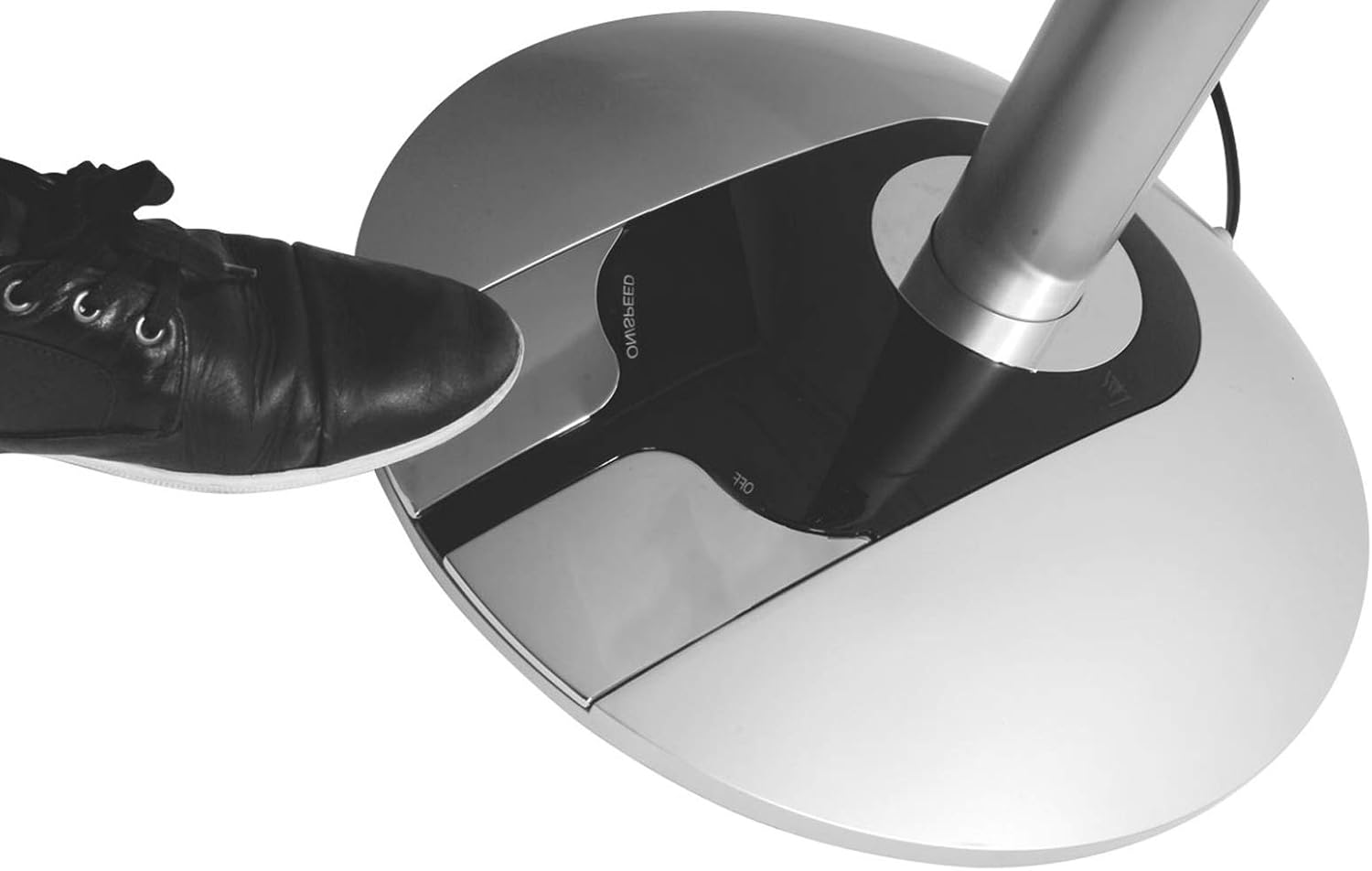
Image 5.2: Demonstrates the convenient foot switch located on the fan's base.
5.3. Ụdị arụ ọrụ
Pịa MODE bọtịnụ ka ịgbagharị site na ụdị ọrụ dịnụ:
- Ụdị nkịtị: Provides a continuous airflow at the selected speed.
- Ụdị eke: Na-eme ka ikuku eke dị ka nke e kere eke site na mgbanwe ọsọ nke fan.
- Modera Modera: Gradually reduces fan speed over time for quiet operation during sleep.
5.4. Oscillation
The fan offers both horizontal and vertical oscillation to distribute air more widely.
- Pịa INGTỌ button to activate or deactivate horizontal oscillation.
- The fan also supports vertical oscillation for comprehensive air circulation.
5.5. Anion Generator
The built-in anion generator helps improve air quality and promote well-being.
- Pịa ANION button to turn the anion generator on or off.
5.6. Ọrụ ngụ oge
The timer function allows you to program the fan to automatically shut off after a set period.
- Pịa TIMER button repeatedly to set the desired shut-off time, from 0.5 to 7 hours, in 0.5-hour increments.
- The set time will be displayed on the LCD screen.
6. Nlekọta na nhicha
Regular cleaning will help maintain the performance and appearance of your fan.
- Kwupuo fan mgbe niile na oghere ọkụ tupu ihicha ya.
- Nchacha mpụta: Jiri nwayọ hichaa elu mpụta nke fan, damp akwa . Ejila ihe nchacha abrasive ma ọ bụ ihe mgbaze.
- Nchacha Grille: Use a vacuum cleaner with a brush attachment to remove dust from the fan grille. For deeper cleaning, the front grille can be carefully removed (refer to assembly instructions in reverse) to access the blades. Ensure the fan is completely unplugged before attempting this.
- Nchekwa: Mgbe a naghị eji ya ogologo oge, chekwaa fan ahụ n'ebe dị jụụ, nke kpọrọ nkụ, ọkacha mma na nkwakọ ngwaahịa mbụ ya.
7. Nchọpụta nsogbu
If you experience issues with your Solis Fan-Tastic 750, please consult the table below before contacting customer support.
| Nsogbu | Ihe nwere ike ime | Ngwọta |
|---|---|---|
| Onye ofufe anaghị agbanwuo. | Not plugged in; power outlet faulty; safety shut-off activated. | Ensure power cord is securely plugged in. Test outlet with another device. Check if anything is obstructing the grille. |
| Ikuku ikuku adịghị ike. | Fan speed too low; grille or blades are dusty. | Increase fan speed. Clean the fan grille and blades as per maintenance instructions. |
| Onye ofufe na-eme mkpọtụ. | Fan not on a stable surface; loose parts; dust accumulation. | Place fan on a flat, stable surface. Check for any loose components. Clean the fan thoroughly. |
| Njikwa anya anaghị arụ ọrụ. | Batteries are dead or incorrectly inserted; remote not aimed at sensor. | Replace batteries (2 AAA). Ensure correct polarity. Aim remote directly at the fan's control panel sensor. |
8. Nka na ụzụ nkọwa
| Akara: | Solis |
| Nọmba nlereanya: | 750 |
| Agba: | Ọlaọcha/Oji |
| Dayameta: | 40 cm |
| Ike: | 60 Watt |
| Voltage: | 230V AC |
| Ihe: | Plastic |
| Ọnụọgụ ọsọ: | 3 |
| Mgbasa ikuku (kacha): | 67 m³/min |
| Ọkwa mkpọtụ (karịrị): | 63 dB(A) (at step 3) |
| Arọ: | 8.7 n'arọ |
| Akụkụ (H x Ø): | 125 x 40 cm |
| Batrị njikwa anya: | 2 x AAA (anaghị etinye ya) |

Image 8.1: Visual representation of the fan's dimensions.
9. Akwụkwọ ikike na nkwado
Solis products are manufactured with high-quality standards and come with a manufacturer's warranty. The Solis Fan-Tastic 750 includes a 5-year guarantee, subject to registration.
- Ndebanye akwụkwọ ikike: To activate your 5-year guarantee, please register your product at www.solis.com/registration.
- Nkwado ndị ahịa: For technical assistance, spare parts, or warranty claims, please contact Solis customer service or your local retailer. Refer to the Solis website for contact information in your region.


