Okwu mmalite
This manual provides comprehensive instructions for the setup, operation, and maintenance of your InFocus IN126x WXGA Network Projector. Designed for both business presentations and home cinema, this projector delivers 4200 lumens and excellent image quality with high contrast and BrilliantColor technology. Its compact and lightweight design ensures portability while maintaining powerful performance.

Figure 1: InFocus IN126x Projector Front View
This image displays the InFocus IN126x projector from a front-right angle, highlighting its main lens and the sleek black casing. The top panel features control buttons and the InFocus logo.
Ozi nchekwa dị mkpa
Please read all safety instructions carefully before operating the projector. Failure to follow these instructions may result in fire, electric shock, or other injuries.
- Isi mmalite ike: Use only the power adapter supplied with the projector. Ensure the power outlet matches the voltage chọrọ.
- Igwe ikuku: Do not block ventilation openings. Adequate airflow is essential to prevent overheating.
- Okpomọkụ: Onye na-eme ihe nkiri lamp and surrounding areas can become very hot during operation. Avoid touching these areas.
- Lamp Ịdọ aka ná ntị: Ndị lamp contains mercury. Dispose of lamps according to local regulations. Do not open the lamp compartment until the projector has cooled down.
- Mkpughe mmiri mmiri: Etinyela ihe ngosi ahụ n'ime mmiri ozuzo, mmiri ozuzo, ma ọ bụ mmiri ọ bụla.
- Ije ozi: Anwala ịnye ngwaahịa a n'onwe gị. Tụtụ aka n'aka ndị ọrụ ruru eru.

Figure 2: Projector Bottom Panel with Warning Labels
This image shows the underside of the InFocus IN126x projector, displaying various regulatory and safety labels. Notable warnings include information about mercury in the lamp and instructions for lamp replacement, emphasizing the need to allow the unit to cool down before servicing.
Ntuziaka nhazi
1. Mwepu na ntinye
Carefully remove the projector and all accessories from the packaging. Place the projector on a stable, flat surface or mount it securely. Ensure there is adequate space around the projector for proper ventilation.

Figure 3: Projector Dimensions
This image illustrates the physical dimensions of the InFocus IN126x projector. The measurements are approximately 29.2 cm (length), 22.1 cm (width), and 9.8 cm (height), providing a clear understanding of its compact size for placement considerations.
2. Ijikọ Ike
Connect the power cord to the projector's power inlet and then plug the other end into a grounded electrical outlet.
3. Ijikọ isi mmalite ntinye
The InFocus IN126x projector supports various input sources. Connect your device (e.g., laptop, Blu-ray player) to the appropriate port on the projector's rear panel.
- HDMI: Maka vidiyo dijitalụ na ọdịyo dị elu.
- VGA (Kọmputa 1/2): For analog computer video input.
- S-Video/Video: Maka vidiyo nkọwa ọkọlọtọ.
- Audio In (Audio 1/2): Maka ntinye ọdịyo analọgụ.
- USB-A/USB-B: For service or specific data transfer.
- LAN: Maka njikọta netwọkụ.
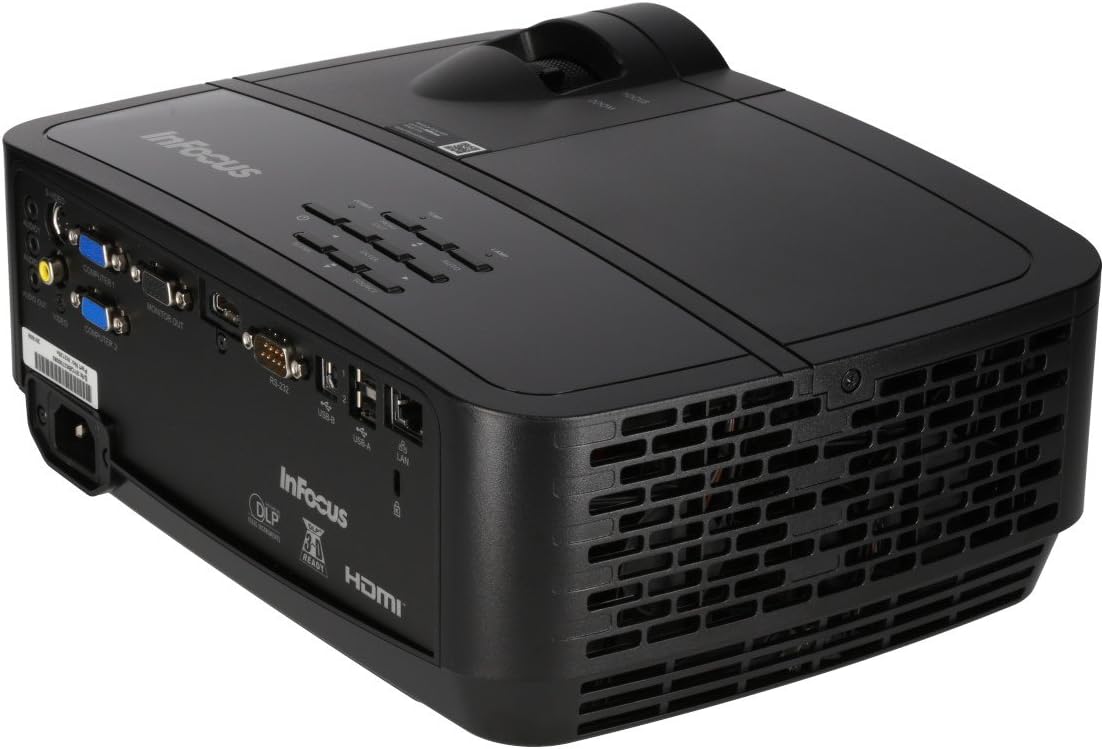
Figure 4: Projector Rear Panel Connectivity
Ihe onyonyo a na-enye nkọwa zuru ezu view of the rear panel of the InFocus IN126x projector, clearly showing all available input and output ports. These include HDMI, VGA (Computer 1 and 2), S-Video, Video, Audio In (Audio 1 and 2), Monitor Out, RS-232, USB-B, USB-A, and LAN ports, facilitating diverse connectivity options.
4. Initial Power On and Adjustment
Press the power button on the projector or remote control. The projector will power on and display the input source. Use the focus and zoom rings on the lens to adjust the image clarity and size to your desired projection area.

Figure 5: Projector Top Panel Controls
This image shows the top surface of the InFocus IN126x projector, highlighting the control panel with various buttons for navigation and settings adjustment. The focus and zoom rings on the lens are also visible, used for fine-tuning the projected image.
Ntuziaka ọrụ
Njikwa ntọala
The projector can be operated using the control panel on the top of the unit or the included remote control.
- Bọtịnụ ike: Gbanyụọ ma ọ bụ gbanyụọ projector.
- Isi mmalite: Cycles through available input sources (HDMI, VGA, etc.).
- Bọtịnụ menu: Opens the On-Screen Display (OSD) menu.
- Bọtịnụ igodo nsoroụzọ: A na-eji ịnyagharịa site na nhọrọ menu wee mezie ntọala.
- Tinye bọtịnụ: Na-akwado nhọrọ dị na menu.
Ntugharị menu na ntọala
Press the Menu button to access the OSD. Use the navigation buttons to select categories such as Picture, Display, Setup, and Advanced. Within each category, you can adjust settings like:
- Icha ọkụ & ọdịiche: Optimize image visibility.
- Color & Tint: Fine-tune color accuracy.
- Akụkụ akụkụ: Select between 4:3, 16:9, or other ratios to match your content.
- Ndozi isi okwu: Adjust image shape if the projector is not perfectly perpendicular to the screen.
- BrilliantColor Technology: Enhance color vibrancy and detail.
Atụmatụ dị elu
The IN126x supports a superior viewing experience, including 3D home cinema (3D Glasses sold separately). For enhanced connectivity, the projector can easily connect to your phone or iPad with a LightCast Key (sold separately).
Nlekọta
Lamp Ndochi
Onye na-eme ihe nkiri lamp has a lifespan of over 5,000 hours. When the lamp reaches the end of its life, a warning message may appear, or the lamp indicator light may illuminate. Always allow the projector to cool down completely (at least 60 minutes) before attempting to replace the lamp. Refer to the safety information on the bottom of the projector for specific warnings regarding mercury content and replacement procedures.
Nhicha
- oghere: Jiri ákwà dị nro, nke na-enweghị ihe e ji ehicha ihe nke e mere maka anya anya. Ejila ihe nhicha aka.
- Ihe ngosiputa Casing: Jiri nwayọ hichaa, damp akwa . Zere kemịkalụ siri ike.
- Igwe ikuku ikuku: Regularly check and clean the air vents to ensure proper airflow and prevent overheating. Use a soft brush or compressed air to remove dust.

Figure 6: Projector Side Ventilation
This image displays the side of the InFocus IN126x projector, prominently featuring the ventilation grilles. These grilles are crucial for dissipating heat generated during operation, and keeping them clear of obstructions is vital for the projector's longevity and performance.
Nchọpụta nsogbu
| Nsogbu | Ihe nwere ike ime | Ngwọta |
|---|---|---|
| Enweghị onyonyo na ihuenyo |
|
|
| Image is dim or poor quality |
|
|
| Enweghị ụda |
|
|
Nkọwapụta
| Njirimara | Nkọwa |
|---|---|
| Ụdị | Infocus |
| Nọmba nlereanya | F321717 (IN126x) |
| Akụkụ ngwaahịa | 18.58 x 20.67 x 7.44 sentimita asatọ |
| Ibu Ibu | 5.5 pound |
| Ngosipụta mkpebi | 1280 x 800 (WXGA) |
| Teknụzụ Njikọta | HDMI, VGA, S-Video, USB, LAN |
| Lamp Ndụ | Ihe karịrị awa 5,000 |
| Njirimara Pụrụ Iche | Enwere ike ibugharị |
| Ụbọchị mbụ dị | Ọgọst 7, 2016 |
Ozi akwụkwọ ikike
The InFocus IN126x Projector comes with a 2-afọ akwụkwọ ikike. InFocus stands behind its products and provides customer service for any issues you may encounter. Please retain your proof of purchase for warranty claims.
Nkwado ndị ahịa
For technical assistance, troubleshooting beyond this manual, or warranty inquiries, please contact InFocus customer support. Visit the official InFocus website for the most up-to-date contact information, including phone numbers and online support resources.
You can also refer to the official InFocus websaịtị maka akụrụngwa ndị ọzọ na FAQs: www.infocus.com


