1. Ozi nchekwa
Please read all instructions carefully before using the Vivitar Women's Shaver. Keep this manual for future reference.
- Always use with caution to avoid cuts.
- Do not use near water while charging.
- Na-asachapụ mgbe ojiji ọ bụla iji gbochie uto nje.
- Avoid use in shower to prevent slipping.
- Debe ebe ụmụaka na-apụghị iru.
- Do not disassemble or attempt to repair the shaver yourself. Contact customer support for assistance.
- Hụ na e mechiri ebe batrị ahụ nke ọma tupu e jiri ya.
2. Ihe ngwugwu
Chọpụta na ihe niile dị na ngwugwu:
- Vivitar Women's Shaver (Model PG-V007)
- 1 Lithium Ion Battery (pre-installed or separate)
- Akwụkwọ ntuziaka

Image 1: Vivitar Women's Shaver PG-V007. This image displays the complete shaver unit, highlighting its ergonomic design and overall appearance.
3. Nhazi
3.1 Ntinye batrị
- Locate the battery compartment cover, usually at the bottom of the shaver handle.
- Gbagọrọ ma ọ bụ mịpịa mkpuchi ahụ iji mepee ya.
- Insert the Lithium Ion battery, ensuring the positive (+) and negative (-) terminals align correctly with the markings inside the compartment.
- Replace the battery compartment cover and secure it firmly.
3.2 Initial Charge (if applicable)
Although the product uses a Lithium Ion battery, it is recommended to fully charge the shaver before its first use to ensure optimal performance. Connect the charging cable (if included) to the shaver and a suitable power source. Refer to the charging indicator for status.
4. Ọrụ
4.1 Gbanyụọ / gbanyụọ
To turn on the shaver, slide the power switch located on the body of the unit to the "ON" position. To turn off, slide the switch to the "OFF" position.
4.2 Usoro ịkpụ afụ ọnụ
- Ensure your skin is clean and dry for best results, though the shaver supports wet/dry application.
- Hold the shaver at a 90-degree angle to the skin.
- Gently glide the shaver against the direction of hair growth.
- Do not press too hard; the hypoallergenic stainless steel blades are designed to remove hair effectively with light pressure.
- For sensitive areas, stretch the skin taut to achieve a closer shave and prevent irritation.
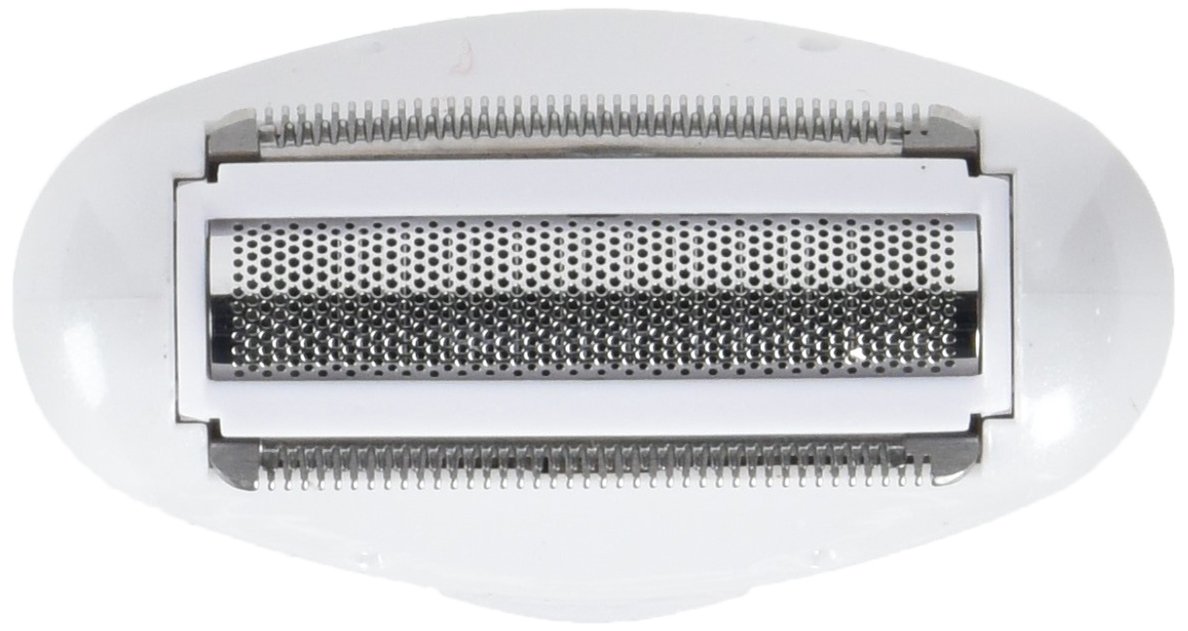
Image 2: Close-up of the Vivitar Women's Shaver foil head. This image shows the precision foil and trimmer blades, designed for a smooth shave.
4.3 Wet/Dry Use
The Vivitar Women's Shaver is designed for both wet and dry use, offering versatility. For wet shaving, you may use shaving cream or gel. Always ensure the shaver is completely dry before charging.
5. Nlekọta
5.1 Ịsacha Isi Afụ ọnụ
Regular cleaning ensures optimal performance and hygiene. It is recommended to clean the shaver after each use.
- Turn off the shaver and disconnect it from any power source.
- Carefully remove the foil head assembly. This usually involves pressing release buttons on the sides or gently pulling it upwards.
- Tap out any accumulated hair from the foil and cutter blades.
- Use the small cleaning brush (if included) to brush away fine hairs from the blades and inside the shaver body.
- Rinse the foil head and cutter blades under running water. Ensure all hair residue is removed.
- Allow all parts to air dry completely before reassembling the shaver.
- Once dry, reattach the foil head assembly securely.
Ihe dị mkpa: Do not use harsh chemicals or abrasive cleaners on the shaver. Do not immerse the entire shaver body in water unless explicitly stated as fully waterproof.
6. Nchọpụta nsogbu
| Nsogbu | Ihe nwere ike ime | Ngwọta |
|---|---|---|
| Shaver anaghị agbanwuo. | Batrị anwụọla ma ọ bụ etinyere ya na ezighi ezi. | Check battery installation. Replace battery if necessary. Ensure battery compartment is closed securely. |
| Shaver pulls hair or does not shave effectively. | Blades are dull or clogged with hair. Incorrect shaving technique. | Clean the shaver head thoroughly. Ensure you are shaving against the direction of hair growth with light pressure. Consider replacing the foil/cutter if blades are dull (replacement parts sold separately). |
| Shaver stops working unexpectedly. | Low battery. Overheating. | Replace or recharge the battery. Allow the shaver to cool down if it feels warm. |
| Irritation after shaving. | Skin sensitivity. Improper technique. Dirty shaver head. | Ensure skin is clean before shaving. Use light pressure. Clean shaver head regularly. Consider using a pre-shave lotion or post-shave balm. |
7. Nkọwapụta
| Njirimara | Nkọwa |
|---|---|
| Nọmba nlereanya | PG-V007 |
| Akụkụ ngwaahịa | 4.25 x 2.1 x 7.75 sentimita asatọ |
| Ibu Ibu | 5.6 ounces |
| Isi Iyi Ike | Akwanyere batrị |
| Ụdị batrị | 1 batrị lithium ion (gụnyere) |
| Ụdị isi | Foil |
| Ihe agụba | Igwe anaghị agba nchara |
| Atụmatụ ndị ọzọ | Cordless, Wet/Dry Application |

Image 3: Vivitar Women's Shaver demonstrating its compact size. This image provides a visual reference for the product's dimensions, showing it held in hand.
8. Akwụkwọ ikike na nkwado
Vivitar products are manufactured to high-quality standards. For information regarding warranty coverage, please refer to the warranty card included with your purchase or visit the official Vivitar websaịtị.
For technical support, troubleshooting assistance, or to inquire about replacement parts, please contact Vivitar Customer Service. Contact details can typically be found on the product packaging or the official Vivitar websaịtị.
Onye nrụpụta: Sakar International/GNC


