1. Okwu mmalite
This manual provides comprehensive instructions for the setup, operation, and maintenance of your A4tech Natural A Ergonomic Keyboard, model KRS-85. Designed with patented A-Shape keys and round-edged keycaps, this keyboard aims to promote a natural typing position, thereby helping to prevent Repetitive Strain Injury (RSI).
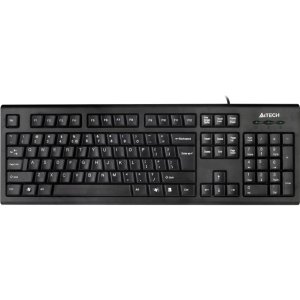
Figure 1: A4tech Natural A Ergonomic Keyboard (KRS-85). This image displays the full layout of the black wired keyboard, highlighting its ergonomic design with A-Shape keys and round keycaps.
2. Nhazi
2.1 System chọrọ
- IBM or Compatible Systems
- Windows 2000 / XP (X64) / 2003 (X64) / Vista
2.2 Jikọọ ahụigodo
- Chọta ọdụ ụgbọ mmiri USB dị na kọmputa gị.
- Insert the USB connector of the A4tech KRS-85 keyboard firmly into the USB port.
- Sistemụ arụmọrụ gị kwesịrị ịchọpụta ma wụnye draịva dị mkpa na akpaghị aka. Usoro a nwere ike were obere oge.
- Once installation is complete, the keyboard is ready for use.
3. Ntuziaka ọrụ
The A4tech Natural A Keyboard is designed for comfortable and efficient typing. Its unique features are intended to enhance your typing experience and reduce strain.
3.1 Atụmatụ
- Patented A-Shape Keys: The layout of the keys is designed to align with the natural position of your hands and wrists, promoting a more relaxed posture.
- Round Edged Keycaps: These keycaps provide a smooth and comfortable typing surface.
- Ọkọlọtọ Nhazi: The keyboard features a full-size layout including a numeric keypad, function keys (F1-F12), and navigation keys.
3.2 Isi ojiji
Use the keyboard as you would any standard computer keyboard for typing, navigating, and executing commands. The ergonomic design is intended to provide comfort during extended use.
4. Nlekọta
Ndozi nke ọma na-achọpụta ogologo ndụ yana ezigbo arụmọrụ nke ahụigodo gị.
4.1 Nhicha
- Kwụpụ kiiboodu na kọmputa gị tupu ihicha.
- Jiri akwa dị nro na-enweghị ntụpọ dampejiri mmiri tinye ma ọ bụ ihe ngwọta dị nro iji hichaa elu nke ahụigodo.
- Zere iji kemịkalụ siri ike, ihe nhicha ihe na-emebi emebi, ma ọ bụ oke mmiri mmiri.
- Maka ihicha n'etiti igodo, jiri ikuku abịakọrọ wepụ uzuzu na irighiri ihe.
5. Nchọpụta nsogbu
If you encounter issues with your A4tech Natural A Keyboard, please refer to the following common solutions.
5.1 Ahụigodo anaghị azaghachi
- Ensure the USB cable is securely connected to a working USB port on your computer. Try a different USB port.
- Malitegharịa ekwentị gị na kọmputa.
- Check your computer's Device Manager (Windows) to see if the keyboard is recognized and if there are any driver issues.
5.2 Specific Key Combinations Not Working (e.g., Ctrl-Alt-Del)
- Some users have reported that certain key combinations, such as Ctrl-Alt-Del, may not function as expected on this keyboard with Windows operating systems. This is a known compatibility limitation for some configurations.
- If this issue persists, consider using alternative methods for these functions within your operating system, or consult A4tech support for potential workarounds or driver updates if available.
6. Nkọwapụta
| Njirimara | Nkọwa |
|---|---|
| Aha ngwaahịa | Natural_A Rounded Edge Keyboard |
| Nọmba nlereanya | KRS-85 |
| Teknụzụ Njikọta | Cable (USB) |
| Nkọwa ahụigodo | Ergonomic |
| Ọnụọgụ igodo | 85 |
| Akụkụ ngwaahịa | 19.69 x 7.87 x 1.97 sentimita asatọ |
| Ibu Ibu | 2.2 pound |
| Onye nrụpụta | ERGOGUYS (A4tech Co., Ltd) |
| Ụbọchị mbụ dị | Ọktoba 31, 2013 |
7. Akwụkwọ ikike Ozi
The A4tech Natural A Ergonomic Keyboard (KRS-85) comes with a Akwụkwọ ikike nke afọ 1 site n'aka onye nrụpụta. Akwụkwọ ikike a na-ekpuchi ntụpọ dị na ihe na ọrụ aka mgbe ejiri ya nkịtị.
Please retain your proof of purchase for warranty claims. For detailed terms and conditions, refer to the warranty documentation provided with your product or contact the manufacturer directly.
8. Nkwado
For further assistance, technical support, or warranty inquiries, please contact the manufacturer or your point of purchase. Ensure you have your product model number (KRS-85) and proof of purchase ready when contacting support.


