Ngwaahịa gafereview
The Sagemcom Sixty Cordless Telephone and Answer Machine combines modern technology with a classic design. Its unique aesthetic, smooth finish, and touchscreen functionality make it a distinctive addition to any environment. Designed for user comfort, the Sixty offers a range of features including hands-free mode, extended battery life, and an intuitive interface for easy communication.
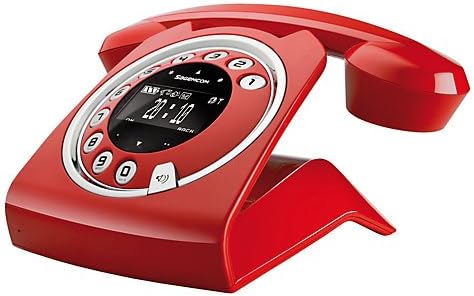
Image: The Sagemcom Sixty Cordless Telephone and Answer Machine in red, showcasing its unique retro-modern design with a circular dial and digital display.

Foto: Akụkụ view of the Sagemcom Sixty Cordless Telephone, highlighting its sleek profile and the cradle design.
Ntuziaka nhazi
1. Iwepu ngwongwo
Carefully remove all components from the packaging. Ensure you have the base unit, handset, power adapter, and telephone line cord.
2. Ijikọ ngalaba ntọala
- Connect the power adapter to the 'DC IN' port on the back of the base unit and plug the other end into a wall outlet.
- Connect one end of the telephone line cord to the 'LINE' port on the base unit and the other end to your telephone wall jack.
3. Ntinye batrị na Nchaji
- Mepee oghere batrị na ekwentị.
- Fanye batrị enwere ike ịchaji, na-elele polarity ziri ezi (+ na -).
- Mechie oghere batrị.
- Place the handset on the base unit. The display will indicate charging. Allow the handset to charge for at least 16 hours before first use to ensure optimal battery performance.
Ntuziaka ọrụ
Ịkpọ na ịnata oku
- Ka ịkpọ oku: Welie ekwentị ma ọ bụ pịa Kpọọ button. Dial the number using the touchscreen keypad.
- Iji nweta oku: Welie ekwentị ma ọ bụ pịa Kpọọ bọtịnụ mgbe ekwentị na-ada.
- Iji kwụsị oku: Debe ekwentị ahụ azụ na ntọala unit ma ọ bụ pịa bọtịnụ Kwụsị oku bọtịnụ.
Iji Touchscreen
The Sixty features a responsive touchscreen for navigation and input. Tap icons or numbers to select functions or dial. Swipe to scroll through lists or menus.
Ụdị Aka-enweghị Aka
Mgbe oku na-aga, pịa Ọkà okwu button to activate hands-free mode. Press it again to return to handset mode.
Njikwa akwụkwọ ekwentị
- Na-agbakwụnye kọntaktị: Navigate to the Phonebook menu, select 'Add New Contact', enter the name and number using the touchscreen, and save. The phonebook can store up to 150 names.
- Searching for a Contact: Access the Phonebook and use the search function or scroll through the list.
- Editing/Deleting a Contact: Select the desired contact from the Phonebook and choose the 'Edit' or 'Delete' option.
Answering Machine Functions
The integrated answering machine has a recording capacity of 10 minutes.
- Na-arụ ọrụ/Na-emenyụ: Access the Answering Machine menu to turn it on or off.
- Ozi egwu: Select 'Play Messages' from the Answering Machine menu.
- Na-edekọ Ozi Na-apụ apụ: Follow the prompts in the Answering Machine menu to record a personalized outgoing message.
Nlekọta
Na-ehicha ekwentị gị
To clean the phone, wipe it with a soft, damp cloth. Do not use abrasive cleaners or solvents, as these can damage the surface. Ensure the phone is disconnected from power before cleaning.
Nlekọta batrị
- Always use the supplied rechargeable batteries.
- Ọ bụrụ na agaghị eji ekwentị ahụ ogologo oge, wepụ batrị ahụ ka ọ ghara ịpụpụ.
- Tụfuo batrị ochie nke ọma dịka iwu obodo siri dị.
Nchọpụta nsogbu
| Nsogbu | Ngwọta enwere ike |
|---|---|
| Enweghị ụda ọkpụkpọ | Check if the telephone line cord is securely connected to both the base unit and the wall jack. Ensure the power adapter is plugged in. |
| Ekwentị anaghị akwụ ụgwọ | Ensure the handset is correctly placed on the base unit. Clean the charging contacts on both the handset and base unit with a dry cloth. Verify the power adapter is working. |
| Ogo ụda adịghị mma | Move closer to the base unit. Check for interference from other electronic devices. Ensure the telephone line cord is not damaged. |
| Ngosipụta bụ oghere | Check if the handset battery is charged. If not, place it on the base unit to charge. Ensure the power adapter is connected to the base unit. |
| Enweghị ike ịkpọ ma ọ bụ nata oku | Verify that the telephone line is active. Check all cable connections. Restart the base unit by unplugging and replugging the power adapter. |
Nkọwa nka nka
| Njirimara | Nkọwapụta |
|---|---|
| Ụdị | Sagemcom |
| Nlereanya | Iri isii |
| Agba | Uhie |
| Ụdị ekwentị | Enweghị eriri |
| Oge Okwu Ekwentị | Ruo awa 10 |
| Oge Njikere | Ruo awa 120 |
| Recording Capacity (Answering Machine) | Nkeji 10 |
| Ikike akwụkwọ ekwentị | 150 Aha |
| ASIN | B00DX64LPI |
| Ụbọchị mbụ dị | Eprel 15, 2014 |
Akwụkwọ ikike na nkwado
For warranty information and customer support, please refer to the documentation included with your purchase or visit the official Sagemcom websaịtị. Debe ihe akaebe nke ịzụrụ ihe maka akwụkwọ ikike ọ bụla.


