1. Okwu mmalite
This manual provides essential information for the safe and efficient operation of your Audiopipe DJAP1580BT 15-inch Professional Loudspeaker. This unit features Bluetooth connectivity, an FM tuner, USB/SD card playback, and remote control functionality. Please read this manual thoroughly before using the product and retain it for future reference.
2. Ntuziaka nchekwa dị mkpa
- Isi mmalite ike: Connect the unit only to the specified power supply as indicated on the product label. Ensure the voltage is compatible with your region.
- Igwe ikuku: Do not block any ventilation openings. Install in accordance with the manufacturer's instructions. Maintain adequate space around the unit for proper airflow.
- Mmiri na mmiri: Etinyela ihe ndị e ji mmiri mee, dị ka ite, n'elu ihe a.
- Okpomọkụ: Awụnyela n'akụkụ ebe okpomọkụ ọ bụla dị ka radiators, ndekọ okpomọkụ, stovu, ma ọ bụ ngwa ndị ọzọ (gụnyere amplifiers) nke na-emepụta okpomọkụ.
- Nhicha: Clean only with a dry cloth. Unplug the unit from the wall outlet before cleaning.
- Ije ozi: Anwala ịrụzi ngwaahịa a n'onwe gị. Ziga ndị ọrụ ruru eru maka ọrụ niile. A chọrọ ọrụ mgbe ngwaọrụ ahụ mebiri emebi n'ụzọ ọ bụla, dịka eriri ọkụ eletrik ma ọ bụ plọg mebiri emebi, mmiri mmiri awụfuola ma ọ bụ ihe ndị ọzọ adaba n'ime ngwaọrụ ahụ, ngwaọrụ ahụ ekpughere mmiri ozuzo ma ọ bụ mmiri mmiri, anaghị arụ ọrụ nke ọma, ma ọ bụ tụfuo ya.
- Ntuziaka California 65 ịdọ aka ná ntị: Ngwaahịa a nwere ike ịnwe kemịkal mara Steeti California iji bute ọrịa kansa na ntụpọ ọmụmụ ma ọ bụ mmerụ ahụ ndị ọzọ.
3. Ihe ngwugwu
Chọpụta na ihe niile dị na ngwugwu:
- Audiopipe DJAP1580BT 15-inch Professional Loudspeaker
- Njikwa anya
- Ụdọ ọkụ
- Akwụkwọ ntuziaka (akwụkwọ a)
4. Ngwaahịa gafereview
Familiarize yourself with the main components of your loudspeaker.
4.1 Ogwe ihu

Foto 1: N'ihu view of the Audiopipe DJAP1580BT loudspeaker, showcasing the 15-inch woofer, horn tweeter, and the included remote control.
The front panel features the main 15-inch woofer for bass frequencies and a horn tweeter for high frequencies. The speaker grille protects the components.
4.2 Rear Panel and Control Interface
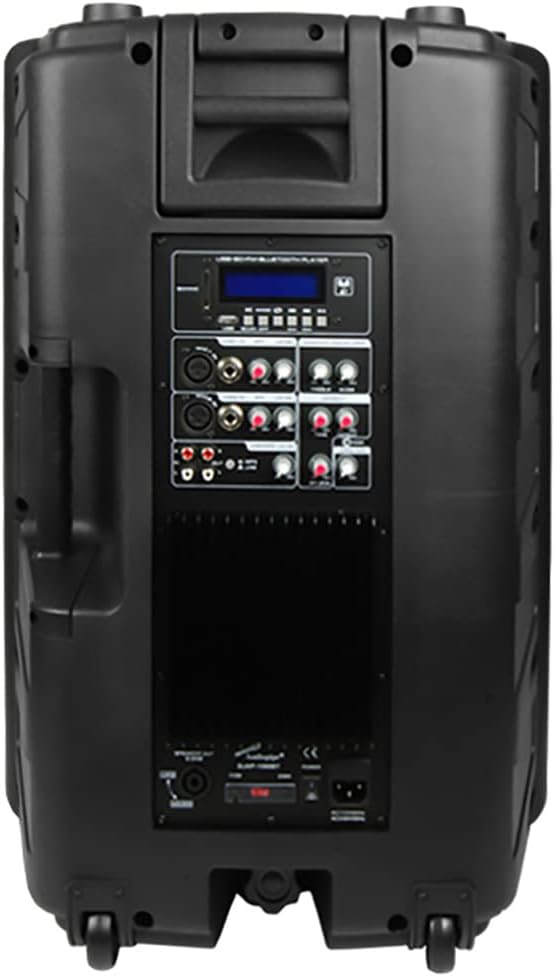
Foto 2: N'azụ view of the Audiopipe DJAP1580BT loudspeaker, displaying the control panel with various inputs, outputs, and adjustment knobs.
The rear panel houses the primary control interface, including:
- Ngosipụta LCD: Na-egosi ụdị dị ugbu a, ozi egwu, na ugboro FM.
- Bọtịnụ ụkpụrụ: Switches between Bluetooth, FM, USB, SD, and Line In modes.
- USB/SD Card Slots: For media playback.
- Microphone Inputs (XLR/1/4" Jack): For connecting microphones.
- Line Inputs (XLR/RCA): Maka ijikọ isi iyi ọdịyo mpụga.
- Line Output (XLR/RCA): For connecting to another speaker or audio device.
- Njikwa olu: Separate controls for Master, Microphone, and Line inputs.
- Equalizer (EQ) Controls: For adjusting bass and treble.
- Power Switch and AC Inlet: For power connection.
5. Nhazi
- Iwepu: Carefully remove the loudspeaker from its packaging. Retain the packaging for future transport or storage.
- Nkwanye: Place the loudspeaker on a stable, flat surface or mount it securely if using a speaker stand (not included). Ensure adequate ventilation around the unit.
- Njikọ ike: Connect the provided power cord to the AC inlet on the rear panel of the loudspeaker, then plug the other end into a suitable wall outlet.
- Ike izizi: Ensure all volume controls are set to minimum before turning on the unit. Flip the power switch on the rear panel to the "ON" position. The LCD display should illuminate.
6. Ntuziaka ọrụ
6.1 Basic Arụmọrụ
- Gbanyụọ/ Gbanyụọ: Use the power switch on the rear panel.
- Nhọrọ ụdị: Press the "MODE" button on the control panel or remote to cycle through input sources: Bluetooth, FM, USB, SD, and Line In.
- Ndozi olu: Use the Master Volume knob on the rear panel or the volume buttons on the remote control. Adjust individual input volumes (Mic, Line) as needed.
6.2 Njikọ Bluetooth
- Switch the loudspeaker to Bluetooth mode using the "MODE" button. The LCD display will show "BLUETOOTH" and an indicator will flash, signifying pairing mode.
- Na ngwaọrụ Bluetooth gị (smartphone, tabletị, wdg), gbanye Bluetooth wee chọọ ngwaọrụ dịnụ.
- Select "DJAP1580BT" from the list of devices.
- Once paired, the Bluetooth indicator on the loudspeaker will stop flashing and remain solid. You can now play audio from your device through the loudspeaker.
6.3 FM Tuner Operation
- Switch the loudspeaker to FM mode using the "MODE" button. The LCD display will show the current FM frequency.
- Press the "PLAY/PAUSE" button (or scan button on remote) to automatically scan and save available FM stations.
- Use the "PREV/NEXT" buttons to navigate between saved stations or manually adjust the frequency.
6.4 Igwegharị kaadị USB/SD
- Insert a USB flash drive or SD card (pre-loaded with MP3 audio files) into the respective slot on the rear panel.
- The loudspeaker will automatically switch to USB or SD mode and begin playing audio. If not, press the "MODE" button to select the correct source.
- Use the "PLAY/PAUSE", "PREV", and "NEXT" buttons on the control panel or remote to manage playback.
6.5 Microphone and Line Inputs
- Connect microphones to the XLR or 1/4" jack inputs. Adjust the dedicated Microphone Volume knob.
- Connect external audio devices (e.g., mixer, CD player) to the XLR or RCA Line Inputs. Adjust the dedicated Line Input Volume knob.
7. Nlekọta
- Nhicha: Jiri ákwà dị nro ma kpọọ nkụ hichaa elu mpụta. Ejila ihe nhicha, wax, ma ọ bụ ihe mgbaze.
- Nchekwa: If storing the unit for an extended period, unplug it from the power source and store it in a cool, dry place, preferably in its original packaging.
- Ijikwa: Avoid dropping or subjecting the loudspeaker to strong impacts.
8. Nchọpụta nsogbu
| Nsogbu | Ihe nwere ike ime | Ngwọta |
|---|---|---|
| Enweghị ike | Power cord not connected; Power switch off; Outlet not active. | Ensure power cord is securely connected. Turn power switch ON. Test outlet with another device. |
| Enweghị mmepụta ụda | Volume too low; Incorrect input mode selected; Audio source issue; Cables not connected. | Increase Master Volume and individual input volumes. Select correct input mode. Check audio source device. Verify all audio cables are securely connected. |
| Njikọ Bluetooth ada ada | Loudspeaker not in pairing mode; Device too far; Device already paired to another unit. | Ensure loudspeaker is in Bluetooth mode and indicator is flashing. Move device closer. Disconnect from other Bluetooth devices. |
| Njikwa anya anaghị arụ ọrụ | Batrị agwụla; Ihe mgbochi dị n'etiti remote na unit; Ihe mmetụta remote akpọchiri. | Replace remote control batteries. Ensure clear line of sight to the unit's remote sensor. |
9. Nkọwapụta
| Aha Nlereanya | DJAP1580BT |
| Ụdị Ọkà Okwu | Woofer |
| Nha Ọkà Okwu | 15 sentimita asatọ |
| Teknụzụ nzikọrịta ozi ikuku | Bluetooth |
| Teknụzụ Njikọta | Bluetooth, USB |
| Atụmatụ pụrụ iche | USB Port, FM Tuner, SD Card Slot, Remote Control |
| Usoro njikwa | Ime ime |
| Isi Iyi Ike | Igwe ọkụ eletrik |
| Ọnọdụ mmepụta ọdịyo | Stereo |
| Akụkụ ngwaahịa | 18 x 21 x 29 sentimita asatọ |
| Ibu Ibu | 61 pound |
| Ihe onwunwe | Metal (Chassis/Grille components) |
| Onye nrụpụta | AUDIOPIPE |
10. Akwụkwọ ikike na nkwado
Audiopipe products are designed for reliability and performance. For information regarding warranty coverage, please refer to the warranty card included with your purchase or visit the official Audiopipe website. For technical support or service inquiries, please contact Audiopipe customer service through their official channels.
Debe nnata nzụta gị dị ka ihe akaebe nke ịzụrụ maka nkwupụta ikike.


