1. Ngwaahịa gafereview
The Elero AeroTec is an advanced control unit designed for automated management of sun protection systems such as awnings and blinds. It integrates seamlessly with environmental sensors to react to changing weather conditions, including sunlight, wind, and rain, ensuring optimal protection and comfort.
This unit can function as a standalone single control or as part of a larger group/centralized control system. Its battery-powered design allows for convenient programming even when the unit is detached, as the display remains active.

Foto 1: N'ihu view of the Elero AeroTec control unit, showing the display and control buttons.
2. Ntọala na nwụnye
2.1 Na-arịgo
The AeroTec control unit supports two primary mounting methods:
- Akwadoro: For integration into a standard wall box (diameter 58 mm).
- Surface-mounted: Using an appropriate surface-mounted housing (not included).
Ensure proper installation by a qualified professional to comply with local electrical codes and safety standards.
2.2 Ntinye batrị
The unit requires one CR 2032 battery for operation and programming. The battery allows for programming even when the unit is removed from its mounting, as the display remains powered.
To install or replace the battery, carefully open the battery compartment, insert the CR 2032 battery with the correct polarity, and close the compartment securely.
3. Ntuziaka ọrụ
The Elero AeroTec is factory pre-set with date and time (CET) for immediate use. It controls your sun protection based on connected sensors.
3.1 njikwa akpaaka
The unit automatically adjusts your sun protection based on input from optional light, wind, and rain sensors. This ensures your awnings or blinds retract during strong winds or rain, and extend to provide shade during sunny conditions.
3.2 Manual Operation and Programming
The AeroTec features several control buttons for manual operation and programming. These buttons are located under a cover flap for protection.
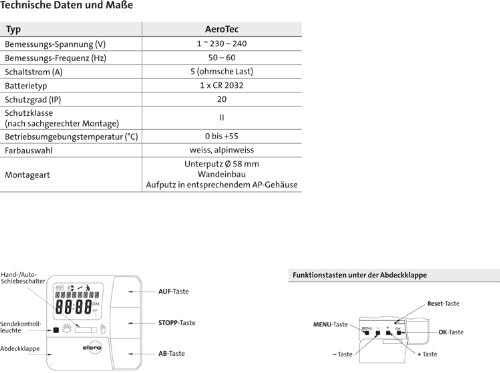
Figure 2: Technical data and button functions diagram. The diagram illustrates the display, hand/auto slider, send control light, cover flap, UP button, STOP button, DOWN button, MENU button, and RESET button.
- Bọtịnụ elu: Extends the sun protection.
- Bọtịnụ Kwụsị: Halts the movement of the sun protection.
- Bọtịnụ ala: Retracts the sun protection.
- Bọtịnụ MENU: Accesses programming options.
- Bọtịnụ Tọgharia: Resets the unit (typically located under the cover flap).
- Hand/Auto Slider: Toggles between manual and automatic control modes.
The unit also supports setting an intermediate position and a reversible position or fabric tensioning, providing flexible control over your sun protection.
4. Nlekọta
The Elero AeroTec control unit requires minimal maintenance. Keep the unit clean by wiping it with a soft, dry cloth. Avoid using abrasive cleaners or solvents.
Regularly check the battery status and replace the CR 2032 battery when the low battery indicator appears on the display to ensure continuous operation and programming capabilities.
5. Nchọpụta nsogbu
If the Elero AeroTec unit is not functioning as expected, consider the following common issues:
- No display or unresponsive buttons: Check the CR 2032 battery. Replace if necessary.
- Sun protection not moving automatically: Verify that the unit is in automatic mode (check the Hand/Auto slider). Ensure all connected sensors (light, wind, rain) are clean, unobstructed, and functioning correctly.
- Oge/ụbọchị na-ezighi ezi: Re-program the date and time settings via the MENU button.
For persistent issues, consult a qualified technician or contact Elero customer support.
6. Nkọwapụta
| Njirimara | Nkọwapụta |
|---|---|
| Onye nrụpụta | Elero |
| Nọmba nlereanya | 28140.0001 |
| Ogo Voltage | 230-240 V |
| Ugboro ugboro | 50-60 Hz |
| Na-agbanwe ugbu a | 5 A (ohmic load) |
| Ụdị batrị | 1 x CR 2032 |
| Klas nchekwa (IP) | IP20 |
| Okpomọkụ na-arụ ọrụ | 0 ruo +55 Celsius |
| Agba | White / Alpine White |
| Ụdị nkwụnye | Flush-mounted (Ø 58 mm) / Surface-mounted |
| Akụkụ (Ngwugwu) | 18.6 x 11 x 6.5 cm |
| Ibu (Ngwugwu) | 180 g |
| UPC | 782298735009 |
7. Akwụkwọ ikike na nkwado
For warranty information and technical support, please refer to the official Elero website or contact your local Elero distributor. Keep your purchase receipt as proof of purchase.
For further assistance, you may contact Elero customer service through their official channels. Please have your model number (28140.0001) ready when contacting support.


