1. Okwu mmalite
This manual provides essential instructions for the safe and efficient use of your Epson L110 Colour Inkjet Printer. The Epson L110 is designed for personal and work projects, offering efficient performance with low running costs. It features a compact design and an integrated ink tank system.
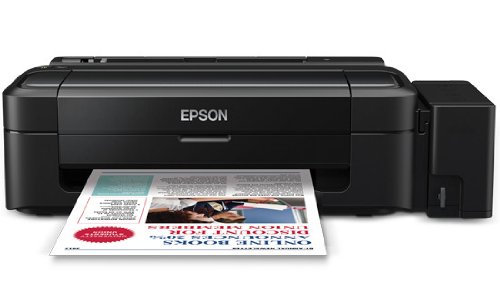
Foto 1: N'ihu view of the Epson L110 Colour Inkjet Printer.
2. Nhazi
2.1 Nwepu
Carefully remove the printer from its packaging. Ensure all protective tapes and packing materials are removed from the printer's exterior and interior. Retain the packaging for future transport or storage.
2.2 Njikọ ike
- Jikọọ eriri ọkụ na ntinye ike nke ngwa nbipute.
- Tinye nsọtụ nke ọzọ nke eriri ọkụ n'ime oghere eletrik gbadoro ụkwụ.
- Do not power on the printer until ink tanks are filled.
2.3 Tankị Ink Na-ejuputa
The Epson L110 features an integrated ink tank system. Use only genuine Epson ink bottles for optimal performance and to prevent damage.
- Mepee mkpuchi unit tank ink n'akụkụ nke ngwa nbipute.
- Uncap the ink bottle for the corresponding color (Cyan, Magenta, Yellow, Black).
- Carefully pour the ink into the correct tank, aligning the bottle nozzle with the tank's filling port. The "Fast Ink Top-Up Technology" is designed for mess-free refills.
- Fill each tank to the upper line.
- Close the ink tank unit cover securely.
Figure 2: Illustration of filling the ink tanks. Ensure correct color matching.
2.4 Nwụnye ọkwọ ụgbọala
After filling the ink tanks, connect the printer to your computer using a USB cable. Install the printer drivers from the provided CD-ROM or download the latest drivers from the official Epson support websaịtị. Soro ntuziaka ihuenyo iji mezue nrụnye.
3. Na-arụ ọrụ na ngwa nbipute
3.1 Mpempe akwụkwọ
- Mepee nkwado akwụkwọ ahụ wee wepụ ndọtị ahụ.
- Fan the edges of the paper stack to separate the sheets.
- Load paper into the sheet feeder with the print side facing up.
- Adjust the edge guide to the width of your paper. The maximum input sheet capacity is 50 sheets.
Figure 3: Proper paper loading into the input tray.
3.2 Mbipụta bụ isi
- Gbaa mbọ hụ na agbanyere ngwa nbipute na jikọọ na kọmputa gị.
- Mepee akwụkwọ ma ọ bụ onyonyo ịchọrọ ibipụta na kọmputa gị.
- Họrọ "Bipụta" na menu nke ngwa ahụ (dịka ọmụmaatụ, File > Bipụta).
- In the print dialog box, select "Epson L110" as your printer.
- Adjust print settings such as paper size, print quality, and number of copies.
- Pịa "Bipụta" iji malite usoro mbipụta.
The Epson L110 offers a print speed of up to 27 pages per minute (ppm) for black prints and 15 ppm for color prints. It produces high-resolution prints of 5760 x 1440 dpi.
4. Nlekọta
4.1 Ink njuputa
Monitor ink levels regularly. When an ink tank is low, refill it promptly using genuine Epson ink bottles. A single ink bottle provides a high page yield of up to 4000 prints (black) and 6500 prints (color).
Ihe dị mkpa: When transporting the printer, ensure the choke valve is locked to prevent messy leaks and ink wastage.
4.2 Bipụta isi nhicha
If print quality declines (e.g., missing lines, faded colors), perform a print head cleaning. This can typically be done through the printer utility software on your computer. Refer to the software's help section for detailed steps.
4.3 Nhicha izugbe
Jiri nwayọ hichaa mpụta nke ngwa nbipute, damp cloth. Do not use abrasive cleaners or solvents. Keep the paper path clear of dust and debris.
5. Nchọpụta nsogbu
- Ihe nbipute anaghị aza:
- Lelee njikọ ike wee hụ na agbanyere ngwa nbipute.
- Verify the USB cable connection between the printer and computer.
- Malitegharịa ma ngwa nbipute ma kọmputa.
- Ensure printer drivers are correctly installed.
- Ọdịmma Mbipụta na-adịghị mma:
- Lelee ọkwa ink ma mejupụta ma ọ dị mkpa.
- Mee nhicha isi ebipụta.
- Run a nozzle check to identify clogged nozzles.
- Gbaa mbọ hụ na ị na-eji akwụkwọ kwesịrị ekwesị maka ntọala mbipụta gị.
- Mpempe akwụkwọ:
- Gbanyụọ ngwa nbipute wee wepụ ya.
- Jiri nlezianya wepụ akwụkwọ ọ bụla gbagọrọ agbagọ na tray ntinye, tray mmepụta, ma ọ bụ n'ime igwe nbipute ahụ.
- Gbaa mbọ hụ na etinyere akwụkwọ nke ọma na ọ bụghị cread ma ọ bụ curled.
Maka enyemaka ọzọ, rụtụ aka na nkwado Epson websaịtị ma ọ bụ kpọtụrụ ndị ahịa.
6. Nkọwapụta
| Njirimara | Nkọwapụta |
|---|---|
| Aha Nlereanya | L110 |
| Teknụzụ obibi akwụkwọ | Inkjet |
| Mmepụta ngwa nbipute | Agba |
| Mkpebi Mbipụta Agba Kachasị Elu | 5760 x 1440 dpi |
| Mkpebi mbipụta ojii na ọcha kacha | 5760 x 1440 dpi |
| Monochrome kacha bipụta ọsọ | 27 ppm |
| Ọsọ mbipụta kacha (Agba) | 15 ppm |
| Agba ink | Cyan, Black, Magenta, Yellow |
| Mmụba ibe (ojii) | Ruo 4000 ibe |
| Page Yield (Colour) | Ruo 6500 ibe |
| Teknụzụ Njikọta | USB |
| Oke ntinye akwụkwọ ikike | 50 |
| Nha mgbasa ozi akwadoro | A4, A5, A6, A7, A8, A9, B5, B6, B7, B8, B9, C5, C6, C7 |
| Akụkụ ngwaahịa (LxWxH) | 47.2 x 22.2 x 13 cm |
| Ibu Ibu | 2.7 n'arọ |
| Oriri ike | Kachasị 10 Watts |
7. Akwụkwọ ikike na nkwado
The Epson L110 Colour Inkjet Printer comes with an Epson Warranty, providing peace of mind. For specific warranty terms and conditions, please refer to the warranty card included with your product or visit the official Epson support websaịtị.
For technical support, driver downloads, FAQs, and service center locations, please visit the official Epson support website or contact Epson customer service directly.


