1. Okwu mmalite
This manual provides essential information for the proper installation, operation, and maintenance of your Wells WS-54228 DPST Rocker Switch. Please read these instructions carefully before use to ensure safe and efficient functionality. Retain this manual for future reference.
2. Ozi nchekwa
ỊDỌ AKA NA NTỊ: Ihe ize ndụ nke mkpọ ọkụ eletrik.
- Always disconnect power before installing, servicing, or removing the switch.
- Installation should be performed by a qualified electrician or technician in accordance with all local and national electrical codes.
- Do not operate the switch if it appears damaged.
- Ensure the switch is rated for the voltage and current of the circuit it will control.
3. Ngwaahịa gafereview
The Wells WS-54228 is a Double Pole, Single Throw (DPST) rocker switch designed for panel mounting. It features a simple ON/OFF operation, controlling two independent circuits simultaneously. Its robust design is suitable for various industrial and scientific applications.
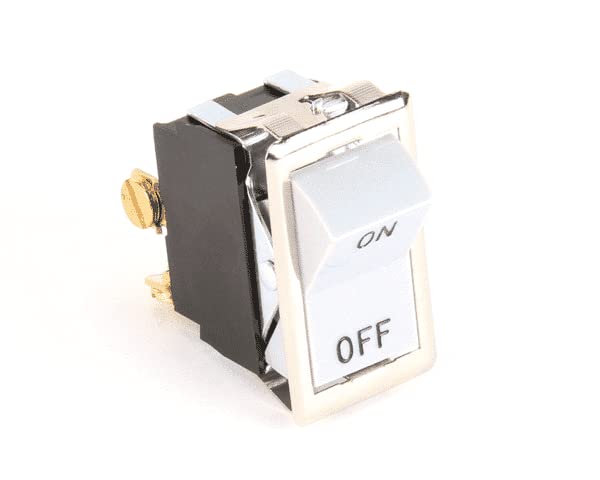
Figure 1: Wells WS-54228 DPST Rocker Switch. This image displays the front and side view of the switch, highlighting the 'ON' and 'OFF' labels on the rocker and the electrical terminals on the side.
4. Ntọala na nwụnye
This switch is designed for panel mounting. Follow these general steps for installation:
- Prepare Panel Opening: Create an appropriately sized rectangular opening in the mounting panel. The switch dimensions are approximately 0.87 x 1.5 inches.
- Kwụpụ ike: Ensure all power to the circuit is disconnected at the main breaker or fuse box before proceeding.
- Fanye Mgbanwe: Carefully insert the switch into the prepared panel opening until it snaps or secures into place.
- Njikọ waya: Connect the electrical wires to the terminals on the back of the switch. As a DPST switch, it typically has four terminals: two for input and two for output, controlling two separate circuits. Ensure correct polarity and secure connections. Refer to the specific wiring diagram for your application.
- Nyochaa nwụnye: Double-check all connections and ensure the switch is securely mounted.
- Weghachi ike: Ozugbo echichi zuru ezu na nkwenye, weghachite ike na sekit.
For complex installations or if you are unsure, consult a qualified professional.
5. Ntuziaka ọrụ
The Wells WS-54228 Rocker Switch operates with a simple touch control method:
- To turn the connected device(s) ON, press the side of the rocker switch labeled 'ON'.
- To turn the connected device(s) OFF, press the side of the rocker switch labeled 'OFF'.
The switch will remain in the position it is set to until manually changed.
6. Nlekọta
The Wells WS-54228 Rocker Switch requires minimal maintenance:
- Nhicha: Periodically wipe the surface of the switch with a soft, dry cloth to remove dust and debris. Do not use abrasive cleaners or solvents.
- Nyocha: Regularly inspect the switch for any signs of physical damage, loose connections, or excessive wear. If any issues are observed, disconnect power and address them promptly.
- Ọnọdụ gburugburu: Ensure the switch is operated within appropriate environmental conditions (temperature, humidity) as specified for its intended application.
7. Nchọpụta nsogbu
If you encounter issues with your Wells WS-54228 Rocker Switch, consider the following:
- Mgbanwe Anaghị azaghachi:
- Check if the power supply to the circuit is active.
- Verify all electrical connections are secure and correctly wired.
- Inspect the switch for visible damage.
- Ọrụ na-adịte aka:
- Ensure connections are tight and free from corrosion.
- Confirm the switch is not exceeding its rated electrical load.
If problems persist after performing these checks, it may indicate a faulty switch or an issue with the connected circuit. Consult a qualified technician.
8. Nkọwapụta
| Njirimara | Nkọwapụta |
|---|---|
| Ụdị | Ọdịda |
| Nlereanya | WS-54228 |
| Ngbanwe Ụdị | Rocker |
| Circuit .dị | DPST (Double Pole, Single Throw) / 2-way |
| Ụdị nkwụnye | Ugwu Panel |
| Usoro njikwa | Metụ aka |
| Akụkụ (Ihe dị ka) | 0.87 x1.5 inch |
| Ọnụọgụ nkeji | 1.0 Ọnụ |
| UPC | 400015024044 |
| Onye nrụpụta | Ọdịda |
| Ụbọchị mbụ dị | Septemba 5, 2025 |
9. Akwụkwọ ikike na nkwado
For information regarding warranty coverage, technical support, or replacement parts for your Wells WS-54228 DPST Rocker Switch, please contact Wells customer service directly. Refer to the product packaging or the official Wells websaịtị maka nkọwa kọntaktị ugbu a.


