Okwu mmalite
Thank you for choosing the LD Systems LDWSECO2X2R2 Double Receiver. This manual provides essential information for the safe and efficient operation of your device. Please read it thoroughly before use and keep it for future reference.
Ntuziaka nchekwa dị mkpa
- Gụọ ntuziaka ndị a: Ekwesịrị ịgụ ntuziaka nchekwa niile na arụ ọrụ tupu ejiri ya rụọ ọrụ.
- Keep these instructions: Ekwesịrị idowe ntuziaka nchekwa na ọrụ maka ntụnye aka n'ọdịnihu.
- ṅaa ntị na ịdọ aka ná ntị niile: Ekwesịrị idobe ịdọ aka ná ntị niile dị na ngwaahịa yana na ntuziaka ọrụ.
- Soro ntụziaka niile: Ekwesịrị ịgbaso ntuziaka ọrụ na ojiji niile.
- Ejila ngwa a n'akụkụ mmiri: Ejila ngwaahịa a n'akụkụ mmiri ma ọ bụ mmiri.
- Clean only with dry cloth: Kwupu ngwaahịa a na mgbidi mgbidi tupu ihicha ya.
- Igwe ikuku: Akwụsịla oghere ikuku ikuku ọ bụla. Wụnye dị ka ntuziaka onye nrụpụta si dị.
- Isi mmalite ike: Operate this product only from the type of power source indicated on the marking label.
- Ije ozi: Anwala ịnye ngwaahịa a n'onwe gị ka imeghe ma ọ bụ iwepụ mkpuchi nwere ike ikpughe gị na voltaji dị egwutage ma ọ bụ ihe egwu ndị ọzọ. Tụtụ aka n'aka ndị ọrụ ruru eru.
Ihe ngwugwu
Biko lelee na etinyere ihe niile edepụtara n'okpuru na ngwugwu gị:
- LD Systems LDWSECO2X2R2 Double Receiver Unit
- Power Adapter (12-18V DC, 300mA)
- Akwụkwọ ntuziaka (akwụkwọ a)
- Antennas (quantity may vary based on model variant)
Ngwaahịa gafereview
The LD Systems LDWSECO2X2R2 is a double receiver designed for wireless audio transmission. It operates on frequencies 863.900 MHz and 864.900 MHz, providing reliable signal reception for professional audio applications.
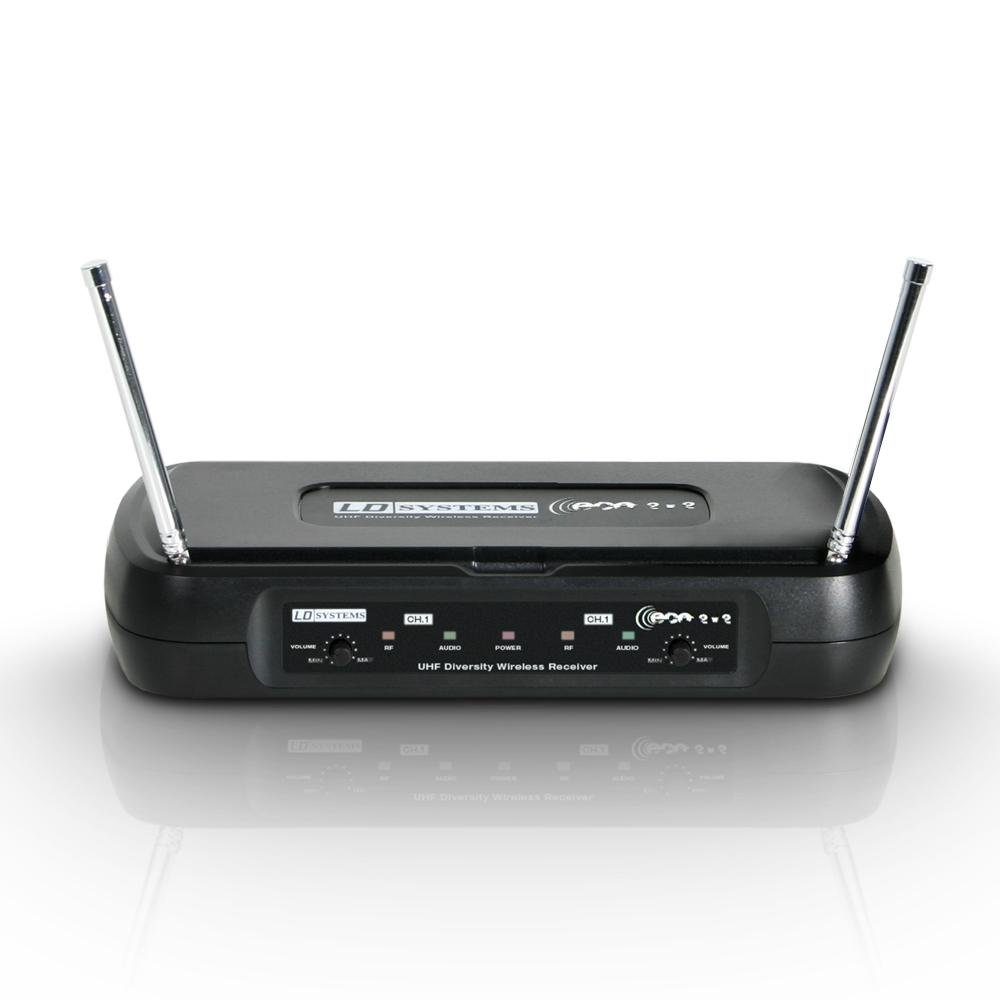
Foto: N'ihu view of the LD Systems LDWSECO2X2R2 Double Receiver, showing controls and display.
Njikwa akụkụ ihu:
- Bọtịnụ ike: Gbanyụọ ma ọ bụ gbanyụọ unit ahụ.
- Ngosipụta ọwa: Shows the currently selected channel for each receiver.
- Njikwa olu: Independent volume adjustment for each receiver channel.
- RF/AF Indicators: LEDs indicating RF signal presence and AF audio level.
Njikọ azụ azụ:
- Ntinye antenna: Jikọọ antenna ndị enyere.
- Balanced XLR Outputs: For connecting to professional audio mixers or ampndị na -enye ndụ.
- Unbalanced 1/4" Jack Outputs: Alternative audio output connections.
- Ntinye ike DC: Jikọọ ihe nkwụnye ọkụ enyere.
Ntuziaka nhazi
Follow these steps to set up your LD Systems LDWSECO2X2R2 Double Receiver:
- Unpack the Receiver: Jiri nlezianya wepụ ihe niile dị na nkwakọ ngwaahịa.
- Jikọọ antennas: Screw the supplied antennas onto the antenna inputs located on the rear panel. Ensure they are securely fastened.
- Position the Receiver: Place the receiver in a stable location, away from potential sources of interference (e.g., computers, Wi-Fi routers). Ensure good line-of-sight to the intended transmitter.
- Connect Audio Outputs:
- For balanced connections, use XLR cables to connect the receiver's XLR outputs to your mixer or ampna -emegharị ihe.
- For unbalanced connections, use 1/4" jack cables to connect the receiver's 1/4" outputs to your audio equipment.
- Njikọ Ike: Connect the provided DC power adapter to the receiver's DC power input. Plug the adapter into a suitable power outlet.
- Ike Na: Press the power button on the front panel to turn on the receiver. The display should illuminate.
- Pair with Transmitters: Refer to your transmitter's manual for instructions on how to pair it with the receiver. Ensure the transmitter and receiver are set to the same frequency/channel.
Ntuziaka ọrụ
- Ike Na: Ensure both the receiver and your wireless transmitters are powered on.
- Lelee akara ngosi: Observe the RF (Radio Frequency) indicator on the receiver. It should illuminate steadily when a signal from the paired transmitter is detected.
- Gbanwee olu: Use the independent volume controls on the front panel to set the desired audio output level for each channel. Start with a low volume and gradually increase it to avoid sudden loud sounds.
- Nyochaa ọdịyo: The AF (Audio Frequency) indicator will light up when audio is being received. Ensure your audio equipment (mixer, amplifier) is also properly configured to receive the signal.
- Nhọrọ ọwa (ọ bụrụ na ọdabara): If your model supports manual channel selection, refer to the specific instructions for changing frequencies to avoid interference. The LDWSECO2X2R2 operates on fixed frequencies 863.900 MHz and 864.900 MHz.
- Gbanyụọ: When finished, power off your transmitters first, then power off the receiver.
Nlekọta
- Nhicha: Disconnect the power before cleaning. Use a soft, dry cloth to wipe the exterior of the receiver. Do not use liquid cleaners or aerosol sprays.
- Nchekwa: When not in use for extended periods, store the receiver in a cool, dry place, away from direct sunlight and extreme temperatures.
- Mpi: Ensure antennas are not bent or damaged. Replace if necessary to maintain optimal signal reception.
- Ihe nkwụnye ọkụ: Regularly inspect the power adapter and cable for any signs of damage. Do not use a damaged adapter.
Nchọpụta nsogbu
| Nsogbu | Ihe nwere ike ime | Ngwọta |
|---|---|---|
| Enweghị ike | Ejikọtaghị ihe nkwụnye ọkụ ma ọ bụ mejọrọ. | Ensure power adapter is securely connected to the receiver and a working power outlet. Check the adapter for damage. |
| Enweghị mmepụta ọdịyo |
|
|
| Poor audio quality / Interference |
|
|
Nkọwapụta
| Njirimara | Nkọwa |
|---|---|
| Nlereanya | LDWSECO2X2R2 |
| Ụdị | Sistemụ LD |
| Oke ugboro ugboro | 863.900 MHz/864.900 MHz |
| Nzaghachi ugboro ugboro | 60-16,000 Hz |
| Audio Output Level (balanced) | 250 mV |
| Ịnye ọkụ | 12 ~ 18 V DC, 300 mA |
| Ọnụọgụ nke ọwa | 2 |
| Ụdị njikwa | Njikwa akwụkwọ ntuziaka |
| Akụkụ (Ngwugwu) | 53.4 x 28 x 9.2 cm |
| Ibu (Ihe) | 500 g |
| Koodu edemede mba ụwa (EAN) | 04049521138928 |
Akwụkwọ ikike na nkwado
LD Systems products are designed for reliability and performance. For specific warranty information, please refer to the warranty card included with your product or visit the official LD Systems website. For technical support, troubleshooting assistance beyond this manual, or spare parts inquiries, please contact your local dealer or the LD Systems customer service department.
Note: Information regarding spare parts availability is not provided in the product details.